
RowSprout – Bulk Page Generator & Programmatic SEO
| 开发者 | rowsprout |
|---|---|
| 更新时间 | 2026年10月14日 20:26 |
| PHP版本: | 7.4 及以上 |
| WordPress版本: | 7.1 |
| 版权: | GPLv2 or later |
| 版权网址: | 版权信息 |
详情介绍:
/plumber-amsterdam/, text and details. When the company changes the design or the opening hours later, it changes the template once and every page follows.
How it works
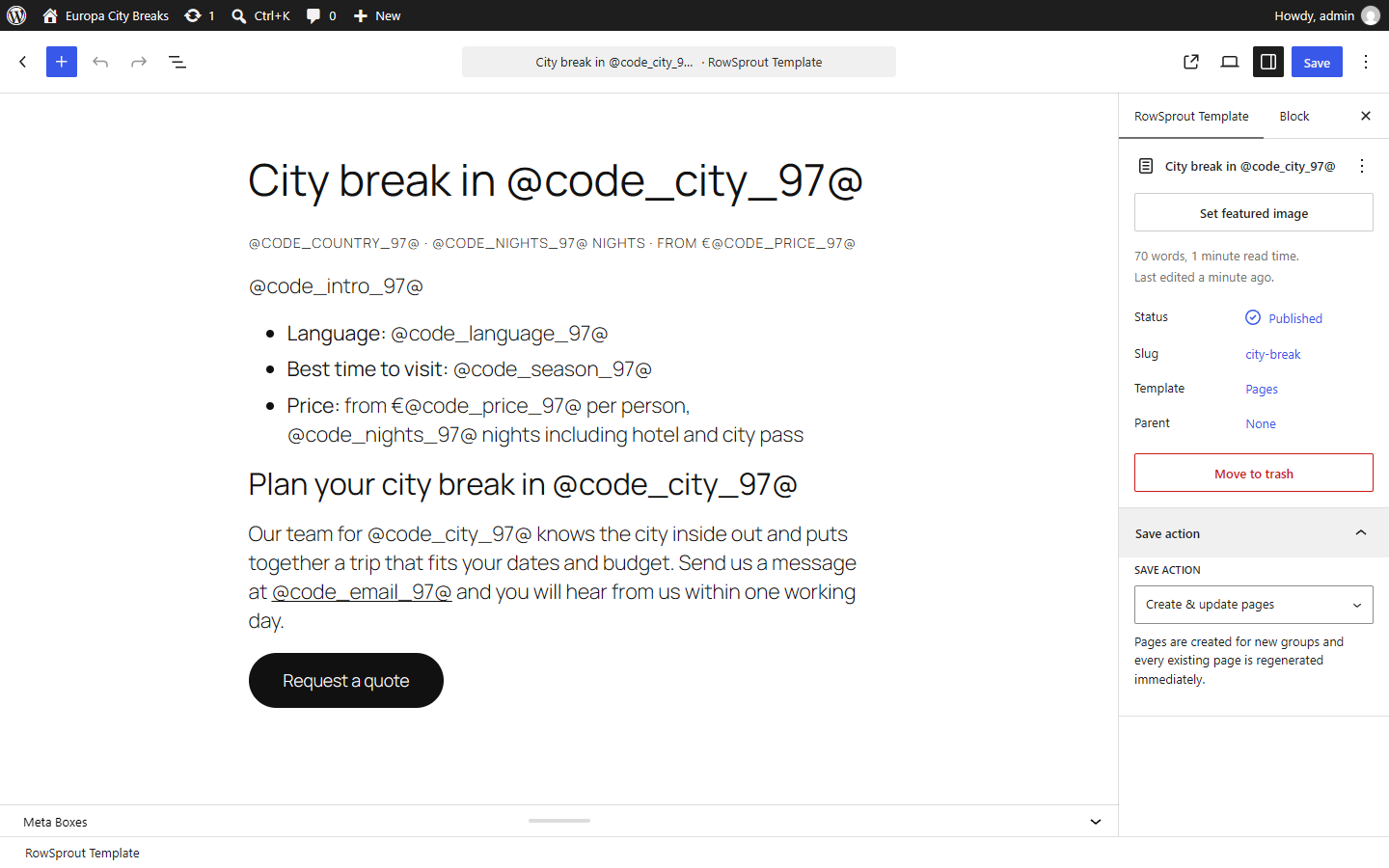
- Build a template. Design the page once in the block editor, Elementor or WPBakery Page Builder, like any other page.
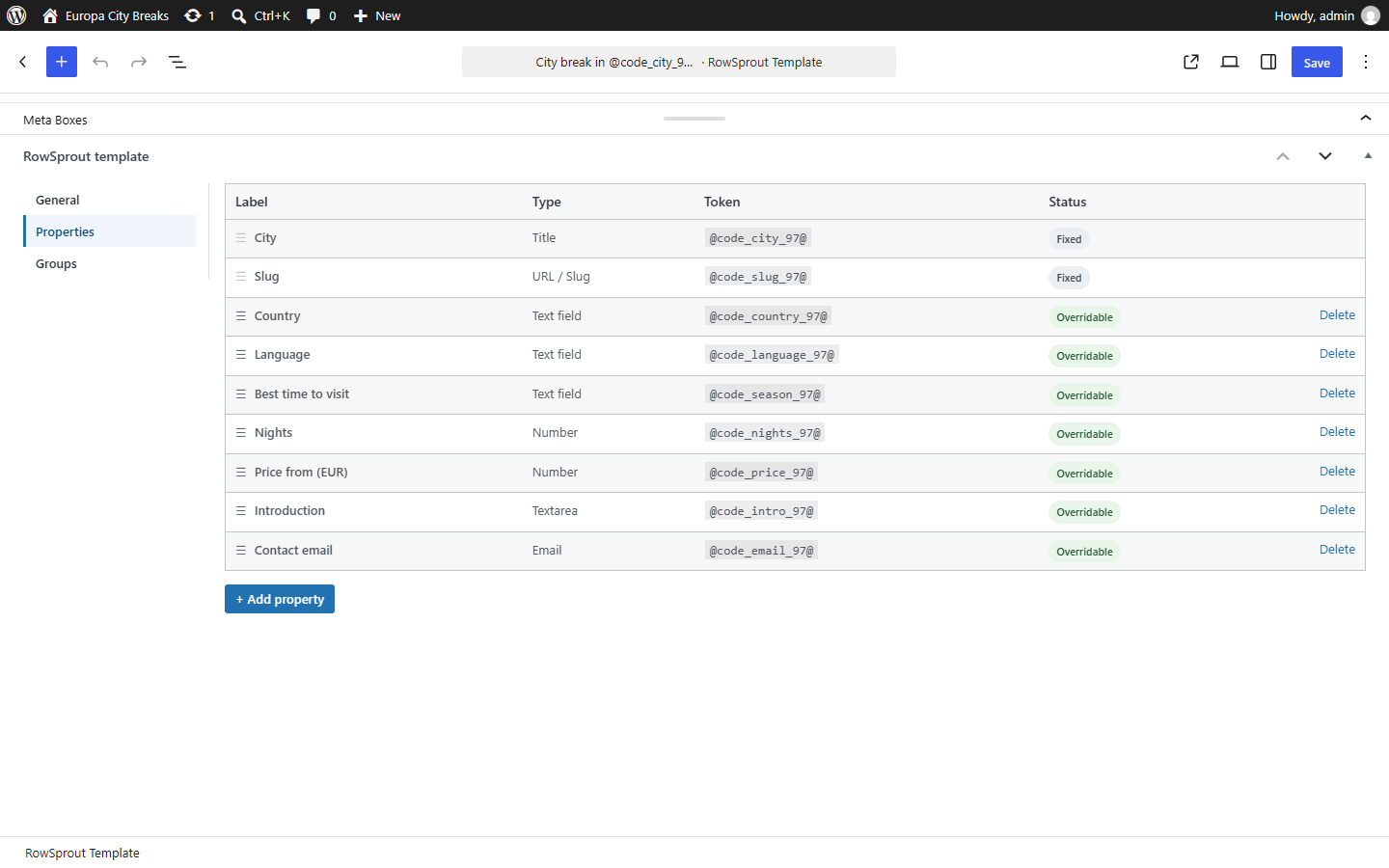
- Define its properties. These are the fields every page will have: a title, a URL, a piece of text, a link, an email address and so on. Place them in your design with a widget, a block or a placeholder.
- Add your data. Every row (a "group") is one page. Type the values in the table right below the editor, or import them from a spreadsheet.
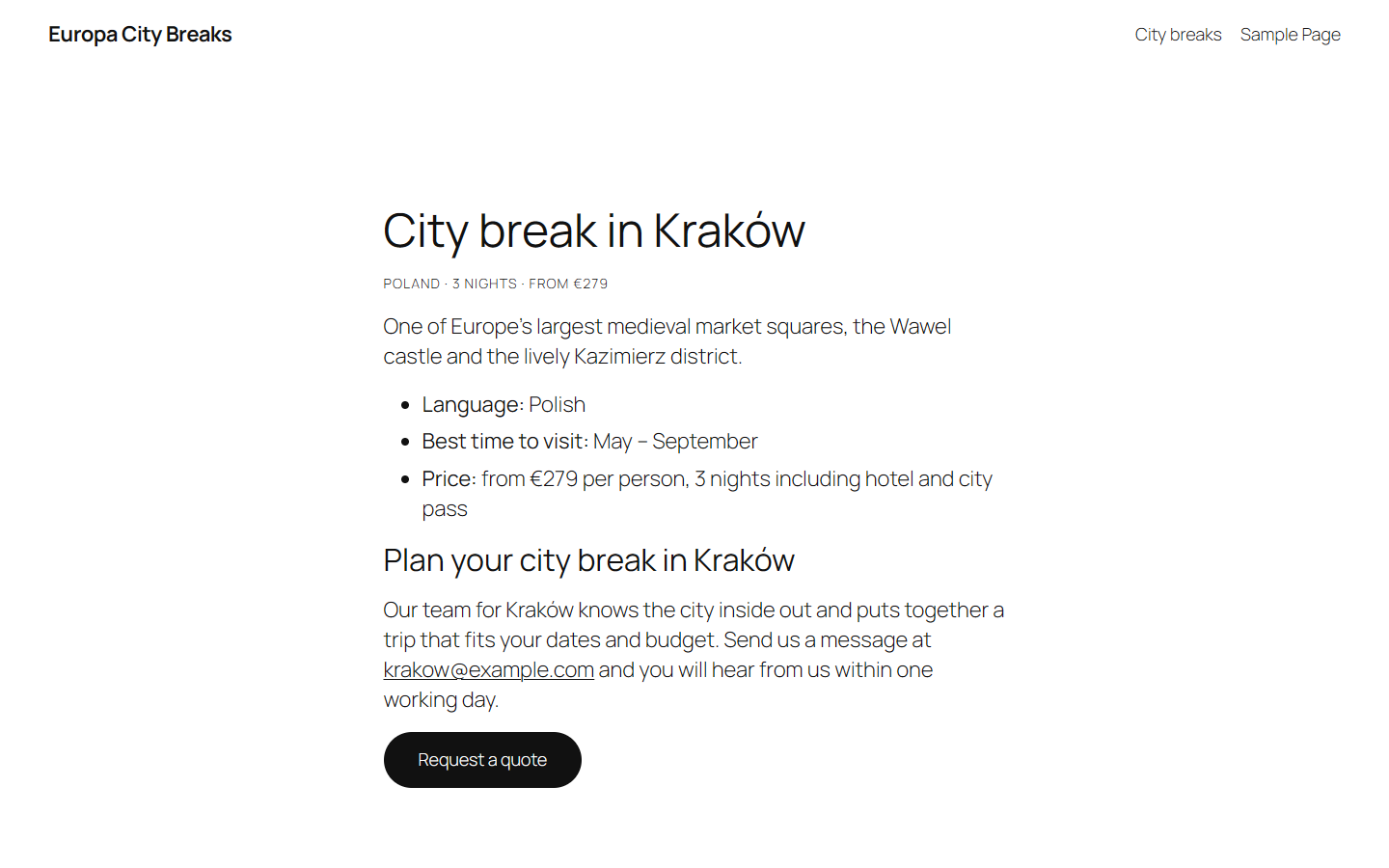
- Save. RowSprout generates the pages in the background. They are real WordPress pages with their own URL, title, content and featured image.
- Real pages, not virtual ones. Every generated page is a normal WordPress post with its own permalink, so search engines, caching plugins and your theme treat it like any other page.
- Your own URL pattern. Build each page's address from its properties, for example
/plumber-amsterdam/,/plumber-utrecht/and so on, under the site root or a prefix of your choice. RowSprout never generates two pages at the same URL, also across templates and, without a prefix, against your other pages and posts: such a page waits until you give it a free URL. - Every language and alphabet. Accents, Greek, Cyrillic, Arabic, Hebrew, Chinese, Japanese and emoji are fully supported in your rows, titles, content and URLs. Addresses follow WordPress's own rules: Zürich becomes
/plumber-zurich/, while other alphabets stay as they are (/plumber-αθήνα/). - Pages stay in sync. Change the design or a row, save, and every page of the template is regenerated from it, so no page is ever out of date.
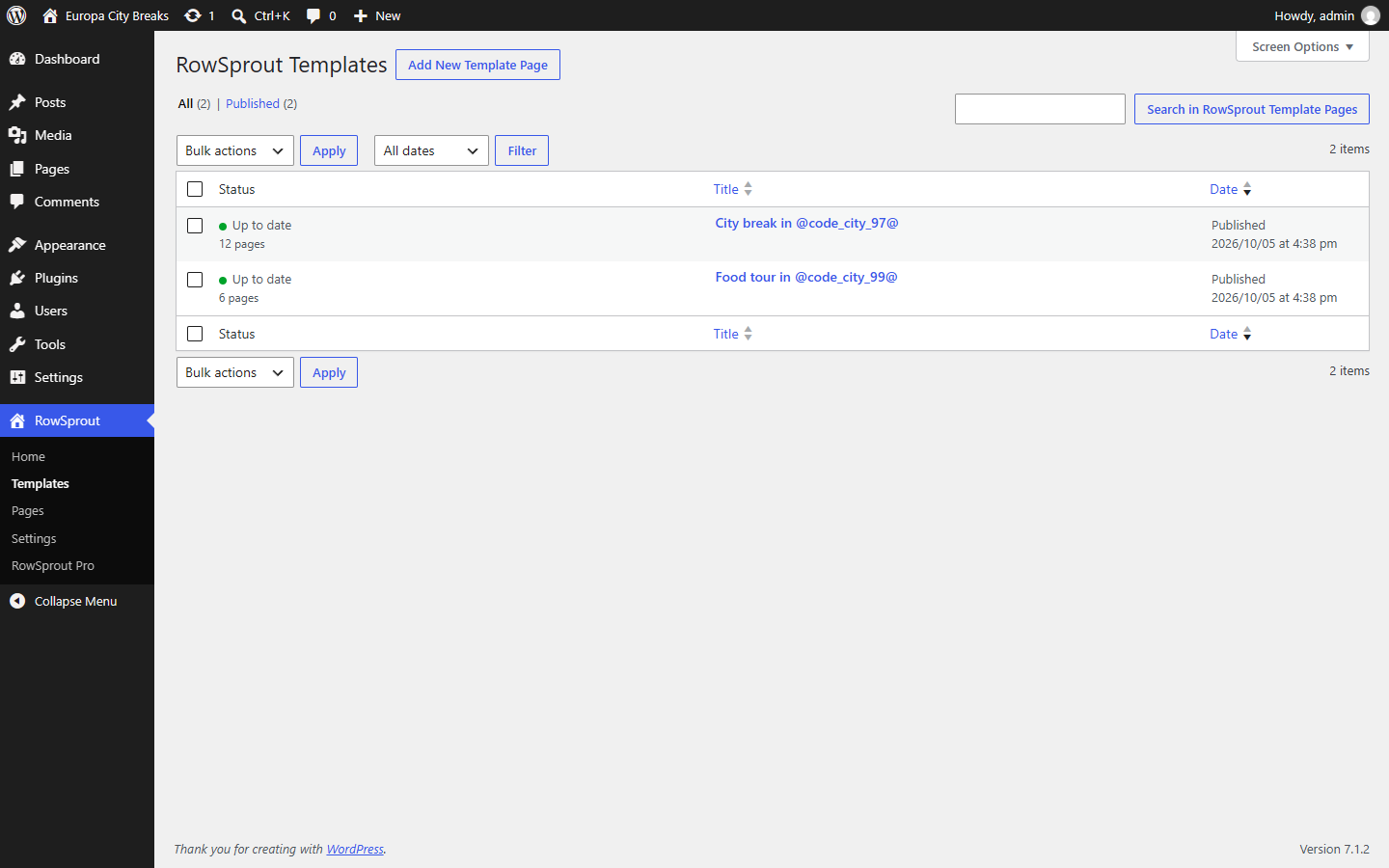
- Status at a glance. The Templates screen shows per template how many of its pages are up to date.
- Background generation. Pages are created in a queue (Action Scheduler), so saving a template with hundreds of rows never slows down your admin.
- Placeholders anywhere. Use a property in the page title, the URL, the content or a link, and it is replaced per page.
- Field types: Title, URL slug, Text, Textarea, URL, Email and Number.
- Import and export. Download templates with their properties, rows and design as a file and add them to another site, for example from a staging site to the live one. Before importing, you see what the file adds and changes.
- Groups from a spreadsheet. Download a template's groups as a CSV file, edit them in Excel or Google Sheets, and import them again: from a CSV or Excel (.xlsx) file, a URL or a shared Google sheet (with a choice of tab). A step-by-step import shows what it will do first, updates the groups it recognises, adds the others, can delete the groups that are not in the file, can add new properties for new columns, and remembers your column choices for next time.
- Content per row with "If / then". Show one part of the design when a page's values match your rules (if the price is above 100, if the date is in the future, if the type is "hotel"), and another part, or nothing, when they don't. Rules can be combined with and/or, and the operators follow the property's type. Rules about today's date stay right on cached pages.
- Grid of pages. Show all pages of a template as a list or as cards on any page, for example an overview of every town you serve.
- Child templates. Give a template a parent template and it reuses the parent's rows: its pages inherit the title, URL and fields of the matching row, for example a "Roof repair in [town]" page for every town that has a "Roofer in [town]" page. Templates nest one level deep.
- As many templates as you need, managed from the Templates screen.
- Block editor: bind a Paragraph, Heading, List item, Button or Image block to a property with Block Bindings, insert placeholders from the text toolbar, and use the Grid and If / then blocks.
- Elementor: Heading, Textarea, Button, Grid and If / then widgets, an "Insert RowSprout property" button in the Text Editor, and a "RowSprout template" tab to manage properties and rows without leaving Elementor. With Elementor Pro, If / then can show a saved Elementor template.
- WPBakery Page Builder: Grid and If / then elements, and the same insert button in its text editors.
- Rank Math: generated pages get the template's SEO, social and robots settings with each page's own values; the template itself is kept out of the sitemap and set to noindex.
- Yoast SEO, SEOPress and The SEO Framework: generated pages get the template's SEO title and meta description, and the other settings these plugins store with a page, with each page's own values; templates are kept out of their sitemaps and set to noindex.
- Without an SEO plugin, templates are kept out of WordPress' own sitemap and set to noindex as well.
- Smart Generate: a save only regenerates the pages affected by what you changed, instead of every page of the template.
- Planning: choose per row when its page is published.
- Scheduled sync: keep a template's groups in sync with a Google sheet, a CSV or Excel file at a URL, or a JSON feed or REST API (with a request header for an API key), every hour, day or week. New and changed pages are generated automatically; a Syncs screen with a log shows every run, with safeguards against a broken source and an email when a sync starts failing.
- WPML: translate a template once and all of its pages are generated in that language.
- Extra field types: Checkbox, Date, Date and time, Item list, Icon, Thumbnail, Select, Rich text, Color, Phone and File.
- Extra Elementor elements: Date, Item List, Thumbnail and Sibling Links widgets, plus RowSprout Page Field and Page Link dynamic tags.
- Extra block editor element: an Item List block.
- Extra WPBakery element: an Item List element.
- Status overview on the Templates screen: a live-updating status bar per template, a per-row overview of every page, and generating all pages of a template in one click.
- Throttling of batch size and processing hours on busy sites.
- WP-CLI and MCP commands to manage templates, pages, group imports and syncs from scripts or AI agents.
- Template import that updates: move changes from a staging site to the live site, with translations, images and a choice of what to export.
- A URL you enter (a CSV, text or Excel file on any server): the request goes to the server that URL points to, under that site's own terms and privacy policy.
- A Google Sheets link: RowSprout fetches the sheet's CSV export, and for a sheet with several tabs its list of tabs, from Google (docs.google.com). This only works for a sheet shared with "Anyone with the link". Google's Terms of Service and Privacy Policy apply.
安装:
- In your WordPress admin go to Plugins → Add Plugin, search for "RowSprout" and click Install, then Activate. Or upload the
rowsproutfolder to/wp-content/plugins/and activate it on the Plugins screen. - Open the new RowSprout menu and create your first template.
- Design the page, add your properties on the Properties tab and your rows on the Groups tab.
- Save with Create & update pages. Your pages usually appear within a minute or two.
/locations/.屏幕截图:
常见问题:
Do I need Elementor?
No. RowSprout works with the WordPress block editor, Elementor and WPBakery Page Builder. Use whichever you already build your site with.
Are the generated pages good for SEO?
They are ordinary WordPress pages with their own URL, title, content and featured image, so SEO plugins, sitemaps and caching treat them like any page you made by hand. Make sure every row has genuinely useful, distinct content: search engines value pages that answer a real question, not near-identical copies.
How is this different from duplicating a page?
A duplicated page is an independent copy: when the layout, a call to action or the opening hours change, you edit every copy by hand. RowSprout keeps the design (the template) and the details (the rows) apart. Change the template and every page is regenerated from it; change a row and only that page's details change. Adding a page is adding a row.
Can I use RowSprout for local SEO and service-area pages?
Yes, that is one of the most common uses: one page per town, region or branch, each with its own title, URL, introduction and contact details. With a child template you can add a second set on top, such as a "Roof repair in [town]" page for every town that has a "Roofer in [town]" page. As with any page, give every location genuinely useful, distinct content (see the SEO question above).
Does RowSprout work in my language?
Yes, in every language and alphabet. Accents, Greek, Cyrillic, Arabic, Hebrew, Chinese, Japanese and emoji arrive on your pages exactly as you type them. In URLs, accents are simplified the way WordPress does it (with German and Danish spelling on sites in those languages), and letters of other alphabets stay as they are. More in the documentation: Languages and special characters.
What happens when I change the template?
Save with "Create & update pages" and every page of the template is regenerated with your changes. "Save template only" stores your changes without touching the pages yet; they are marked as outdated until you generate them. (RowSprout Pro's Smart Generate only regenerates the pages affected by what you changed.)
Can I edit a generated page directly?
Generated pages are locked by default, because they are overwritten the next time their template generates them: change the template for everything or the row for one page. If you do want to edit generated pages by hand, unlock them under RowSprout → Settings, and keep in mind that the next regeneration replaces those edits.
What happens when I remove a row or the template?
Removing a row removes its page. Moving a template to the trash moves its pages to the trash too; restoring the template restores them.
Does RowSprout slow down my site?
No. Pages are generated in the background, and visitors get normal WordPress pages. Nothing is built on the fly when someone opens a page.
Does this plugin connect to external services?
Only when you ask it to: importing groups from a URL or a Google Sheets link fetches that file (see External services). Otherwise the free plugin works entirely on your own site. RowSprout Pro, a separate plugin, contacts RowSprout's license server to activate a license and check for updates.
Can I import my rows from Excel or Google Sheets?
Yes. On a template's General tab, click "Import groups…" and choose a CSV or Excel (.xlsx) file, a URL, or the link of a Google sheet shared with "Anyone with the link". The wizard shows a preview, lets you choose which column fills which property (or a new one), and tells you what it will add, update or delete before it saves anything. RowSprout Pro can repeat such an import from a URL on a schedule.
Can a page show different content depending on its row?
Yes, in the block editor, Elementor and WPBakery. Add "If / then", set rules on the page's properties, such as "Price is greater than 100" or "Date is in the future", and choose what to show when they match (Then) and when they don't (Else).
更新日志:
- New: import and export a template's groups. On the General tab, download the groups as CSV (four formats, for Excel in any language and for scripts), edit them in a spreadsheet and import them again. The import wizard reads CSV and text files, Excel workbooks (.xlsx, with a choice of worksheet), any URL and shared Google sheets (with a choice of tab). It shows a preview, lets you choose the delimiters, which column fills which property or a new property, and the character encoding and start row under "Advanced options", and tells you what it will add, update, leave alone or delete before saving. Column choices are remembered per template. Values a spreadsheet app changed (such as dropped leading zeros) keep their stored value.
- New: "If / then", for the block editor (a block with Then and Else areas), Elementor (a widget with style settings, which can also show an Elementor Pro template) and WPBakery (an element with Then and Else containers). Show content when a page's values match your rules, joined with and/or, with operators that follow the property's type; rules about today's date stay right on cached pages.
- New: Yoast SEO, SEOPress and The SEO Framework. Generated pages get the template's SEO settings with each page's own values, and templates are kept out of these plugins' sitemaps and set to noindex.
- New: importing templates first shows what the file adds and changes: per template a new draft or an update, and the properties and groups that are new, changed or removed, plus a missing parent template and duplicate URLs.
- New: hooks for add-ons in the group import (other file formats, the request for a URL, extra fields in the wizard, after an import), for an add-on's settings in the settings form, and for the comparison of If / then rules. See the hook reference on docs.rowsprout.com.
- Change: a group without a title gets no page; the Groups tab and the save notice say which groups wait for one. An empty URL/slug follows from the title.
- Change: removing a group of a parent template also removes the groups its child templates have for it, with their pages.
- Change: a child template's Groups tab no longer offers "Add group" or drag handles, as its groups come from the parent template.
- Change: RowSprout → Settings has one Save Changes button for all its settings.
- Fix: saving a template with many groups could cut the form off at PHP's max_input_vars and lose the groups past the limit. The form is now sent as one field, and a cut-off form is never stored.
- Fix: removing a group no longer removes the rows that a child template or a WPML translation has under the same group ID.
- Fix: an empty new group card is no longer marked as missing a title.
- Fix: the Grid block's editor texts are translated, and four admin texts were worded more clearly.
- Fix: the sample data no longer sets a page template of its own, so its pages use the theme's page template.
- New: RowSprout → Import / Export. Download templates (with their properties, groups and page-builder layout) as a file and import them on another site as drafts. The Templates list gets an Export action too.
- New: sample data. One click on the Import / Export page adds two example templates (city breaks and food tours in European cities) to try RowSprout with.
- New: a page whose URL is already in use on the site is not generated: by another template's page or, without a URL prefix, by a regular page, post or another plugin's content. The template is still saved and its other pages are generated; a notice lists the URLs and what has them. Before, one of the two pages could no longer be reached, without any warning.
- Change: a child template whose parent has no pages yet is now saved; its pages are generated once the parent has its own. Before, the save was refused.
- Change: a template without groups now shows "No groups" as its status, instead of "No pages generated yet".
- Fix: generated pages now use the theme's page template instead of its blog-post template, so block themes such as Twenty Twenty-Five no longer show an empty "Written by … in …" line above them. A template you chose yourself still wins.
- Fix: a bulk action (Move to Trash, Restore, Delete Permanently, Empty Trash, or Undo after a bulk trash) on a parent template selected together with its child templates no longer ends in an error.
- Initial public release.