
Current Year Shortcode
| 开发者 | runthingsdev |
|---|---|
| 更新时间 | 2026年11月16日 12:51 |
| PHP版本: | 7.4 及以上 |
| WordPress版本: | 7.1 |
| 版权: | GPLv3 or later |
| 版权网址: | 版权信息 |
详情介绍:
This is a plugin which adds a simple shortcode to display the current year or a dynamic year range, particularly useful for copyright statements at the bottom of your website.
Its most basic usage is
[year], which will display the current year. If you provide a starting year with the 'from' parameter, it will expand into a date range when the 'from' year is before the current year.
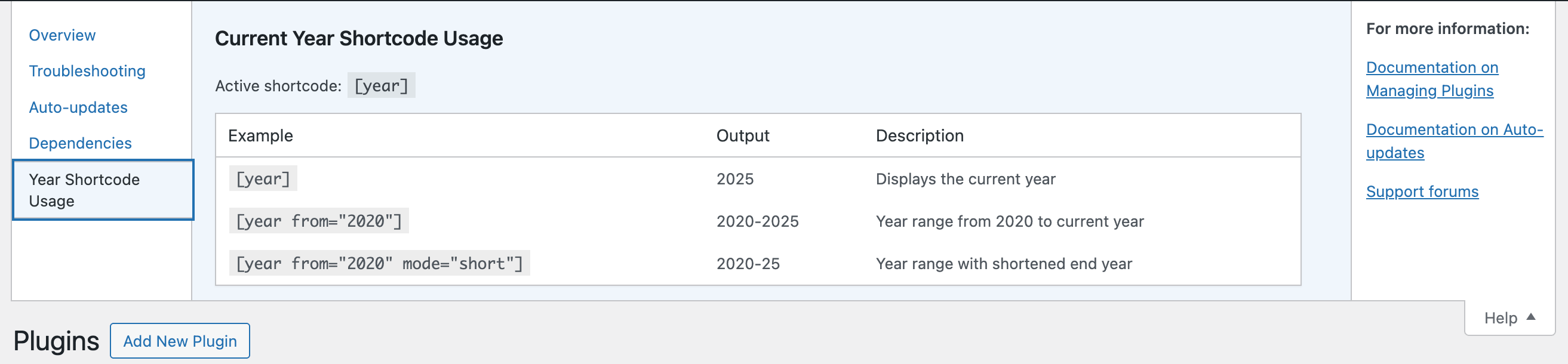
If [year] is used by another plugin, then it uses the fallback [runthings_year] which can be customised with the runthings_current_year_shortcode_tag filter. You can see the active shortcode tag in it entry in the installed plugins page.
Features
- Display current year with
[year] - Create a dynamic year range with
[year from="2020"] - Abbreviated year format with
[year from="2020" mode="short"], which shows "2020-26" (if the current year is 2026) - Automatic fallback shortcode
[runthings_year]if another plugin already uses the 'year' shortcode - Filter (
runthings_current_year_shortcode_tag) to set your own shortcode
[year]displays "2026"[year from="2026"]displays "2026" (since it's the current year)[year from="1983"]displays "1983-2026"[year from="2020" mode="short"]displays "2020-26" (shortened current year)[year from="1995" mode="short"]displays "1995-2026" (not shortened because centuries differ)
安装:
- Upload the plugin files to the
/wp-content/plugins/runthings-current-year-shortcodedirectory, or install the plugin through the WordPress plugins screen directly. - Activate the plugin through the 'Plugins' screen in WordPress.
- Use the
[year]shortcode in your posts, pages, or widgets.
屏幕截图:

常见问题:
What if another plugin already uses the [year] shortcode?
If another plugin already uses the [year] shortcode, this plugin will automatically use [runthings_year] instead to avoid conflicts.
How can I check which shortcode is active?
On the Plugins admin page, you'll see the active shortcode listed in the plugin's row.
Can I use this in my footer?
Yes! This shortcode works perfectly in footer widgets, custom footer code, or anywhere else shortcodes are supported in your theme.
What's the 'mode=short' parameter for?
When using a date range with years in the same century (e.g., 2020-2026), the 'short' mode will abbreviate the end year to just the last digits (2020-26), creating a cleaner look for your copyright statements.
更新日志:
2.1.2 - 16th November 2026
- Update WordPress tested-up-to metadata to 7.1.
- Update year examples to 2026
- Bump tested up to 6.9
- Move scripts and styles into external files
- Update year examples to 2025
- Added fallback shortcode runthings_year if year is taken
- Added
runthings_current_year_shortcode_tagfilter to customise the shortcode - Added contextual help tab to plugins page
- Added usage examples link to plugins page
- Added active shortcode info to plugins page
- Prepare for WordPress.org repository
- Update year examples to 2024
- Update year examples to 2023
- Added license
- Updated plugin meta
- Added readme file
- Initial public release
- Internal release