
SAA Admin Menu Controls
| 开发者 | sdnet |
|---|---|
| 更新时间 | 2026年9月1日 04:08 |
| PHP版本: | 7.4 及以上 |
| WordPress版本: | 7.1 |
| 版权: | GPL-2.0-or-later |
| 版权网址: | 版权信息 |
详情介绍:
?saamc_safe=1) guarantees you can never lock yourself out.
Key features:
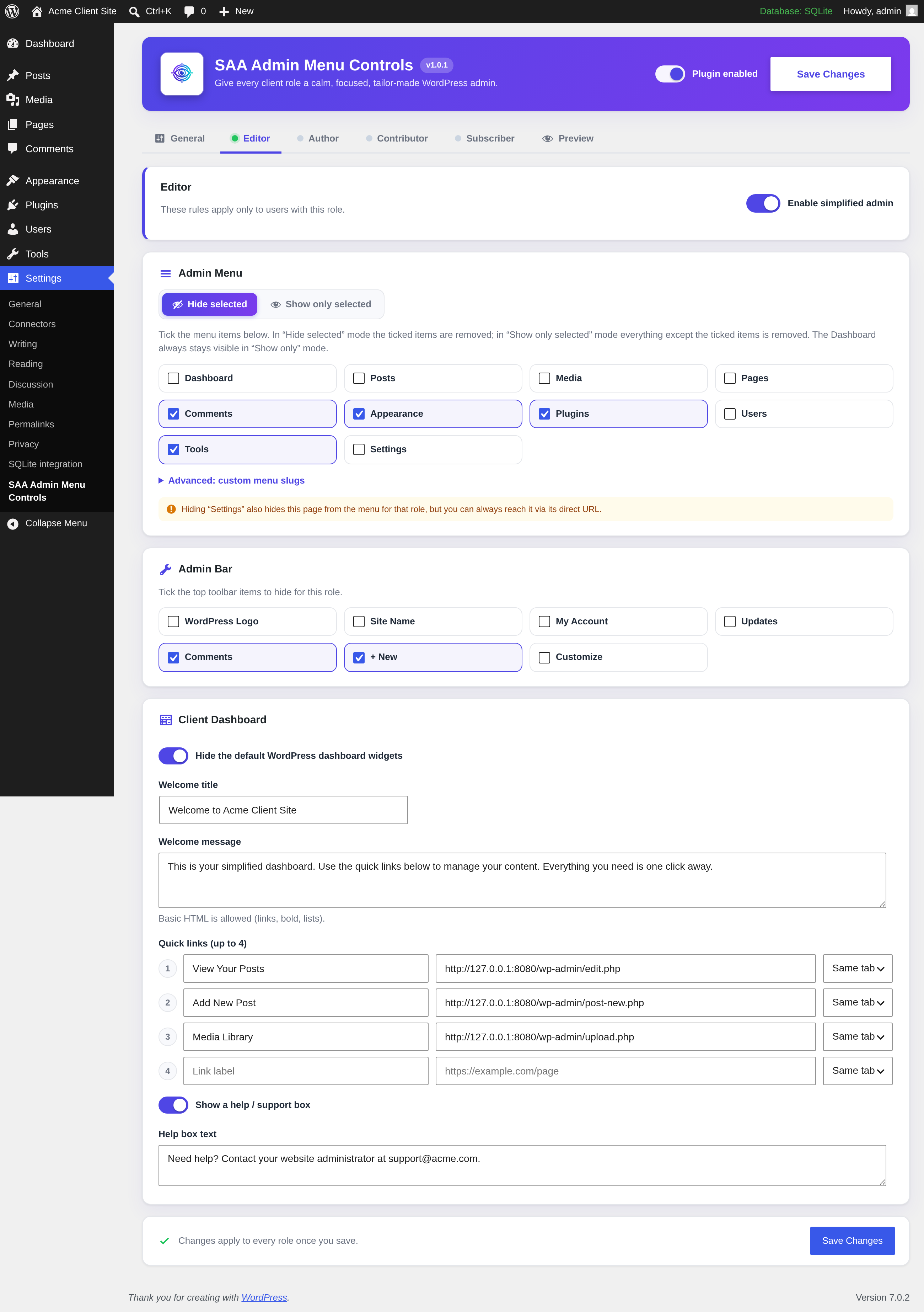
- Per-role admin menu control — independent rules for each role (Editor, Author, Contributor, Subscriber, plus any custom roles).
- Two menu modes — "Hide selected" (tick what to remove) or "Show only selected" (tick what to keep, hide everything else).
- Automatic menu detection — every registered admin menu appears as a tickable choice, including third-party plugin menus.
- Admin toolbar control — also hide admin bar nodes per role.
- Optional client dashboard — replace default widgets with a welcome panel (title, message, quick links, help box).
- Preview Mode — see the admin exactly as any role sees it, with a bright "Exit Preview Mode" button.
- Lockout-proof — administrators are never affected unless previewing, and
?saamc_safe=1instantly restores every menu. - Modern tabbed settings screen, no external dependencies, no build step, translation ready.
安装:
- Upload the
saa-admin-menu-controlsfolder to the/wp-content/plugins/directory, or install the plugin through the WordPress Plugins screen directly. - Activate the plugin through the "Plugins" screen in WordPress.
- Go to Settings > SAA Admin Menu Controls to configure the plugin.
- Select the target roles, choose a menu mode (Hide selected / Show only selected), and tick the admin menu links.
- Use Preview Mode to verify the menu as that role sees it, then Save.
屏幕截图:

常见问题:
Will this affect administrators?
No. Administrators (users with the manage_options capability) are always protected and never have effects applied, unless they explicitly enable Preview Mode from the settings page.
I hid too much and cannot find the settings. What do I do?
Add ?saamc_safe=1 to any admin URL (for example /wp-admin/index.php?saamc_safe=1). This instantly disables all effects for administrators and clears Preview Mode.
Does hiding a menu item actually block access?
No. Hiding a menu item only removes it from the admin menu for the selected roles. It does not change WordPress capabilities. Use a dedicated role/capability plugin if you need to restrict access itself.
Can I hide menus added by other plugins?
Yes. The plugin detects every top-level admin menu currently registered — including menus added by plugins such as Elementor and WooCommerce — and lists them automatically as tickable choices, so you no longer have to type them by hand.
If a menu is not listed (for example one that only appears in certain contexts), you can still add it via the "Custom menu slugs" textarea, one slug per line. Use the menu slug the plugin registered, not the URL: for example elementor, not admin.php?page=elementor. The plugin also accepts the full admin.php?page=... form and normalises it for you. Core custom post type menus use their full slug, for example edit.php?post_type=product.
What is the difference between "Hide selected" and "Show only selected"?
Each role's Admin Menu section has a mode switch. In "Hide selected" mode (the default) the items you tick are removed and everything else stays. In "Show only selected" mode the plugin keeps only the items you tick and removes everything else — ideal when a client should see just a couple of menus. The Dashboard is always kept in "Show only" mode so the client still has a home screen.
Does the plugin store any personal data?
No. It stores a single settings option and a per-administrator preview flag in user meta. Both are removed when you uninstall the plugin.
Is the plugin translation ready?
Yes. All user-facing strings use the saa-admin-menu-controls text domain and a POT template is included in the languages folder.
更新日志:
- Patch: Force CSS cache refresh to ensure styling loads correctly after updates.
- Initial release.
- Independent per-role configuration — each role has its own hidden menus, hidden toolbar items, and client dashboard.
- Automatic detection of all registered admin menus, including third-party plugin menus.
- Per-role "Hide selected" / "Show only selected" mode for admin menus.
- Modern settings screen with hero header, tabbed navigation, and per-role panels.
- Branded client dashboard widget with gradient header, quick links, and help box.
- Preview Mode to experience the admin as any configured role.
- Safe-mode bypass (
?saamc_safe=1) for lockout protection. - Translation ready.