Scotiabank Payment Gateway for WooCommerce
| 开发者 |
imanuelgittens
andrija freemius |
|---|---|
| 更新时间 | 2026年10月20日 20:51 |
| 捐献地址: | 去捐款 |
| PHP版本: | 7.4 及以上 |
| WordPress版本: | 7.1.2 |
| 版权: | GPLv2 or later |
| 版权网址: | 版权信息 |
详情介绍:
- Zero transaction fees — pay a flat annual rate, no percentage taken from your sales
- Direct bank connection — funds settle into your Scotiabank account by the next business day
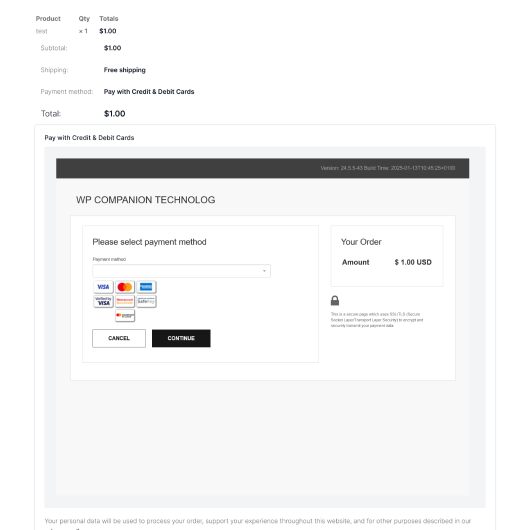
- Embedded checkout — customers complete payment on your site without being redirected
- Full access to all plugin features in sandbox (test) mode — test every capability before going live
- 3D Secure 2.0 authentication for strong customer verification
- Accept payments in both local Caribbean currency and USD
- Embedded hosted payment page — customers never leave your site
- Duplicate transaction protection — guards against double charges from page refreshes
- WooCommerce Block Checkout compatible
- Fully PCI compliant through Scotiabank's hosted payment platform
- All Free plan features, plus:
- Live payment processing — connect to Scotiabank's production environment
- Admin refunds — process refunds directly from your WooCommerce dashboard without logging into Scotiabank Merchant Admin (Scotia API activation required)
- Pre-authorization — authorize a card at checkout and capture the full or partial amount later
- Partial capture — capture less than the authorized amount for split fulfillment or adjusted orders. Done directly from WooCommerce (Scotia API activation required)
- Void transactions — cancel pre-authorized transactions directly from WooCommerce (Scotia API activation required)
- Priority support — direct access to the development team
- All Professional plan features, plus:
- Save Payment Methods — customers can securely save their card for faster checkout on future purchases
- WooCommerce Subscriptions — automatic payment method saving for recurring charges, with renewals processed without any customer interaction
- Order ID Prefix — add a custom prefix to order IDs submitted to the gateway (e.g. "WEB-" → "WEB-182") for easy reconciliation when running multiple stores on one Scotiabank account
- Install the free plugin from WordPress.org
- Enter your Scotiabank eCom+ credentials in WooCommerce settings
- Test transactions in sandbox mode to confirm everything works
- Upgrade to Professional or Premium to switch to live payment processing
- Start accepting real payments — funds are in your bank account by the next business day
- Trinidad and Tobago
- Jamaica
- Barbados
- Guyana
- Cayman Islands
- Turks and Caicos
安装:
- In your WordPress admin panel, navigate to Plugins > Add New
- Search for "Scotiabank"
- Click Install Now on "Scotiabank Payment Gateway for WooCommerce"
- Click Activate
- Go to WooCommerce > Settings > Payments and click on Scotiabank eCom+ to configure
- Download the plugin from this page or from wpcompanion.co
- In your WordPress admin panel, navigate to Plugins > Add New > Upload Plugin
- Select the downloaded zip file and click Install Now
- Activate the plugin and configure under WooCommerce > Settings > Payments
- Go to WooCommerce > Settings > Payments > Scotiabank eCom+
- Enable the payment method
- Enter your Store ID and Shared Secret (provided by Scotiabank when you activate eCom+)
- Start in Sandbox mode to test with Scotiabank's test credentials
- When ready, upgrade to a paid plan and switch to Production mode
屏幕截图:

常见问题:
Do I need a Scotiabank account to use this plugin?
Yes. This plugin connects directly to Scotiabank's eCom+ payment gateway, which requires an active Scotiabank merchant account with eCom+ enabled. If you need help setting this up, contact us and we'll connect you to the right people at Scotiabank.
Can I test the plugin before purchasing?
Yes — and you can test everything. The free plan gives you full access to every plugin feature in sandbox mode: payments, saved cards, admin refunds, captures, voids, pre-authorization, and order prefix. This lets you verify the complete integration works with your theme, page builder, and checkout flow before committing to a paid plan. Sandbox mode is only shown at checkout to logged-in administrators and shop managers, so test while logged in to your WordPress account.
What's the difference between the Free, Professional, and Premium plans?
The free plan gives you full access to every feature in sandbox (test) mode. You can test the entire integration — including saved cards, API operations, and order prefix — without purchasing a plan. Sandbox mode is only shown at checkout to logged-in administrators and shop managers, so test while logged in to your WordPress account. The Professional plan unlocks live payment processing, plus admin refunds, pre-authorization with partial capture, and void transactions — all processed directly from WooCommerce without logging into Scotiabank Merchant Admin. The Premium plan includes everything in Professional, the ability for customers to save their card for faster future checkouts, and the Order ID Prefix feature for multi-store reconciliation.
Are there any transaction fees?
WP Companion charges zero transaction fees. You pay a flat annual subscription for the paid plans. The only per-transaction costs are Scotiabank's own merchant processing fees, which are part of your merchant account agreement with the bank.
Which currencies does the plugin support?
The plugin supports both USD and your local Caribbean currency (TTD, JMD, BBD, etc.), depending on your Scotiabank eCom+ configuration. You can accept payments in either currency using a standard currency switcher plugin.
Is the checkout secure?
Yes. All payment processing happens on Scotiabank's PCI-compliant hosted payment platform. Your website never sees or stores credit card numbers. The plugin also supports 3D Secure 2.0, which adds an additional layer of authentication to protect against fraud.
Does the payment form redirect customers away from my site?
No. The Scotiabank hosted payment page is embedded directly on your checkout page using an iframe. Your customers enter their card details without ever leaving your website.
Can customers save their card for future purchases?
Yes, with the Premium plan. When the Save Payment Methods feature is enabled, logged-in customers can tick a checkbox at checkout to save their card. On future purchases they can select their saved card and skip re-entering their details. Saved cards are managed securely by Scotiabank — your site only stores a token reference, never the card number.
What is the Order ID Prefix feature?
With the Premium plan, you can add a custom prefix (e.g. "WEB-") to the order ID submitted to Scotiabank. This is useful if you run more than one WooCommerce store connected to the same Scotiabank merchant account, as it lets you identify which store each transaction came from in your Scotiabank Merchant Admin reports.
Can I process refunds from WooCommerce?
Yes, with the Professional plan. You can process full or partial refunds directly from the WooCommerce order screen once you activate Scotia's API on your account — no need to log into Scotiabank's Merchant Admin portal.
What is pre-authorization and when would I use it?
Pre-authorization allows you to authorize (hold) an amount on a customer's card at checkout without immediately capturing (charging) it. You can then capture the full amount, a partial amount, or void the authorization entirely — all from your WooCommerce dashboard (with Scotia's API active and the Professional plan). This is useful for businesses that need to verify stock, adjust order amounts, or delay fulfillment.
Does the plugin work with WooCommerce Block Checkout?
Yes. The plugin is compatible with both the classic WooCommerce checkout and the newer Block Checkout. Saved payment methods are fully supported in both checkout types for Premium plan users.
I'm a web developer or agency. Do you have a partner program?
Yes! We offer an agency partner program with referral commissions, free development licenses, priority support, and early access to new features. Contact us to learn more.
Where can I get support?
Free plan users can use the WordPress.org support forum. Professional and Premium plan users get priority support — contact us directly through our website.
更新日志:
- Live payment processing is a Professional and Premium plan feature — the plugin now checks for an active license before accepting live payments. If a license expires, live payments continue for a 7-day grace period; after that the gateway is turned off and switched to sandbox mode until the license is renewed
- Existing subscription renewals, and refunds, captures and voids on existing orders, continue to work if a license expires
- Customers' saved cards remain available; saving new cards requires the Premium plan
- Add admin notices before a license expires and during the grace period
- Sandbox (test) mode is now only shown at checkout to logged-in administrators and shop managers, so customers can never pay in test mode by mistake
- Test-mode orders are now clearly marked in the orders list and on the order screen
- Subscription renewals, refunds, captures and voids now always use the environment (sandbox or production) the original order was paid in
- Fix deleting a saved card in My Account leaving its subscriptions on the deleted card when the customer has another saved card
- Update the Freemius SDK to 2.13.5
- Confirm compatibility with WordPress 7.1.2 and WooCommerce 11.1.2
- Fix the payment form scrolling inside its own frame on the order pay page — the frame is now sized to the payment form at any screen width, so the page scrolls normally instead
- Improve Modal Checkout on phones — the payment form is given more of the screen width, which makes it shorter and easier to complete
- Fix transactions failing when your Scotiabank shared secret contains a "<" or "&" character — the secret is now stored exactly as Scotiabank issued it. If you worked around this by regenerating your secret, no action is needed
- Add the Subscription Support setting to the free plan so subscriptions and saved cards can be tested in sandbox mode at no cost
- Improve Modal Checkout — a loading spinner now shows while the secure payment form loads
- Add WooCommerce Subscriptions support — payment method is automatically saved at checkout and used for all future renewals without customer interaction (Premium plan)
- Add Modal Checkout — payment form opens in an overlay on the checkout page, eliminating the redirect to a separate order-pay page
- Fix card not being saved to subscription when customer did not check "Save card" at checkout
- Fix save card preference not carrying through in Block Checkout with Order Pay Page flow
- Fix save card preference not carrying through in Classic checkout with Modal flow
- Improve admin settings layout — settings are now grouped into logical sections (Payment Credentials, Payment Behaviour, Scotia REST API, Premium Features)
- Improve transaction logging — each transaction now opens and closes with a clear separator line, making log files easier to read when troubleshooting customer payment issues
- Security: enforce constant-time HMAC comparison to prevent timing attacks on callback verification
- Security: restrict postMessage broadcasts to same origin only
- Security: add nonce verification to the modal payment REST endpoint
- Security: add order ownership verification before processing payment callbacks
- All plugin features (saved cards, API operations, order prefix) are now fully available in sandbox mode without a paid plan — test everything before going live
- Add admin notice when a paid plan lapses in production mode to alert merchants they are no longer receiving updates or priority support
- Fix duplicate order emails sent when Scotia delivers an empty pre-response followed by the real approval response
- Add internal Fiserv primary token payment API support as groundwork for WooCommerce Subscriptions integration (coming soon)
- Add Save Payment Methods — logged-in customers can save their card (tokenized) for faster future checkouts (Premium plan)
- Add Order ID Prefix — prepend a custom prefix to order IDs submitted to the gateway for multi-store reconciliation (Premium plan)
- Add plan expiry protection — admin notices and inline settings warnings when a paid feature is active but the plan has lapsed, with a one-click renewal link
- Improve saved card display in classic checkout — left-aligned flexbox layout consistent across themes
- Fix saved payment methods appearing in Block Checkout when Premium plan is inactive
- Fix duplicate admin notices when multiple gateway instances are initialized on the same page
- Add admin refund processing directly from WooCommerce order screen
- Add void support for pre-authorized transactions
- Add partial capture for pre-authorized transactions
- Add Scotiabank Fiserv API integration for refund, capture, and void operations
- Improve error handling and transaction status reporting
- Add pre-authorization feature
- Add guards around transactions to reduce duplicate transaction submissions and empty responses from Scotiabank
- Fix bug that caused the payment form not to load when optional checkout fields had no value
- Update Freemius SDK, readme.txt and update payment form scroll to center of screen
- Sanitize code properly to meet WordPress repository standards
- Update 3D Secure validator value
- Updated code to account for new WooCommerce checkout blocks
- Initial release