
Scrumptious – Recipe Cards
| 开发者 | natebald |
|---|---|
| 更新时间 | 2026年10月6日 09:40 |
| PHP版本: | 7.4 及以上 |
| WordPress版本: | 7.1 |
| 版权: | GPLv2 or later |
| 版权网址: | 版权信息 |
详情介绍:
- Paste & Parse: paste a recipe from anywhere (your notes, an old post, an email) and the card fills itself in. Works out of the box, no account needed.
- Switch in a few clicks: move your recipes from WP Recipe Maker, Tasty Recipes or Create by Mediavine. Recipes, photos, ratings and categories come across, your posts are updated, and you can undo it.
- Type ingredients naturally: "2 cups flour, sifted" is split into amount, unit and notes automatically.
- Optional AI, your own key: connect OpenRouter in one click (or Google Gemini, OpenAI, Anthropic, or WordPress's built-in AI) for messy text and for suggesting course, cuisine and diet. You pay your provider directly; nothing goes through us.
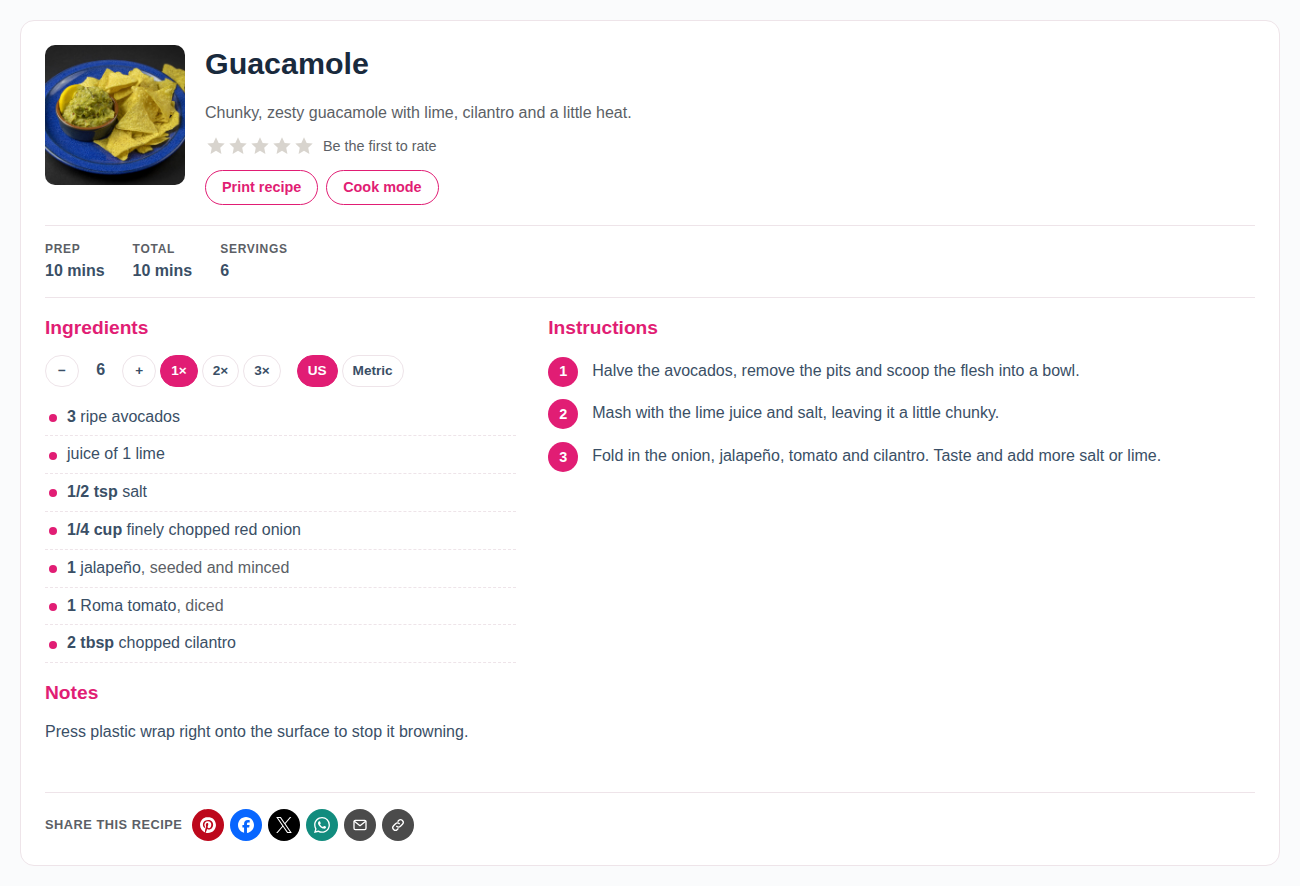
- Servings scaling (−/+ and 1×, 2×, 3×) and US / Metric conversion.
- Tap to tick off ingredients and steps, and Cook mode to keep the screen on.
- Star ratings, a clean print page, a Jump to Recipe button, a photo gallery and share buttons (plain links, no tracking scripts).
- Complete schema.org Recipe data: times, servings, ingredients, step-by-step instructions, nutrition, ratings, video, diets.
- Fast: styles and scripts load only on pages with a recipe. No jQuery.
- Recipe Card, Jump to Recipe, Recipe Grid and Recipe Part blocks (put ingredients in one column and steps in another).
- Optional recipe pages and a recipe index. Courses, cuisines and diets.
- For developers: theme-overridable templates, PHP filters and actions, JavaScript events and a REST API. Full reference in the developer docs.
- Import from a link: bring in a recipe from another site that publishes recipe data for Google.
- Bulk AI: tidy up and tag all your existing recipes at once.
- Meal planner and shopping lists: readers save recipes to a weekly plan and get a combined shopping list.
- Submit a Recipe (Studio and Agency): readers send in recipes, and you approve them from a review queue.
- Priority support from the person who built it.
安装:
- In WordPress go to Plugins → Add New Plugin, search for Scrumptious, then click Install Now and Activate.
- A one-minute setup opens (you can skip it).
- In a post, add the Recipe Card block, click Create new recipe, and paste your recipe.
屏幕截图:


常见问题:
Do I need an AI account?
No. Paste & Parse works without AI. AI is an optional upgrade that uses your own key.
Can I switch from WP Recipe Maker, Tasty Recipes or Create?
Yes. Go to Recipes → Import. Your recipes are copied (the originals stay untouched), and your posts are updated to show the new card. You can undo the post changes from the same screen.
Where are recipes stored?
Each recipe is its own item under Recipes in the admin, so you can reuse it in more than one post and it survives theme changes.
Will it work with my theme?
Yes. Cards use your theme's fonts, and you pick the accent colour and one of three card styles. Block themes can also design full recipe pages in the Site Editor.
Does it slow my site down?
No. Nothing loads on pages without a recipe, and cards use a few KB of CSS and JavaScript.
Is there a Pro version?
Yes. The free plugin is complete on its own. Pro adds import from a link, bulk AI tools, a meal planner, shopping lists and priority support. Studio and Agency add reader recipe submissions and more sites. See plans and pricing.
更新日志:
- New: a short Scrumptious Pro card on the settings screen and a "Get Pro" link on the Plugins screen, for admins only. Both are hidden once Scrumptious Pro is installed.
- Fix: the recipe card's Preview in the block editor now shows the card styles (it looked unstyled).
- New: on classic themes, the recipe index can use a Scrumptious grid (photos, ratings, times) with course and cuisine filters. Recipes → Settings → Recipe index layout. Existing sites keep their theme's layout.
- Fix: recipe pages repair themselves if another plugin or a hosting tool rebuilt permalinks without them (they returned "page not found").
- All stored names now use the full "scrumptious_" prefix (recipes, courses, cuisines, diets, ratings and settings data). Existing sites are moved over automatically on update; nothing to do.
- Admin and print-view styles and scripts are now proper enqueued files.
- The block editor source code is included (src/), with build instructions in this readme.
- Security: star ratings only trust a visitor-IP header from Cloudflare's own servers (or proxies you add with the
scrumptious_trusted_proxiesfilter), so votes can't be multiplied with a faked header. - Security: password-protected recipes stay hidden (card, print view and REST API) until the password is entered.
- Recipes created inside a post start as drafts and are published together with the post, so nothing shows before the post goes live.
- AI requests from the editor are capped per user per hour (60; administrators aren't limited; filter
scrumptious_ai_hourly_limit). - Fix: "WordPress AI" (Settings → Connectors) can be chosen as the AI provider again.
- The Recipes list only shows "Used in" posts you're allowed to see.
- Fix: on the Compact card, share buttons and other extras now use the full card width instead of squeezing into the ingredients column.
- New default look: Raspberry accent (#e11d74) on a white card. Buttons, step numbers and text all meet WCAG AA contrast. Sites that already chose an accent colour keep it.
- The Recipes menu in wp-admin now uses the Scrumptious cookie icon.
- Removed: Import from URL. The plugin no longer downloads pages from other websites. Paste & Parse works with text you paste in.
- Developers:
scrumptious.pasteParse.sources,scrumptious.pasteParse.introandscrumptious.pasteParse.placeholderJavaScript filters for adding input types to Paste & Parse.
- Developers:
scrumptious_card_actionsaction for extra buttons in the card's button row (used by Scrumptious Pro's meal planner).
- Share buttons now sit at the bottom of the card by default, and are a little smaller. Move them back to the top (extra small) under Recipes → Settings → Sharing → Position on the card.
- Developers:
scrumptious_share_positionfilter.
- Cards show "Recipe by …" when a recipe has an author name.
- Developers:
scrumptious_card_creditfilter andscrumptious_card_endaction.
- Share buttons now use each network's logo and colour: round icon buttons by default, or icons with names (Recipes → Settings → Sharing → Button style).
- Developers:
scrumptious_share_iconsfilter; each button sets--swp-brand.
- New: Suggest with AI fills in course, cuisine and diet. It reuses your existing terms (Main, Mains and main-course count as one) and only suggests a diet when every ingredient fits.
- New: Paste & Parse with AI now sets course, cuisine and diet too.
- Developers:
scrumptious_tag_prompt, andscrumptious_suggest_termsfilters;POST /scrumptious/v1/suggest-terms;Tagger::ids()for loose term matching.
- Share buttons on every card: Pin it, Facebook, X, WhatsApp, email, copy link, plus the phone's own share menu. Plain links, no tracking scripts. New Recipe Share Buttons part block.
- Setup wizard: a one-minute setup after first activation (look, reader features, optional AI). Run it again from Recipes → Setup.
- Help links: "?" icons and "Learn more" links throughout the plugin open the matching help article.
- The gallery lightbox and share buttons use a separate small script, loaded only when needed.
- Fix: Recipe Gallery part block could show a PHP notice.
- Recipe gallery: extra photos per recipe, shown as a grid with a tap-to-enlarge lightbox. New Recipe Gallery part block; first five photos added to Google data.
- "Adapted from" link field; sent to Google as isBasedOn.
- Diets are now sent to Google (suitableForDiet) for the diets Google recognises.
- Fix: step photos stay with their step when other steps are added or removed.
- Importers for WP Recipe Maker, Tasty Recipes and Create by Mediavine (Recipes → Import): ingredients and step groups, times, servings, notes, nutrition, images, step images, video, keywords, course/cuisine/diet and star ratings.
- Posts are updated to show the Scrumptious card in place of the old one (blocks, shortcodes and WP Recipe Maker's classic fallback markup), including Jump to Recipe buttons. Undo puts the original content back.
- Works when the old plugin is already deactivated. Original recipes are never changed. Running it again skips recipes already imported.
- Imported ratings are kept and new votes are added on top.
- New [scrumptious-jump] shortcode for classic content.
- Paste & Parse: paste a recipe from anywhere and the card fills itself in — title, summary, times, servings, ingredient and step groups, notes and nutrition. Works without AI.
- Bring your own AI: connect OpenRouter in one click, or paste a Google Gemini, OpenAI or Anthropic key. A fast, low-cost model is picked automatically (or choose your own). Test button included.
- Keys are encrypted at rest, never sent to the browser, and deleted when the plugin is deleted.
- SEO: with public recipe pages on, the recipe page is now the primary page — it is self-canonical and the only page that outputs recipe data. Blog posts can still show the card. Recipe Grid links and the print view point to the recipe page.
- Developers: new filters (scrumptious_recipe_data, scrumptious_card_sections, scrumptious_card_classes, scrumptious_card_html, scrumptious_reader_features, scrumptious_recipe_url, scrumptious_grid_query_args), actions before/after the card and each section, and JavaScript events (scrumptious:ready, change, cook, rated).
- Recipe Part blocks: Ingredients, Instructions, Times & Servings, Rating, Nutrition, Notes, Summary and Buttons — build your own recipe layouts anywhere.
- Recipe Grid block: filter by course, cuisine or diet; order by newest, highest rated, A–Z or random.
- Recipe page and Recipe Index templates are now built from these blocks, so you can rearrange them in the Site Editor.
- SEO: recipe data is output only once per recipe.
- Star ratings: readers rate right on the card (one vote per visitor, rate-limited); the average feeds Google recipe data.
- Servings scaling (− / + and 1×, 2×, 3×) with kitchen-friendly fractions.
- US / Metric conversion.
- Cook mode keeps the screen awake; tap ingredients and steps to check them off.
- All reader features can be switched on/off in Settings. One ~4.6 KB script, loaded only where a recipe appears.
- Per-block "Card display" options: style (full, compact, minimal), show/hide each section, print button — overriding the site defaults.
- New Jump to Recipe block (jump + print buttons, custom label), plus an optional setting to add it automatically.
- Clean print view (no theme or ads, noindex) with image/notes/nutrition toggles.
- Settings: default card style, print button, auto Jump to Recipe.
- Fix: ingredient and instruction groups no longer disappear or lose text when editing a new recipe inside a post.
- Course, cuisine and diet pickers in the Recipe Card block sidebar.
- Shortcode column removed (the [scrumptious] shortcode still works as a fallback).
- "View" links for recipes: row actions and a "Where this recipe appears" panel link to the posts that show the recipe (and its own page when public pages are on).
- Full recipe editor on the Recipes screen (same editor as the block).
- Settings page: accent color, card sections, optional public recipe pages with index, comments on recipe pages, schema on/off, delete data on uninstall.
- Recipes list: image, total time, "used in" posts and shortcode columns.
- First development build: recipe post type, Recipe Card block, ingredient parser, Recipe JSON-LD.