Security Ninja – WordPress Security & Firewall
| 开发者 |
lkoudal
cleverplugins freemius |
|---|---|
| 更新时间 | 2026年9月2日 00:46 |
| 捐献地址: | 去捐款 |
| PHP版本: | 7.4 及以上 |
| WordPress版本: | 7.1 |
| 版权: | GPLv3 |
| 版权网址: | 版权信息 |
标签
下载
详情介绍:
- Basic Firewall (8G-based) – Blocks common malicious requests and bot noise before it becomes a problem.
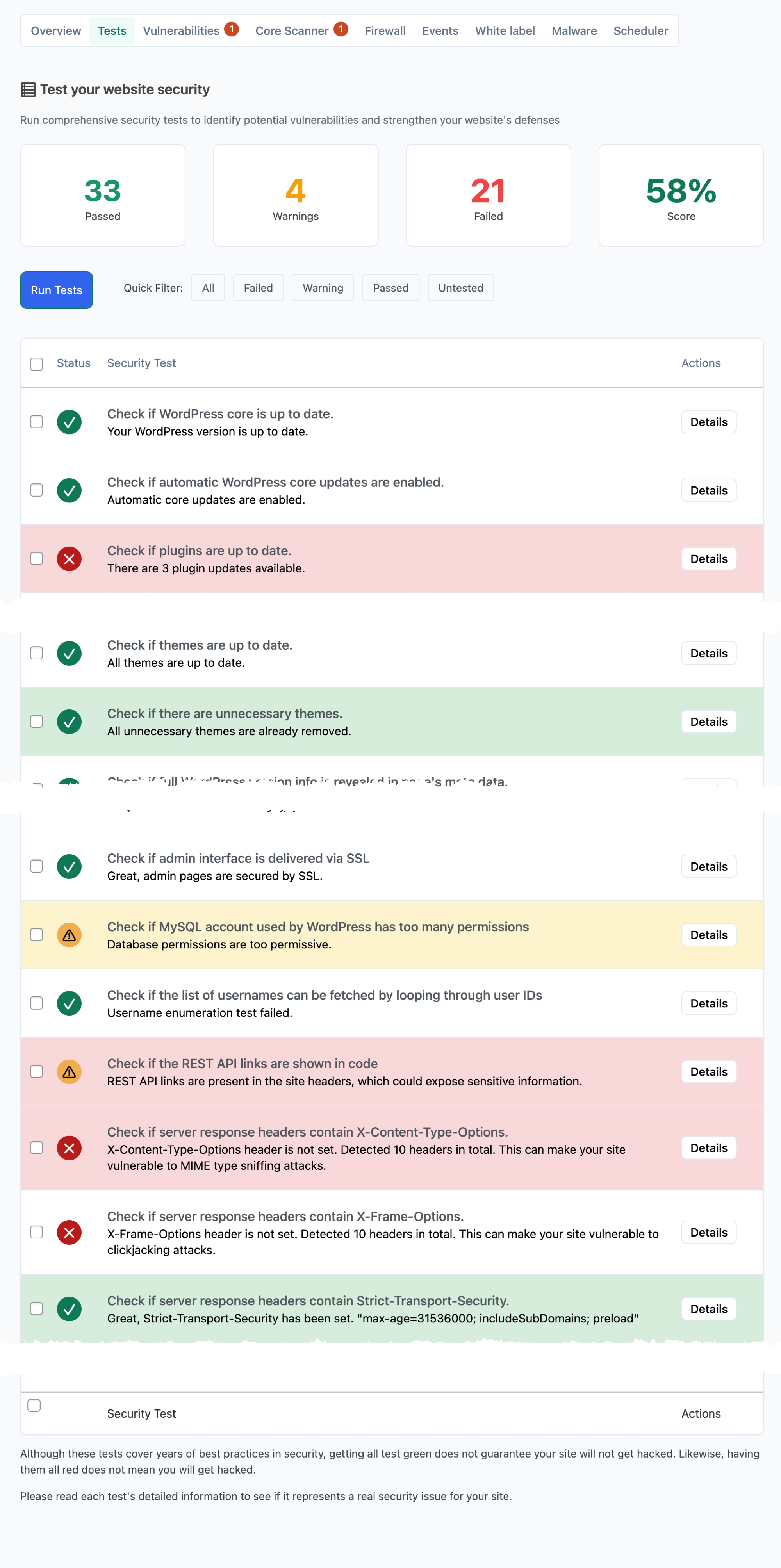
- 50+ Security Tests – Fast audit of common WordPress security misconfigurations.
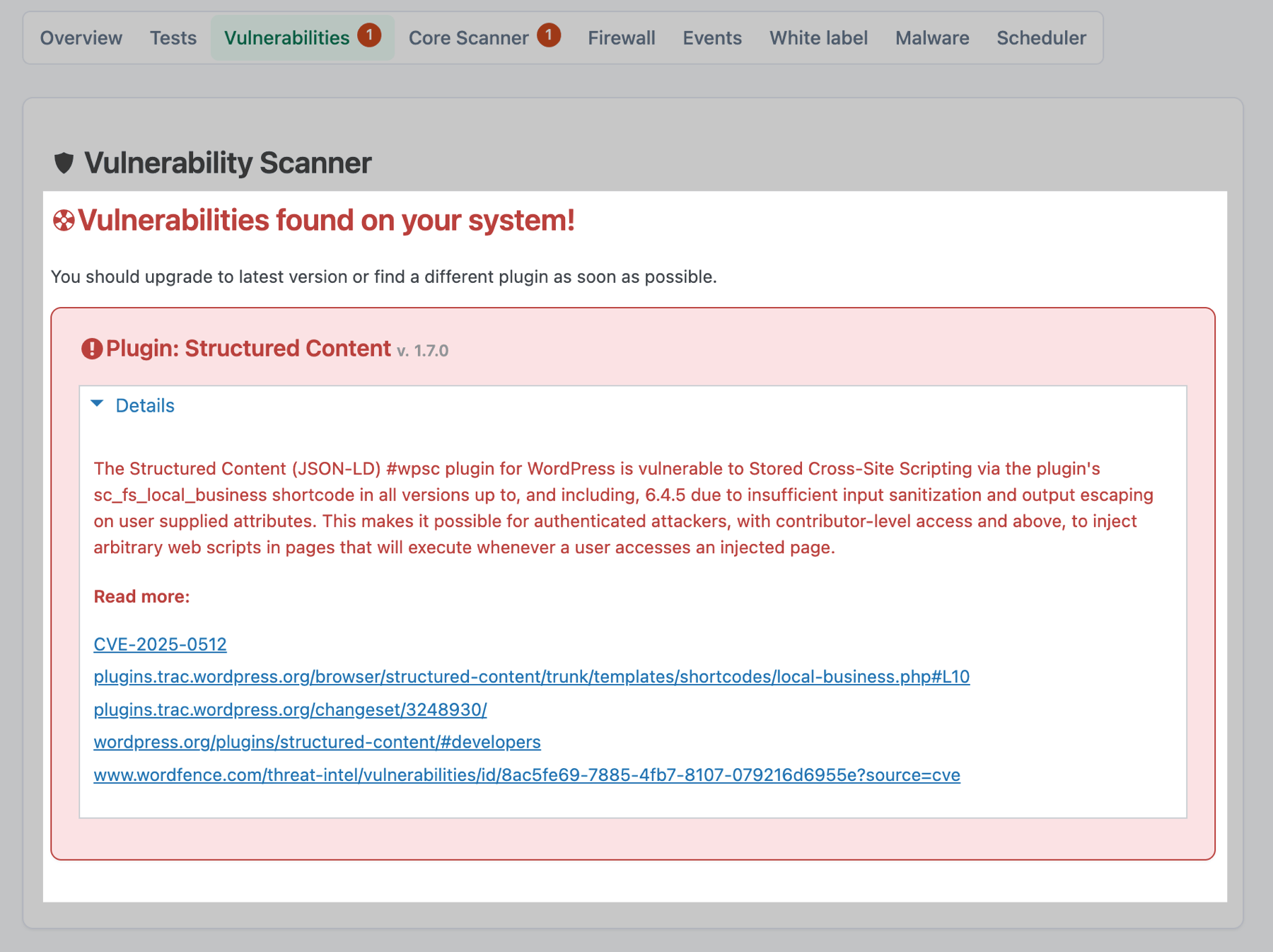
- Vulnerability Scanner – Highlights known issues in plugins/themes so you can patch faster.
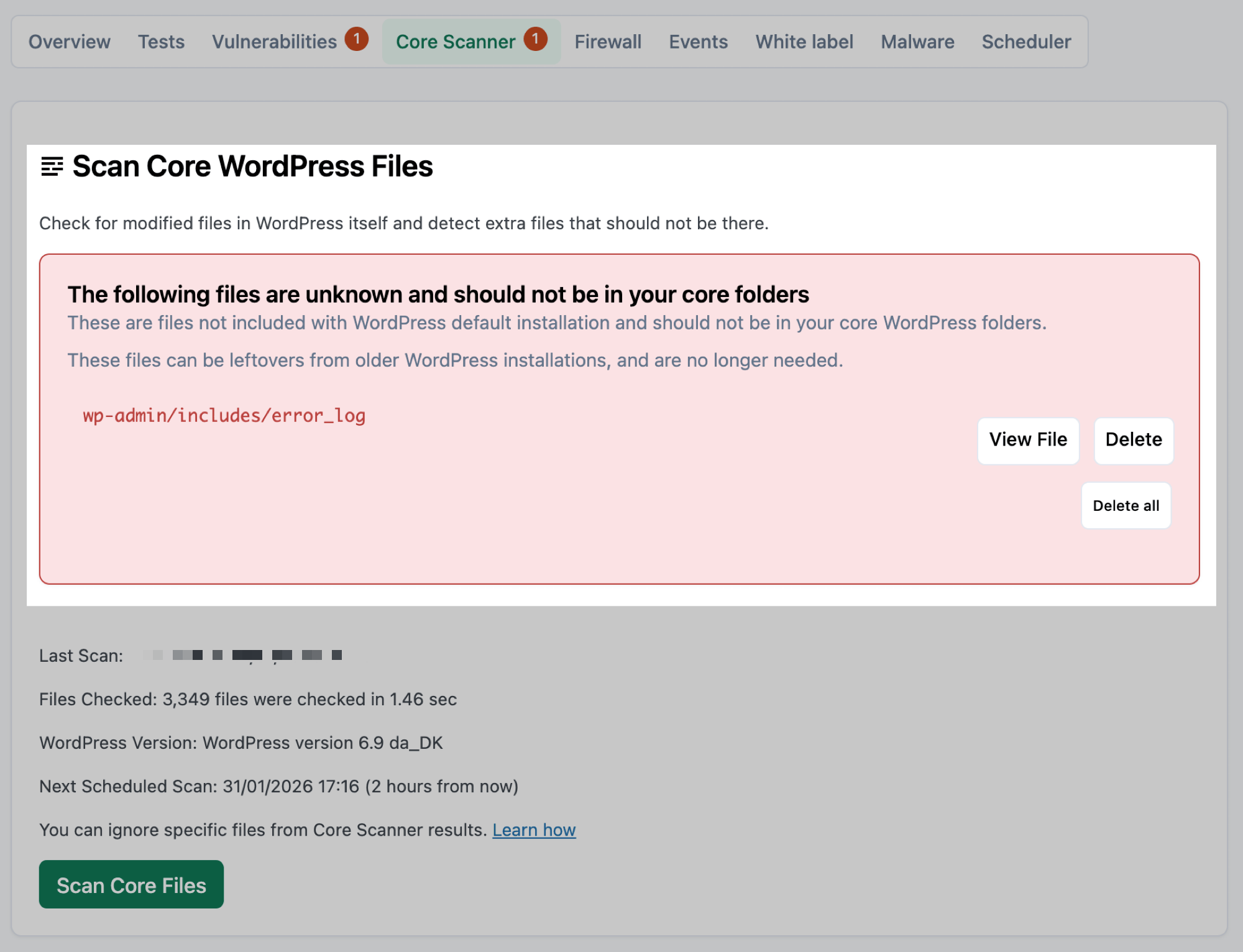
- Core Scanner – Detect modified or unexpected files in WordPress core folders.
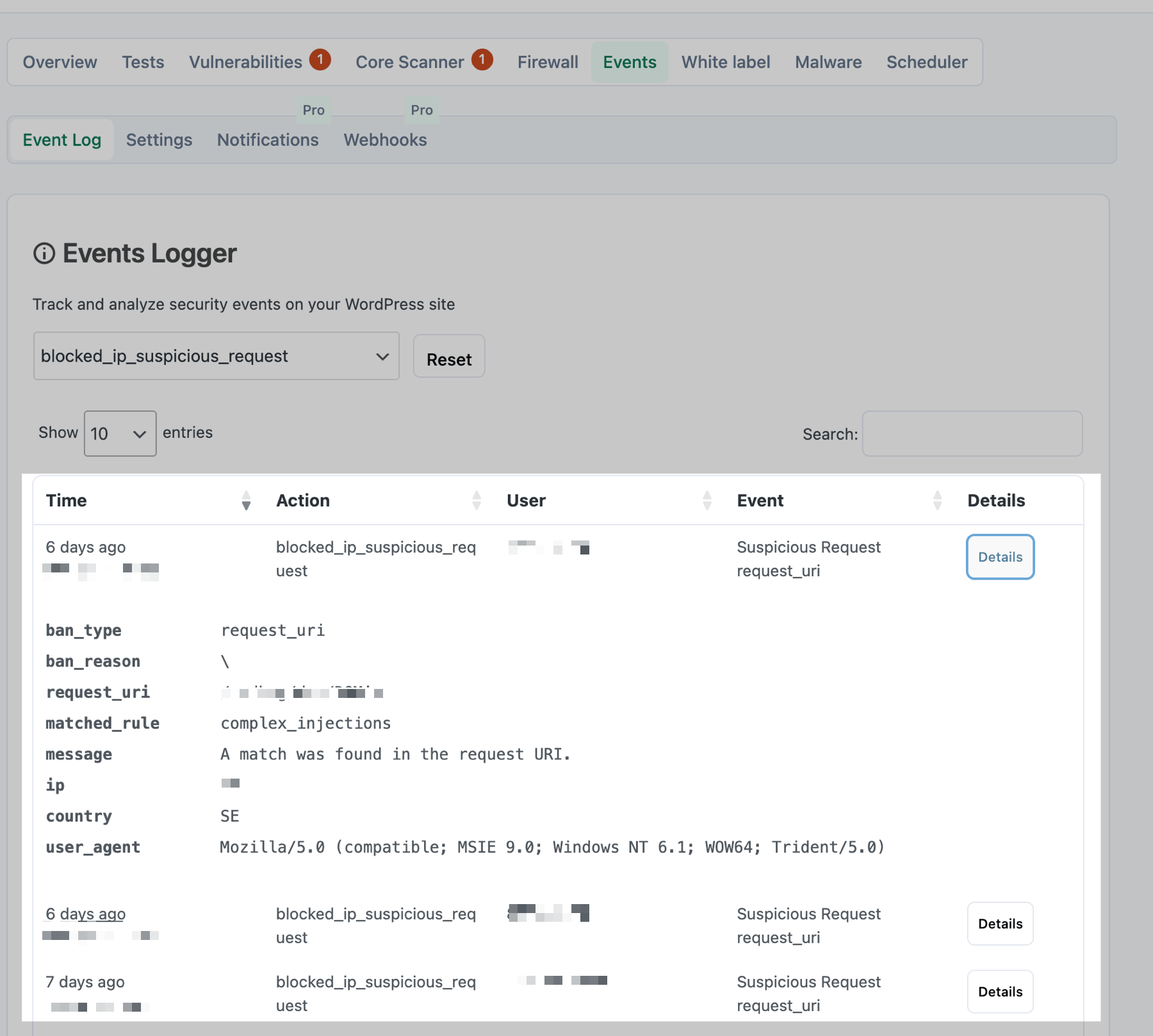
- Basic Events Logger – Logs firewall events and login attempts (successful/failed).
- AI Security Advisor (WordPress 7) – AI-generated audit summaries and guided follow-ups from your scans, using WordPress AI Connectors (you choose the LLM provider). Optional WordPress Abilities let other AI tools on your site read test summaries, attack activity, and your latest saved report. Pro adds
- Cloud Firewall & advanced WAF – Block 600+ million known bad IPs, country blocking, IP management, and stronger firewall controls (free includes the 8G-based firewall).
- Advanced Malware Scanner – Detect and clean malicious code and suspicious files.
- Login protection & 2FA – Limit failed logins, rename the login URL, and add two-factor authentication.
- One-click Fixes – Harden WordPress from the Fixes page (XML-RPC, file editor, headers, and more).
- Full Events Logger – Export logs, scheduled email reports, webhooks (e.g. Slack/Discord), and deeper alerting.
- Scheduled scans & reporting – Automated security scans and reports. Key Features
- Login and password checks – Audits weak passwords and related settings (Pro adds failed-login limits, rename login, and 2FA).
- File integrity monitoring – Detects unauthorized changes to WordPress core files, themes, and plugins.
- Database security checks – Identifies weak database permissions and potential SQL injection threats.
- User role audits – Ensures no unauthorized administrator accounts exist.
- Security misconfiguration scans – Identifies and fixes weak settings that could compromise security.
- Full core file integrity check – Scans every file in core WordPress folders for modifications.
- Unknown file detection – Flags extra or unexpected files in core directories.
- Built-in file viewer – Review flagged files in the dashboard.
- Restore or delete – Restore altered core files with one click, or remove suspicious unknowns.
- Malicious scripts and backdoors – Identifies hidden malware and harmful injections.
- Trojan and virus detection – Scans for suspicious PHP and JavaScript entries.
- One-click malware removal – Instantly quarantine and delete infected files.
- Basic protection (Free) – 8G rules block many common exploit patterns and abusive requests.
- Advanced protection (Pro) – Cloud Firewall, country blocking, IP lists, and additional intelligence/automation.
- Login brute-force protection (Pro) – Limit failed logins and harden the login flow (not included in the free firewall).
- WP Compress – image optimization and compression service
- MonSpark – uptime and website monitoring
- Modular DS – remote site management
- WPMU DEV – hosting and management platform
- Divi Dash – Elegant Themes site management
- Fastpixel – optimization service
- Broken Link Checker – link checking service
- GetTerms – cookie consent scanner (getterms.io)
- ManageWP – enabled by default on new installs
- WP Rocket – caching and optimization
- UptimeRobot – uptime monitoring
- Uptimia – uptime monitoring You can still add your own IPs and CIDR ranges manually on the IP Management screen.
- Two-Factor Authentication (2FA) – Requires additional verification for safer logins.
- Brute-force attack protection – Limits failed login attempts to block unauthorized access.
- Rename login - Getting a lot of requests to your login form? Hide it for spammers.
- Disable XML-RPC – Blocks common DDoS attacks and brute-force exploits.
- Restrict file editing – Prevents unauthorized theme and plugin modifications.
- Hide PHP error messages – Stops hackers from exploiting sensitive error details.
- Free: firewall events and login attempts (successful/failed) in the dashboard.
- Pro: export security logs, scheduled email reports, webhooks (e.g. Slack/Discord), and deeper alerting.
- Set up daily, weekly, or monthly security scans.
- Receive email alerts about vulnerabilities and malware infections.
- Analyze detailed reports to keep your website secure.
- Fake registrations and spam comments – Stops bots from even getting to your site.
- Malicious bot attacks – Blocks scripts attempting to hack your site.
- Unwanted traffic – Reduces server load by preventing unnecessary bot access.
安装:
- Open WordPress admin, go to Plugins, click Add New
- Enter "Security Ninja" in search and hit Enter
- Plugin will show up as the first on the list, click "Install Now"
- Activate & go to Tools - Security Ninja to make your site more secure
- Download the plugin.
- Unzip it and upload to wp-content/plugin/
- Open WordPress admin - Plugins and click "Activate" next to the plugin
- Activate & go to Security Ninja to make your site more secure
屏幕截图:
常见问题:
Does the free version include a WordPress firewall (WAF)?
Yes. Security Ninja includes a basic Web Application Firewall (WAF) for free, based on the 8G ruleset. It blocks common malicious requests and reduces bot noise.
Does Security Ninja protect against brute force attacks and login attempts?
Pro includes login brute-force protection (failed-login limits), rename login, and 2FA. The free version records login attempts (successful/failed) in the Events Logger and runs security tests that check password strength-it does not block repeated failed logins on its own.
Does Security Ninja include a WordPress vulnerability scanner?
Yes. The Vulnerability Scanner is fully available in the free version and helps you identify known vulnerabilities in plugins/themes so you can patch quickly.
Who is this plugin for?
Site owners, agencies, and developers who want a lightweight WordPress security plugin to harden sites and catch problems early.
Will this plugin slow down my site?
In normal operation, no. Some scans can temporarily use more resources while they run.
What changes will Security Ninja make to my site?
Security Ninja runs checks and shows recommendations. Some Pro features can add active protection layers (firewall/WAF controls, login protection), which you can configure.
What if I encounter issues with the plugin?
While we strive for universal compatibility, if you face any issues, our support team is ready to assist. Visit our support forum to open a new thread, and we'll help you as soon as possible.
更新日志:
- 2026-09-01
- FIX: Firewall - Per-visitor reverse-DNS, ASN, and GeoIP caches no longer fill the WordPress options table with one row per IP. On busy sites without Redis/Memcached that could grow to hundreds of thousands of rows and cause intermittent downtime. After update, leftover rows are removed automatically in small batches. Thank you Davina.
- FIX: Firewall - Search-engine and crawler checks only run reverse-DNS when the User-Agent looks like a known crawler. Normal browser traffic no longer triggers a DNS lookup on every page view. AI crawlers (OpenAI, Perplexity, Claude) are checked against published IP ranges only.
- FIX: Firewall - Hostname-based "blocked hosts" matching (part of Filter Suspicious Queries) is off by default. URI, query string, user agent, and referrer rules still run. Developers can re-enable hostname checks with the secnin_cf_check_blocked_hosts filter.
- FIX: Firewall - Satellite/ASN softening (Pro) no longer calls the remote ASN API on every miss when the site has no object cache. With Redis or Memcached, results are cached there instead of in the database.
- FIX: Firewall - The list of remembered validated crawler IPs is limited to 200 entries so it cannot grow without bound.
- FIX: Fixes - Disable Username Enumeration now blocks anonymous REST user listing (/wp/v2/users and ?rest_route=), not only by removing the endpoint. The username enumeration security test checks that path as well. Thank you Elias.
- 2026-08-31
- FIX: Fixes - Saving Security Fixes with "Disable debug mode" off no longer forces WP_DEBUG to true in wp-config.php. Thank you Mike.
- IMPROVED: Vulnerability Scanner - Update notices now say we are tracking more known vulnerabilities in the database, not that vulnerabilities were "downloaded" to the site. Thank you Tom.
- 2026-08-25
- FIX: Firewall - Removed the blocked_kanagawa hostname rule again (Japanese prefecture / OCN false positives). Thank you Masahiro.
- IMPROVED: Firewall - Filter Suspicious Queries help text now states that it includes reverse-DNS hostname checks, separate from Cloud Firewall and Prevent Banned IPs.
- FIX: Scheduled Scanner - Security Testing emails no longer fire on message-only diffs or HTTP timeout Warning/Good flaps.
- 2026-08-24
- FIX: Vulnerability Scanner - Opening the Vulnerabilities tab no longer floods PHP warnings when a CVE reference is missing its display name (Undefined property stdClass::$name) or when strip-http helpers receive null (strpos deprecation on PHP 8+).
- NEW: Cloud Firewall - Claude / Anthropic crawlers (ClaudeBot, Claude-User, Claude-SearchBot) are verified against Anthropic's published IP ranges at claude.com/crawling/bots.json, same pattern as OpenAI and Perplexity. Thank you David.
- FIX: Security Tests - Local site detection no longer strips dots from 127.0.0.1 via sanitize_key (which broke TLS skip-verify). Self-checks against .local hosts and WP_ENVIRONMENT_TYPE=local work again, so tests like debug.log accessibility stop failing with a generic transport error on Local.
- FIX: Security Tests - REST API enabled check now skips TLS verify on local sites (same as other self-checks). Local installs with self-signed certs no longer get a false "Could not determine REST API accessibility" warning.
- FIX: Security Tests - PHP ini boolean checks (allow_url_include, expose_php, display_errors, register_globals, safe_mode) no longer treat the string Off as enabled.
- IMPROVED: Security Tests - expose_php test passes when the PHP version header is already hidden via Security Headers or server config (e.g. .htaccess), not only when php.ini is editable.
- FIX: Auto Fixer - Table prefix change requires an explicit prefix, shows the applied prefix on success, and handles long runs/timeouts more clearly.
- 2026-08-18
- FIX: MainWP - Applying Malware Scanner whitelist settings no longer wipes existing file hashes when the dashboard does not send them, so ignored files stay ignored.
- IMPROVED: MainWP - White Label updates now properly report success or failure per site, so a bulk push no longer looks like it succeeded everywhere.
- IMPROVED: German - Events Logger and Overview now talk about security events (Ereignisse), not calendar events. Other leftover strings such as event details, action counts, and emptied log are corrected too.
- IMPROVED: Spanish - Admin screens read more naturally. Buttons and actions such as Close, Save, Clear, and Ban IP now mean what they say.
- 2026-08-14
- FIX: Compatibility - Removed a chillerlan Settings class_alias that broke LatePoint (and similar) booking confirmation QR codes after the 5.294 Imposter isolation fix. Thank you Daniel.
- IMPROVED: Security headers - Default Referrer-Policy is now strict-origin-when-cross-origin (browser-aligned; better embed compatibility). Existing saved settings are not changed. Thank you Heath.
- NEW: MainWP - Added the remote
update_vulnerabilitiesaction for free and Pro sites. It schedules a dedicated one-off database refresh even when the normal daily or weekly vulnerability job already exists. - IMPROVED: MainWP - Remote vulnerability refreshes now return clear scheduled, already-pending, unavailable, and scheduling-failed responses.
- IMPROVED: MainWP - Remote settings apply accepts blocked-country lists, Malware Scanner whitelist paths, and Core Scanner ignore paths with Security Ninja for MainWP 2.2.0+.
- FIX: MainWP - Copying Malware Scanner whitelist settings now keeps filename, hash, and pattern entries instead of flattening them into strings the scanner ignores.
- FIX: Core Scanner - Deactivating the plugin on a Multisite subsite no longer deletes network-wide scan results, ignore lists, or the main-site daily scan schedule.
- FIX: MainWP - Malware whitelist path sanitization now accepts the stored
filenamefield when settings are copied between sites.
- 2026-08-11
- FIX: After activating the plugin, redirect to the main Security Ninja page instead of the setup wizard so Freemius license entry is not skipped. Wizard opens after license activation when setup is still incomplete.
- FIX: Vulnerability Scanner - Rendering a WordPress CVE no longer fatals with ArgumentCountError (sprintf placeholder mismatch), which could white-screen the entire Security Ninja admin. Thank you Franck.
- FIX: Vulnerability Scanner - Vulnerability list download works whether the CDN sends gzip, already-decoded JSONL, or a stale Content-Encoding header. A failed decode no longer wipes a good local file. Local lists saved as .jsonl_.gz (WordPress sanitize_file_name on 5.294+) are read again; new saves use .jsonl.gz.
- 2026-08-03
- FIX: AI Security Advisor - Scheduled Core Scanner (and other background scans) no longer fatal with "Wf_Sn_Ai_Advisor_Reevaluate_Notice class not found" during WP-Cron, which could abort the rest of the cron run. Thank you Michael.
- FIX: Malware Scanner - A failed or incomplete AJAX scan no longer shows as clean ("No suspicious files found"). Failed steps stop the chain, mark the run incomplete, and show a clear warning instead of a false clean banner. Thank you Haseeb.
- 2026-08-02
- FIX: Vulnerability Scanner - Local vulnerability database files are stored compressed so host malware scanners no longer false-positive on known-issue descriptions (e.g. wp-config). Thank you Lee.
- FIX: Compatibility - Imposter-prefixed vendor autoload no longer claims unprefixed chillerlan namespaces, fixing a fatal when LatePoint (and similar plugins) generate booking QR codes. Thank you Daniel.
- FIX: Core Scanner - Scheduled (cron) scans no longer fail with "Insufficient permissions". Manual scans were fine; background runs now complete as expected. Thank you Mirco.
- IMPROVED: Cloud Firewall - Faster visitor checks with less DNS and disk work on each page load.
- IMPROVED: Vulnerability Scanner - Lighter scheduled vulnerability list updates with lower memory use.
- FIX: AI Security Advisor - Prevent a critical error on Overview when WordPress AI Client connector checks fail (e.g. TypeError from getModelMetadataMap). Admin stays usable; thank you Tyson.
- FIX: AI Security Advisor - WordPress Abilities register on plugin load so REST and other AI tools can discover them reliably.
- FIX: AI Security Advisor - Abilities load their data when invoked outside the Advisor screen (no fatal on REST/MCP calls).
- IMPROVED: AI Security Advisor - WordPress Abilities exposure is on by default for new installs (can be turned off in AI settings).
- FIX: Vulnerability Scanner - Admin menu badge and other admin hot paths no longer load the full vulnerability database on every wp-admin request (could time out / 502 on slower hosts). Counts are served from cache; scans run in the background via WP-Cron. Thank you Christopher.
- FIX: Vulnerability Scanner - Opening Security Ninja no longer sync-downloads the vulnerability database when files are missing; updates are scheduled in the background. Pending scans no longer show a false "no vulnerabilities" message.
- IMPROVED: Vulnerability Scanner - Plugin/theme and vulnerability-database updates keep the last known results until the background rescan finishes (no empty badge gap).
- IMPROVED: Cloud Firewall - Logged-in admins skip expensive ban checks in wp-admin and admin-ajax; local banned-IP list is cached per request.
- IMPROVED: sn-global.js loads only on Security Ninja admin pages; AI Security Advisor class files load on demand instead of every request.
- IMPROVED: Cloud Firewall (Pro) - Added GetTerms cookie scanner IP (45.55.125.144) to the built-in automatic whitelist (always on; no checkbox required). Thank you Jamie.
- FIX: Cloud Firewall (Pro) - "Only block these countries from login functionality" now works when "Prevent Banned IPs from Accessing the Site" is ON. Previously, country login-only could still full-site block via the visitor check path. Thank you Jamie.
- 2026-07-22
- NEW: File Viewer - Safely preview common images (PNG, JPG, JPEG, GIF, WebP, ICO) from Core and Malware Scanner results. SVG is not supported. Images are verified before display and shown only in the admin viewer (they are not executed).
- FIX: File Viewer - Extensionless and rotated log files such as error_log and error_log.1 open more reliably, including case-insensitive name matching.
- IMPROVED: File Viewer - Very large text/log files show a truncated preview instead of failing when over the size limit.
- IMPROVED: Core Scanner - The View File button only appears when the file can actually be opened in the viewer.
- IMPROVED: Security Tests - The unused-themes check no longer treats keeping an extra default WordPress (Twenty*) theme as required. Any inactive theme can be flagged for removal, matching the auto-fixer behavior. Thank you for the feedback.
- FIX: Fixes - Disable Username Enumeration no longer blocks URLs with parameters like book_author= (e.g. store search). It now matches only the WordPress author= parameter, and skips the block for logged-in users.
- 2026-07-15
- IMPROVED: Translations - Full POT refresh and locale sync.
- IMPROVED: Translations - 2FA email and login strings covered in language packs (Spanish included).
- IMPROVED: White Label (Pro) - HTML emails use your plugin icon (when set) in branding.
- FIX: 2FA (Pro) - Login "Back to site" link uses the correct text domain so it can be translated.
- IMPROVED: 2FA (Pro) - Custom intro and enter-code texts from Login Protection now appear on the 2FA login screen.
- IMPROVED: 2FA (Pro) - Email verification codes now use the same shared email template as other Security Ninja emails.
- FIX: 2FA (Pro) - Email "Time:" label is properly registered for translation.
- NEW: Prettier interface for confirmations and overlays across free and Pro — replaces browser confirm/alert on Tools, scanners, Firewall, Events, AI Advisor, 2FA, and more. Escape closes, backdrop cancels, Enter confirms.
- NEW: Optional notes/labels on manual IP whitelist and blacklist entries (IP Management), including CIDR ranges. Notes are limited to 150 characters and stored separately so existing installs and list matching stay compatible.
- IMPROVED: Settings import/export and MainWP sync include IP notes when present.
- FIX: AI Security Advisor - Omit temperature from WordPress AI connector requests so providers that reject sampling parameters (e.g. newer Claude models) work reliably. Thank you Tyson.
- IMPROVED: Update Freemius SDK.
- IMPROVED: readme.txt - Shortened short description, description, and changelog to meet WordPress.org length limits.
- FIX: Cloud Firewall (Pro) - Avoid PHP warning when REMOTE_ADDR is missing during cron blocklist sync. Thank you Tom.
- 2026-07-06
- NEW: Overview tab - AI Security Advisor card, next best actions, what changed since your last AI review, and quick action links to key modules.
- NEW: Security Advisor - Suggested next steps and "what changed since last report" panels use scan snapshots without an extra AI call.
- FIX: AI Security Advisor - Database upgrade on update adds the snapshot column to existing AI report tables so comparisons work on upgraded sites.
- FIX: 2FA (Pro) - Email code verification works when you press Verify or Enter.
- IMPROVED: 2FA (Pro) - Login verification updates apply immediately after plugin updates.
- IMPROVED: 2FA (Pro) - Administrator is pre-selected under Required Roles when 2FA is not yet enabled; clearer grace period help for required roles.
- FIX: AI Security Advisor - Your selected AI connector applies when you generate a report.
- IMPROVED: AI Security Advisor - Model selection follows WordPress AI Client settings.
- FIX: Setup wizard - Opens automatically on first install only.
- IMPROVED: Cloud Firewall (Pro) - Added more WP Compress service IPs to the built-in automatic whitelist (always on; no checkbox required).
- FIX: Cloud Firewall - Filter Suspicious Queries no longer false-positives on s2Member loader URLs.
- NEW: Cloud Firewall (Pro) - MonSpark uptime monitoring IPs are included in the built-in automatic whitelist (always on; no checkbox required). Thank you Heath.
- IMPROVED: Core Scanner - Detects unexpected files in the WordPress root and hidden dotfiles in wp-admin and wp-includes.
- NEW: Malware Scanner (Pro) - Flags suspicious plugin and theme folder structure when wordpress.org checksums are unavailable (review recommended, separate from malware signatures).
- IMPROVED: Malware Scanner (Pro) - Clearer integrity messaging; structural findings included in issue counts, whitelist, scheduled reports, and AI advisor context.
- IMPROVED: Core Scanner - OS metadata files (e.g. .DS_Store) are excluded from scan results.
- IMPROVED: Core Scanner - Severity levels (critical, warning, notice) with guidance for phpinfo and dev-tool files; table-based results UI.
- IMPROVED: Core Scanner - Live scan results without page reload; summary stats; Overview Core Integrity widget.
- IMPROVED: White Label (Pro) - Security Advisor and Overview use your white label plugin name in the UI and AI reports. Thank you Davina.
- IMPROVED: Visitor Log (Pro) - Cleaner Refresh button on the visitor log page.
- IMPROVED: Core Scanner - Summary strip with scan context, status banner, and last-scan metadata; delete or restore individual rows without a full rescan.
- IMPROVED: Core Scanner - Findings action buttons match Malware Scanner styling (View File, Diff, Restore, Delete).
- IMPROVED: Malware Scanner (Pro) - Issue counter on the Malware tab when suspicious files are found.
- IMPROVED: Malware Scanner (Pro) - Summary strip with last-scan context, status banner, and Whitelist all; streamlined results header.
- IMPROVED: Malware Scanner (Pro) - Findings use the same table layout as Core Scanner (file, severity, guidance, actions) with location group headers.
- IMPROVED: Core Scanner and Malware Scanner - Cleaner findings list layout.
- 2026-06-30
- NEW: 2FA (Pro) - Optional mode: enable 2FA without requiring any role; leave all required roles unchecked for opt-in only (with an admin notice when saved).
- NEW: 2FA (Pro) - Users can enable 2FA from their profile (authenticator app or email, when allowed) even if their role is not required.
- NEW: 2FA (Pro) - Admins can allow authenticator app and/or email; users choose their method at login when both are enabled (preference is remembered).
- IMPROVED: 2FA (Pro) - Required roles can be fully unchecked and stay saved (previously Administrator was forced back on).
- IMPROVED: 2FA (Pro) - Grace period "Skip for now" applies only to role-required users who have not voluntarily enrolled.
- IMPROVED: 2FA (Pro) - Grace period can be set to 0 days to enforce setup immediately.
- IMPROVED: Wizard - CSS on installation. ...