
Sendfeather SMTP
| 开发者 | sendfeather |
|---|---|
| 更新时间 | 2026年10月26日 18:43 |
| PHP版本: | 7.4 及以上 |
| WordPress版本: | 7.1 |
| 版权: | GPLv2 or later |
| 版权网址: | 版权信息 |
详情介绍:
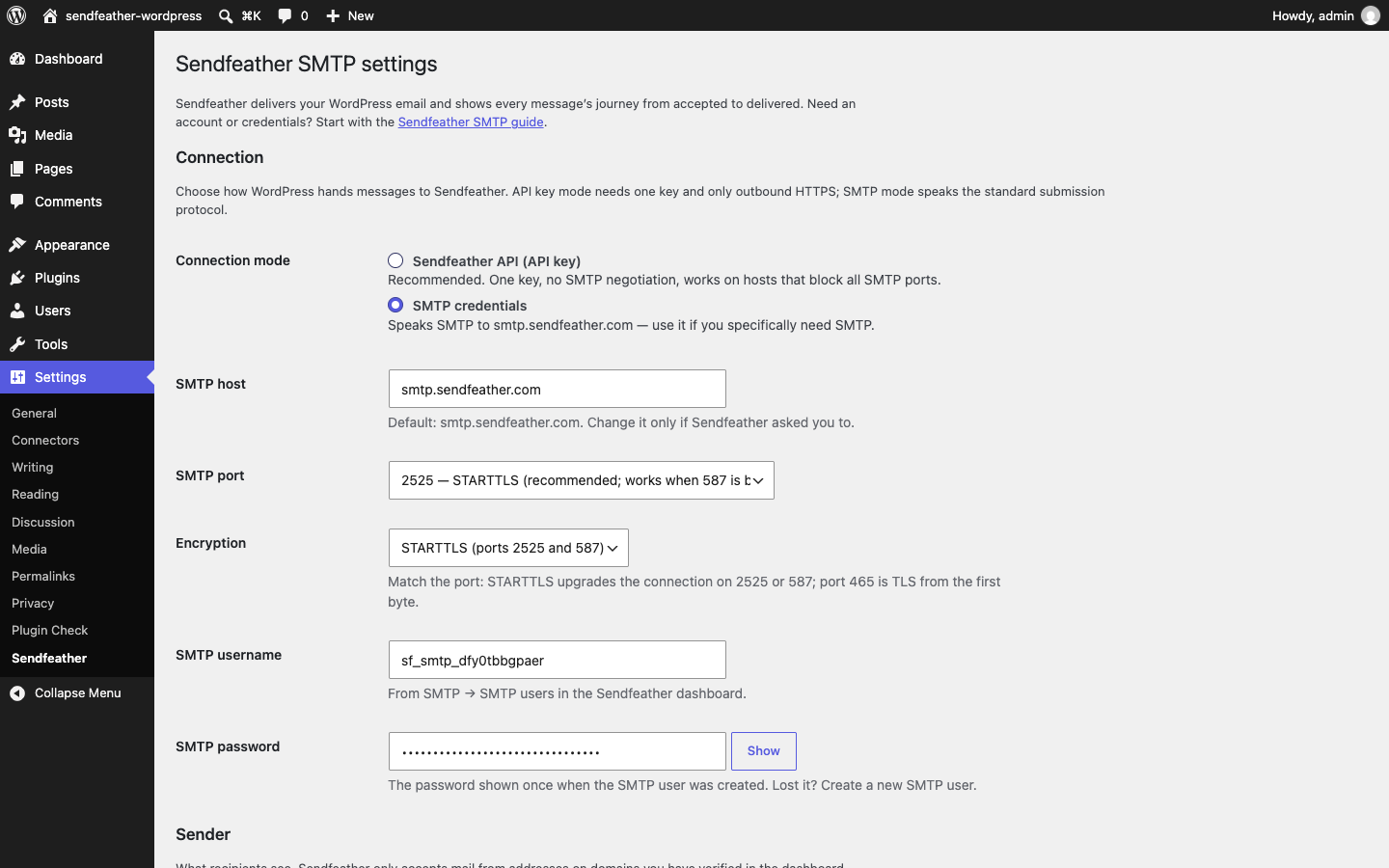
smtp.sendfeather.com and works with the credentials you create in the dashboard. Switch modes at any time on the same settings screen.
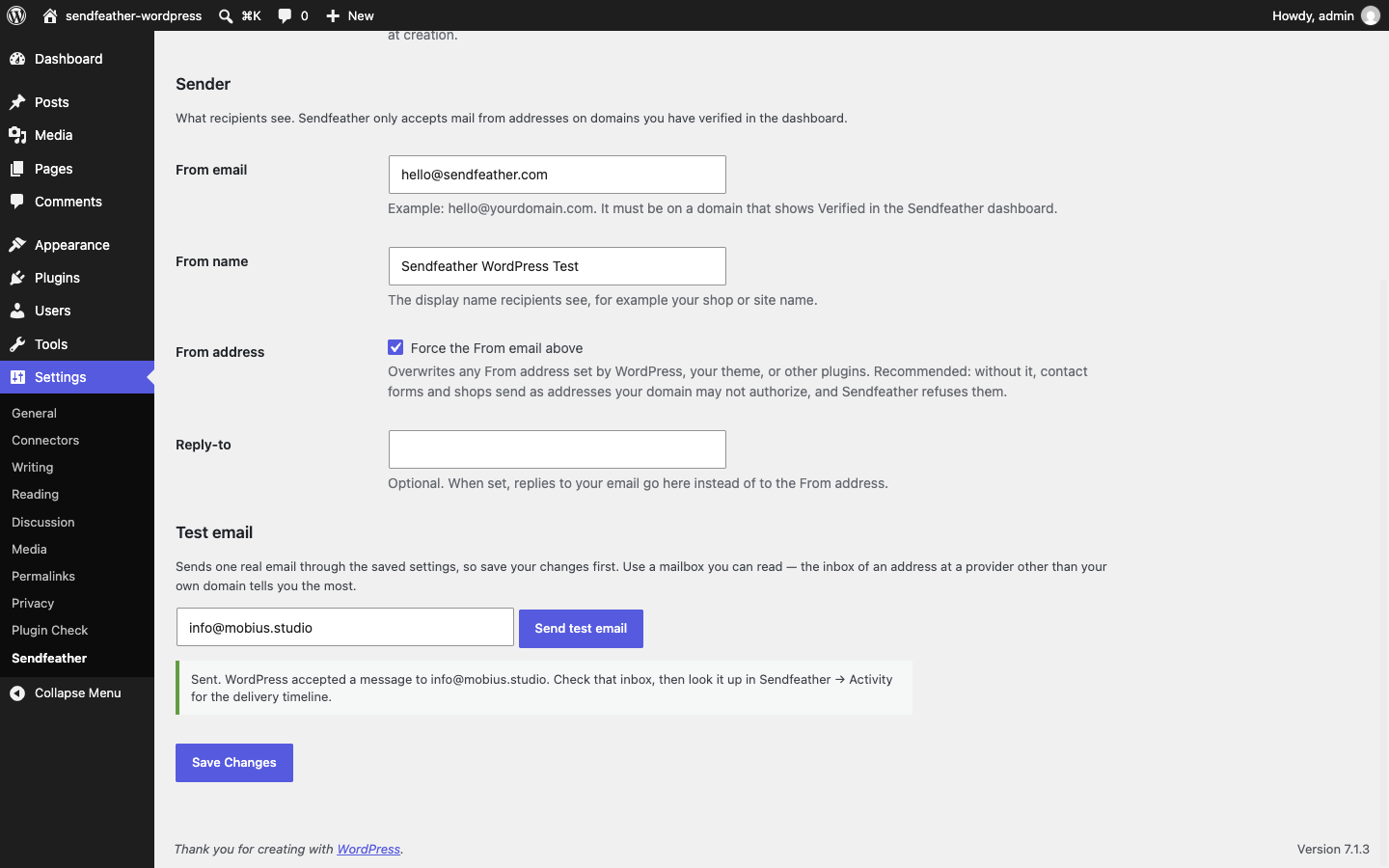
A From address you control. Set the From email and name, and turn on "force From" so nothing else on your site can overwrite them. Sendfeather only accepts mail from addresses on domains you have verified in the dashboard, and forcing the address is what keeps shop and contact-form mail inside that boundary.
A test email that tells you the truth. The settings screen sends one real email through your saved settings and reports the result inline. After that, open Activity in the Sendfeather dashboard: every message appears there with its delivery timeline — accepted, delivered, and any bounce or complaint.
No tracking, no upsells. The plugin has no analytics, no telemetry, and no admin-nags. It makes network requests for one reason only: sending the mail you asked it to send, to Sendfeather.
安装:
- Upload the plugin files to the
/wp-content/plugins/sendfeatherdirectory, or install the plugin through the WordPress plugins screen directly. - Activate the plugin.
- Go to Settings → Sendfeather and choose your connection mode.
- Create credentials in your Sendfeather dashboard: an API key (with the "send" scope) for API mode, or an SMTP user for SMTP mode.
- Fill in the settings, save, and use the built-in test email to confirm everything works.
屏幕截图:
常见问题:
Do I need a Sendfeather account?
Yes. Sendfeather is a hosted email delivery service; the plugin is its WordPress client. You can create an account at sendfeather.com. The free plan includes 1,000 emails a month, and paid plans start at $7/month (prices current as of October 2026; see the pricing page for today's numbers).
Which connection mode should I choose?
API key mode is the default: one key, no SMTP negotiation, and it works on hosts that block outbound SMTP ports. Choose SMTP mode when you specifically want the submission protocol — for example when your host allows SMTP but restricts outbound HTTPS, or when other tooling on your server should share the same SMTP user.
Will this plugin alone make my email land in inboxes?
The plugin routes your mail through Sendfeather; deliverability comes from the domain setup. Add your domain in the Sendfeather dashboard and publish the DNS records it shows (SPF, DKIM, DMARC). Once the domain shows Verified, messages are signed with your domain's DKIM key and you can watch delivery in Activity.
Does it work with WooCommerce?
Yes. WooCommerce sends its order emails through wp_mail(), and so does this plugin — no separate WooCommerce integration is needed. The same applies to contact forms, membership plugins, and anything else that uses WordPress's mail function.
I already use another SMTP plugin. What do I do?
Deactivate it. Two plugins both trying to route WordPress mail fight over the same hook, and which one wins is not predictable. This plugin's settings screen shows all connection settings in one place, and the test email confirms the result.
Does the plugin collect any data?
No. There is no analytics, no telemetry, and no external request except the messages you send, which go to the Sendfeather endpoint you configured. Settings are stored in your WordPress database only.
What if I lose my SMTP password or API key?
Both are shown once, at creation, and stored hashed on Sendfeather's side — they cannot be displayed again. Create a new SMTP user or API key in the dashboard and paste the new value here; disable or delete the old one.
更新日志:
- First release.
- API key and SMTP connection modes for routing all
wp_mail()mail through Sendfeather. - From email, From name, force-From, and reply-to controls.
- Built-in test email with inline result.