SendPulse Free Web Push
| 开发者 |
sendpulse
SendPulse |
|---|---|
| 更新时间 | 2026年5月25日 16:59 |
| PHP版本: | 5.7 及以上 |
| WordPress版本: | 7.0 |
| 版权: | GPLv2 or later |
| 版权网址: | 版权信息 |
详情介绍:
SendPulse Web Push is a WordPress plugin that allows you to send web push campaigns.
Web push notifications are instant notifications sent to subscribers’ devices. They allow you to quickly inform your customers about recent news, sales, order statuses, or other important events.
Your site visitors can sign up to receive notifications about your new posts or important events.
FEATURES
- Browsers supported: Chrome (Desktop & Android), Firefox (Desktop), and Opera (Desktop) on both HTTP and HTTPS sites.
- Offline notifications: Users will see your notification as soon as they go online.
- Personalization and segmentation: Your site visitors can receive personalized notifications. Segment your web push campaigns based on users’ location or other details.
- A/B Testing: Maximize your web push campaigns’ CTR by split-testing them.
- Trigger messages and bulk messages: Send web push notifications via your personal account, or create automated campaigns triggered by certain events.
- Real Time Stats: Monitor your open rate, click-through rate, subscription rate, and more.
- Developer API: Use SendPulse’s API to send web push notifications, emails, and SMS messages via a single platform.
安装:
Installation is plain and simple
- Add the plugin to WordPress by searching and installing, uploading a zip, FTP copy, or some other way, and activate it
- Mark the checkbox if you want to pass information about your registered users to your account.
屏幕截图:
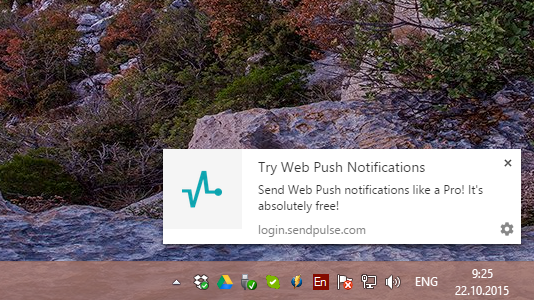
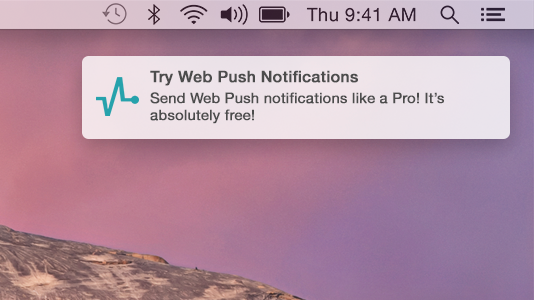
常见问题:
Do I need and Apple Developer Account or Google Developer account?
No, it's on us
Do my subscribers have to create an account at SendPulse?
No, they just subscribe in the browser, it's a one-click subscription. No any accounts required.
Do you support Firefox web push?
Yes we do
Why is Web Push not appearing on my website?
If Web Push does not appear on your website, the issue is often caused by frontend optimization plugins. Many performance plugins (such as WP Rocket, Autoptimize, LiteSpeed Cache, W3 Total Cache, etc.) modify how JavaScript is loaded by enabling features like:
- JavaScript minification
- JavaScript combination (bundling)
- Deferred or delayed script execution
- Temporarily disable JavaScript optimization options and check if Web Push starts working.
- If it works, re-enable options one by one to identify the conflicting setting.
- Disable the "Combine JavaScript files" option
- Clear the cache after making changes
更新日志:
1.4.2
- Tested up to WordPress 7.0
- Improved legacy web push script handling and frontend rendering stability.
- Hardened legacy script normalization and validation for safer output handling.
- Improved compatibility handling for malformed legacy script configurations.
- Improved legacy script migration consistency and structured settings behavior.
- Fixed several edge cases related to legacy script parsing and output generation.
- Minor code quality and compatibility improvements.
- Updated plugin text domain from
sendpulse-webpushtosendpulse-web-push - Renamed bundled translation files to match the updated text domain
- Improved WordPress coding standards and security compatibility across plugin files
- Added safer handling and sanitization for request, cookie, and server input data
- Improved admin settings form validation and escaping
- Improved compatibility with modern PHP and WordPress coding standards checks
- Reworked internal script loading for WordPress enqueue compatibility
- Added versioning for internal JavaScript assets to improve cache invalidation
- Improved handling of plugin settings page URLs and admin submenu registration
- Improved legacy integration script migration and validation flow
- Replaced direct file deletion calls with WordPress filesystem-safe alternatives
- Added direct access protection for internal PHP files
- Improved handling of cookie domain detection for multi-domain and multilingual setups
- Fixed various escaping, translation, and output handling issues
- General internal cleanup and stability improvements
- Updated supported WP versions
- Tested up to 6.7.1
- Fix script output bug
- Avoid possible XSS vulnerability (thanks to Francesco Carlucci)
- Update supported WordPress version to 6.6.2
- Fix unexpected output during activation
- WordPress 6.5 ready tested
- Avoid possible XSS vulnerability
- Fix Cross Site Request Forgery (CSRF)
- Update supported WordPress version to 6.4.3
- Small fixes
- Updated supported WP versions
- Tested up to Wordpress 6.0.2
- Options moved to own menu
- Add settings and FAQ links to plugins page
- Add FAQ to own plugin page
- Updated translations
- Various fixes
- Tested up to Wordpress 6.3.1
- Add new push worker
- Just changed tested version
- Minor tweaks and improvements
- Initial Release