DefiniteSEO – AI SEO Plugin to Boost SEO Rankings
| 开发者 | definiteseo |
|---|---|
| 更新时间 | 2026年3月26日 00:23 |
| PHP版本: | 7.4 及以上 |
| WordPress版本: | 6.9 |
| 版权: | GPLv3 or later |
| 版权网址: | 版权信息 |
详情介绍:
- SEO Setup Wizard To streamline onboarding for first-time users, DefiniteSEO includes a Setup Wizard that simplifies the initial configuration process. This wizard guides users through essential steps, asking for information such as website category, business/owner name, and website logo. This ensures search engines receive the basic details needed for optimal indexing. Additionally, users can set the homepage title and description, as well as social media preview settings. If you've previously used another Search Engine Optimization plugin, the wizard may prompt you to import existing data, making the transition seamless.
- AI SEO Writer DefiniteSEO includes a powerful AI SEO Writer designed to help you create high-quality, search-optimized content directly within WordPress. This AI SEO Writer guides you through a simple step-by-step process, collecting key inputs like keywords, intent, and content structure before generating well-optimized content tailored for better rankings. Whether you're writing blog posts, landing pages, or product descriptions, it ensures your content aligns with SEO best practices, including proper keyword usage, readability, and on-page optimization.
- Schema Markup Builder DefiniteSEO’s built-in Schema Markup Builder helps you implement structured data effortlessly. Choose from multiple schema types such as Articles, Products, Reviews, FAQs, and more to generate Rich Snippets that enrich search results and improve click-through rates. This Schema Markup feature makes your content more appealing and informative in search results, strengthening On-Page SEO and overall SERP visibility.
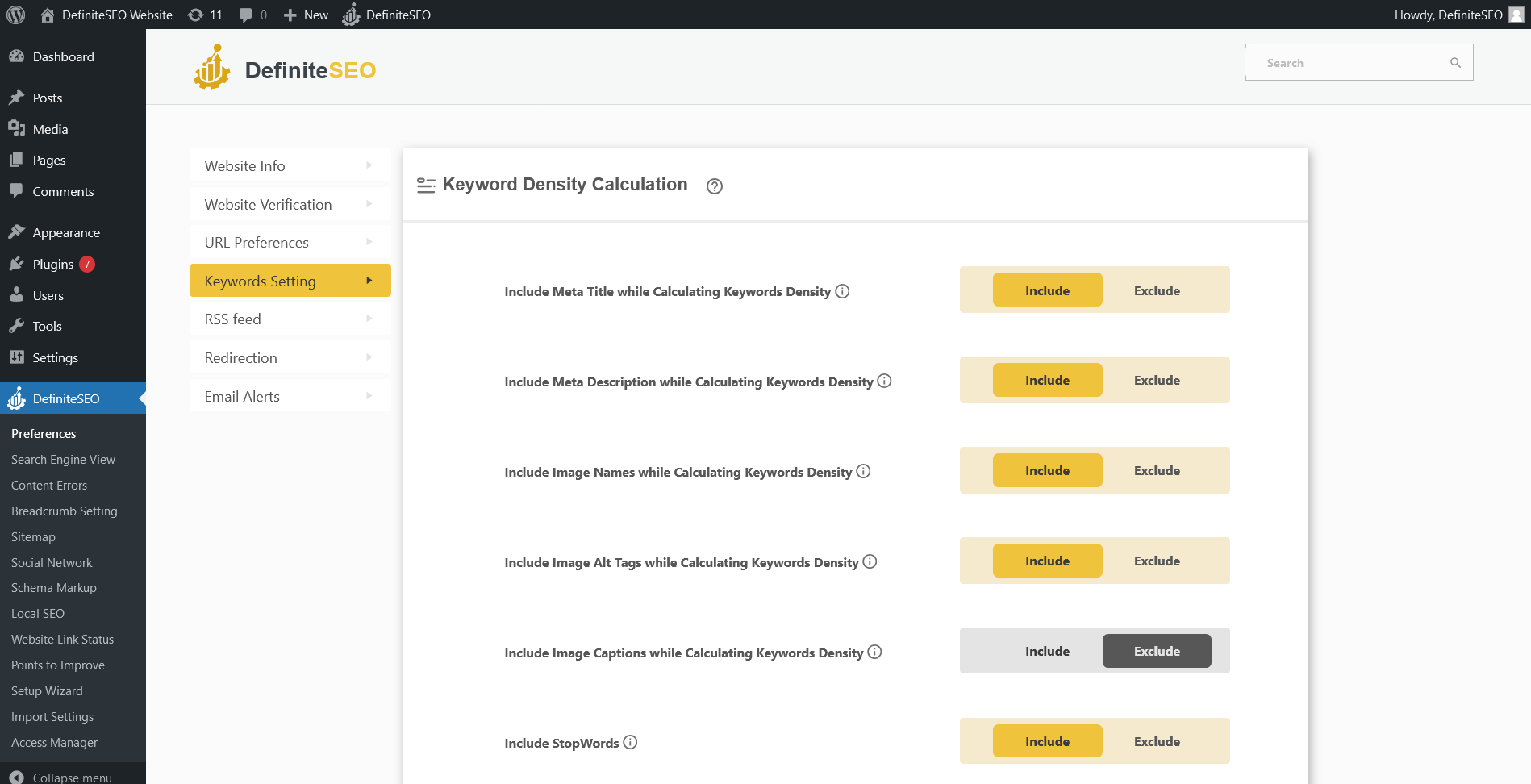
- Keyword Optimization for better SEO This feature analyzes your content to automatically identify the primary keywords it is optimized for, eliminating the need for manual Keyword Research. After you confirm the suggested keyword, it performs in-depth calculations to improve keyword optimization and overall content relevance. The analysis measures Keyword Density and evaluates keyword usage across critical on-page elements, including the URL slug, title, meta description, image file names, ALT text, captions, and more. You can include or exclude specific elements from the analysis to fine-tune optimization, helping your content achieve stronger SERP visibility and drive sustainable Organic Traffic.
- EEAT Optimization (Expertise, Experience, Authoritativeness, Trustworthiness) DefiniteSEO now includes built-in Google EEAT optimization features to help website owners strengthen content credibility and author trust signals. You can enable E-E-A-T site-wide, assign authors and reviewers to posts, define author experience topics, display author bio boxes, and automatically generate structured Author and Reviewer schema. These features make it easier for search engines to understand who created and reviewed your content, supporting better trust, transparency, and long-term SEO performance, especially for content-focused and authority-driven websites.
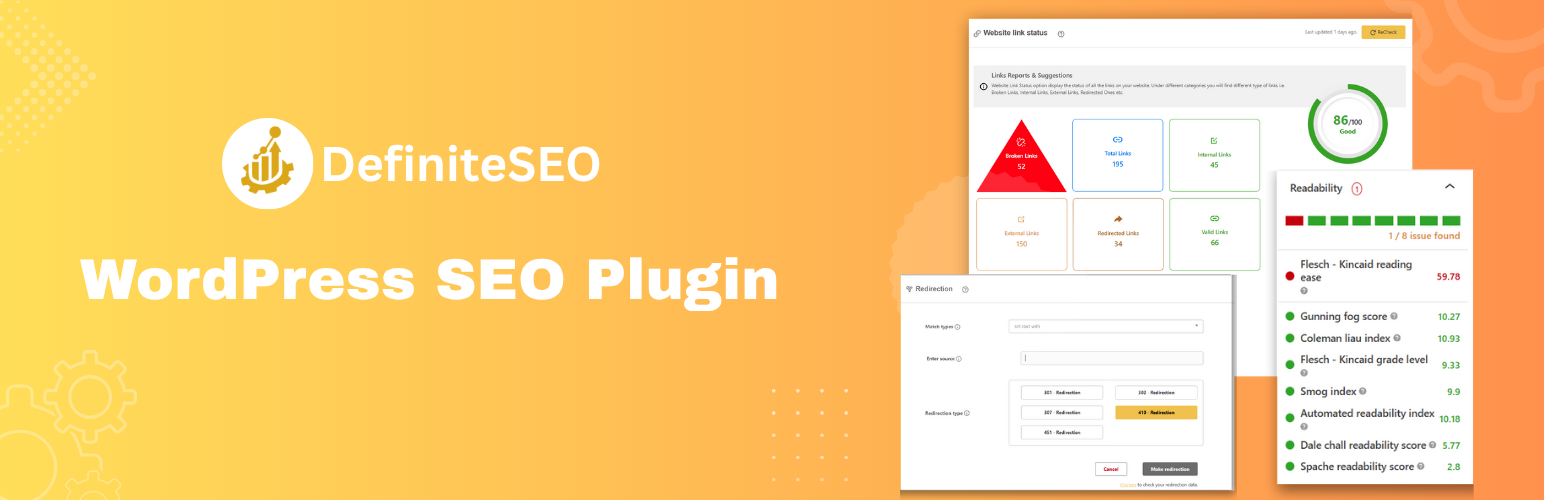
- SEO Readability Tests Ensuring Content Readability is essential for user engagement and Search Optimization. This plugin conducts eight key readability tests on your content, offering actionable suggestions for improvement. These tests include: Flesch-Kincaid Reading Ease, Gunning Fog Score, Coleman-Liau Index, Flesch-Kincaid Grade Level, SMOG Index, Automated Readability Index, Dale-Chall Readability Score, Spache Readability Score.
- Find and Fix Content Errors Grammatical mistakes and misspelled words can negatively impact your branding. It helps you identify and correct these errors automatically. Whenever a page or post is updated, it scans for spelling and grammatical issues and displays them in an organized manner on your dashboard. You can also add custom words to your dictionary, so they won't be flagged as errors in the future.
- Optimize Your Content for Unlimited Keywords It enables you to optimize your content for unlimited keywords, helping you target multiple search terms and ramp up On-Page SEO. This ensures better visibility across various search queries, driving more traffic to your website.
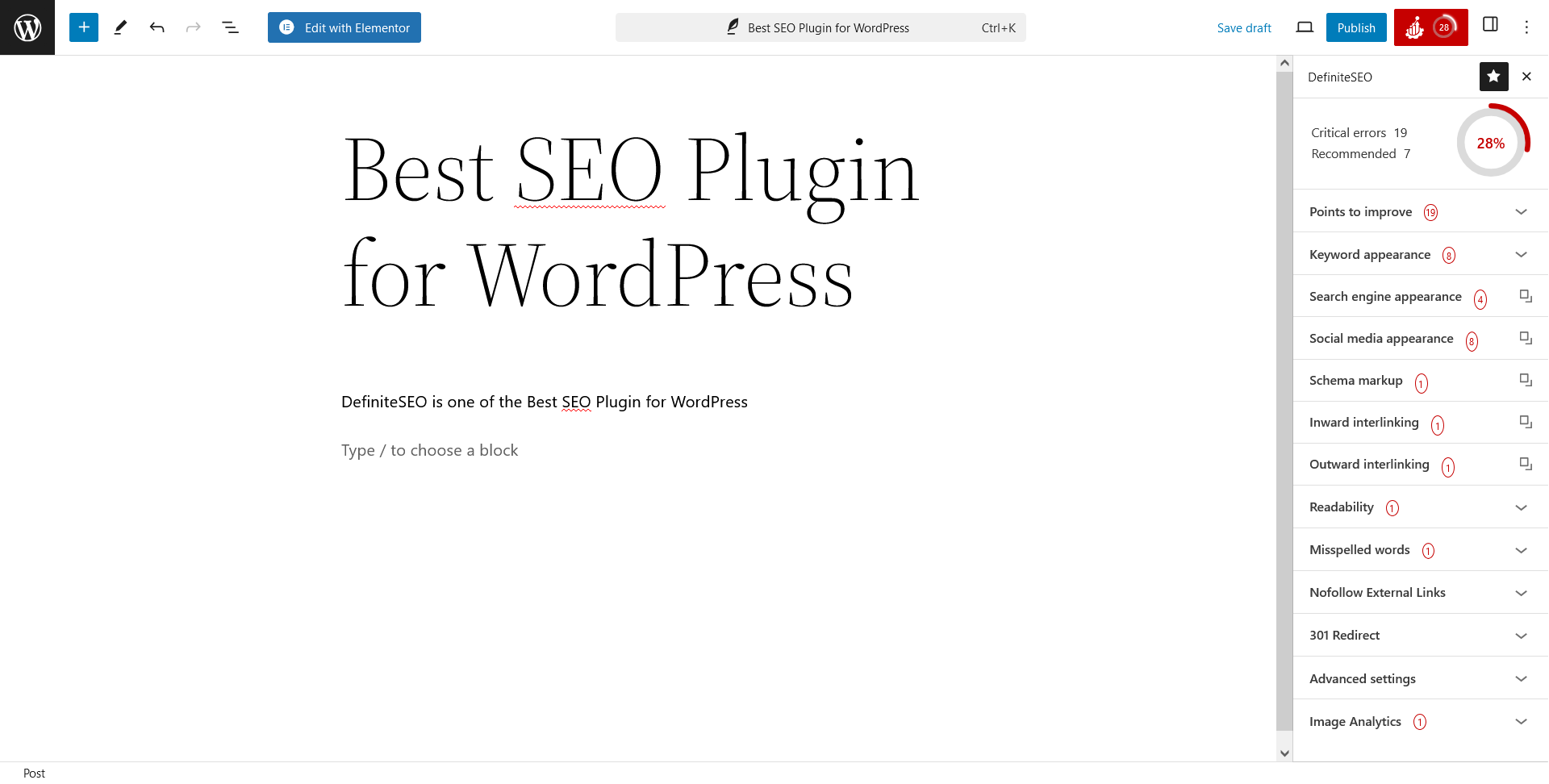
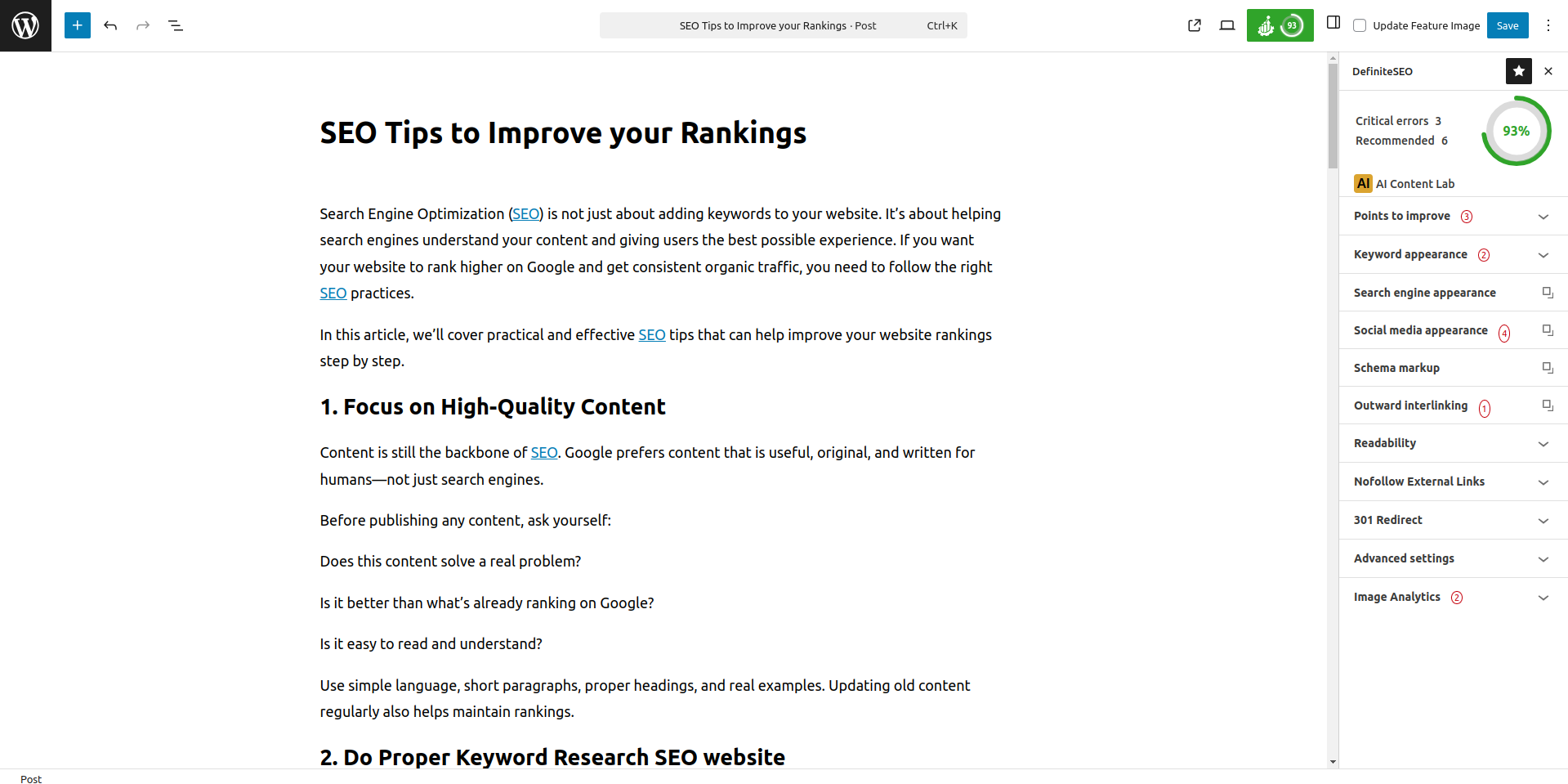
- SEO Points Centralized to Improve Dashboard This tool compiles all critical issues and improvement suggestions for your website in a centralized SEO Assistant. This feature provides a clear overview of your site's SEO health, allowing you to track and address issues as they arise. The intuitive dashboard keeps you informed of any potential problems that could impact your site's Page Speed Optimization and Core Web Vitals.
- SEO Audit Score The DefiniteSEO's SEO Score provides a comprehensive assessment of your website’s overall SEO health, based on a detailed SEO Audit of key on-page and technical factors. This score adjusts dynamically according to critical issues and recommendations highlighted in the Points to Improve section, ensuring your SEO Audit results remain actionable and up to date. A higher SEO Score reflects a well-optimized site, while a lower score clearly signals areas that need attention, helping you prioritize and improve your Search Engine Optimization efforts effectively.
- Image SEO DefiniteSEO provides Image SEO optimization out of the box, automatically improving how your images contribute to On-Page SEO and overall SERP performance. The plugin intelligently manages image titles, Alt Text, file names, and URL structure to enhance Image SEO, accessibility, and relevance. By optimizing images at scale, DefiniteSEO helps improve crawlability, supports better rankings, and contributes to higher Organic Traffic without manual effort.
- Local SEO Implementation To make your business more visible in local searches and on Google Maps, DefiniteSEO supports comprehensive Local SEO implementation. By simply filling in your organization's details, you can activate Local SEO and boost your local presence. The plugin also allows you to add opening hours and accurately pin your business location, ensuring potential customers find you easily.
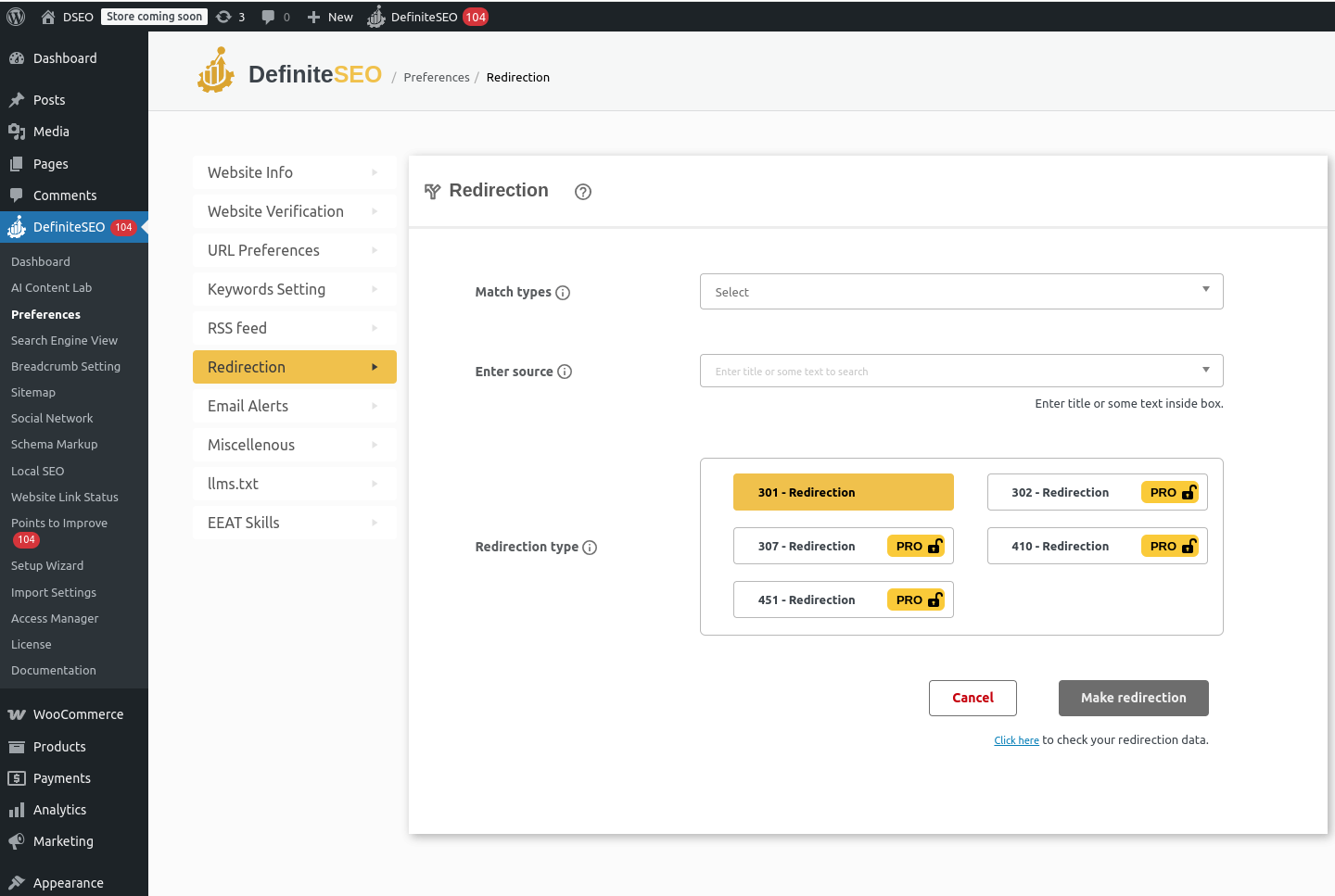
- Redirection option for better SEO This WordPress AI SEO plugin includes a powerful Redirection Manager that lets you easily manage Canonical URLs and redirect any page, post, product, or URL while preserving a clean URL Structure. It supports advanced redirection types including 301 redirects, 302 redirects, 307 redirects, 410 redirects, and 451 redirects, along with flexible match rules such as exact match, URL begins with, URL ends with, and URL contains. By fixing broken links and handling outdated URLs efficiently, this feature improves Crawlability / Indexing, maintains SEO equity, and ensures a seamless user experience with optimized search engine performance.
- SEO Optimized Breadcrumb Setting Breadcrumbs are an important SEO component that improves website navigation and user experience. It allows you to enable and customize breadcrumbs appearance effortlessly. You can use shortcodes for classic and block editors or copy/paste the PHP function into your theme file. Customize the breadcrumb separator, show or hide the homepage link, adjust the homepage label, set prefixes for breadcrumbs, and modify settings for search and 404 pages. Additionally, you can choose to show or hide post/category titles in breadcrumbs or set custom breadcrumb titles for specific posts.
- Broken Link Checker DefiniteSEO continuously analyzes your website's content for link status, generating comprehensive reports on all types of links. This includes a breakdown of internal and external links, redirects, and broken links with their status like HTTP, HTTPS so that you can add missing SSL. With this tool, you can efficiently monitor and maintain link integrity, ensuring your website remains user-friendly and optimized for search engines.
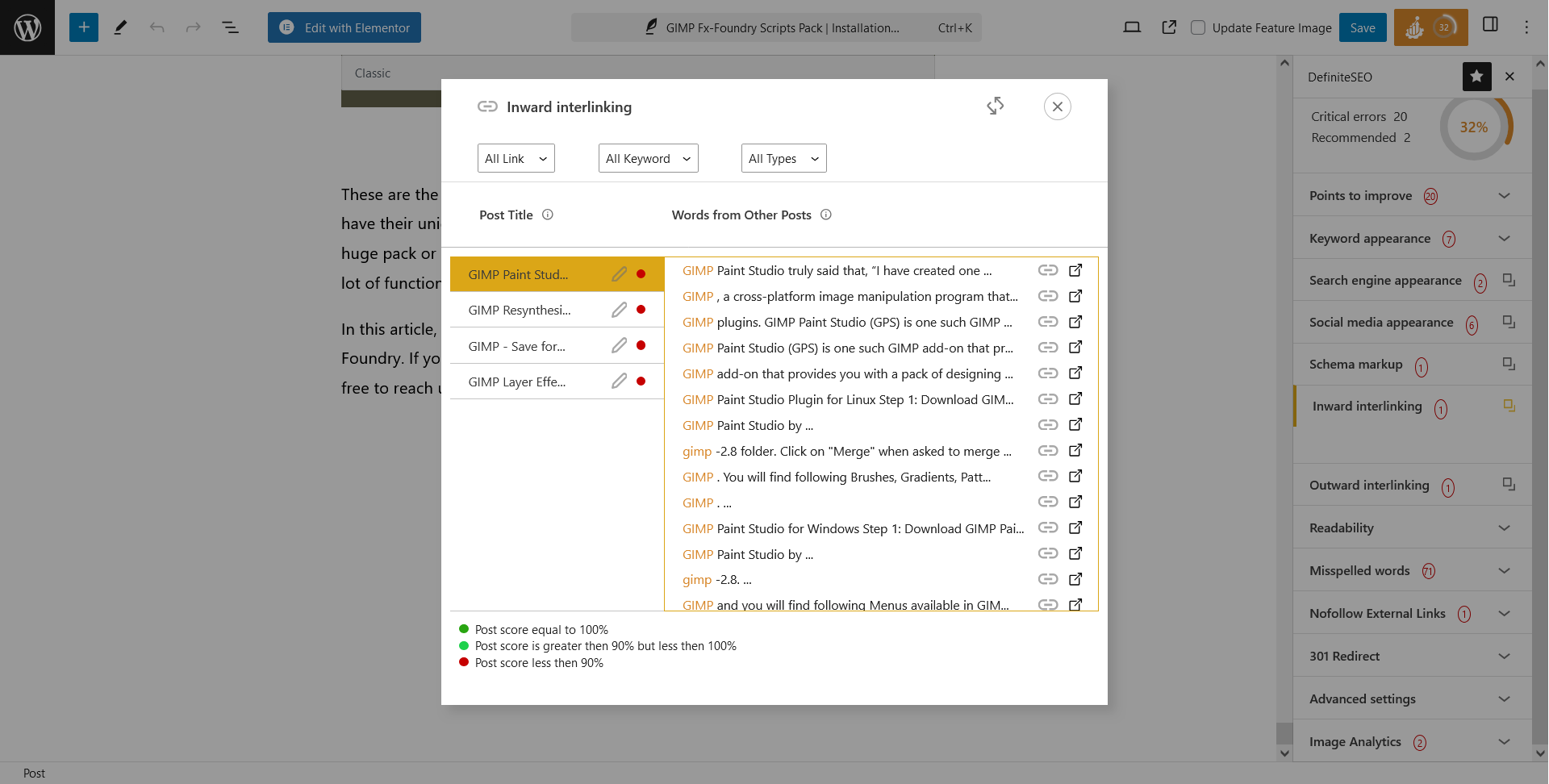
- Inward Linking Suggestions DefiniteSEO helps improve your site's internal linking structure by suggesting potential inward linking opportunities. Once keywords are assigned to posts or pages, the plugin highlights terms and phrases in other content that can be linked to the target post/page, enhancing site navigation and On-Page SEO.
- Outward Linking Suggestions To further bolster your website's connectivity, this AI SEO tool provides outward linking suggestions. After setting keywords for your content, the plugin identifies terms and phrases in the current post/page that could be linked to other relevant posts/pages within your site. This supports a comprehensive interlinking strategy, boosting SEO performance.
- XML Sitemap Options DefiniteSEO offers comprehensive and customizable XML Sitemap options to ensure your website is indexed efficiently by search engines. By default, all pages, posts, products, images, and taxonomies are included in the sitemap; however, you have full control to exclude specific or entire categories, such as individual pages, posts, images, taxonomies, or author archives. Additionally, it provides the flexibility to include non-WordPress pages and images, enhancing the scope of your sitemap beyond standard WordPress content. Users can also set the priority level for each element in their sitemap, allowing for a more tailored indexing approach.
- Video Sitemap DefiniteSEO simplifies video SEO by automatically generating video sitemaps. Video Sitemap feature ensures that all video content on your website is formatted and presented to search engines in an optimal way, boosting the discoverability of your multimedia content.
- News Sitemap For news publishers, it includes built-in support for news sitemaps. News Sitemap feature allows you to set your Google News publication name and mark specific posts or pages as news articles, facilitating faster indexing and visibility in Google News search results. This targeted approach helps new publication sites reach their audience more effectively.
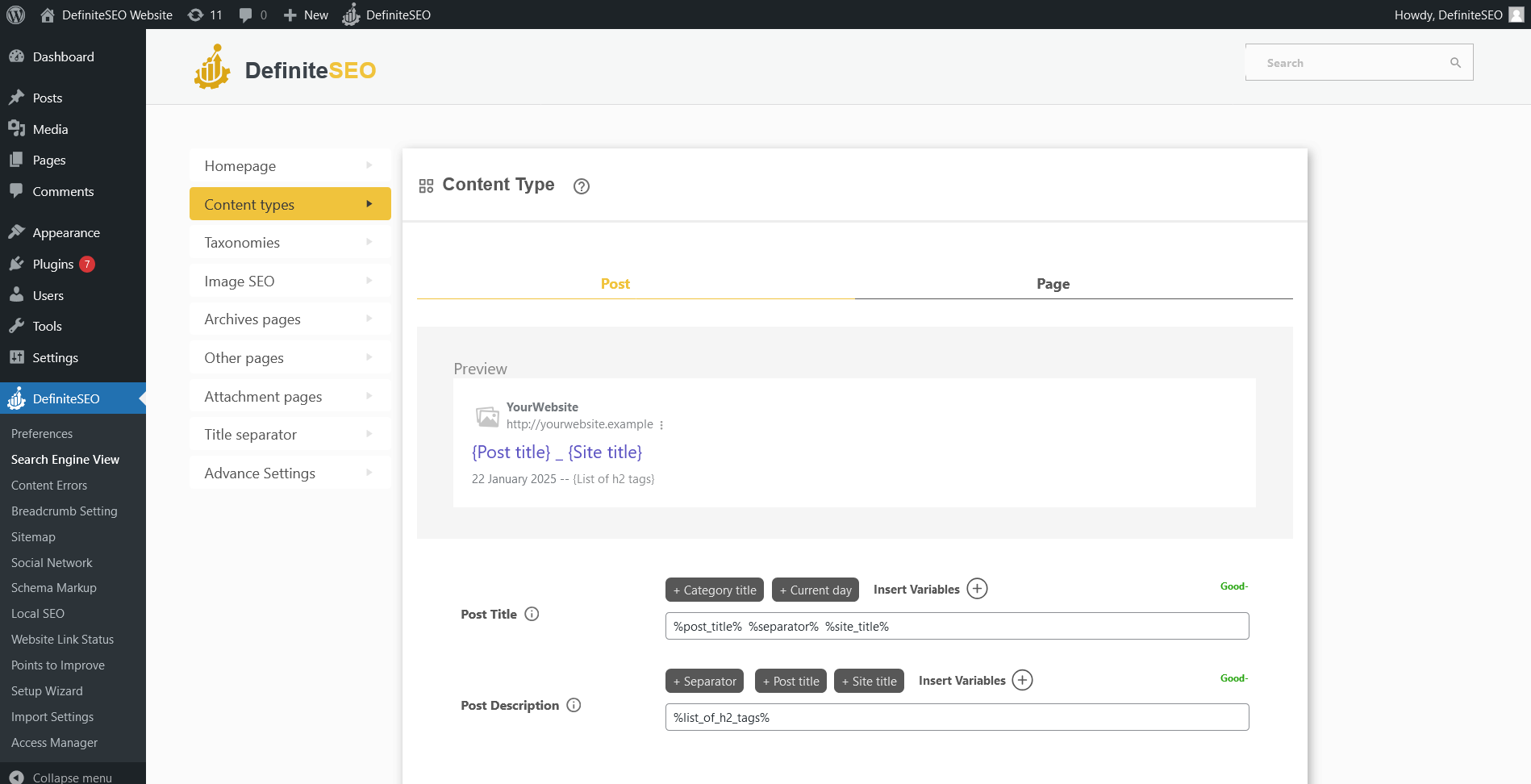
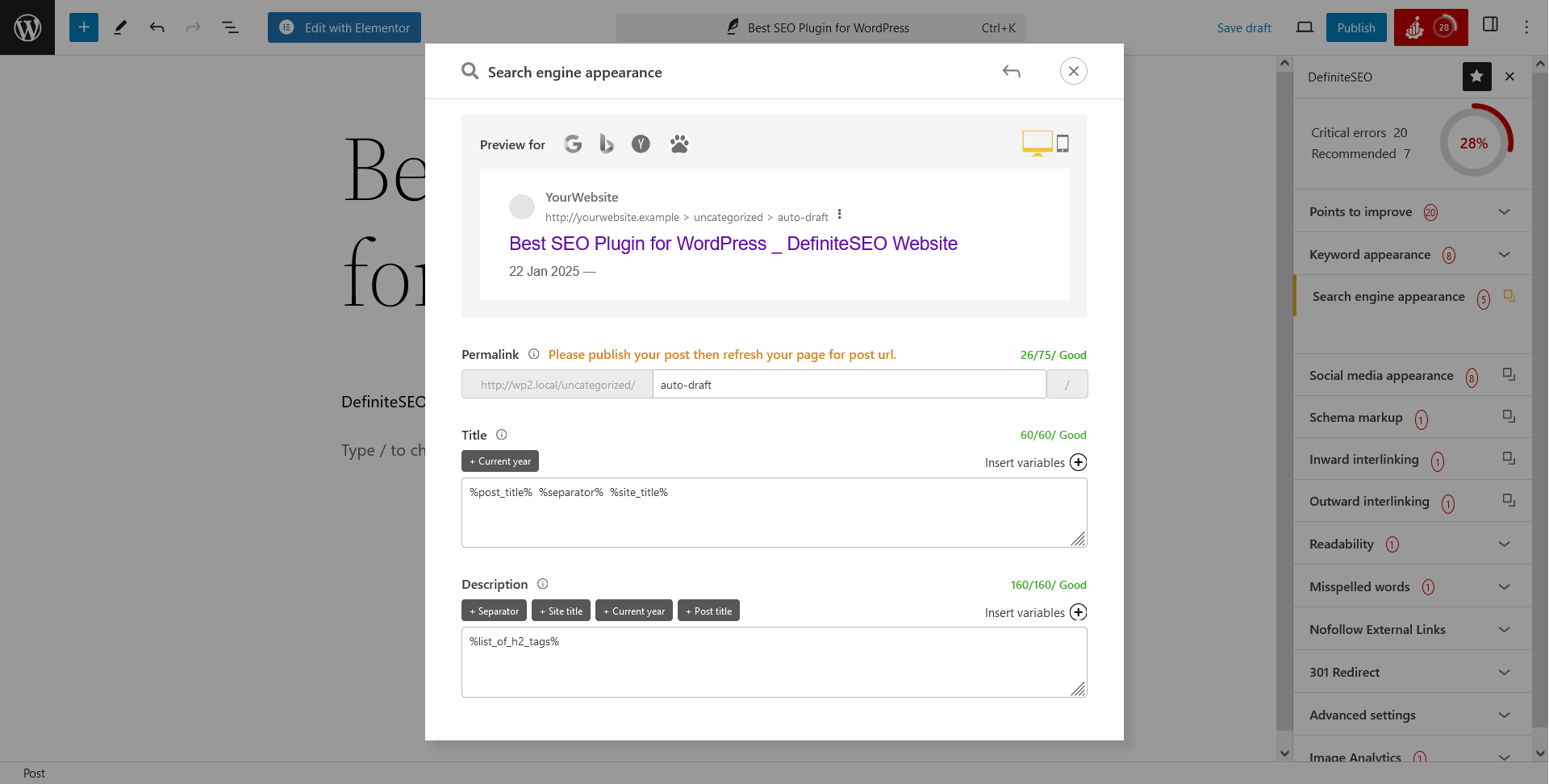
- Configure How Your Website Appears on Search Engines DefiniteSEO grants you full control over how each part of your website is displayed in search engine results. You will get preview of your web pages for both desktop and mobile devices for better Mobile SEO and Mobile-Friendly previews. From writing custom SEO Meta Titles and meta descriptions to other crucial elements, you can tailor your site's appearance to align with your SEO goals.
- llms.txt Support for AI Crawlers & LLM Access Control DefiniteSEO includes built-in llms.txt support for WordPress, allowing site owners to easily generate and manage llms.txt files to control how AI crawlers and large language models (LLMs) access and use website content. This feature helps publishers manage AI indexing, define AI content usage rules, and stay aligned with emerging AI search and AI content access standards, without any manual file creation or server-level configuration.
- Stop Words Configuration In the digital marketing and SEO realm, stop words can impact keyword analysis. You will get full control over which stop words to consider and even allows you to add custom stop words, ensuring precision in your keyword density metrics.
- Configure your Website SEO out of the box DefiniteSEO removes the uncertainty of setting up important Search Engine Optimization configurations. From the start, it fine-tunes every On Page SEO element of your website by automatically. Search engines rely on crucial elements like Meta Titles, SEO Descriptions, Image ALT texts, and Image Titles for every page, post, product, and taxonomy on your site. Typically, new websites lack these foundational SEO elements, which can hinder their ranking in search engines. DefiniteSEO, one of the best WordPress SEO Plugin addresses this gap by generating Meta Titles and Descriptions for your homepage, all posts, pages, products, categories, tags, product categories, product tags, author archives, date archives, 404 pages, search pages, and attachment pages, ensuring your site is optimized for SEO from day one.
- Import Option DefiniteSEO allows users to import configurations from other SEO plugins, making migration seamless. After importing data and settings, it generates an import log that you can download to review what was successfully imported and identify any errors in the process.
- Export Option Users can also export their current SEO settings for backup or transfer purposes. This ensures that SEO preferences can be easily restored or migrated whenever needed.
- Access Manager You can assign specific Search Engine Optimization functionalities to designated user roles. Beyond the default WordPress user roles, it introduces three additional roles: Editor, Manager, and Admin. Users can also extend this capability by using the User Role Editor to create custom roles, providing precise control over who can access various SEO features.
- Social media SEO (OG Tags and Twitter Cards) Easily set Open Graph (OG) Tags and Twitter Cards on your WordPress Website to control how your content appears when shared on social media. Customize the OG Title, Description, and Image, and choose from Twitter Card types like Summary, Large Image, Player, and App Cards to boost Social Media SEO.
- SEO For WooCommerce DefiniteSEO simplifies WooCommerce SEO by automatically adding essential SEO meta tags and schema to your products. You also have full control to customize these settings for better visibility, ensuring a seamless and efficient optimization process tailored to your store’s needs.
- SEO For Elementor DefiniteSEO fully supports SEO for Elementor Page Builder, allowing you to configure all SEO settings directly within the editor. With everything accessible in one place, you can fine-tune your page’s SEO while designing, making the process more efficient and user-friendly.
- Social Network Integration Enhance your website's online presence by adding links to all your official social media profiles. This helps search engines recognize your connected social accounts, reinforcing your site's authority. Additionally, it allows you to set a default social sharing image, titles, and descriptions for your site. This ensures that whenever your website link is shared on social media platforms, it is presented in a visually appealing and well-formatted manner, attracting more engagement.
- Easy Website Verification on Third-Party Websites If you've been using third-party plugins for website verification, this plugin streamlines the process. Simply obtain the verification code from Google SEO, Bing SEO, Yandex SEO, Baidu, or Pinterest, paste it into your website admin panel using DefiniteSEO's options, and your website is verified effortlessly.
安装:
屏幕截图:
常见问题:
What is DefiniteSEO and how is it different from other WordPress SEO plugins?
DefiniteSEO is an AI-powered WordPress SEO plugin designed to handle both traditional SEO and modern AI search optimization. Unlike basic SEO plugins, it combines AI content writing, automated SEO audits, schema markup, keyword optimization, image SEO, XML sitemaps, and redirection management in a single, modular interface, making it suitable for beginners and advanced SEO professionals alike.
Does DefiniteSEO work as an AI SEO plugin for content writing and optimization?
Yes. DefiniteSEO includes an AI Content Lab that helps with Keyword Research, Long-Tail Keywords, LSI Keywords, optimal Keyword Density, and full Content Optimization. It generates SEO-friendly titles, meta descriptions, headings (H1, H2, H3), and structured content designed to improve SERP visibility and eligibility for Featured Snippets.
Can DefiniteSEO generate schema markup and Rich Snippets automatically?
Absolutely. DefiniteSEO includes a built-in Schema Markup Builder along with an AI-powered Schema Generator that can create and optimize all types of schema markup automatically. It supports Articles, Products, Reviews, FAQs, Local Business, Organization, and more, generating accurate structured data and Rich Snippets to help search engines better understand your content and improve click-through rates from search results.
Does DefiniteSEO support XML sitemaps, video sitemaps, and news sitemaps?
Yes. DefiniteSEO provides fully customizable XML Sitemaps, along with dedicated Video Sitemaps and News Sitemaps. You can include or exclude posts, pages, products, images, taxonomies, and even non-WordPress URLs to ensure optimal crawlability and indexing.
Can I use DefiniteSEO to perform a complete SEO Audit of my website?
Yes. DefiniteSEO performs a detailed SEO Audit covering on-page SEO, technical SEO, content issues, readability, internal linking, image SEO, page speed signals, and more. The results are summarized in a dynamic SEO Score, helping you quickly identify critical issues and prioritize improvements.
Can I import SEO data from other SEO plugins like Rank Math, Yoast or AIOSEO?
Yes. DefiniteSEO supports SEO data import from Yoast. During setup, you can migrate existing titles, meta descriptions, schema data, and settings seamlessly, ensuring no SEO data is lost during the transition.
Does DefiniteSEO help with local SEO and Google Maps visibility?
Yes. DefiniteSEO supports Local SEO implementation, allowing you to add business details, opening hours, location data, and local schema markup. This helps improve visibility in local search results and Google Maps.
Will DefiniteSEO slow down my WordPress website?
No. DefiniteSEO is designed with performance in mind. It uses modular controls, allowing you to enable only the features you need. The plugin is optimized to minimize overhead while still delivering comprehensive SEO functionality.
What WordPress themes does DefiniteSEO support?
DefiniteSEO is built following WordPress coding standards and best practices, ensuring compatibility with all standard WordPress themes. It works seamlessly with popular themes as well as custom-built themes, as long as they follow WordPress theme development guidelines.
What WordPress plugins does DefiniteSEO support?
DefiniteSEO is designed to work smoothly alongside all standard WordPress plugins without conflicts. It integrates well with page builders, eCommerce plugins, caching plugins, security plugins, and other commonly used WordPress extensions that adhere to WordPress development standards.
I already use an SEO plugin. Can I use DefiniteSEO alongside it?
While DefiniteSEO is compatible with WordPress standards, it is recommended to use only one primary SEO plugin at a time to avoid overlapping features such as meta tags, schema markup, sitemaps, and redirects. DefiniteSEO provides an import option that allows you to migrate SEO settings from other plugins easily, making it safer and more effective to switch rather than run multiple SEO plugins in parallel.
更新日志:
- Added option for Pro users to white label audit report emails and customize email templates.
- AI SEO Content Writer is now available in the free version with up to 2,500 AI credits per month for new users.
- Redesigned AI SEO Content Writer with a step-by-step wizard for easier content generation.
- Added Primary Category selection widget in the post sidebar.
- Added new meta description variable for use in social sharing (og:description, twitter:description) and Schema Builder.
- Fixed issue where nofollow tag was not applied correctly to external links in taxonomy.
- Fixed incorrect indexing status when WordPress "Noindex" setting was enabled.
- Fixed breadcrumbs schema by implementing a proper structured breadcrumb trail.
- Separated dependency of "Organization Identifiers" and "Site Policies" from Local SEO schema settings.
- Introduced multi-location support in the Local SEO module, allowing businesses to manage, optimize, and scale Local SEO for multiple locations from a single dashboard.
- Launched a free plan for AI Content Creation, enabling all DefiniteSEO users to write and improve content with AI, generate SEO-friendly text, and create website content using an AI content writing tool.
- Extended Access Manager capabilities by including additional modules such as the Dashboard and AI Content Tool.
- Enhanced the module search functionality to display only those features that are currently enabled via the dashboard, improving usability and accuracy.
- Published comprehensive Schema Structured Data article and added it to the Documentation section for easier access.
- Fixed an issue where the global external link setting was not correctly applying the noindex option to outbound links.
- Resolved a problem where blank values appeared in XML sitemaps for Custom Post Types.
- Corrected an admin notice display issue related to Custom Post Types.
- Improved the responsiveness of the AI content writing tool on the post editor screen, making it faster and more usable for writing content with AI.
- Modular Dashboard Controls Introduced Dashboard Modules that allow users to enable or disable specific features based on individual workflow and site requirements.
- AI-Powered Keyword Discovery Discover and analyze relevant keywords before creating content using integrated AI assistance.
- AI SEO Metadata Generation Generate SEO titles, meta descriptions, excerpts, and Open Graph (OG) tags automatically using AI.
- AI-Driven Content Creation Create complete pages, posts, and other content types directly within WordPress using AI assistance.
- E-E-A-T Skills Integration Assign and manage Experience, Expertise, Authoritativeness, and Trustworthiness (E-E-A-T) skills at the post level.
- Advanced Schema Templates Added a collection of pre-built advanced schema templates to support extended and complex structured data use cases.
- Schema Import from External Websites Import schema markup directly from third-party websites for faster implementation and validation.
- Advanced Schema Builder Build and customize structured data manually using a flexible and powerful schema builder.
- AI Schema Builder Automatically generate schema markup using AI based on page content and context.
- Advanced WooCommerce SEO Fields Added support for product identifiers such as GTIN, ISBN, and MPN to improve product visibility in search engines.
- Site Policies Page Mapping for Transparency Configure and link essential site policy pages including Publishing Principles, Ownership & Funding Information, Actionable Feedback Policy, Corrections Policy, Ethics Policy, Diversity Policy, and Diversity Staffing Reports to strengthen transparency and trust signals.
- Advanced Organization Identifiers & Entity Metadata Add comprehensive organization details such as VAT ID, Tax ID, D-U-N-S, LEI code, NAICS classification, ISO identifiers, founding date, employee count, legal name, contact details, and organization descriptions to improve entity clarity and structured data accuracy.
- Crawler Optimization Controls Introduced options to optimize how search engine crawlers access and interpret website content. This feature add allow / deny rules in Robots.txt
- Orphan Pages Detection Identify and list orphan pages that are not internally linked within the website.
- Improved Dashboard Navigation Added breadcrumb navigation in the dashboard UI to enhance usability and orientation.
- Website Link Export Utility Export all links present on a website into a CSV file for auditing, analysis, and optimization.
- Fixed multiple issues related to schema JSON generation and validation.
- General UI/UX enhancements across the plugin for improved usability.
- Performance optimizations for faster analysis and smoother operations.
- Responsive design improvements for better experience across all devices.
- Enhancements to Local SEO functionality and data handling.
- Improved tooltip clarity and consistency throughout the interface.
- Fixed an issue where draft posts containing videos were incorrectly included in the video sitemap.
- Corrected video URLs in the video sitemap.
- Resolved a sitemap indexing issue for Custom Post Types (CPTs) where the first index value was missing.
- Fixed improper display of the hyphen character on the frontend HTML.
- Fixed a data-saving issue in Local SEO settings for About Us and Contact Us pages.
- Resolved an issue where the Local SEO sitemap link did not appear in the main sitemap.
- Fixed the Satellite Map value not being saved properly in Local SEO settings.
- Corrected a filter issue under the Redirection section.
- Fixed navigation issues within plugin options and sub-options.
- Updated the Site Audit Report email to be sent weekly by default.
- Included llms.txt in the plugin’s search feature.
- Added an option to choose whether to delete or keep all DefiniteSEO data and settings upon plugin uninstallation/deletion.
- Added a “View RSS Feed” button for easier access.
- Linked DefiniteSEO documentation pages from the plugin dashboard and help icons for easier access.
- Added alerts to notify users when a "noindex" is detected on the website and for various other conditions.
- Improved responsive design for mobile devices.
- Added breadcrumb support in the dropdown for Astra theme.
- Added option for custom website verification.
- Added support for generating llms.txt file
- Fixed an issue with redirection when adding 410 and 451 redirections.
- Fixed the missing canonical tag in the case of Easy Digital Downloads.
- Fixed a console error.
- Fixed a Breadcrumb schema issue.
- Fixed an issue with the sitemap when priority is enabled.
- Fixed an Astra theme related issue that caused an error when trying to publish a post in Gutenberg.
- Fixed compatibility issues with popular multilingual plugins like Polylang and others.
- Fixed minor dropdown issues.
- Improved responsive design for mobile devices.
- Bug Fixes and Performance Improvements
- Added support for Custom Post Types.
- Advanced Schema Builder is now available.
- Added App Card and Player Card options in Twitter Cards.
- Restructured the Redirection feature for improved stability.
- Fixed several miscellaneous bugs.
- WordPress Dashboard Widget is added for the DefiniteSEO Plugin.
- Added a new features in import settings that allow you to download the import log.
- Added some new meta tags i.e. article publisher.
- Redirected the default wp-sitemap.xml to sitemap_index.xml to prevent duplicate sitemaps.
- Added a new option inside Open Graph that accepts facebook page ID.
- Added alerts to warn users for the critical issues on their website.
- Fixed a redirection issue in 404 Monitor.
- Fixed a filter issue in the Website link status.
- Separated the Points to Improve suggestions for Posts, Pages, and Products.
- Improved the Website SEO audit report email.
- SEO Meta Tags improved for the Search Page and 404 Page.