Seotune Search Insights
| 开发者 | seotune |
|---|---|
| 更新时间 | 2026年7月10日 15:41 |
| PHP版本: | 8.0 及以上 |
| WordPress版本: | 7.0 |
| 版权: | GPLv2 or later |
| 版权网址: | 版权信息 |
详情介绍:
- Connection: OAuth connection to GSC; automatic detection of the property matching your site domain (no manual property picker).
- Dashboard: Overview with clicks, impressions, CTR, position; charts; top queries and pages; recent alerts.
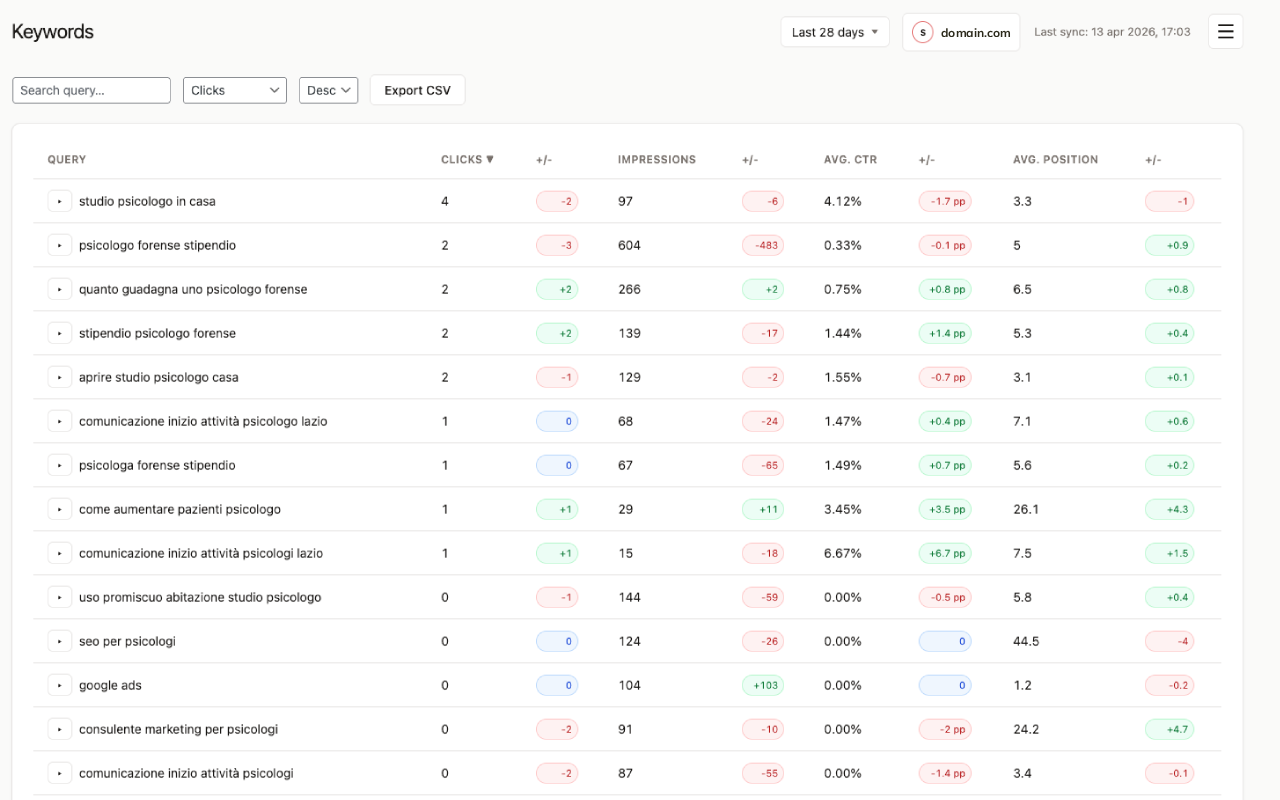
- Keywords: Filterable, sortable report with export to CSV.
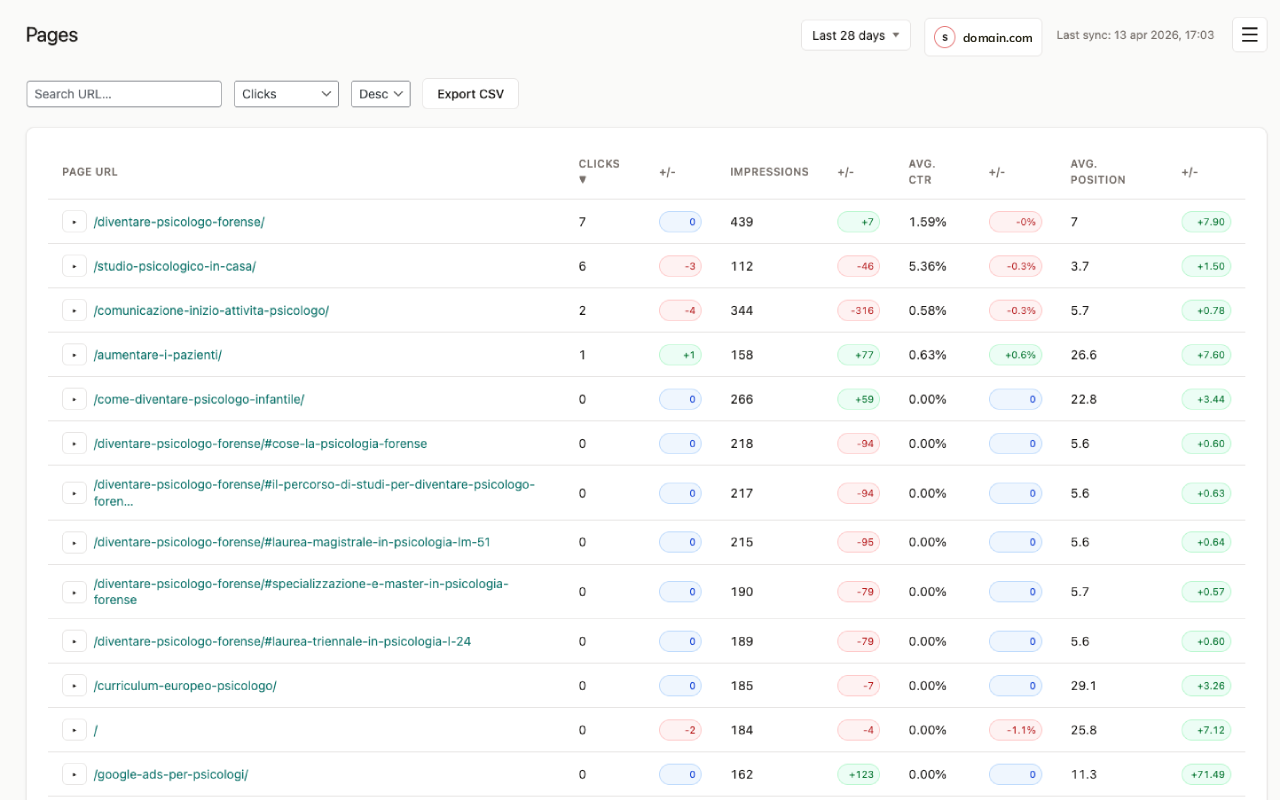
- Pages: Same for page URLs with export to CSV.
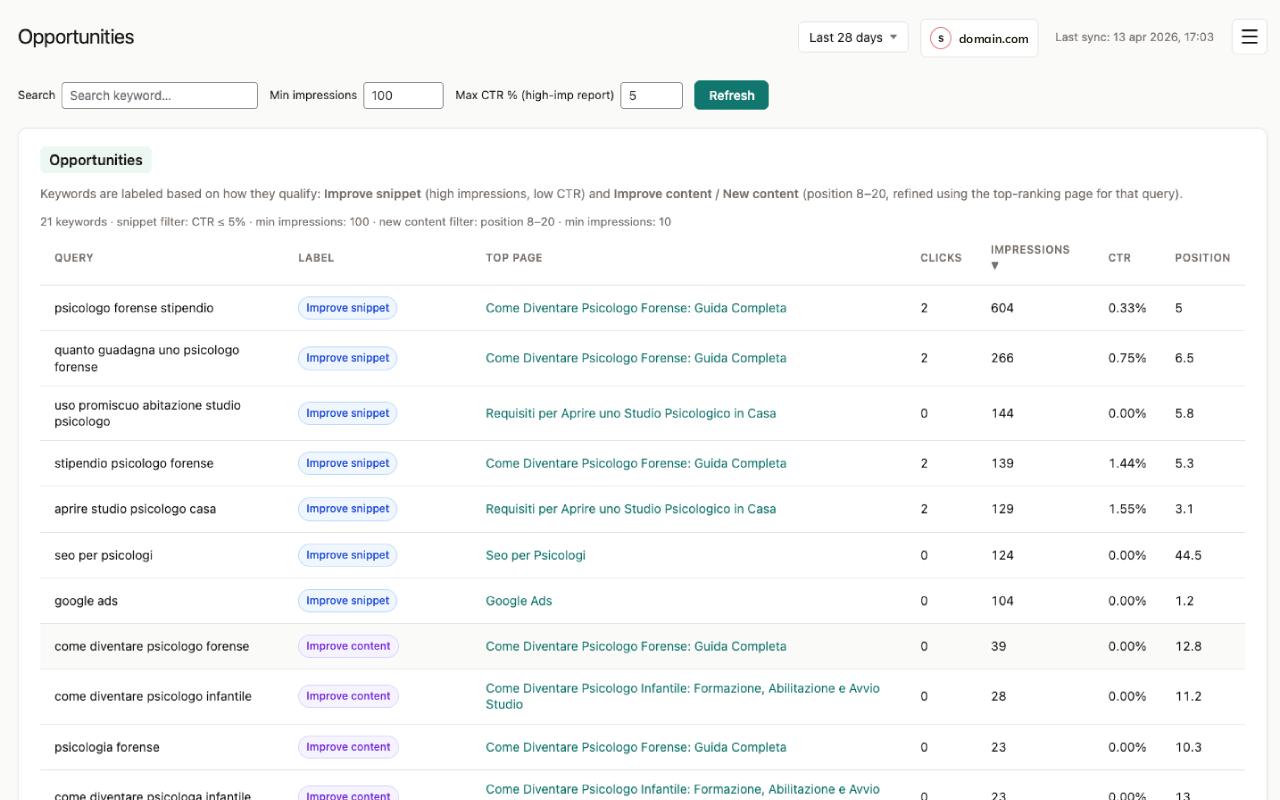
- Opportunities: Two reports — high impressions / low CTR, and keywords in positions 8–20 (quick wins); CSV export.
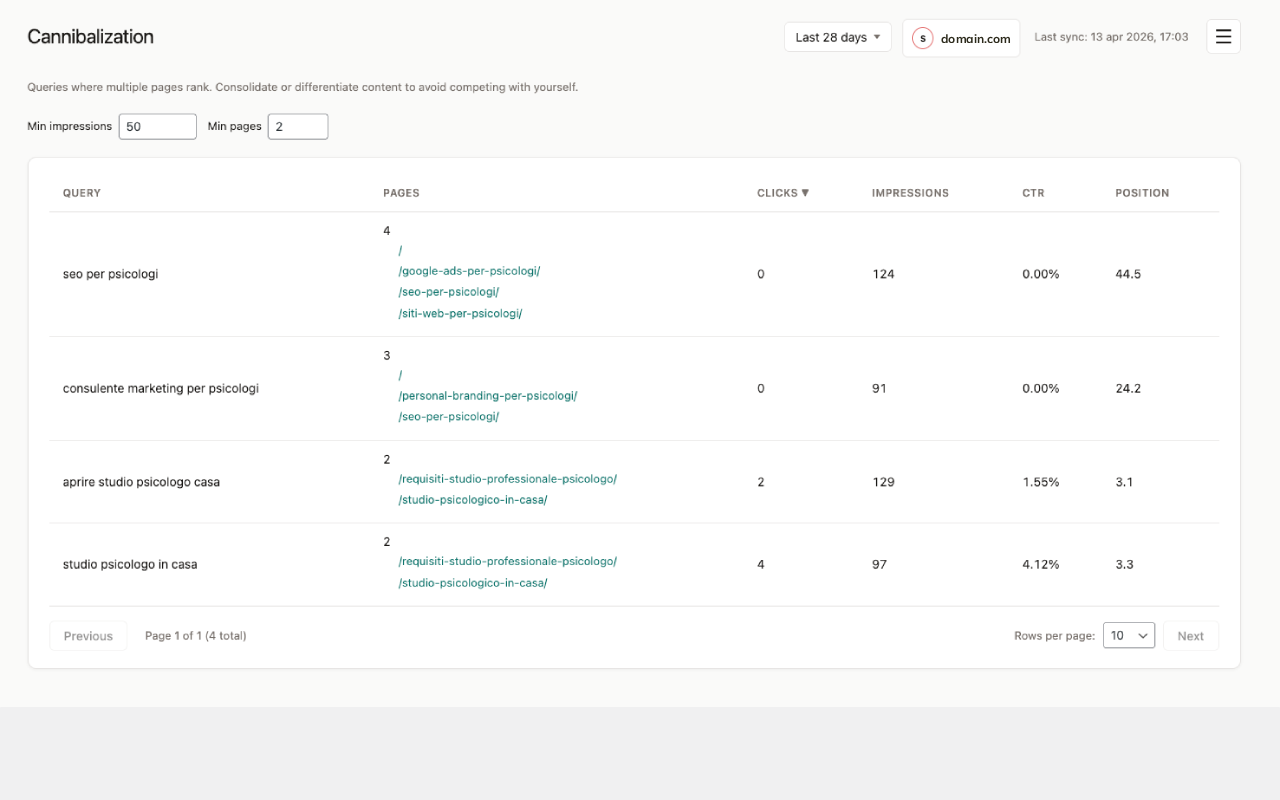
- Cannibalization: Queries with multiple pages competing; per-query URL list. Normalized by URL (fragment stripped).
- Decay: Pages with declining organic performance vs the previous period; filters, probable-cause hints, CSV export.
- Content Refresh: Pages prioritized for refresh (urgency levels) with reasons and metrics; CSV export.
- Internal Links: Internal linking opportunities from WordPress content and GSC signals; filters; CSV export.
- Question Queries: Question-style search queries with difficulty signals and metrics (from GSC data).
- Alerts: Automatic detection of position drop, CTR drop, traffic drop, impressions spike (runs after daily sync); list on the Dashboard and CSV export.
- Export: CSV export for queries, pages, opportunities, alerts, decay, content refresh, and internal linking (with filters where applicable; UTF-8 BOM for Excel).
- Settings: Google OAuth credentials, connect/disconnect, Sync & Import (auto-import last 28 days on first connection, sync now 3/7 days, import range in background), advanced import tuning, and import diagnostics.
安装:
- Upload the
seotune-search-insightsfolder to/wp-content/plugins/. - Activate Seotune Search Insights from the Plugins menu.
- Go to Seotune Search Insights → Settings: enter your Google OAuth Client ID and Secret, then Connect to Google.
npm run release zip to keep the download smaller)
- Full guide (installation, OAuth, sync, troubleshooting, privacy): open
documentation/index.htmlin a browser, or print to PDF from the browser. - Maintainers: section “Plugin readme & listing compliance” in
documentation/index.html; copy-ready notes indocumentation/listing-description-notes.txt(third-party services, no overpromising, trademarks, privacy note for installers). - Third-party licenses (Composer, JS bundle):
documentation/third-party-licenses.txt. - Admin UI source/build and WordPress.org expectations:
documentation/source-and-build.txt. - Network endpoints & privacy (Google):
documentation/network-and-privacy.txt. - Security, REST permissions, enqueue (guidelines 8 & 13):
documentation/security-rest-and-assets.txt. - Front-end vs admin UX (guidelines 10 & 11):
documentation/admin-ux-and-frontend.txt. - Trialware / complete plugin (guidelines 5 & 16):
documentation/trialware-and-complete-plugin.txt. - Trademarks & naming (guideline 17):
documentation/trademarks-and-naming.txt. - Registro audit WordPress.org (gap, priorità):
documentation/wordpress-org-audit-register.txt. - Contributors WordPress.org (slug readme):
documentation/CONTRIBUTORS-wordpress-org.txt.
屏幕截图:
常见问题:
Do I need a Google account and OAuth credentials?
Yes. Seotune Search Insights reads your Google Search Console data for the site you verify in Search Console. You create an OAuth client in Google Cloud Console, paste the Client ID and Client Secret into Seotune Search Insights → Settings, then click Connect to Google and approve access in your browser. Without this step, the plugin cannot fetch metrics and reports stay empty.
Where is my Search Console data stored?
Imported metrics, OAuth tokens, and plugin settings are stored in your WordPress database on your server (custom tables use a plugin-specific prefix). Data is not sent to Seotune Search Insights or to a third-party analytics service for Seotune Search Insights’s own use. Only administrators who can access your WordPress admin can see the dashboard.
How often does data update? Why might numbers look old?
After you connect, Seotune Search Insights syncs recent days on a schedule and can import more history from Seotune Search Insights → Settings → Sync & Import. Day-to-day updates rely on WordPress cron (and your server running scheduled tasks). If numbers do not refresh, cron may not be running—see Troubleshooting and Hosting requirements below.
What happens when I uninstall the plugin?
By default, uninstalling does not remove plugin tables or options. If you want a full cleanup, enable the option to delete plugin data on uninstall in Seotune Search Insights → Settings (wording may vary; see the bundled manual under Uninstall & data removal) before you delete the plugin from Plugins. When that option is on, the plugin’s uninstall.php removes the plugin tables and related stored settings (including OAuth tokens) as implemented in that release.
Does Seotune Search Insights track my website visitors?
No. Seotune Search Insights does not add visitor tracking, advertising pixels, or marketing scripts to your public pages. It works with Search Console data that Google already collects for your property, shown to logged-in administrators in the WordPress admin.
更新日志:
- Readme: Tested up to set to 7.0 (WordPress 7.0 compatibility).
- Composer: updated
google/apiclientto 2.19.4 (and related Google/Guzzle dependencies); vendor pruned to Search Console + Webmasters APIs only.
- Fix: ship SeoTune brand images (menu icon + header logo) inside the WordPress.org download so they display correctly in the sidebar, header, and About tab.
- Readme and translations: Seotune Search Insights branding only in user-facing text; database table prefix described generically (no marketing confusion with internal table names); developer notes reference the main plugin file version constant instead of naming it in the readme.
- OpenAI / AI insights integration removed from the base plugin (REST routes, PHP
Insightsclass, Settings tab, feature flag, docs, and privacy readme section). The distributed build targets Google Search Console only. - Readme: Tags reviewed for directory SEO — final set:
seo,google search console,analytics,keywords,queries(replaced genericinsightswith GSC-alignedqueries). - Readme: Tested up to set to 6.9.
- Readme: Frequently Asked Questions section (OAuth, data storage, cron/sync, uninstall, visitor privacy).
- Versioning, readme header, and LICENSE file aligned for distribution (plugin version 1.0.0 matches Stable tag).
- Admin app package.json version aligned with plugin release.
- Added
documentation/index.html: user-facing manual (requirements, Google OAuth, GSC connection, sync/import, features, troubleshooting, uninstall, privacy & third-party services). - Internationalization: Jed JSON for the admin bundle; React uses
@wordpress/i18n; PHP REST/OAuth/sync error strings wrapped with__(); script translations loaded viawp_set_script_translations. - Documentation: readme/listing compliance section in
documentation/index.htmlanddocumentation/listing-description-notes.txtfor listing transparency (Google API, OAuth, trademarks, privacy). - Release: default
npm run releaseincludesadmin/react-appin the zip (GPL source access); excludesnode_modulesanddocumentation/; rootcomposer.jsonandcomposer.lockare included for Composer transparency. - Composer autoload switched to classmap for
includes/(cleancomposer dump-autoload); Monolog kept at^2.9as required by Google client + PHP 8.0 compatibility. - Admin UI: React admin mounted with static imports (single Vite/Rollup IIFE bundle,
base: './'); CSS extracted toadmin-app.cssfor WordPress enqueue compatibility.
- Admin UI: new header with section name only and hamburger menu containing all sections (including Settings).
- Removed duplicate section titles from all report pages (Dashboard, Keywords, Pages, etc.).
- Header: property selector (domain name with icon and chevron) and last sync timestamp on the same row.
- Header: global date range dropdown (Last 7 days, Last 28 days, Last 90 days, Custom) on the same row; all reports use the same range; removed per-page date filters.
- Settings: added Save Settings button in the Google Search Console tab.
- Readme: new "Hosting requirements (for smooth import)" section (PHP limits, cron, tips for restrictive hosting e.g. Aruba).
- Header title styling: font-size 23px, font-weight 400.
- Initial release.
- Google Search Console OAuth; sync queries and pages; dashboard with KPIs and charts.
- Reports: Keywords, Pages, Opportunities (high-imp low-CTR, position 8–20), Cannibalization.
- Alerts (position/CTR/traffic drop, impressions spike); cron after sync.
- CSV export for all reports.
- Settings: GSC credentials, connect/disconnect, manual sync.