
Setup Default Featured Image
| 开发者 | gravitymaster97 |
|---|---|
| 更新时间 | 2026年7月19日 14:29 |
| PHP版本: | 5.6 及以上 |
| WordPress版本: | 7.0 |
| 版权: | GPLv2 or later |
| 版权网址: | 版权信息 |
详情介绍:
- One-click default image setup — Choose any image from your Media Library as the global fallback featured image.
- Works everywhere — Applies to posts, pages, and all registered custom post types automatically.
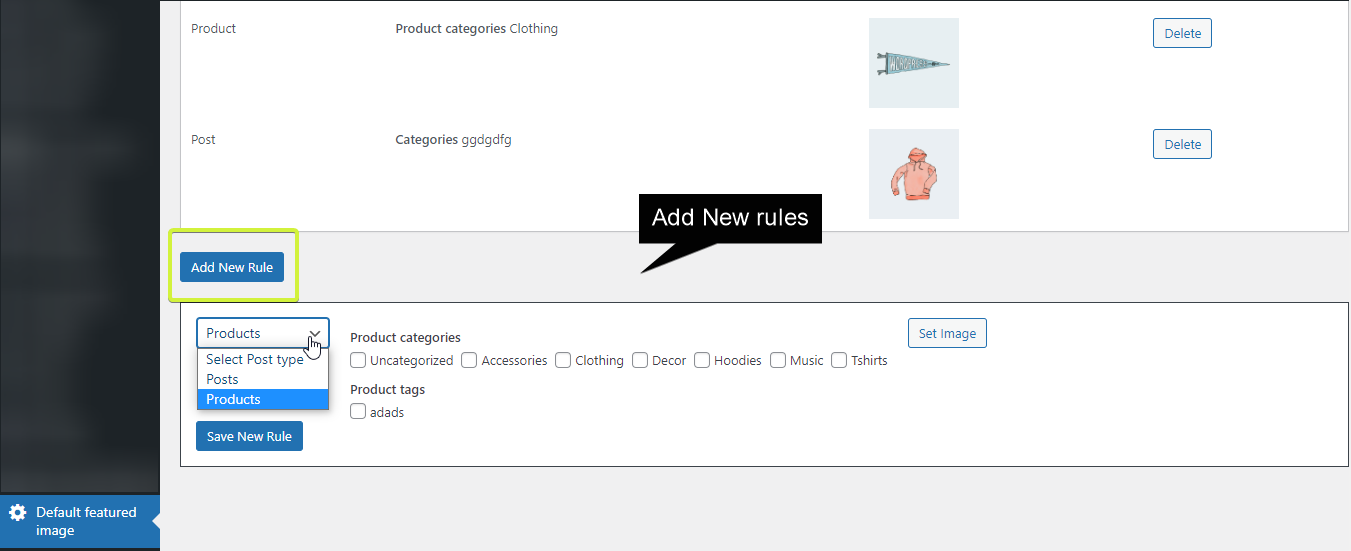
- Include / exclude post types — Limit or skip specific post types so the default only applies where you need it.
- Include / exclude by category — Fine-grained control to apply (or skip) the default image for specific categories.
- Zero configuration required — Install, activate, select your image, done.
- Lightweight and fast — No bloat; the plugin adds no overhead to your front-end.
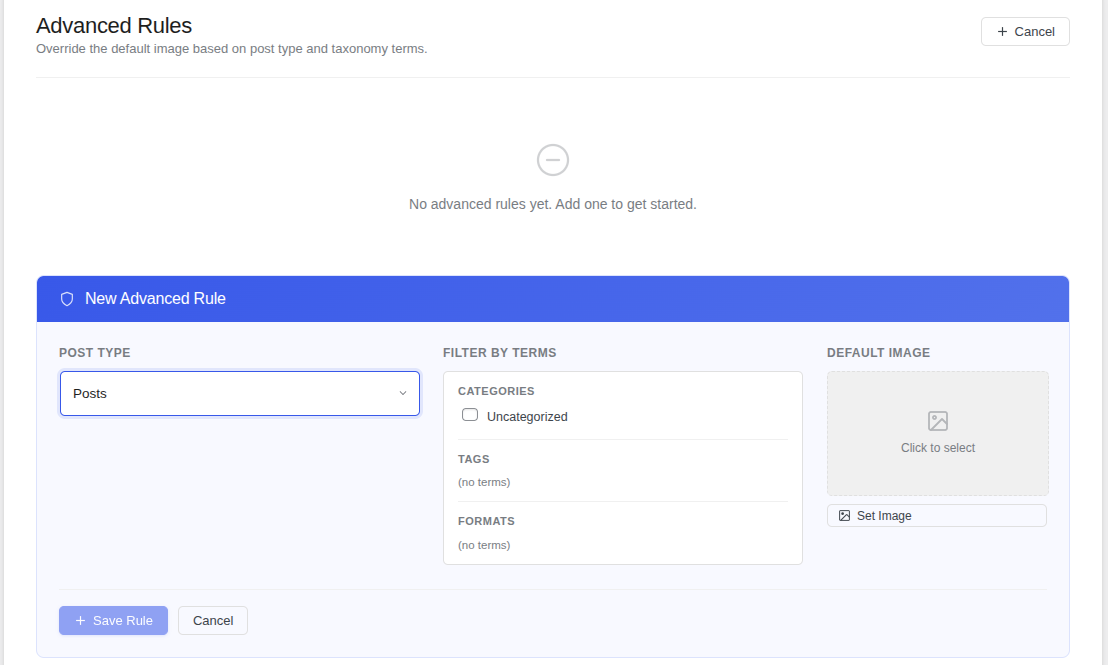
- Advanced taxonomy rules (Pro) — Set different default images per taxonomy term for complete control.
- Blogs and news sites with high publishing volume
- WooCommerce stores where product images may be missing
- Membership or multi-author sites where contributors forget to add thumbnails
- Any site that uses a grid or card-based theme relying on featured images
- Install and activate the plugin.
- Go to Settings → Default Featured Image.
- Click Select Image and choose your fallback from the Media Library.
- Save — every post or page without a featured image will now display your chosen default automatically.
- Set different default images for different taxonomies and terms
- Advanced conditional rules for maximum flexibility
- Custom Field For WP Job Manager — Add custom fields to job submission forms.
- Auto Location for WP Job Manager — Enable location-based job filtering.
- Post to PDF — Convert WordPress posts into downloadable PDF documents.
- Festival Snow Effect — Add a festive snow animation to your site.
安装:
- Go to Plugins → Add New in your WordPress dashboard.
- Search for "Setup Default Featured Image".
- Click Install Now, then Activate.
- Navigate to Settings → Default Featured Image and choose your fallback image.
- Download the plugin ZIP file.
- Go to Plugins → Add New → Upload Plugin.
- Upload the ZIP, click Install Now, then Activate.
- Navigate to Settings → Default Featured Image and choose your fallback image.
屏幕截图:
常见问题:
What happens if a post already has a featured image set?
Nothing changes. The default featured image only acts as a fallback — it will never override an image that has already been manually assigned to a post or page.
Does this work with custom post types?
Yes. The plugin works with all post types registered on your site, including custom post types created by themes or other plugins.
Can I exclude certain post types from using the default image?
Yes. The plugin includes include/exclude settings per post type so you have full control over where the default image is applied.
Can I exclude specific categories?
Yes. You can include or exclude specific categories so the default image is only applied where it makes sense for your content.
The default featured image isn't showing on my site — what should I do?
First, confirm that your theme uses the standard WordPress get_the_post_thumbnail() or the_post_thumbnail() functions to display featured images. If the problem persists, please open a support thread with details about your theme and setup.
Is this plugin compatible with page builders like Elementor and Divi?
Yes. As long as the page builder or theme uses standard WordPress functions to retrieve featured images, the default image will appear correctly.
Will the default image appear in SEO meta tags and social sharing previews?
Yes, in most cases. SEO plugins like Yoast SEO and Rank Math read the featured image via standard WordPress functions, so your default image will be used in Open Graph and Twitter Card meta tags as well.
Does the plugin slow down my site?
No. The plugin is deliberately lightweight and only hooks into the existing WordPress thumbnail retrieval process — it adds no front-end scripts, styles, or database queries beyond what is necessary.
Is there a Pro version?
Yes! Setup Default Featured Image Pro adds advanced taxonomy-based rules, letting you set different default images per category, tag, or any custom taxonomy term.
更新日志:
- Tested and confirmed compatibility with WordPress 6.9.4.
- Minor code improvements and stability fixes.
- Added include/exclude options for custom post types.
- Added include/exclude options for categories.
- Added support for all registered custom post types.
- Performance improvements.
- Initial release. Set a default featured image for posts and pages.