
Sheet Wise – WordPress to Google Sheets Automation for Forms, Users, Posts & WooCommerce
| 开发者 |
Sapayth H.
sapayth |
|---|---|
| 更新时间 | 2026年4月3日 03:42 |
| PHP版本: | 8.0 及以上 |
| WordPress版本: | 6.9 |
| 版权: | GPLv2 or later |
| 版权网址: | 版权信息 |
详情介绍:
- Store owners who track orders, customers, and inventory in spreadsheets
- Site admins who need user registrations and form submissions in a central sheet
- Agencies managing content workflows across WordPress and Google Sheets
- Anyone tired of manually copying data from WordPress to spreadsheets
- User registrations, profile updates, logins, logouts, and deletions
- Posts created, edited, or trashed
- Comments added or edited
- WooCommerce orders, products, and order status changes
- Contact Form 7 form submissions with auto-detected fields
- Sync log dashboard — see every sync attempt with status, timestamp, and error details
- Automatic retry — transient API failures are retried with exponential backoff so you never silently lose data
- Failure notifications — get alerted in wp-admin when consecutive syncs fail
- Dead-letter queue — permanently failed syncs are preserved with full data for manual retry
- Test sync button — verify your integration works before waiting for real data
- Column auto-creation — auto-detect fields and create sheet headers in one click
- Smart sheet detection — warns you if your sheet is not shared with the service account
- Historical data backfill — export existing users, posts, orders, or comments to your sheet in bulk
- Editable column headers — add, remove, and reorder columns from the integration form
- Conditional logic filters — sync only the events you want with IF/THEN rules (e.g., "only sync orders over $100")
- WooCommerce — sync orders, products, and status changes
- Contact Form 7 — sync form submissions with automatic field detection
安装:
- Upload the
sheet-wisefolder to/wp-content/plugins/, or install the plugin through the WordPress plugins screen. - Activate the plugin through the Plugins screen.
- Go to Sheet Wise > Settings and paste your Google Service Account credentials JSON.
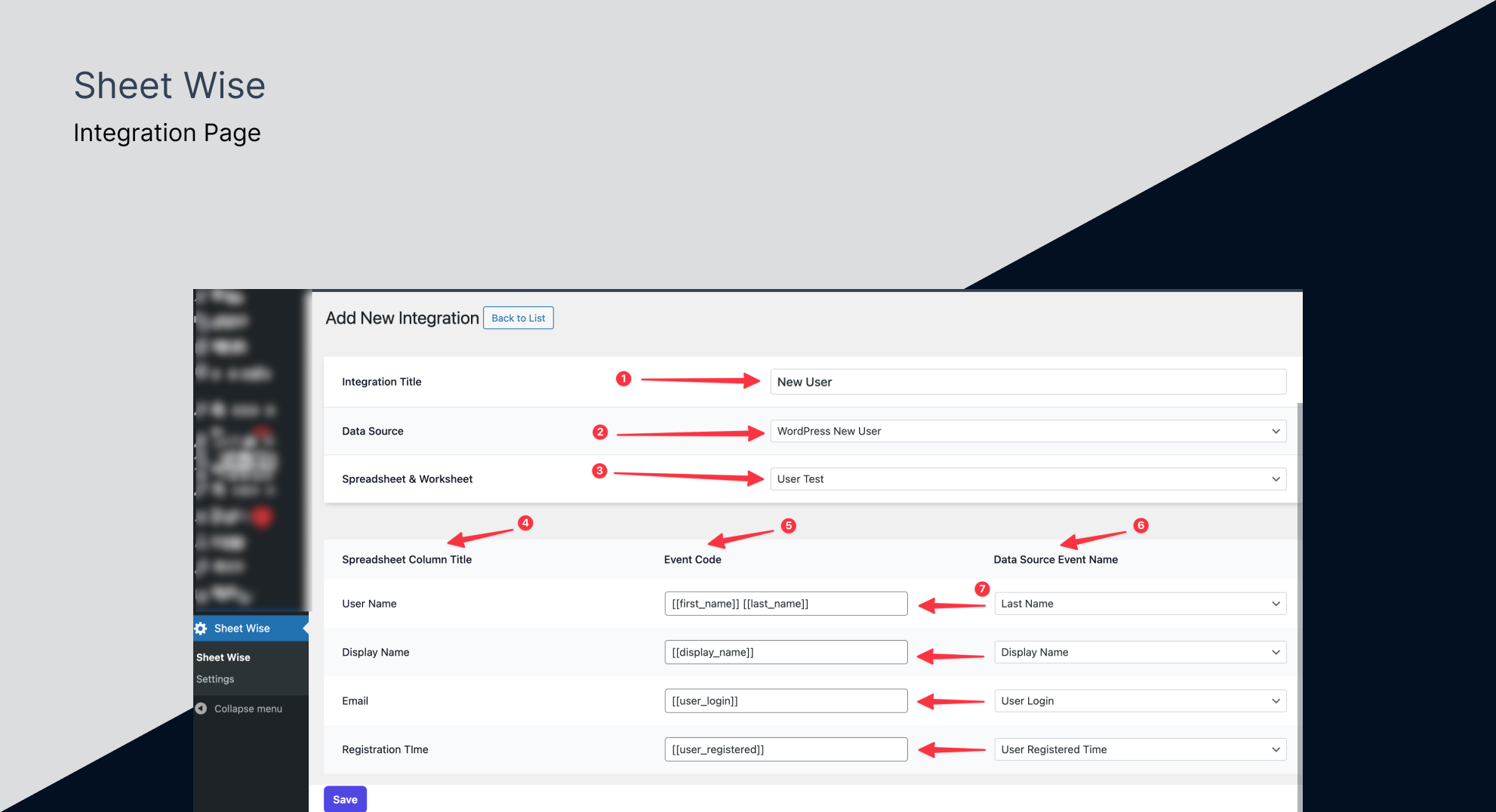
- Go to Sheet Wise > Add New Integration to create your first sync.
屏幕截图:
常见问题:
How do I get Google Service Account credentials?
Create a project in the Google Cloud Console, enable the Google Sheets API and Google Drive API, then create a Service Account key. The plugin settings page includes a step-by-step guide, or watch the setup video in the Description section above.
Do I need to share my Google Sheet with the service account?
Yes. Copy the service account email from the Sheet Wise settings page and share your Google Sheet with it as an Editor. Sheet Wise will warn you if the sheet has not been shared yet.
Does it work with WooCommerce?
Yes. Sheet Wise syncs WooCommerce orders, products, and order status changes. Select any WooCommerce event as your data source when creating an integration.
Does it work with Contact Form 7?
Yes. Sheet Wise auto-detects your CF7 forms and their fields. Create an integration with Contact Form 7 as the data source and map your form fields to sheet columns.
What happens if the Google API is temporarily unavailable?
Sheet Wise automatically retries failed syncs with exponential backoff (up to 3 attempts by default). If all retries fail, the sync is logged with full error details and preserved in a dead-letter queue for manual retry from the sync log dashboard.
Can I export existing data that was created before installing the plugin?
Yes. Use the Historical Data Backfill feature to export existing users, posts, comments, or WooCommerce orders to your Google Sheet in bulk. Records are processed in batches to avoid timeouts.
Can I test my integration without triggering a real event?
Yes. Every integration has a Test Sync button that sends sample data to your sheet immediately so you can verify the setup is correct.
Can I filter which events get synced?
Yes. Conditional Logic lets you create rules to control what data lands in your sheet. For example, sync only completed orders over $100, or skip test user registrations. Events that don't match your rules are logged as "skipped" in the sync log dashboard.
What is the minimum PHP version required?
Sheet Wise requires PHP 8.0 or higher.
更新日志:
- New - Test sync button for instant integration verification
- New - Column auto-creation and smart sheet detection
- New - Automatic retry with exponential backoff and error classification
- New - Editable column headers with add/remove and live sheet sync
- New - Contact Form 7 integration for syncing form submissions
- New - Historical data backfill for exporting existing records
- New - Sync log dashboard with filtering, retry actions, and failure notifications
- Enhance - Redesigned integration form with shared component and clickable field chips
- Enhance - Redesigned HowTo page
- Enhance - Integration list shows Name, WordPress Event, and Google Spreadsheet in single row
- Enhance - Rule name clickable to open edit page
- Fix - Prevent fatal error when WooCommerce handler fires on non-product posts
- Fix - Move error_response() to base REST controller
- Enhance - Added WooCommerce integration
- Enhance - How to page added for Google API setup
- Initial release
- Sync data from WordPress to Google Sheets using various hooks
- User-friendly settings page for API setup and sync management