
ShipEdit
| 开发者 | cnrcodetech |
|---|---|
| 更新时间 | 2026年11月13日 23:13 |
| PHP版本: | 7.4 及以上 |
| WordPress版本: | 7.1 |
| 版权: | GPLv2 or later |
| 版权网址: | 版权信息 |
详情介绍:
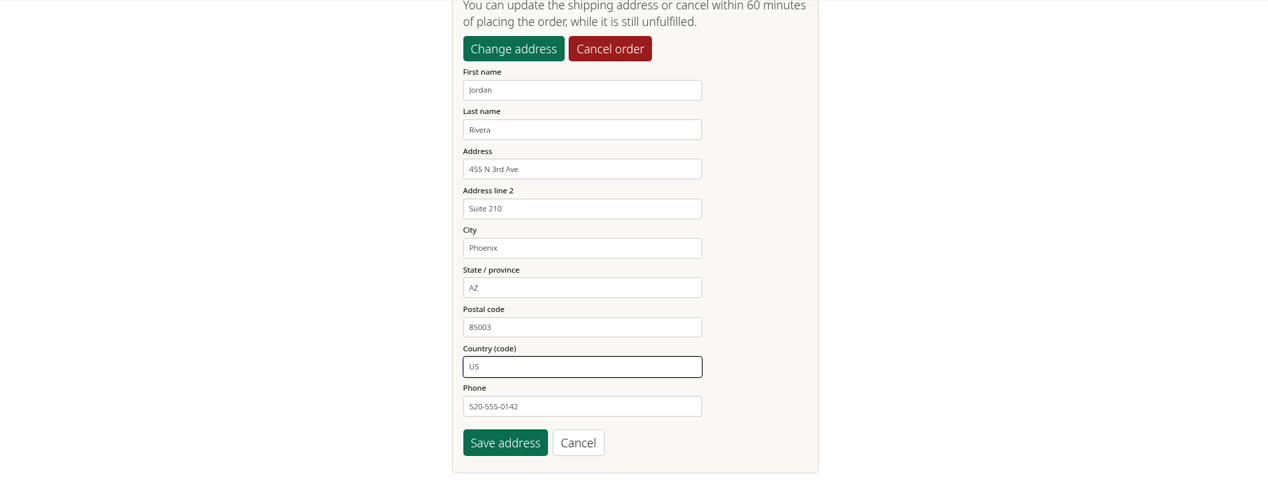
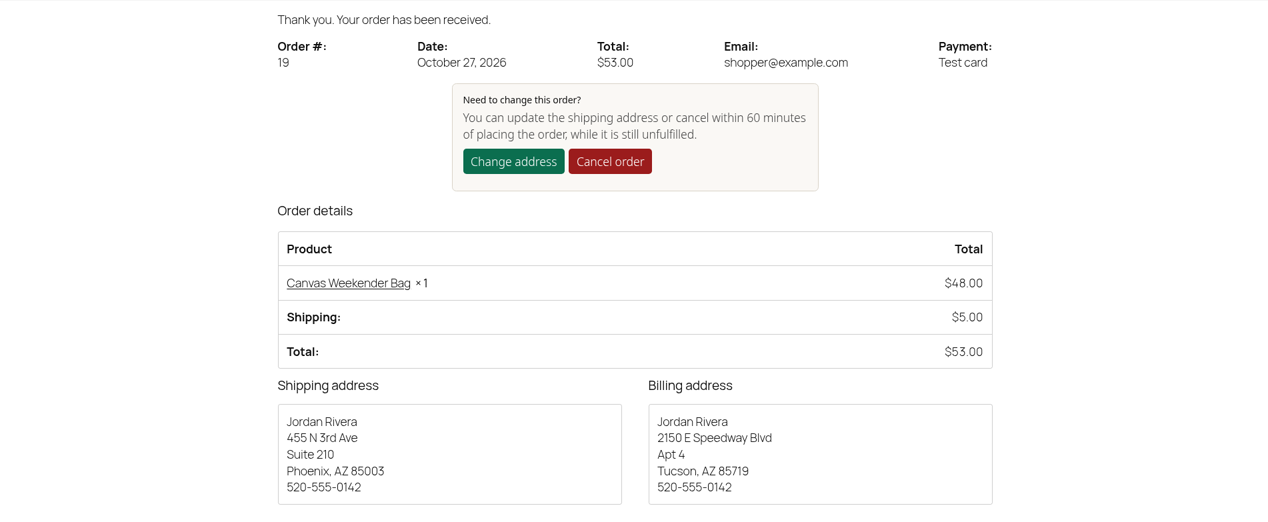
- Change the shipping address on an order that hasn't shipped yet
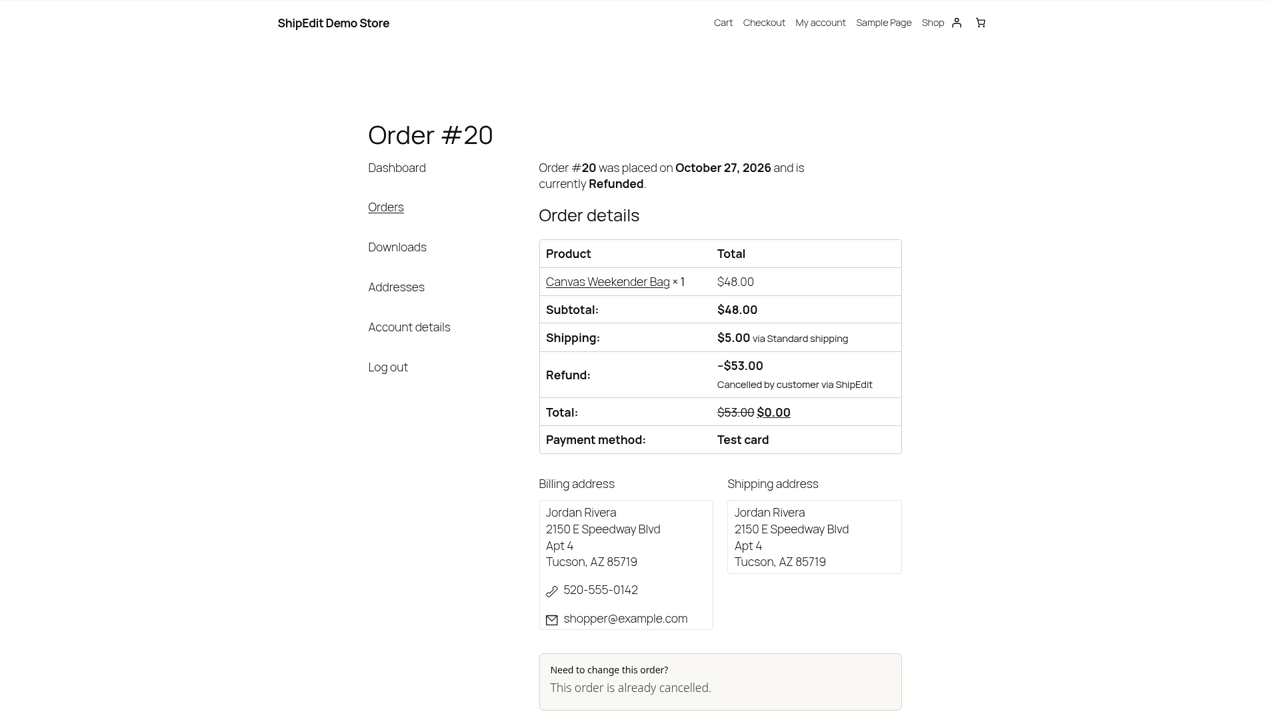
- Cancel an unfulfilled order, and see whether a refund was issued or the store will handle it
- Do it from the thank-you page right after checkout, or later from My Account > View order
- See a plain message when a change isn't allowed, such as a PO Box, a country you don't ship to, or a closed edit window
- After fulfillment, report damage from My Account > View order (logged-in customers only). If an open claim already exists for that order, they reopen the same buyer portal link instead of starting a duplicate
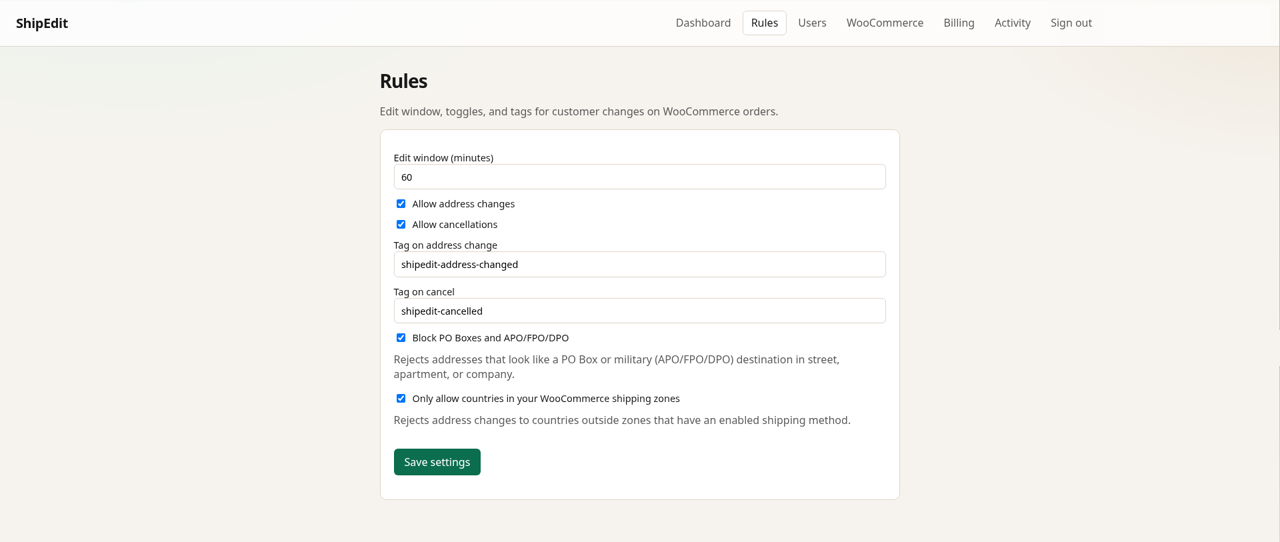
- How long after checkout changes are allowed (the edit window)
- Whether address changes, cancellations, or both are turned on
- Optional destination checks: block PO Boxes and APO/FPO/DPO addresses, or only allow countries in your WooCommerce shipping zones
- An email to you when a customer changes an address or cancels, so the packing team knows before the order ships
- An activity log of every change in ShipEdit
- Damage claims under WooCommerce > ShipEdit Claims: list and open claims, change status, start an invite from an order, copy or resend the buyer portal link
- A ShipEdit Claims box on the order edit screen (HPOS and classic) to list that order's claims and start a claim
- Order received and My Account view-order pages (only when API settings are saved): the customer's browser loads ShipEdit assets from this plugin and calls your configured API base URL (
/api/woo/order,/api/woo/order/address,/api/woo/order/cancel) with the order id, order key, and integration key to check eligibility and submit address changes or cancellations. - Report damage (logged-in My Account / order-received): the browser calls WordPress admin-ajax only. WordPress verifies the customer owns the order, then ShipEdit's server calls your configured API base URL (
/api/woo/claims/customer-claim-link) with the store integration key. The integration key is not printed into the claims button markup. - WooCommerce > ShipEdit Claims and the order Claims box: WordPress calls your configured API base URL (
/api/woo/claimsand related paths) server-to-server with the store integration key to list claims, load detail and signed photo URLs, change status, start invites, and mint or resend buyer portal links. Those calls require the manage_woocommerce capability and WordPress nonces. - Tools > Export Personal Data / Erase Personal Data: when a request includes an email, WordPress asks ShipEdit (
/api/woo/claims/export-buyer,/api/woo/claims/erase-buyer) for claim records tied to that email on this connected store. - Admin settings screen: settings stay in WordPress options until you save them. No outbound call is made from the settings page itself.
- Order sync / updates: ShipEdit reads and updates order data through the WooCommerce REST API key and webhooks you authorize from ShipEdit company admin.
安装:
- In WordPress, go to Plugins > Add New, search for "ShipEdit", then install and activate it. WooCommerce must be active. (You can also upload the zip under Plugins > Add New > Upload Plugin.)
- Create or open your ShipEdit company at https://shipeditapp.com/company/login and start your plan (include damage claims if you want that feature).
- In WordPress, go to WooCommerce > Settings > Advanced > REST API and add a key with Read/Write access.
- In ShipEdit, open WooCommerce and connect your store with its URL and that REST API key.
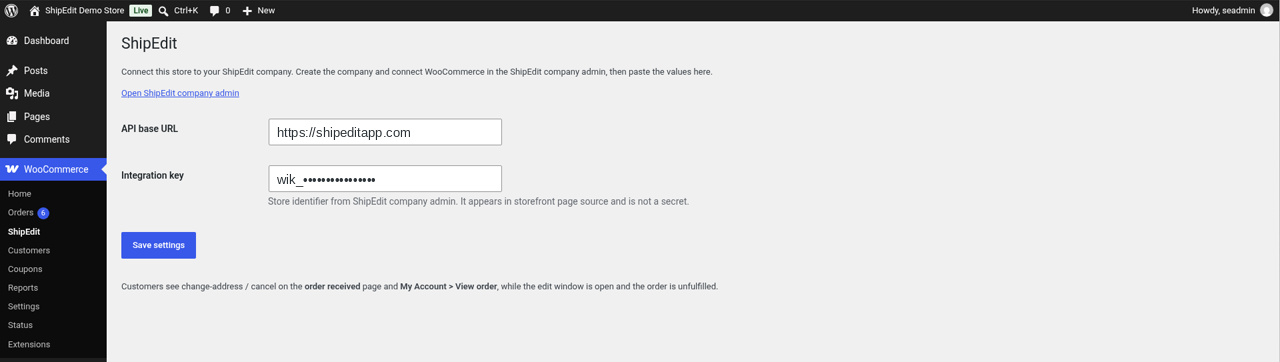
- Back in WordPress, open WooCommerce > ShipEdit and paste the API base URL and integration key from ShipEdit.
- In ShipEdit, set your edit window and choose whether customers can change addresses, cancel orders, or both.
- Place a test order and leave it unfulfilled. Check that Change address and Cancel order appear on the thank-you page and under My Account > View order.
- Mark a test order completed, sign in as that customer, and confirm Report damage appears. Merchants can also open WooCommerce > ShipEdit Claims.
屏幕截图:
常见问题:
Can WooCommerce customers change their shipping address after checkout?
Not on their own; WooCommerce doesn't offer it. With ShipEdit, customers can edit the shipping address on the thank-you page or under My Account > View order, as long as the order hasn't been fulfilled and is still inside your edit window.
What happens once an order ships?
Address change and cancel options disappear. Logged-in customers can use Report damage on completed orders. If they already have an open claim for that order, ShipEdit returns the same buyer portal link instead of creating another claim.
Can guests report damage?
Not in this release. Report damage requires a logged-in customer who owns the order so ownership can be checked in WordPress before ShipEdit mints a portal link. Merchants can still invite a claim from WooCommerce > ShipEdit Claims.
How do merchants manage claims?
Open WooCommerce > ShipEdit Claims to search claims, open detail (description, photos, timeline), change status, start an invite, and copy or resend the buyer portal link. The order edit screen also has a ShipEdit Claims box.
Can I block PO Boxes or countries I don't ship to?
Yes. In ShipEdit Rules you can block PO Boxes and APO/FPO/DPO addresses, and limit new addresses to countries in your WooCommerce shipping zones. The PO Box check looks at the address text, so treat it as a best-effort filter.
Will I know when a customer changes an order?
Yes. ShipEdit emails the company owner after an address change or cancellation. If a customer edits the address several times in a few minutes, you get one summary email instead of several. Claim invites can also email the buyer a portal link.
Does it work with my 3PL or shipping plugin?
The new address is saved on the WooCommerce order, so anything that reads the order afterwards gets the updated address. If your 3PL has already pulled the order, check with them how they pick up changes.
Do I need a ShipEdit account?
Yes. Create a company at https://shipeditapp.com/company/login, connect the store, then paste the API base URL and integration key into WooCommerce > ShipEdit.
What does it cost?
The plugin is free. The ShipEdit service is billed on shipeditapp.com. Address/cancel and damage claims depend on the plan you choose there. Nothing is billed inside WordPress. WooCommerce setup help: https://shipeditapp.com/woocommerce-change-shipping-address
What data is sent to ShipEdit?
Configured stores send eligibility and update requests from the customer's browser to your API base URL for address/cancel, including order id, order key, and the integration key. Claims admin and Report damage go through WordPress first; WordPress then calls your API base URL with the store integration key. Personal data export/erase for claims also calls ShipEdit. ShipEdit uses the WooCommerce REST API connection you authorize from company admin to read and update orders. See https://shipeditapp.com/privacy.
Does it work with block themes?
Yes. It works with block themes, including the Order Confirmation block, and with classic themes. It also supports WooCommerce High-Performance Order Storage (HPOS) and the Cart and Checkout blocks.
Where can I read the full setup guide?
The guide at https://shipeditapp.com/woocommerce-change-shipping-address covers setup, edit windows and cancellations.
Where do I get help?
Post in this plugin's support forum on WordPress.org, or email support@shipeditapp.com with your store URL.
更新日志:
- Damage claims inside the same ShipEdit plugin (not a separate plugin).
- WooCommerce > ShipEdit Claims: list, detail (description, photos, timeline), status changes, start invite, copy/open/resend buyer portal link.
- ShipEdit Claims box on the order edit screen (HPOS and legacy) with Start claim.
- Report damage for logged-in customers on completed orders (My Account view-order and order-received). Reuses an open claim portal link when one already exists.
- WordPress personal data exporter and eraser for ShipEdit claim data by customer email.
- Server-to-server claims calls use the stored integration key with capability and nonce checks; the key is not exposed in the claims browser UI.
- Respects ShipEdit plan entitlements for damage claims and shows an upgrade message when not entitled.
- Readme and links update.
- Added sign-up and settings links so new stores can find ShipEdit company admin.
- Security: thank-you and My Account panels render only for visitors with the order key, order ownership, or the view_order capability, so order keys are not exposed (including block-theme order-received URLs without ?key=). Guest email fallback fixed for WooCommerce 8.0 to 8.3.
- Cancel panel reports the refund outcome (refund issued, or the store will process it).
- Address changes show the Worker message when ShipEdit blocks them (different shipping zone, PO Box, edit window closed, store auth failure, and similar). Clearer ZIP and state/province validation messages. Storefront errors always show a plain customer sentence (not a raw error code).
- Shop managers can save WooCommerce > ShipEdit settings (options.php capability filter).
- Plugin settings are deleted on uninstall.
- Storefront copy: fixed 0 and 1 minute edit window wording, panel hidden when billing has lapsed, refresh note after an address update.
- Settings page clarifies that the integration key is a store identifier, not a secret.
- Storefront disables save and cancel while a request is in flight; ignores a busy (409) response after a success. Settings page shows the saved notice under WooCommerce > ShipEdit.
- Set WordPress.org display name and slug to ShipEdit / shipedit.
- Set Author to CNR Consulting Services, Inc. Plugin URI https://shipeditapp.com; Author URI https://cnrcode.com (WordPress.org ownership clarity).
- Expand WordPress.org readme (external services, FAQ, tags, tested-up-to).
- Declare WooCommerce HPOS and cart/checkout blocks compatibility.
- Align Text Domain to
shipedit.
- Prior connector release (thank-you / My Account panels, settings, block confirmation inject).