
Shipping Simulator for WooCommerce
| 开发者 |
luizbills
linknacional |
|---|---|
| 更新时间 | 2026年10月23日 21:07 |
| 捐献地址: | 去捐款 |
| PHP版本: | 8.2 及以上 |
| WordPress版本: | 7.1 |
| 版权: | GPLv3 |
| 版权网址: | 版权信息 |
标签
下载
详情介绍:
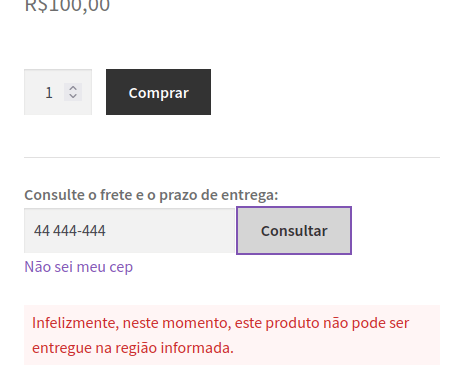
Shipping Simulator for WooCommerce brings the shipping calculator to your customers while they are still browsing: directly on the product page and on the cart page. Instead of waiting until checkout, customers enter their postcode (CEP) and instantly see the available shipping methods, price and estimated delivery time.
The plugin also helps increase your average order value with free shipping rules — by minimum cart amount or per product — and a configurable free-shipping progress bar that shows the customer how much is left to unlock free shipping. Results are cached and the last postcode is remembered, so repeated lookups are fast.
Calculator features
- Calculate shipping directly from the product page
- Calculate shipping from the cart page
- Free shipping by minimum amount and by product
- Visual customization: colors, borders, icons and position of the fields
- Calculate shipping without having to choose variations (Check it on the plugin settings page)
- Automatically fills in and updates the customer's address (Check it on the plugin settings page)
- Uses the same postcode field, button and results list described below
- If you are using some page builder, use the shortcode
[wc_shipping_simulator]
- CEP validation popup that asks visitors to confirm delivery availability, with WhatsApp contact when delivery isn't available
- Hide the address fields automatically when the customer selects local pickup
- Delivery time system: business days and hours, delivery time slots and order deadline tracking
- Postcode / CEP (
postcode): the only address field on the calculator. It is required, can be typed as text or number, and its placeholder is configurable. Brazilian stores can also look the address up automatically from it. - Calculate shipping (submit button): triggers the lookup. Its label is configurable, and the field and the button can be repositioned (inline, stacked or floating over the product image).
- Shipping results (results list): one line per shipping method, with the method name, the price and the estimated delivery time. It is filled by AJAX, without reloading the page.
- Free shipping progress bar: shows how much is left to unlock free shipping, on the cart, and the message shown when the customer gets there. Its texts, colors and values are configurable.
- Country, State and City (native fields, not shown for Brazil): Brazilian stores see only the postcode field and get the address filled in automatically. Stores in other countries keep WooCommerce's default calculator with all address fields.
屏幕截图:





常见问题:
Where can I get support or talk to other users?
You can ask for help in the Plugin Forum
更新日志:
3.0.5
- Options that are locked by a dependency (e.g. "Free shipping only" with the minimum-amount free shipping turned off) no longer keep the old value stored — the lock is now visual only, so what the screen shows is what gets saved.
- While loading, the text below the progress bar no longer repeats the message already shown inside the bar and keeps its height reserved, so the component no longer jumps when the cart updates.
- The reserved height is measured again when the phone is rotated or the window resized, keeping the layout stable at any screen width.
- For Brazilian stores, the native shipping calculator on the cart (shortcode) now shows only the postcode field; the country, state, and city fields are hidden (other stores keep the default calculator).
- Entering the postcode auto-fills the address for both billing and shipping (city, state, and street) and stores the neighborhood in the session/profile.
- The postcode is now saved in the Brazilian format (00000-000).
- The outdated woo-better notice now reappears after the beta-test notice is dismissed while woo-better remains below 5.0.0, so the update button is always offered when needed.
- Removed the "Gutenberg number field" note (a woo-better fix) from the settings screen.
- The woo-better update notice now installs version 5.0.0 directly from GitHub and only appears when the installed version is below 4.17.2.
- Removed the outdated alphanumeric-CNPJ feature notice from the settings page.
- Added a new postcode (CEP) shipping calculator on product and cart pages with automatic address autofill, styled input and button, and a list of shipping methods with price and estimated delivery time.
- Calculator results are cached and the last postcode is remembered, avoiding unnecessary lookups.
- Added a cart free-shipping progress bar with configurable minimum amount, remaining-value and success messages.
- Added a per-product free shipping option and free-shipping-by-minimum-amount rules.
- Fixed hiding of checkout and cart address fields when shipping is disabled, including block, classic and shortcode checkout.
- Added a new "Shipping calculator" settings tab (WooCommerce > Settings) with options imported automatically from the woo-better plugin when present.
- Removed the admin donation notice.
- Fixed text domain strings for better translation support.
- Requires WordPress 6.0+ and PHP 8.2+.
- Allow multiple shipping simulators on the same page (fixes Elementor compatibility).
- Tested up to WordPress 6.9 and WooCommerce 10.6
- Minor fix.
- Tested up to WooCommerce 10.2
- Fix: wierd bug since WooCommerce 9.8
- Misc: Fix w.org plugin tags
- Tested up to WordPress 6.8
- Improve shortcode
- Tested up to WordPress 6.7
- Minor fixes.
- Tested up to WordPress 6.6
- Autofill don't includes complements (address_2) anymore.
- Tested up to WordPress 6.4
- Fix: missing translation for some strings.
- Fix: Street name duplicated in customer address.