
Sidebar Adder 2
| 开发者 | Shrikant Dubey |
|---|---|
| 更新时间 | 2016年2月27日 17:02 |
| PHP版本: | 3.0 及以上 |
| WordPress版本: | 4.4.1 |
| 版权: | GPLv2 or later |
| 版权网址: | 版权信息 |
详情介绍:
Sidebar Adder 2.0.1 follows the keep it simple mantra. It leverages wordpress' built-in features. It uses page option for the additition and updation of sidebar. It is simple yet flexible. This version of sidebar adder provides shortcode functionality which can be used anywhere i.e. within file, pages, post, ect.
Features:
- Adds sidebar to the admin section.
- Updates variour option of sidebar.
- Easy to use and update.
- Provide Shorcode functionlity.
- Sidebar Adder is no longer actively maintained. Please consider using Sidebar Two.
安装:
Install via WordPress Admin
- Ready the zip file of the plugin
- Go to Admin > Plugins > Add New
- On the upper portion click the Upload link
- Using the file upload field, upload the plugin zip file here and activate the plugin
- First unzip the plugin file
- Using FTP go to your server's wp-content/plugins directory
- Upload the unzipped plugin here
- Once finished login into your WP Admin and go to Admin > Plugins
- Look for Add Sidebar and activate it
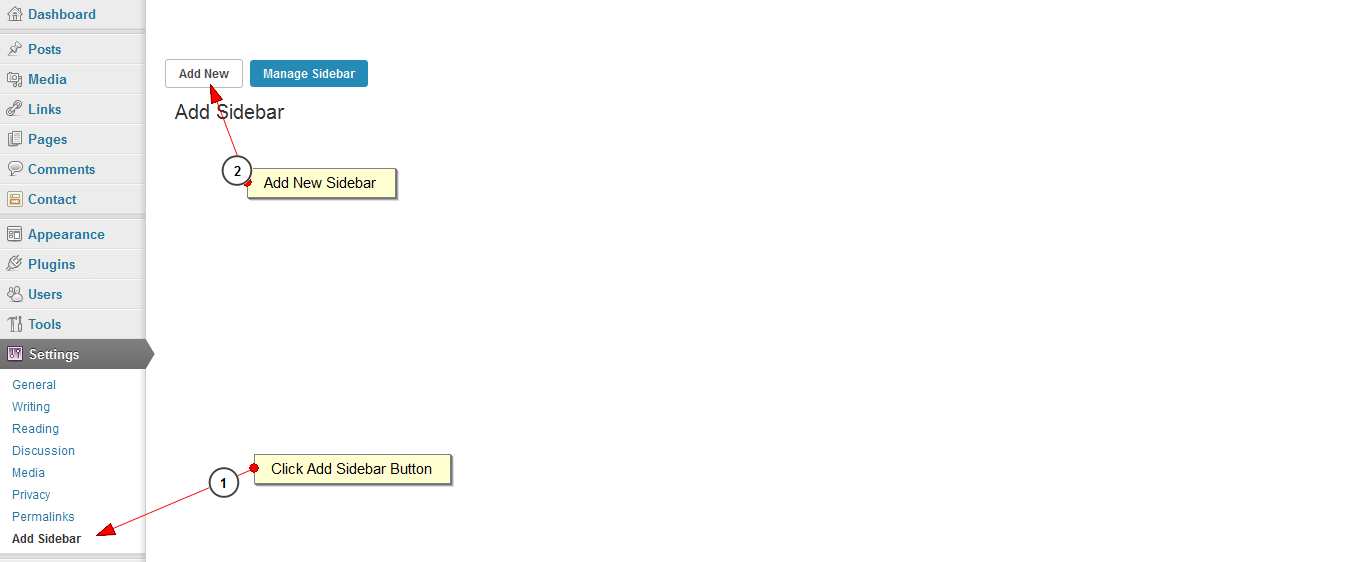
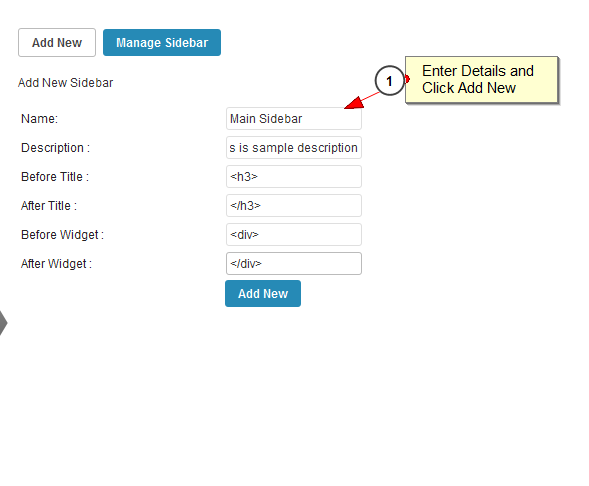
- Start adding sidebar in 'Settings/Add Sidebar' menu in WordPress
- You can then use a shortcode to display your slideshow. Example:
[sidebar_adder id="sd-adder-1"] - Function do_shortcode can be used inside template files. Example:
<?php echo do_shortcode('[sidebar_adder id="sd-adder-1"]'); ?>
屏幕截图:

常见问题:
How the plugin works?
- The plugin stores the data in the database. As the user adds a sidebar it's name and all the required fields are saved in the data base.
更新日志:
1.0.0 - 2013-04-27
- Add sidebar.
- Shorcode facility added.
- New version support wordpress version 3.9.1.
- Sidebar description Added.