
Simple Editor Control – File History, Diff & Restore
| 开发者 | tlloancy |
|---|---|
| 更新时间 | 2026年11月8日 09:12 |
| PHP版本: | 7.4 及以上 |
| WordPress版本: | 7.1 |
| 版权: | GPLv2 or later |
| 版权网址: | 版权信息 |
详情介绍:
functions.php in Appearance → Theme File Editor, saved, and the site went down. Or a plugin file was quietly modified and you want to know who, when, and what exactly changed.
Simple Editor Control records every save made through the WordPress theme and plugin file editors — automatically, with zero setup. For each save it stores the complete file, compressed and sealed with a SHA-256 integrity hash, along with the user and the timestamp.
History you can trust
- Every revision stores the full file content — revisions are independent, so your history can never drift or corrupt.
- The very first tracked save also captures the file as it was before the change, so the original state is always recoverable.
- A save is only recorded after WordPress actually wrote it. Saves that core refused or rolled back (fatal PHP error) never pollute the history.
- SHA-256 integrity check on every read: a corrupted revision is detected and refused, never silently written to disk.
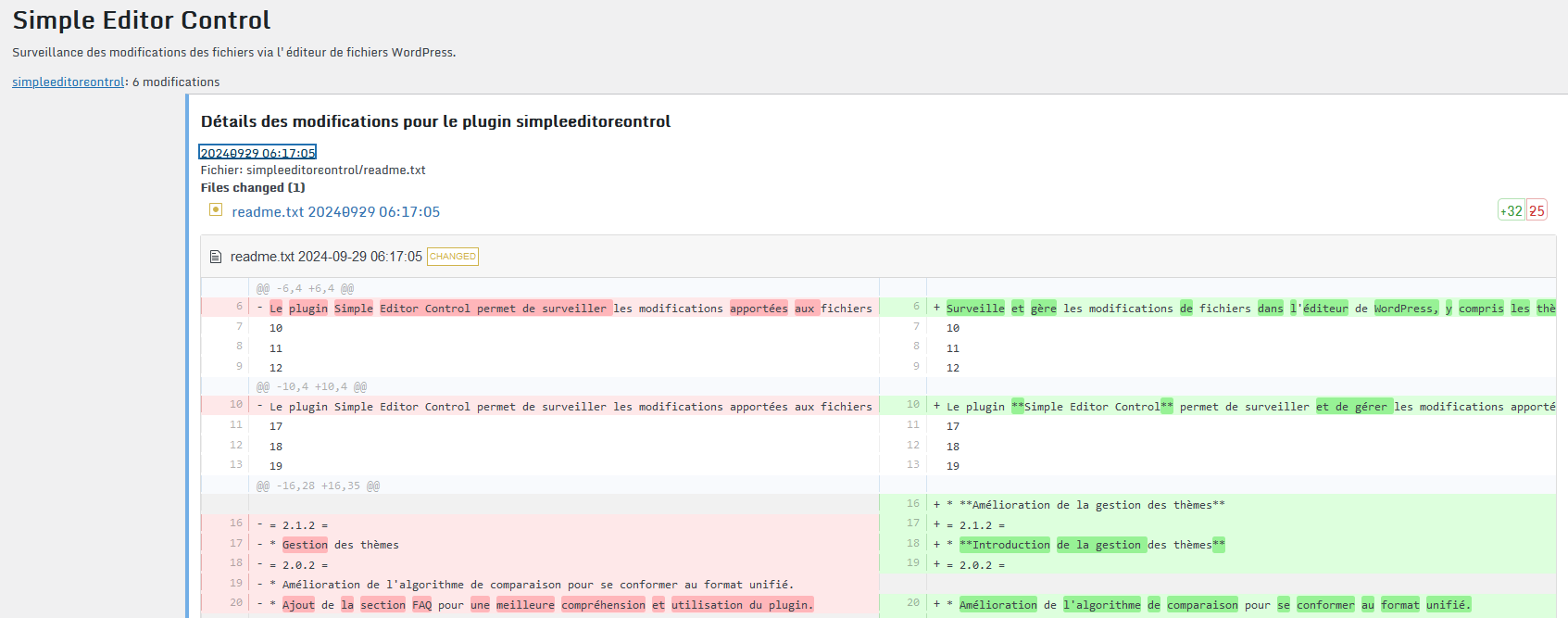
- Real Myers diff algorithm (jsdiff) rendered by diff2html — side-by-side or unified, with syntax awareness.
- Instant context switching (0 to 25 lines) with no server round-trip.
- Added/removed line counts on every revision in the timeline.
- Compare any two revisions of a file, not just consecutive ones.
- One-click restore of any revision (arm, then confirm — no accidental clicks).
- Before overwriting, the current on-disk content is snapshotted as a new revision: a restore can never lose data, even changes made outside WordPress.
- When restoring a PHP file of an active plugin or theme, the site is probed afterwards; if a fatal error is detected, the previous content is put back automatically. No white screen.
- Restore requires the same capabilities as the core editors, and is disabled entirely when
DISALLOW_FILE_EDITis set — the audit trail never becomes a policy bypass.
安装:
- Install and activate through Plugins → Add New, or upload to
/wp-content/plugins/. - That's it — tracking is automatic. Edit any file through Appearance → Theme File Editor or Plugins → Plugin File Editor.
- Browse the history under Tools → Editor Control.
屏幕截图:
常见问题:
Is this related to Gutenberg or the post editor?
No. It tracks the file editors (theme-editor.php and plugin-editor.php), which edit PHP/CSS/JS files of your themes and plugins.
Are changes made via FTP or SSH tracked?
Not live. However, if a file drifted via FTP and you later restore a revision, the drifted content is snapshotted first — so even those changes end up preserved rather than lost.
What happens when I restore a broken PHP file?
If the file belongs to an active plugin or theme, the plugin probes the site right after writing. On a fatal error it puts the previous content back automatically and tells you. Your site stays up.
I upgraded from 5.x — where is my old history?
It was migrated automatically into the new storage engine, with a corrected replay of the old diff chains (labelled “Imported” in the timeline). The old table is kept untouched as a backup and only removed if you delete the plugin.
How big does the database get?
Each revision stores the full file, gzip-compressed — a typical functions.php compresses to a few KB. With the default cap of 100 revisions per file, a heavily edited file uses well under 1 MB.
Can I delete the history?
Deactivating preserves it. Deleting the plugin removes everything: both database tables and all options.
更新日志:
- New storage engine — every revision now stores the full file content (gzip + SHA-256). Revisions are independent: no more diff chains, no replay, no possible history corruption. Existing 4.x/5.x history is migrated automatically; the legacy table is preserved as a backup.
- Fixed: restores could scramble files. The old replay applied multi-line insertions in reverse order, which could write broken PHP to disk. Migration replays old chains with the corrected order; new storage makes the bug impossible by design.
- Fixed: the diff viewer dropped lines. Multi-line insertions were displayed as a single line at the wrong position. Diffs are now produced by jsdiff (real Myers algorithm) and match what git shows.
- Fixed: saves are recorded only if they actually happened. Recording now happens after WordPress finished writing — saves refused by core or rolled back after a fatal error no longer appear in the history.
- Fixed: quadratic diff engine removed. Editing large files (~2000+ lines) could exhaust PHP memory on save. Per-revision stats now use WordPress core's Text_Diff with a size guard.
- New: crash-proof restore. Restoring a PHP file of an active plugin/theme probes the site and rolls back automatically on fatal errors.
- New: pre-restore snapshot. Whatever is on disk is saved as a revision before any restore overwrites it.
- New: compare any two revisions of a file.
- New: onboarding empty state, per-revision +/- counts, origin badges (initial state, restored, imported), user display names, local-time dates (previously shown in the wrong timezone).
- New: automatic pruning with a configurable per-file cap (default 100).
- New:
uninstall.php— deleting the plugin now really removes its tables and options, as the FAQ always claimed. - New:
.potfile shipped; the plugin is now actually translatable, as the readme always claimed. - Security: restore respects
DISALLOW_FILE_EDIT/DISALLOW_FILE_MODSand requiresedit_plugins/edit_themesrather than onlymanage_options. - Removed debug
error_log()calls from production code. - Redesigned admin UI following native WordPress admin patterns.
- Tested up to WordPress 7.1.
- One-click file restore, restore audit entries,
source_typecolumn, inline notices, editor deep links, diff re-render fixes, DB auto-upgrade.
- Fixed initial revision logic using the stored snapshot.
- Fixed incorrect table name reference.
- Migration to the sec_revisions table, hardened AJAX security, LCS diff engine, two-panel UI.
- Minor fixes.