
Simple Entry Booking for WooCommerce
| 开发者 |
anhqui
Qui Nguyen |
|---|---|
| 更新时间 | 2026年8月20日 07:39 |
| PHP版本: | 7.4 及以上 |
| WordPress版本: | 7.0.4 |
| 版权: | GPLv2 or later |
| 版权网址: | 版权信息 |
详情介绍:
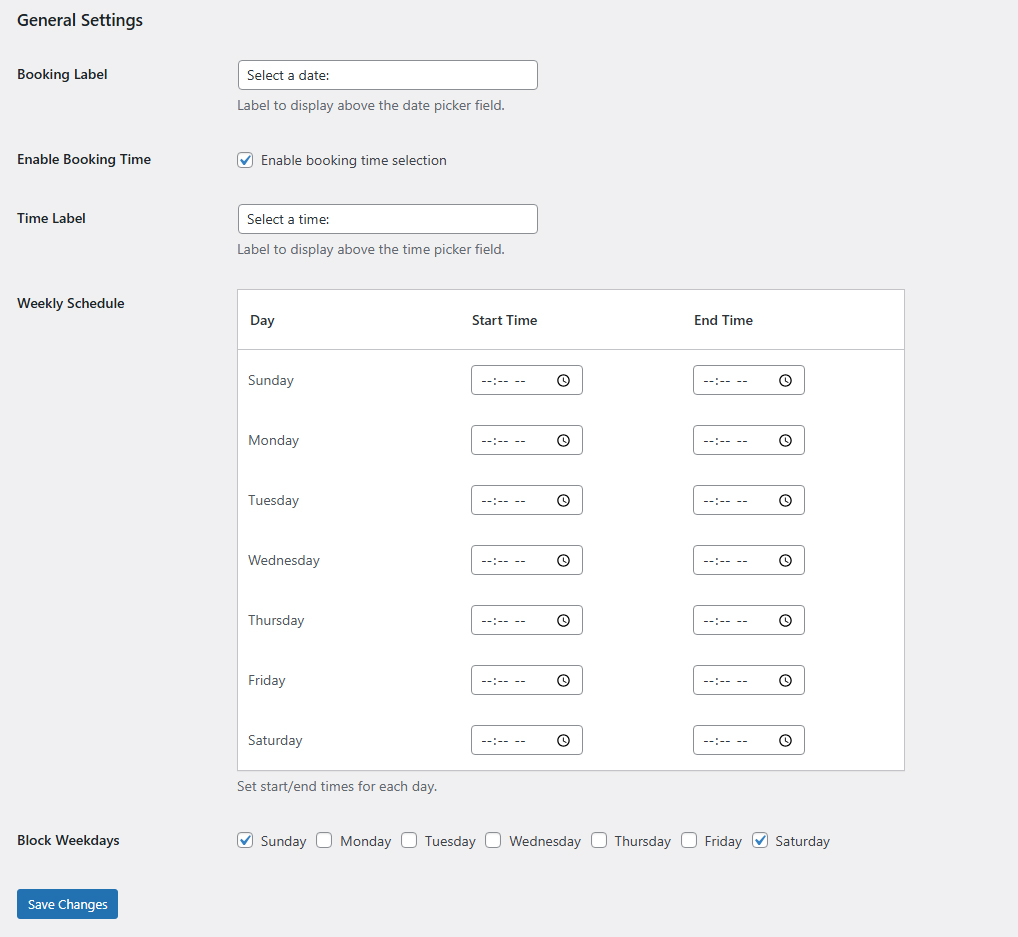
Looking for the most straightforward WooCommerce booking solution that actually works? Most booking plugins cost $100+/year or force you into a complicated setup. This plugin is free, installs in minutes, and handles real-world booking scenarios out of the box.Who Is This Plugin For? Equipment & Vehicle Rentals Set daily booking limits, block weekends or off-days, and let customers pick up their gear on a specific date. Prevents double-booking automatically. Appointment-Based Services Configure your weekly schedule with custom start and end times per day. Clients choose from your available hours, and the calendar greys out fully-booked slots. Tour Operators & Event Bookings Limit how many bookings each date can hold, block holidays or closed dates, and apply weekday discounts to fill slow periods. Freelancers & Consultants A clean, unobtrusive booking date field on your service products lets clients select their preferred date without leaving WooCommerce. Free Version Features Booking Date & Time Fields
- Adds a clean jQuery UI datepicker to any WooCommerce product page
- Optional time selection field alongside the calendar
- Customizable labels for the date and time fields to match your brand Scheduling & Availability Control
- Set available hours (start and end time) for each day of the week
- Block specific weekdays from being bookable (e.g., block all Saturdays and Sundays)
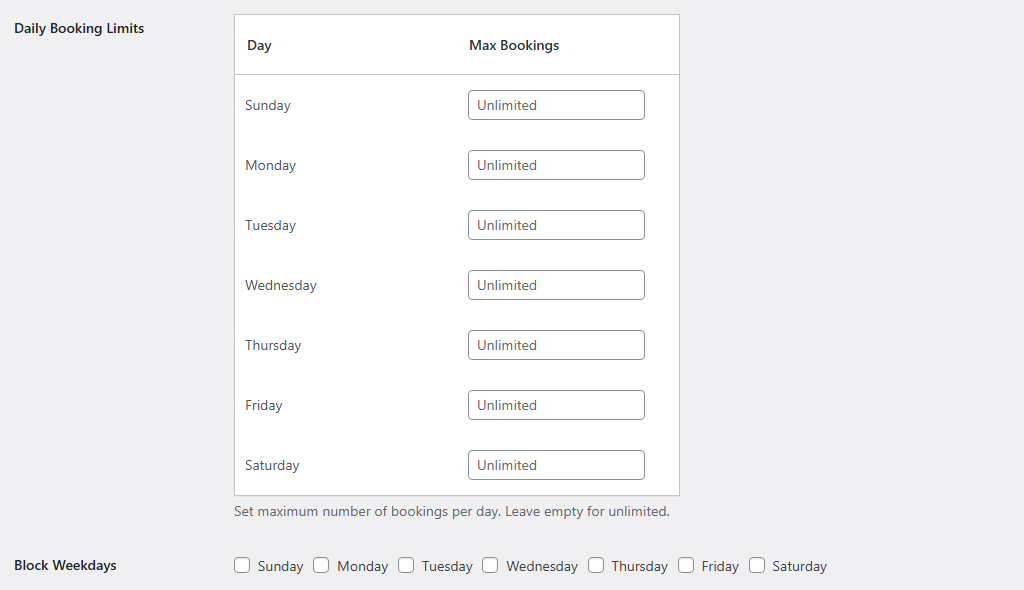
- Set a maximum number of bookings per weekday to prevent overbooking
- Calendar dates automatically grey out when capacity limits are reached Smart Real-Time Availability
- Live availability count includes both confirmed orders and items currently in other customers' carts
- Strict cart validation — customers cannot add a product if the selected date is full or invalid Product & Category Control
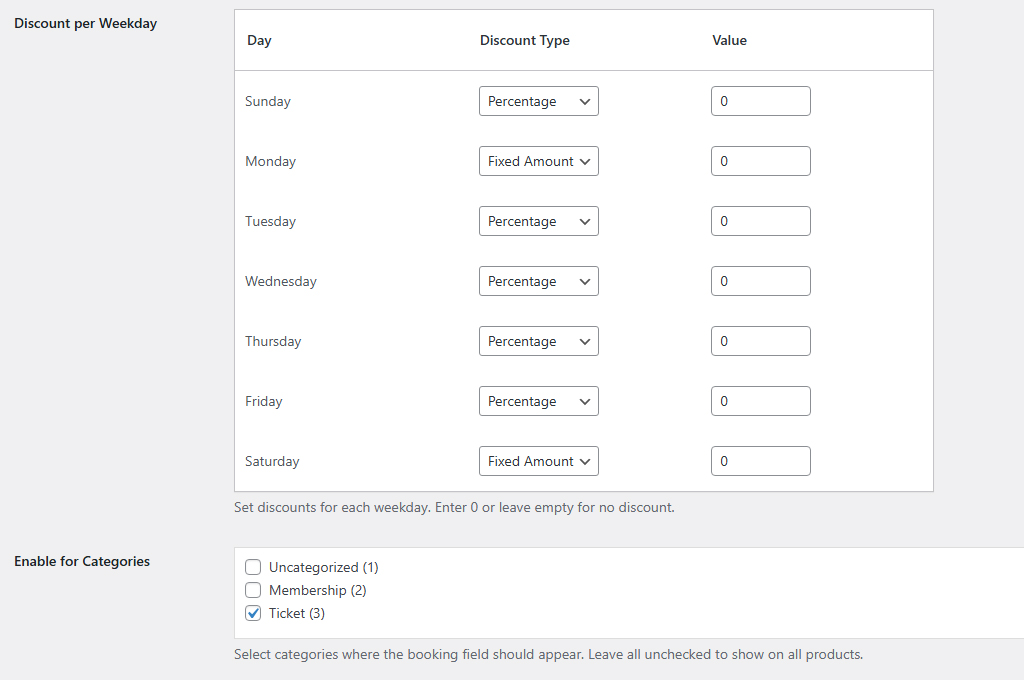
- Restrict the booking date picker to specific product categories only
- Full support for hierarchical categories (selecting a parent auto-includes child categories) WooCommerce Integration
- Booking date and time are saved directly to the cart, checkout, and order details
- Visible to both customers (order confirmation) and admins (WooCommerce order screen)
- Fully compatible with WooCommerce High Performance Order Storage (HPOS) Promotions & Discounts
- Apply percentage or fixed-amount discounts on specific days of the week (e.g., 10% off Mondays)
- Free forever — core booking functionality with no forced upgrades
- Lightweight — no page-builder dependencies, no bloated scripts
- No subscription fees — unlike most WooCommerce booking plugins
- Native WooCommerce — works inside the standard cart/checkout/orders flow
- HPOS-ready — future-proof for modern WooCommerce performance
- Easy to configure — one settings page, sensible defaults, ready in minutes
- Break Times — Set break periods per day (e.g., lunch 12:00–13:00) that are excluded from bookable hours
- Date-Specific Booking Limits — Override your standard daily limit for individual calendar dates
- Block Specific Holiday Dates — Block exact dates (national holidays, closures, vacations) on the calendar
- Advanced Date Discounts — Apply promotional discounts to specific calendar dates, not just weekdays
- Minimum Days Ahead — Require customers to book at least N days in advance
- Per-Product Control — Enable the booking field on specific individual products for granular management
- Priority Developer Support — Direct support for your custom booking setup
安装:
- In your WordPress dashboard, go to Plugins > Add New and search for "Simple Entry Booking for WooCommerce"
- Click Install Now, then Activate
- Go to Settings > Booking Date Picker to configure the plugin
- The booking date (and optional time) field will automatically appear on your WooCommerce product pages
/wp-content/plugins/simple-entry-booking-for-woocommerce and activate it from the Plugins screen.屏幕截图:
常见问题:
Is this plugin really free? Are there hidden fees?
Yes, the core plugin is completely free with no hidden charges. A Pro version is available that adds advanced features like blocking specific holiday dates, break times, and per-product control — but the free version is fully functional for standard single-date booking scenarios.
Does this plugin work without WooCommerce?
No. Simple Entry Booking is an add-on for WooCommerce. You must have WooCommerce installed and activated for this plugin to work.
How do I add a booking date picker to my WooCommerce product?
After activating the plugin, go to Settings > Booking Date Picker and configure your preferences. By default, the booking field appears on all products. You can use the Category Control setting to restrict it to specific product categories only.
Can I show the booking calendar on specific products only?
In the free version, you can restrict the field to specific product categories using the Category Control setting. To target individual products directly, upgrade to the Pro version which includes per-product control.
Does this plugin support multi-day or date-range bookings?
No — this plugin is intentionally designed for single-date bookings only (one date per order item). It is optimized for daily rentals, single appointments, and one-day service bookings. For multi-day or date-range bookings, this is not the right plugin.
How does the booking availability limit work?
You can set a maximum number of bookings allowed per weekday. When that limit is reached, the date is automatically blocked (greyed out) in the calendar. The limit counts both completed orders and items currently sitting in other customers' carts, so you never accidentally overbook.
Where does the booking date appear after the customer orders?
The selected booking date and time are stored as order meta and displayed:
- On the Cart page alongside the product
- On the Checkout page in the order summary
- In the WooCommerce Order details in the admin dashboard
- In the Customer order confirmation email
Can I block weekends or specific days of the week?
Yes. In the Settings page, you can block any combination of weekdays (Monday through Sunday) from being selectable on the calendar. For blocking specific individual dates (like public holidays), upgrade to the Pro version.
Is this plugin compatible with WooCommerce HPOS (High Performance Order Storage)?
Yes. The plugin is fully compatible with WooCommerce High Performance Order Storage. It uses optimized SQL queries and hidden meta keys (_booking_date) to maintain excellent performance even on large stores.
Can I customize the label of the booking date field?
Yes. You can change the frontend label of both the date field and the time field to any text you want from the Settings > Booking Date Picker page.
Does the plugin support booking discounts?
Yes. The free version supports percentage or fixed-amount discounts applied to specific days of the week (e.g., 10% off every Tuesday). For discounts on specific calendar dates, see the Pro version.
Is Simple Entry Booking compatible with the latest version of WooCommerce?
Yes. The plugin is regularly tested with the latest versions of WordPress and WooCommerce. The "Tested up to" field in the plugin header always reflects the most recently verified version.
Will this work with my theme?
The plugin outputs standard WooCommerce hooks and uses jQuery UI datepicker, which is included in WordPress by default. It should work with any properly coded WooCommerce-compatible theme.
更新日志:
- Explicitly declared compatibility with WooCommerce High-Performance Order Storage (HPOS) so the plugin is no longer flagged as incompatible under WooCommerce > Settings > Advanced > Features.
- Fixed a bug where, after Category Control was configured, adding a product that is not eligible for booking to the cart could be blocked by a "Please select a booking date" error even though that product never shows the booking field.
- Confirmed compatibility with WordPress 7.0.4 and WooCommerce 11.0.1.
- Redesigned the Booking Date Picker settings page with a cleaner, card-based layout.
- Combined the Weekly Schedule, Daily Booking Limits, Block Weekdays, and Discount per Weekday settings into a single unified table (one row per weekday).
- Added toggle switches for Enable Booking Time and Block Day for a more intuitive on/off experience.
- Added search and Select All / Select None controls to the Product Categories picker.
- Improved responsive layout for smaller screens.
- Added Category Control feature: Enable booking field only for specific product categories.
- Supports hierarchical categories (child categories included when parent is selected).
- Improved settings page organization.
- Implemented robust quantity-based counting for booking limits.
- Added support for multi-quantity bookings.
- Enhanced HPOS compatibility with optimized SQL queries.
- Added hidden meta key (_booking_date) for improved query performance.
- Improved visual blocking with real-time availability checking.
- Updated promotional content with comprehensive feature list.
- Refactored plugin prefixes to be unique (sebfw_).
- Added nonce verification for security.
- Updated contributors list.
- Fixed WordPress coding standards issues (I18n, escaping, date functions).
- Updated readme tags.
- Fixed syntax error in settings page HTML output.
- Added class existence check to prevent redeclaration errors.
- Improved settings saving logic for checkboxes.
- Fixed missing datepicker navigation icons (prev/next arrows).
- Created languages directory for translation support.
- Initial release.
- Added Booking Date and Time fields.
- Added Weekly Schedule and Blocked Weekdays settings.
- Implemented Cart and Order data saving.
- Disabled past dates in booking date picker.
- Added PRO Upsell box.