
Simple IP Blocker for Pages
| 开发者 | phm1000 |
|---|---|
| 更新时间 | 2026年1月5日 04:42 |
| 捐献地址: | 去捐款 |
| PHP版本: | 7.4 及以上 |
| WordPress版本: | 6.9 |
| 版权: | GPLv2 or later |
| 版权网址: | 版权信息 |
详情介绍:
Simple IP Blocker for Pages is a lightweight security plugin to restrict access to specific pages based on visitor IP addresses.
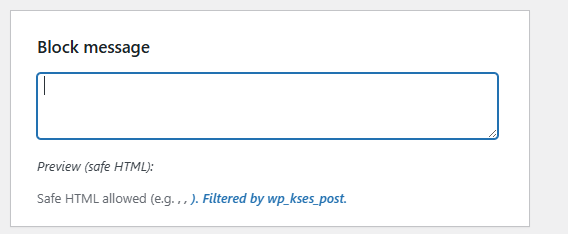
It features a secure administration interface and supports custom block messages with safe HTML (via
wp_kses_post) for secure personalization.
安装:
- Upload the plugin folder to the
/wp-content/plugins/directory. - Activate the plugin through the 'Plugins' menu in WordPress.
- Navigate to 'IP Blocker' to configure protected pages and blocked IP addresses.
屏幕截图:
常见问题:
How do I block an IP address?
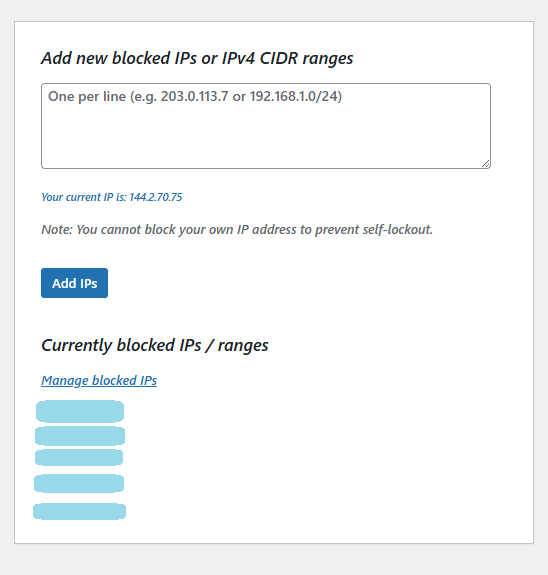
- Go to 'IP Blocker' in your WordPress admin menu
- Scroll to the "Add IPs to Block" section
- Enter IP addresses (one per line) or CIDR ranges (e.g., 192.168.1.0/24)
- Click "Add IPs"
- You'll see a success message confirming how many IPs were added
Can I see which IPs are currently blocked?
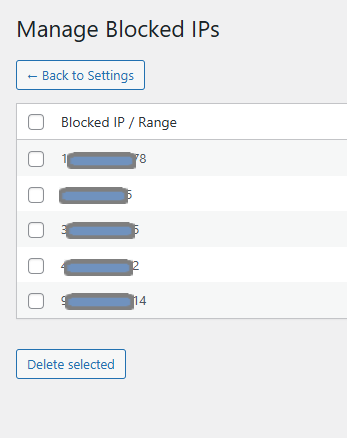
Yes! The blocked IPs list is displayed on the main settings page (first 10 IPs). Click "Manage All Blocked IPs" to see the complete list and manage them.
How do I remove blocked IP addresses?
- Go to 'IP Blocker' → 'Manage IPs'
- Check the boxes next to the IPs you want to remove
- Click "Delete Selected"
- You'll see a confirmation message
What happens if I try to block my own IP?
The plugin has a built-in safeguard that prevents you from blocking your own IP address. You'll receive a warning message showing which IPs were skipped.
What is CIDR notation?
CIDR (e.g., 192.168.1.0/24) allows you to block entire IP ranges. /24 blocks 256 addresses (192.168.1.0 to 192.168.1.255), /16 blocks 65,536 addresses, etc.
Does this work with Cloudflare or other CDNs?
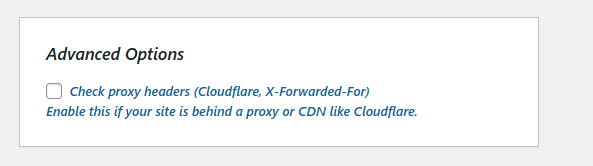
Yes! Enable "Check Proxy/Cloudflare Headers" in the settings to correctly identify visitor IPs behind proxies or CDNs.
Which pages can I protect?
You can select any published WordPress page. The rest of your site remains accessible to everyone.
更新日志:
2.3.4
- Security: Added explicit re-validation of IP addresses before deletion to prevent invalid data manipulation.
- Security: Enhanced CIDR range validation with strict boundary checking (0-32) and decimal value prevention.
- Security: Improved
sipbl_validate_ip_or_cidr()function with separated validation logic for better clarity and security. - Security: Complete output escaping using
absint()for all numeric values displayed in admin interface. - Security: IP addresses in warning messages are now properly escaped with
esc_html(). - Improvement: Added comprehensive admin notification system with success, warning, and error messages.
- Improvement: Blocked IPs list now displayed on main settings page (shows first 10 with "...and X more" indicator).
- Improvement: Added "Manage All Blocked IPs" button for easy navigation to full IP management page.
- Improvement: Added "Back to Settings" navigation button on IP management page.
- Improvement: Real-time IP count indicators on both settings and management pages.
- Improvement: Better user feedback when attempting to block own IP address (shows specific IPs that were skipped).
- Fix: Resolved WordPress.Security.EscapeOutput.OutputNotEscaped warnings for numeric variables.
- Security: Full security audit of data validation and output escaping.
- Security: Strict page ID validation using
absint()to prevent injection. - Security: Enhanced redirect URL validation using
esc_url_raw(). - Security: Implemented systematic output escaping to prevent XSS vulnerabilities.
- Security: Fixed
WordPress.Security.EscapeOutput.OutputNotEscapederrors. - Security: Replaced
__translation functions withesc_html__andesc_attr__for secure admin UI rendering.
- Security: Removed insecure
filter_inputcalls and replaced them with strict manual sanitization usingwp_unslash()andsanitize_textarea_field(). - Security: Enhanced validation logic using
filter_varwithFILTER_VALIDATE_IPfor all address and CIDR inputs. - Security: Improved output escaping throughout the admin UI (esc_html, esc_attr, and esc_textarea).
- Improvement: Added safe admin UI feedback using transients for success and error notifications.
- Security: Full internationalization (i18n) of all user-facing strings.
- Security: Enhanced input validation and sanitization across all forms.
- Security: Strict nonce verification implemented for all admin actions.