
Simple Voting System Formally Fc Feedback
| 开发者 | AdnanHyder |
|---|---|
| 更新时间 | 2026年6月9日 19:39 |
| 捐献地址: | 去捐款 |
| PHP版本: | 8.0 及以上 |
| WordPress版本: | 7.0 |
| 版权: | GPLv2 or later |
| 版权网址: | 版权信息 |
详情介绍:
[svsfc_feedback] for manual placement inside posts and pages.
Admin feedback analytics dashboard with total votes and helpful score.
CSV export for article feedback reporting.
Custom frontend question text, yes/no labels, and thank-you text.
Controls for automatic display and page support.
Responsive design for compatibility across various devices and screen sizes.
Usage:
Frontend (Visitor Perspective):
Visit any single post article on your website.
Scroll to the end of the article to find the feedback feature.
Click on the "Yes" or "No" button to submit your vote.
After voting, you will see the current feedback results displayed as an average percentage.
The buttons will remain inactive, but your vote will be displayed.
Refreshing the page will retain the feedback results and your vote.
Shortcode usage:
Add [svsfc_feedback] to a post or page to place the voting form manually.
When the shortcode is used inside a blog post, the plugin will not append a duplicate voting block automatically.
Backend (Admin Perspective):
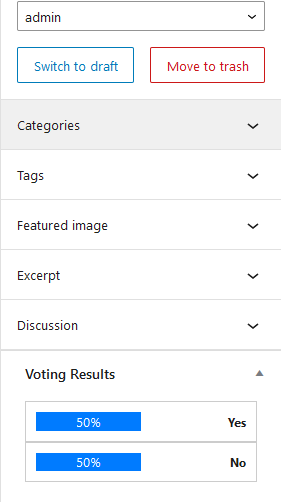
When editing an article in the admin area, you will see the feedback results in a meta widget.
The meta widget displays the positive and negative percentage of feedback.
Open Feedback Analytics in the WordPress admin menu to review top feedback posts, total votes, positive/negative counts, helpful score, and export CSV reports.
Hooks
Two custom filter hooks also provided by this plugin
- svsfc_feedback_form Filter Hook:
- svsfc_feedback_results Filter Hook:
安装:
屏幕截图:

常见问题:
- Can I place the voting box manually inside content?
Yes. Version 3.0.0 adds the [svsfc_feedback] shortcode for manual placement inside posts or pages.
= 1. How does the SVSFc Feedback plugin prevent visitors from providing multiple feedback on the same article?
The SVSFc Feedback plugin utilizes visitor fingerprinting methods, such as checking IP addresses, to prevent multiple feedback submissions from the same user on a single article. This ensures that each visitor can provide feedback only once per article, maintaining the integrity of the feedback data.
= 2. Can I customize the appearance of the feedback buttons to match my website\'s design?
Yes, you can easily customize the appearance of the feedback buttons to align with your website\'s theme. After activating the plugin, navigate to Settings > SVSFc Feedback in your WordPress admin panel. From there, you can customize button labels, colors, and other display settings to seamlessly integrate the feedback feature with your website\'s design aesthetic.
= 3. Is the SVSFc Feedback plugin compatible with all WordPress themes and plugins?
The SVSFc Feedback plugin is designed to be compatible with most WordPress themes and plugins. However, compatibility can vary depending on the complexity of your theme or the functionality of other plugins installed on your website. We recommend testing the plugin on a staging or development environment to ensure compatibility before deploying it on your live website.
- Can I view overall feedback statistics for all articles?
Yes. Version 4.0.0 adds a Feedback Analytics dashboard with totals, top posts, helpful score, and CSV export.
更新日志:
- Added a nonce-protected Reset Votes action for each post in Feedback Analytics.
- Resetting a post now clears vote totals and stored visitor vote markers.
- Added per-post vote generations so old browser cookies do not block voting after a reset.
- Added shortcode-level question, yes label, no label, and thank-you text overrides.
- Added [svsfc_feedback_results] shortcode for embedding compact vote results anywhere.
- Added raw yes/no percentage values to the results API for better theme integrations.
- Improved manual feedback placement for landing pages, comparison posts, and reusable blocks.
- Added post_id support to the [svsfc_feedback] shortcode for manual placement.
- Added a browser cookie vote lock to reduce duplicate voting beyond IP checks.
- Improved AJAX vote handling by safely reading visitor IP values.
- Added settings for custom feedback question text.
- Added settings for custom Yes and No button labels.
- Added custom thank-you text setting.
- Added automatic display toggle.
- Added optional automatic display on pages.
- Added Feedback Analytics admin dashboard.
- Added CSV export for article feedback reports.
- Added total vote, positive vote, negative vote, and helpful score summaries.
- Updated WordPress.org banner artwork for the release.
- Added
[svsfc_feedback]shortcode support for manual placement. - Prevents duplicate output when the shortcode is used inside blog posts.
- Improved vote submission validation for post IDs and vote types.
- Updated WordPress.org banner artwork for the release.
- Initial release.