
SiteCare – Vulnerability Scanner
| 开发者 | fstab |
|---|---|
| 更新时间 | 2026年9月12日 03:22 |
| 捐献地址: | 去捐款 |
| PHP版本: | 7.4 及以上 |
| WordPress版本: | 7.1 |
| 版权: | GPLv2 or later |
| 版权网址: | 版权信息 |
详情介绍:
- Automatic daily monitoring in the background - plus an instant re-scan whenever you install, update or activate a plugin or theme.
- Email alerts the moment a new vulnerability appears, so you find out without having to be logged in.
- Clear severity ratings (CVSS) and CVE references, with the most urgent components listed first.
- One-click updates right from the results whenever a fix is available.
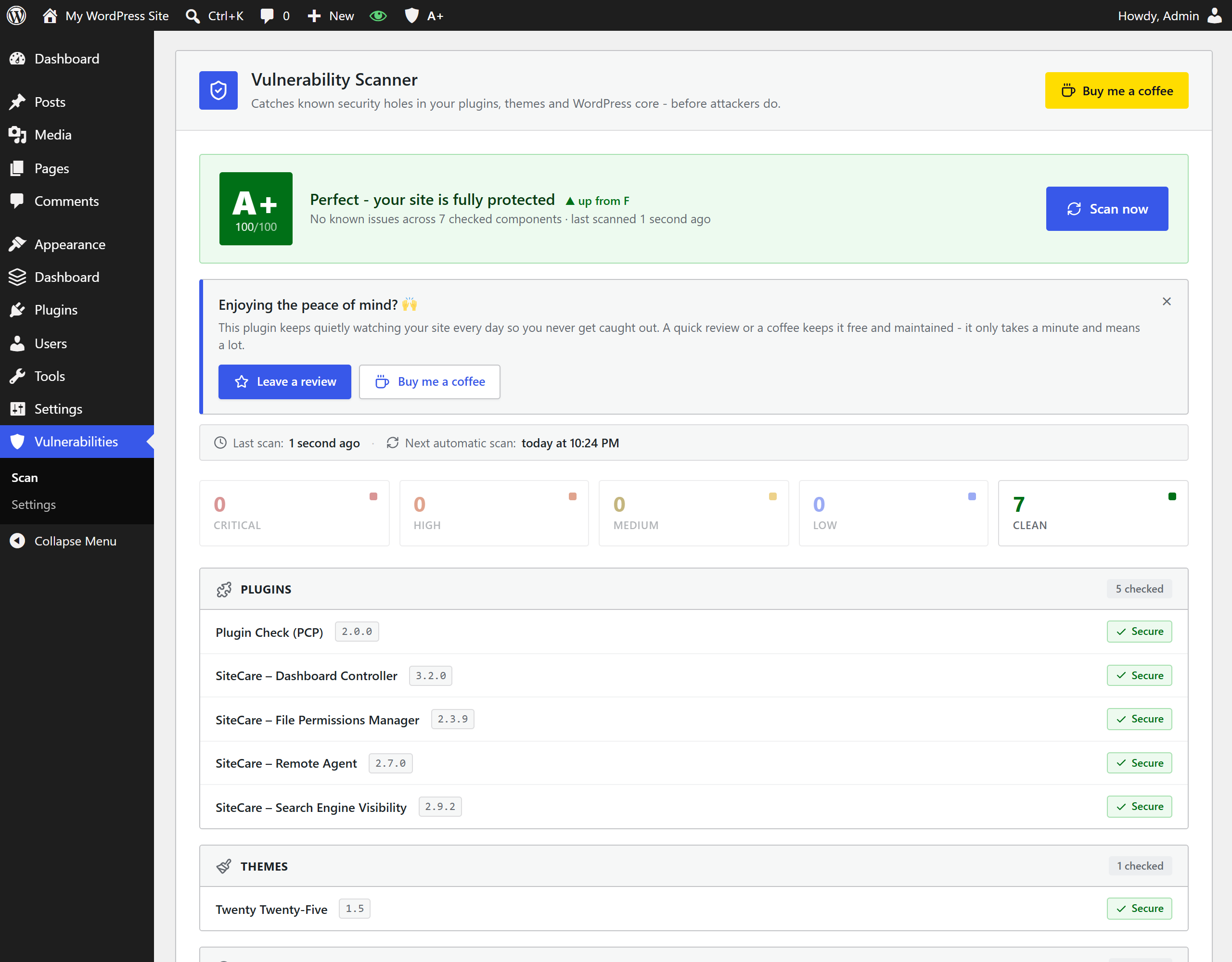
- Security score A-F (0-100) that grades your whole site at a glance, with a trend against your previous scan.
- Abandoned & removed plugin detection - warns you when an installed plugin has been closed on WordPress.org or has had no update for years.
- Slack / Discord alerts via webhook, and a WP-CLI command (
wp vulnerability scan) with a CI-friendly exit code. - Shown where you already look - a dashboard widget and a WordPress Site Health check.
安装:
- Go to Plugins → Add New and search for "SiteCare Vulnerability Scanner".
- Click Install Now, then Activate.
- Download the plugin .zip file.
- Go to Plugins → Add New → Upload Plugin and choose the .zip.
- Click Install Now, then Activate.
屏幕截图:
常见问题:
Does it scan automatically?
Yes. It runs a background scan once a day (configurable) and an immediate re-scan whenever you install, update or activate a plugin or theme. You can also press "Scan now" any time.
Will it email me?
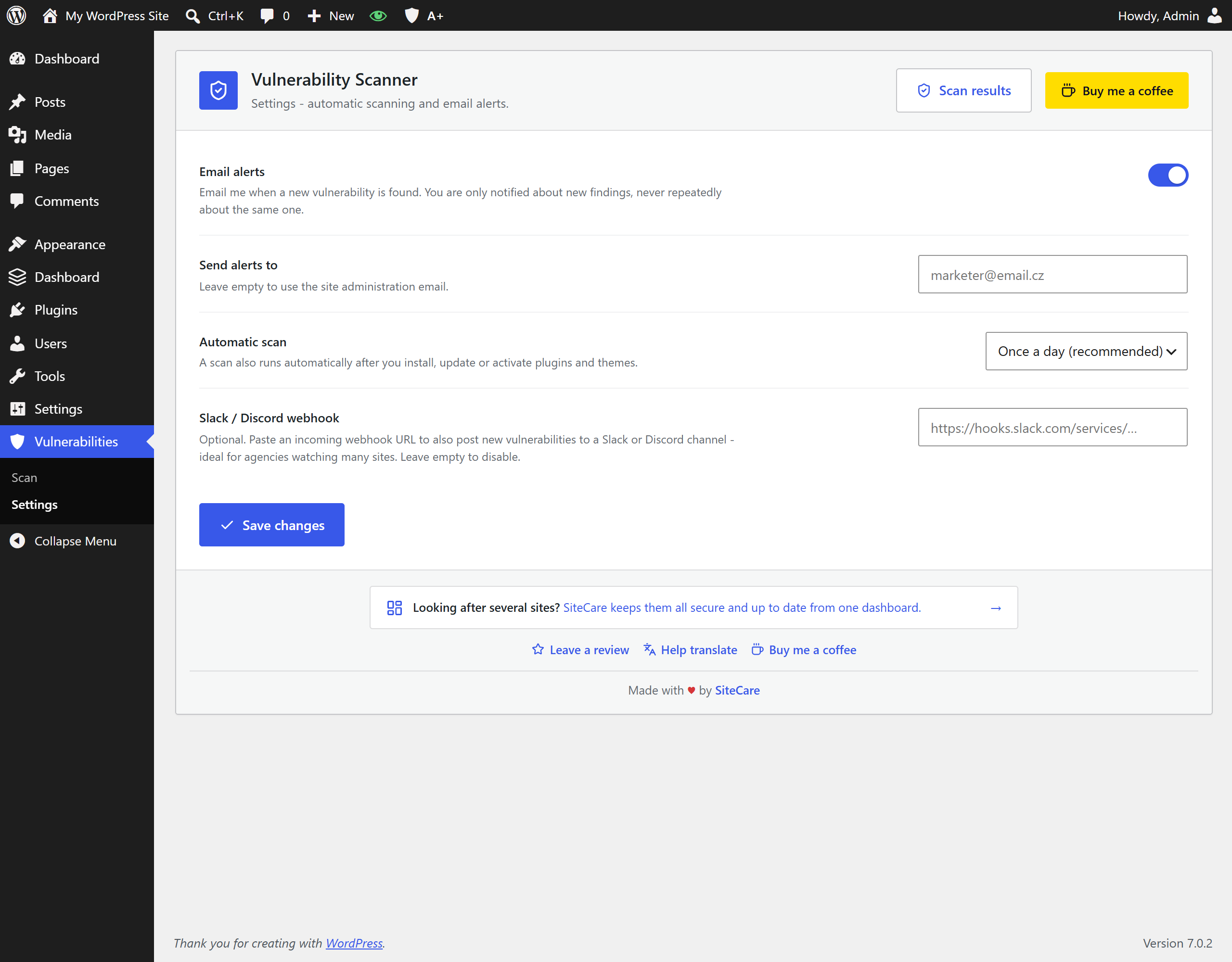
Yes, if email alerts are enabled (they are by default). You are notified only about new vulnerabilities, never repeatedly about the same one. You can turn this off under Vulnerabilities → Settings.
How does it decide something is vulnerable?
It compares your installed version against the affected version ranges published for each known vulnerability - so it catches issues even when you are several versions behind, not only on an exact-version match.
Does it send my data anywhere?
No. Only the public slug and version of each plugin, theme and WordPress core are looked up against the WP Vulnerability API. No site content, credentials or personal data ever leave your server.
Does it slow down my site?
No. Lookups are cached and scans run in the background via WP-Cron, so your admin stays fast.
What is the security score?
A single A-F grade (0-100) that summarises the health of your whole site - lower when you have open vulnerabilities or abandoned components, higher when everything is up to date. Each scan also shows whether the score went up or down since last time.
How do abandoned / removed plugins get flagged?
The plugin checks each installed component against the WordPress.org directory. If a plugin has been closed (removed) or has had no update for a very long time, it is flagged so you can plan a replacement. Premium or off-directory plugins are not falsely flagged.
Can I get Slack or Discord alerts?
Yes. Paste a Slack or Discord webhook URL under Vulnerabilities → Settings and new findings are posted there.
Is there a WP-CLI command?
Yes: wp vulnerability scan and wp vulnerability status. It returns a non-zero exit code when vulnerabilities are found, so you can use it in CI.
Can I support plugin development?
Yes, via Buy Me a Coffee.
更新日志:
- Hardened admin output: all icon and button markup now passes through wp_kses().
- Set "Requires at least" to 5.2 to match the readme and the scheduling functions used.
- Added direct-access protection to the WP-CLI file.
- Completed the translations - all six locales now cover every string.
- Critical-severity rows now have a distinct stronger red highlight, separate from Unknown/Unrated rows.
- Webhook URL is sanitized with esc_url_raw() on save.
- The scanner screens are now ad-free: notices and promos injected by other plugins no longer appear inside them.
- Czech translation is back on board alongside the five world languages.
- Unified translations across the SiteCare family: five world languages (German, Spanish, French, Portuguese, Russian).
- Refreshed screenshots.
- Shortened the directory description to fit WordPress.org limits.
- License unified across the SiteCare family to GPLv2 or later; uniform screenshots.
- Readme polish: proper FAQ formatting and refreshed screenshots, including a real "vulnerability found" example.
- Footer links no longer underline on hover.
- Unified the footer across the SiteCare plugin family; the SiteCare link now points to app.sitecare.cz.
- Added a subtle link to SiteCare for people who manage several sites and want them all watched from one dashboard.
- New security score (A-F / 0-100): an at-a-glance grade for your whole site, shown on the dashboard, in the admin bar and the dashboard widget, with a trend against your previous scan.
- New abandoned & removed plugin detection: installed plugins that have been closed on WordPress.org, or left without an update for years, are now flagged (premium/off-directory plugins are not falsely flagged).
- New Slack / Discord webhook alerts: paste a webhook URL in Settings to get new findings posted to your channel.
- New WP-CLI command:
wp vulnerability scanandwp vulnerability status, with a CI-friendly exit code. - Refreshed dashboard UI: score hero, health badges and a clearer scan/last-scan status line.
- A friendly "your site is clean" note after a spotless scan (dismissible).
- Major rewrite. Fixed detection: vulnerabilities are now matched by version range (CVSS-aware) instead of an exact-version match that previously missed almost every real case.
- New background monitoring via WP-Cron (daily, configurable) plus instant re-scans after installs, updates and activations.
- New email alerts for newly discovered vulnerabilities (only new ones), with a Settings screen.
- New results screen: severity ratings, CVE links, "fixed in" versions and one-click updates, most urgent first.
- New WordPress Site Health check and dashboard widget.
- API responses are cached to keep the admin fast; full data cleanup on uninstall.
- Rebranded to SiteCare – Vulnerability Scanner, part of the SiteCare plugin family
- Donate and support links now point to Buy Me a Coffee
- Fixed the "Donate" and "Support me on Ko-fi" links to point to the correct account
- Fixed malformed markup on the Ko-fi support button
- Asset versions now follow the plugin version for reliable cache-busting
- Tested up to WordPress 6.8.3
- Minor improvements and bug fixes
- Tested up to WordPress 6.8.3
- Minor improvements and bug fixes
- Tested up to WordPress 6.8.3
- Minor improvements and bug fixes
- Tested up to WordPress 6.8.3
- Minor improvements and bug fixes
- Initial release
- Automated scanning of installed plugins, themes, and WordPress core
- Real-time results and alerts
- Uses WP Vulnerability API (read-only)
- Lightweight and efficient
- Easy-to-use admin interface
- Supports donations via Buy Me a Coffee
- Installation via WordPress plugin screen or upload