SiteLock Security – WP Hardening, Login Security & Malware Scans
| 开发者 |
SiteLockSecurity
SiteLock tlow awarner20 logankipp |
|---|---|
| 更新时间 | 2026年6月24日 02:46 |
| PHP版本: | 8.0 及以上 |
| WordPress版本: | 7.0 |
| 版权: | GPLv2 or later |
| 版权网址: | 版权信息 |
详情介绍:
🌟 Completely redesigned in Version 5.0 — now even stronger with 2FA in 5.1 🌟 The SiteLock WordPress plugin was recently rebuilt with three goals: make it faster, make it clearer and move the heavy work to the cloud. We built a cloudfirst architecture, modernized UI, expanded security controls and stripped out everything that didn’t need to be there. Our latest 5.1 release builds on that foundation with TwoFactor Authentication (2FA) to strengthen login security and give you tighter control over access. The big changes: - 🔒 Enhanced WordPress-specific hardening and login security controls - ☁️ Cloud-powered scanning architecture for zero performance impact - 🩺 New Site Health interface that shows you what matters in one view - ⚡ Streamlined controls (fewer clicks to get protected) - ✨ Modern codebase built for the WordPress you're actually using today - 🔢 Two-Factor Authentication (2FA) now available for stronger login protection If you used the old plugin: this is a different tool. If you're new: you're starting with the cleanest, fastest version of the plugin.Your website deserves protection that’s simple, fast and built for WordPress. SiteLock WordPress Security focuses on the everyday controls that matter most and helps you establish a secure baseline in minutes — WordPress-specific hardening, login protection with Two-Factor Authentication (2FA) and a clear Site Health dashboard that keeps you in control without slowing your site down. It’s lightweight, action-first protection that complements your host defenses: essential safeguards run inside WordPress while deeper checks happen securely in the SiteLock cloud. Skip heavy on-server scans and alert fatigue — run on-demand checks when you need extra assurance, so you can ship updates with confidence. Security that grows with you Our goal is straightforward: maintain a strong baseline with minimal overhead while giving you clear visibility and room to grow as your needs evolve. And because security is never static, this plugin keeps pace. Two-Factor Authentication (2FA) is now available to strengthen login security with an extra layer of protection. Commercial plugin This plugin is free but offers additional paid commercial upgrades or support.
安装:
- In Plugins → Add New, search “SiteLock Security”, then Install and Activate
- Open SiteLock from the left menu
- Choose your setup path: a. Use free baseline protections (no account required) or b. Connect your SiteLock account (or create one) to enable cloud checks and add broader protections (optional)
- Toggle the WordPress hardening and login protections that fit your site
- After you’ve connected a SiteLock account (free tier supported), Scan Now runs an on-demand check and recurring scans run by default to keep your site monitored at all times
屏幕截图:
常见问题:
Will this slow my site?
No, the plugin is designed to be lightweight. SiteLock security scans run in the SiteLock cloud, so both recurring scans and on-demand checks are processed off-site, keeping the resource impact on your WordPress site minimal. Locally, the plugin applies optional website hardening and login hygiene. These actions are event-driven with negligible impact on typical page loads. Bottom line: cloud-powered scanning plus low-overhead local controls deliver ongoing monitoring with minimal footprint in WordPress.
Does this plugin run constant background scans?
No. The plugin focuses on low-impact protections and on-demand checks you control.
Where do I see results inside WordPress?
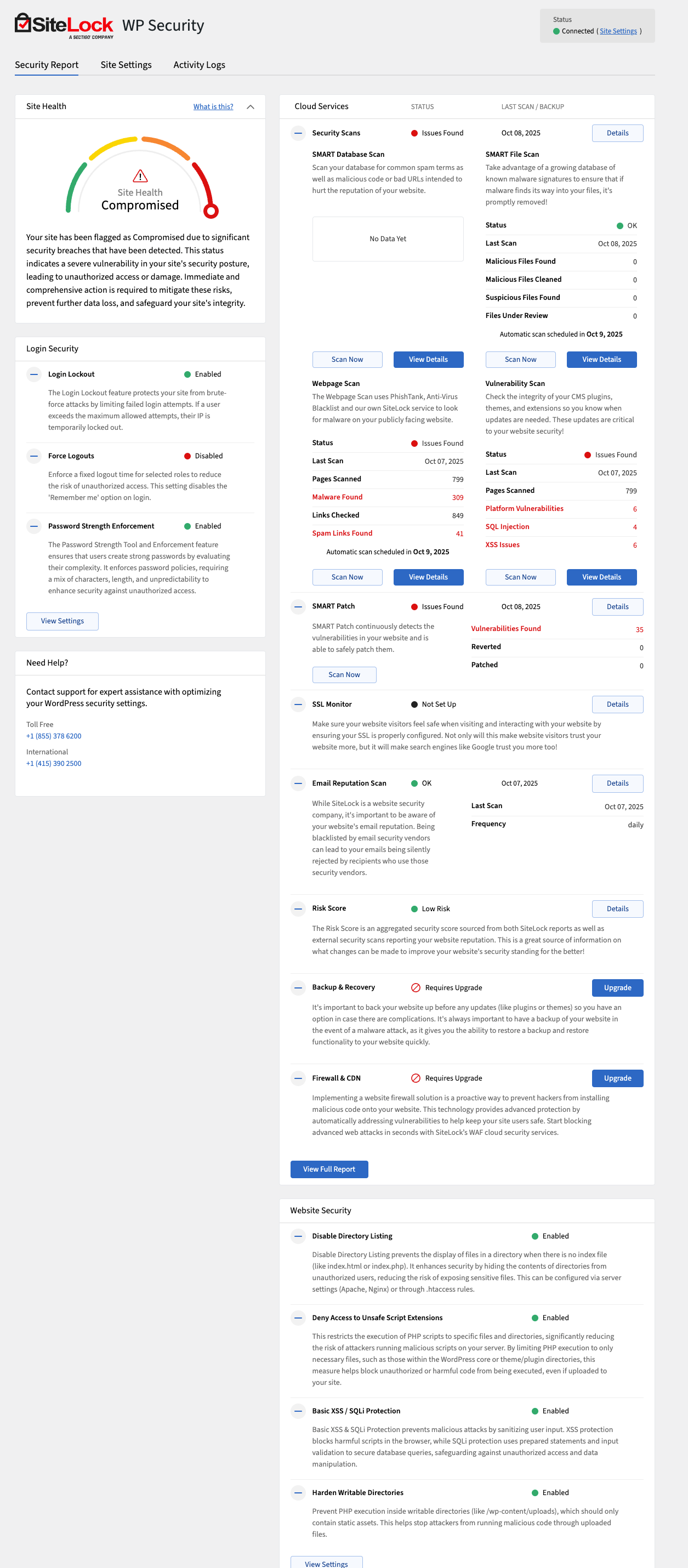
The Site Health view shows status at-a-glance. The Cloud Services panel shows your latest cloud scan status and findings. For full history, use your SiteLock dashboard.
Can I use the plugin without a SiteLock account?
Yes, you can use the free plugin features without an account. Core hardening and login security work out of the box. Connect a free SiteLock account to unlock Site Health, Scan Now and recurring Cloud Checks. Paid SiteLock plans add deeper malware and vulnerability scans.
What happens if I disconnect my SiteLock account?
Local protections continue to work. Cloud scans, if configured, will continue to operate but data will not be pulled into the plugin unless they’re connected with a license key.
What’s included in the free SiteLock tier vs paid?
The free plugin includes WordPress Hardening and Login Security. Connect a free SiteLock account to unlock the Site Health view, enable recurring Email Reputation Scan, SSL Monitoring, Webpage and Vulnerability scans + Scan Now on-demand checks. Paid plans add SMART File and SMART Database scans.
Can I safely disable features?
Yes. Every hardening toggle is reversible — disable and retest anytime.
Does this replace my firewall or CDN?
No. This plugin sets your on-site baseline. For active blocking and performance protection, connect a full SiteLock plan to enable the SiteLock Firewall (WAF) and CDN.
What about Two-Factor Authentication (2FA)?
Enhanced protection is here — Two-Factor Authentication (2FA) is now available. It adds an extra verification step on top of our existing login protections and works with authenticator apps like Google Authenticator and Microsoft Authenticator.
Will 2FA be required or optional?
For security, 2FA is required for all accounts. Users have a 7-day enrollment window to complete setup.
What changes does this plugin make that could affect my site?
Nothing changes until you enable a setting. Login features don’t alter your theme or content. Some hardening options intentionally tighten execution rules and may impact edge cases, for example:
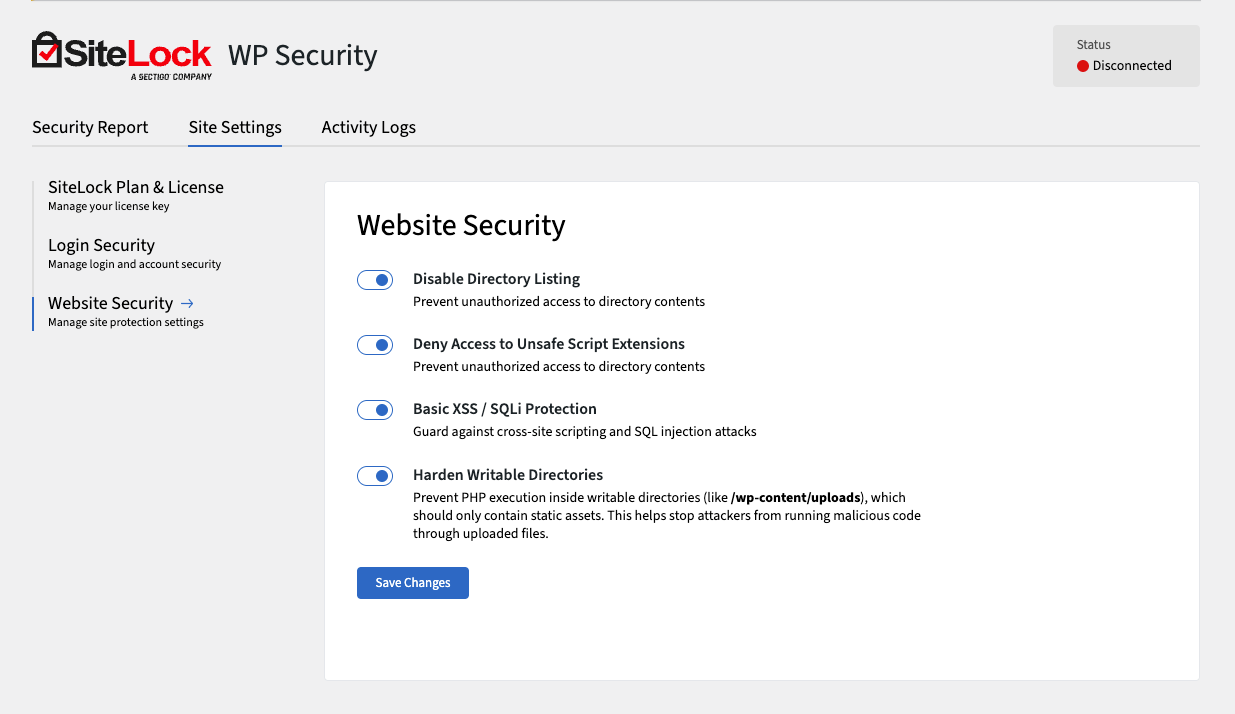
- Deny Access to Unsafe Script Extensions: blocks execution of unexpected script types (phtml, phar, cgi, pl, py, asp, aspx, jsp). If your site needs one of these, don’t enable this toggle.
- Harden Writable Directories: blocks PHP execution in /wp-content/uploads. Plugins/themes that execute PHP there may stop working. Best practice: enable settings gradually, test and revert any toggle that conflicts with your stack.
What is the Site Health view?
It’s a simple, low-impact status view of key checks.
What is “Scan Now”?
An on-demand check for key items — useful after you update plugins/themes or change configuration. It does not perform heavy on-server scans.
更新日志:
- Perf: Faster admin dashboard and backend operations
- Fix: Enhanced login lockout experience with clearer status messaging
- Fix: Improved reliability when saving connection and security settings
- Feature: New SiteLock branding
- Feature: Added new Two-Factor Authentication (2FA) functionality to improve login security
- Fix: Improved license key validation flow
- Fix: Improved WordPress hardening handling to prevent .htaccess update issues
- Fix: Improved report data freshness, including last scan and next scheduled scan date handling
- Fix: Minor UI improvements
- Perf: Reduce database queries and standardize admin enqueue logic
- Security: Improved admin permission checks for restricted functions
- Feature: Queue new cloud scans directly from plugin
- Fix: Support license key activation on subdirectory installs
- Fix: Minor admin UI improvements
- Fix: Improve admin load times
- Security updates.
- License key–based connection flow (SSO-compatible) replacing legacy auth.
- Full UI redesign aligned with SiteLock dashboard + WordPress admin standards.
- WordPress Hardening features:
- Disable directory listing.
- Block execution of unsafe script extensions.
- Basic XSS / SQL Injection request filtering.
- Block PHP execution inside writable asset directories (e.g. 'wp-content/uploads').
- Login Security features:
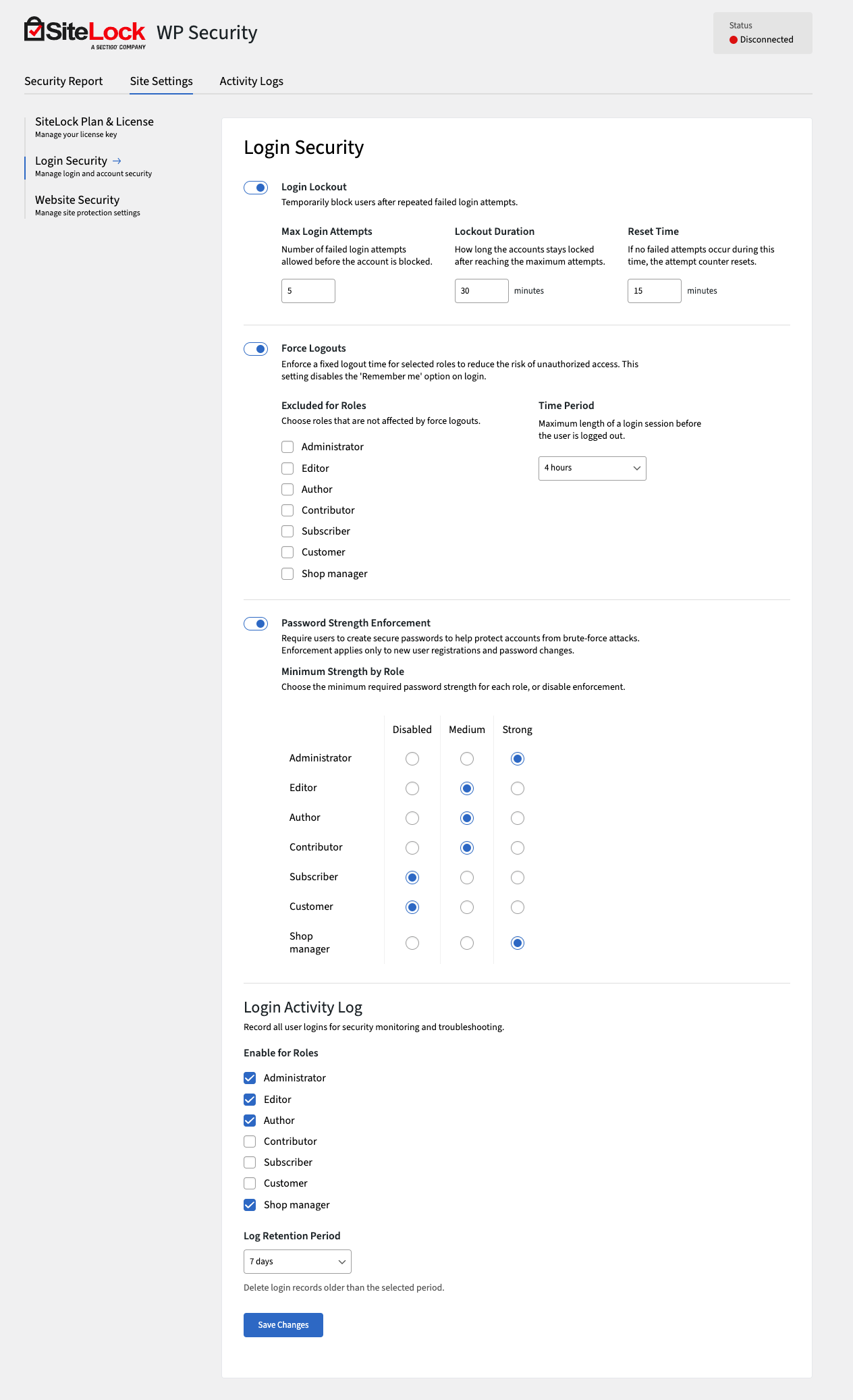
- Login lockout (rate limiting after repeated failures).
- Forced logout time controls by role.
- Password strength enforcement (new users & password changes).
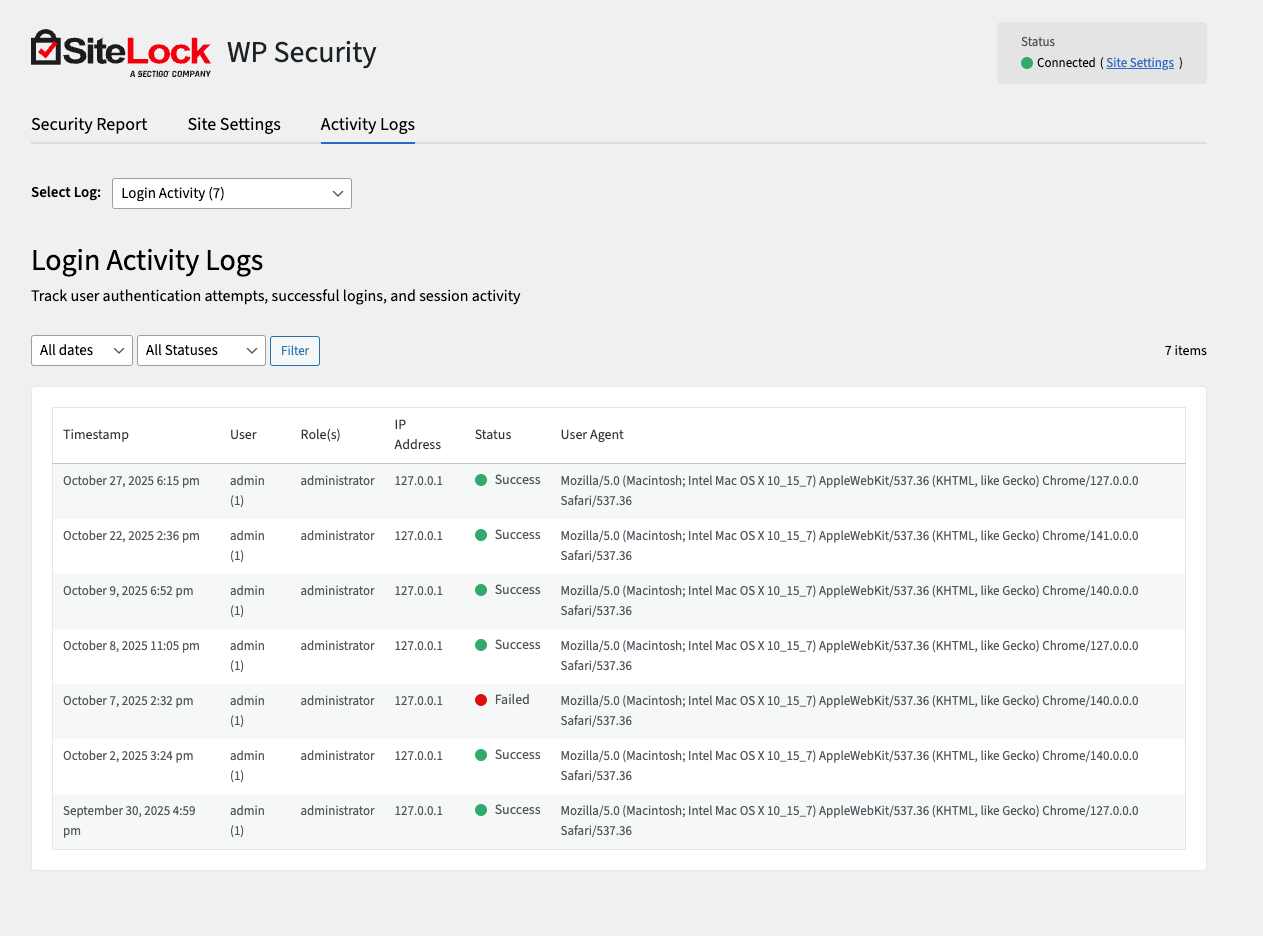
- Login Activity Log (role-aware).
- Admin Audit Log (tracks privilege & role changes).
- In-dashboard Security Report providing an overview of your latest SiteLock security scans.
- Site Health score indicator in wp-admin.
- Improved signup flow for new users.
- SiteLock Trust Seal HTML embed.
- Post scanning functionality (legacy).
- Admin Dashboard Widget, Admin Bar dropdown.
- Post editor metaboxes.
- WAF & CDN settings panel (SiteLock Dashboard preferred).
- After updating, go to: SiteLock > Settings > SiteLock Plan & License and enter your new license key (required going forward).