
SlideVerse – Slider, Carousel & Image Slider Blocks
| 开发者 | wpxero |
|---|---|
| 更新时间 | 2026年10月11日 01:08 |
| PHP版本: | 7.4 及以上 |
| WordPress版本: | 7.1 |
| 版权: | GPLv2 or later |
| 版权网址: | 版权信息 |
详情介绍:
- Base Slider & Hero Carousel – Hero and banner slides with a title, subtitle, description, and button over a background image. Includes a colour overlay, content alignment, and a responsive slide height.
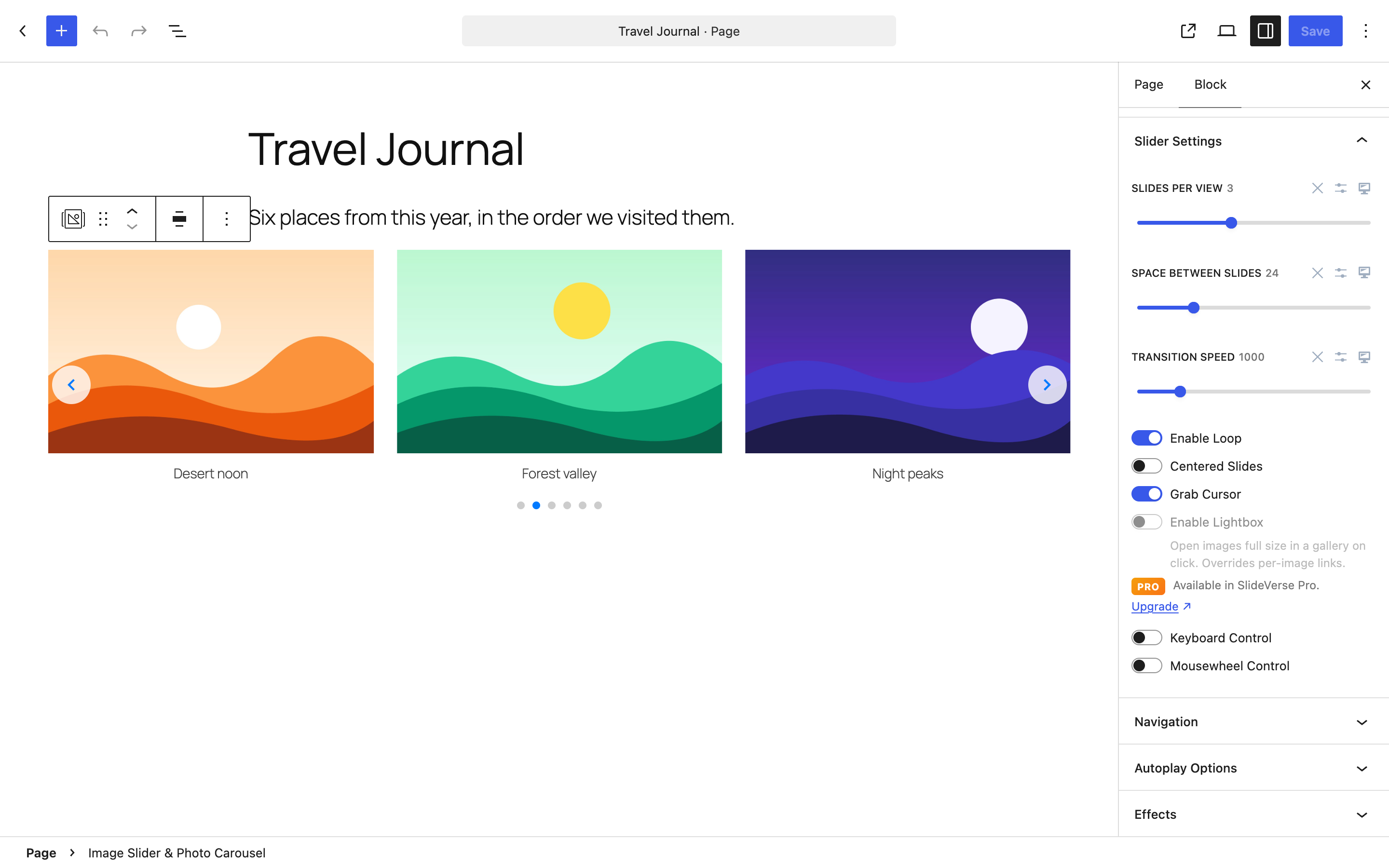
- Image Slider & Photo Carousel – An image carousel with captions (below the image or as a hover overlay), hover tooltips, and a link for each image.
- Flexi Content Slider – Build each slide from any blocks: images, headings, paragraphs, buttons, groups, or columns. Slide height can be Auto, Fixed, or Minimum.
- Infinite Slider – A continuous scrolling carousel (marquee) for logos, text, or any blocks. Horizontal or vertical, with adjustable speed and spacing, and grab/swipe dragging.
- Post Slider & Blog Carousel – Shows posts, pages, or public custom post types with featured image, title, excerpt, and a read-more link. Filter by category and set the order and count.
- Logo Carousel & Partner Showcase – A carousel for client, partner, or sponsor logos.
- Testimonial Slider & Review Carousel – Testimonials with star rating, author name, role, and avatar.
- Video Slider & Video Carousel – YouTube, Vimeo, and self-hosted videos with thumbnail previews, played inside the card.
- Before After Image Comparison – Two images with a draggable divider.
- Flexi Content Slide and Infinite Slider Item – Helper blocks that hold the content of one slide. They are added for you inside their parent block.
- Slider Settings – Slides per view, space between slides, transition speed, loop, centered slides, grab cursor, keyboard control, and mousewheel control.
- Navigation – Show or hide arrows and pagination bullets, and choose the arrow position.
- Autoplay Options – Turn autoplay on or off and set the delay.
- Effects – Slide or fade transition.
- Style – Colours, spacing, borders, and typography for the slider, slides, and arrows, with hover states.
- Sliders adapt to desktop, tablet, and mobile screens, and support touch and swipe.
- Autoplay pauses while a visitor hovers over or focuses a slider.
- Autoplay stays off for visitors who prefer reduced motion.
- 3D and creative transitions: coverflow, cube, flip, cards, and creative presets.
- An image lightbox and popup video playback.
- Fraction and progress-bar pagination, and a draggable scrollbar.
- Vertical before/after comparisons.
- A WooCommerce Product Slider block.
- A Dynamic Content Slider block for any post type, taxonomy, or custom field.
- Ready-made slider templates.
安装:
- Go to Plugins → Add New Plugin.
- Search for SlideVerse.
- Click Install Now, then click Activate.
- Download the plugin zip file from WordPress.org.
- Go to Plugins → Add New Plugin → Upload Plugin, choose the zip file, and click Install Now.
- Click Activate Plugin.
- Open a post or page in the block editor.
- Click the block inserter (+) and search for SlideVerse or slider.
- Choose a slider block, for example Image Slider & Photo Carousel.
- Add your slides. For the Image Slider, click Add Images and select images from the Media Library.
- Select the block and open the block settings sidebar. Adjust Slider Settings, Navigation, Autoplay Options, and Effects.
- Open the Style tab to change colours, spacing, and typography.
- Preview the page, then click Publish or Save.
屏幕截图:


常见问题:
Is SlideVerse a Gutenberg slider plugin?
Yes. SlideVerse is built for the WordPress block editor. Every slider is a block that you insert and edit in the editor.
Does SlideVerse work with the WordPress block editor?
Yes. SlideVerse requires the block editor. It works in posts, pages, and the Site Editor, with block themes and classic themes.
Does SlideVerse provide shortcodes?
No shortcodes are currently provided. Sliders are added as blocks.
Can I create image sliders?
Yes. Use the Image Slider & Photo Carousel block. You can add captions, hover tooltips, and a link for each image.
Can I create content or card sliders?
Yes. Use the Flexi Content Slider block. Each slide can contain any blocks, such as an image, a heading, a paragraph, and a button.
Can I show my blog posts in a slider?
Yes. The Post Slider & Blog Carousel block shows posts, pages, or public custom post types. You can filter by category and set the order and number of posts.
Is the slider responsive?
Yes. You can set slides per view, spacing, and speed for desktop, tablet, and mobile. The editor preview follows the device you select.
Does SlideVerse work on mobile devices?
Yes. Sliders support touch and swipe gestures. You can also set a different number of slides for mobile screens.
Can I customize navigation and pagination?
Yes. You can show or hide the arrows and the pagination bullets, choose the arrow position, and style the arrows. Fraction and progress-bar pagination and the scrollbar are part of SlideVerse Pro.
Can I enable autoplay?
Yes. Open Autoplay Options in the block settings, turn on Enable Autoplay, and set the delay. Autoplay pauses on hover and focus, and stays off for visitors who prefer reduced motion.
Which video sources are supported?
The Video Slider supports YouTube, Vimeo, and self-hosted video files.
Does SlideVerse require coding?
No. All settings are available in the block sidebar.
Does SlideVerse load files from other servers?
No. The slider scripts and styles are included in the plugin and load only on pages that contain a slider. YouTube and Vimeo players load only if you add those videos. See "External services".
Is there a Pro version?
Yes. SlideVerse Pro is a separate add-on. It adds 3D and creative transitions, a lightbox, popup video, fraction and progress-bar pagination, a scrollbar, vertical before/after comparisons, a WooCommerce Product Slider, a Dynamic Content Slider, and templates. The free plugin works without it.
Where can I get help?
Use the WordPress.org support forum. Documentation is available at wpxero.com/docs.
更新日志:
- Changed: New SlideVerse logo in the dashboard and the admin menu.
- Changed: Block descriptions for the Image Slider and Video Slider no longer mention the lightbox, which is part of SlideVerse Pro.
- Changed: Rewritten readme with new screenshots.
- Changed: The Free vs Pro page shows lifetime licenses, with prices kept in sync with the SlideVerse store.
- Changed: Upgrade buttons open the SlideVerse pricing page with the launch coupon.
- Changed: "Get support" in the dashboard opens the WordPress.org support forum.
- Fix: The "Save" amount on the pricing cards no longer rounds down by a dollar.
- Fix: The account page download button reads "Download Premium Version" instead of the plan name.
- New: SlideVerse dashboard — see which slider blocks your site uses, switch individual blocks off (they leave the inserter; existing sliders keep rendering), and check system information.
- New: SlideVerse Pro add-on support. Pro options appear in the block settings marked "Pro" and unlock when SlideVerse Pro is active.
- New: Base Slider slide manager — collapsible slides with thumbnails, drag-and-drop reordering, duplicate, move and delete, a large background image picker, button links that search your pages and posts, and "Select Images" to create one slide per image.
- New: The Base Slider editor preview jumps to the slide you are editing and holds autoplay on it.
- Changed: 3D and creative transitions (coverflow, cube, flip, cards, creative), the image lightbox, popup video playback, fraction and progress-bar pagination, the scrollbar and vertical Before & After comparisons are now part of SlideVerse Pro. Without Pro, sliders that use them keep working with the free equivalents: slide transition, bullet pagination, inline video and a horizontal comparison.
- Changed: The plugin is now named "SlideVerse – Slider, Carousel & Image Slider Blocks".
- Changed: Requires WordPress 6.5 or newer.
- Improvement: Editor previews match the frontend on desktop, tablet and mobile, and every slider uses the same defaults in the editor and on the site.
- Improvement: Deleting the plugin removes its settings and cached data.
- Performance: Swiper ships with the plugin and loads only on pages that contain a slider — nothing is loaded from a CDN, and pages without sliders load no SlideVerse files.
- Performance: Smaller editor scripts.
- Accessibility: Autoplay pauses while a visitor hovers over or focuses a slider, and stays off for visitors who prefer reduced motion.
- Accessibility: Logo Carousel images use the media title when they have no alt text.
- Security: Block style settings are sanitized before they are printed as CSS, and custom CSS is only output for authors allowed to post unfiltered HTML.
- Security: The Post Slider only queries public post types and validates its query settings.
- Fix: An empty Logo Carousel no longer stops other sliders on the page from starting.
- Fix: Empty sliders no longer leave arrows or blank space on the page.
- Fix: Post Slider pagination dots now show when pagination is on.
- Fix: Hovering a block in the inserter shows its description instead of a blank preview, and the Logo Carousel placeholder shows its name.
- New: Base Slider block — hero slides with a pre-built title, subtitle, description and button over a background image, with a colour overlay, horizontal and vertical content alignment, and responsive slide height.
- New: Image Slider block — image carousel with an opt-in lightbox gallery, captions shown below the image or as a hover overlay, hover tooltips, and per-image links with an open-in-new-tab option.
- New: Flexi Content Slider block — build each slide from any Gutenberg blocks, with Auto, Fixed and Minimum slide height modes.
- Improvement: The new blocks drive Swiper breakpoints from their responsive slides-per-view and spacing settings, so the tablet and mobile layouts match the generated CSS.
- Improvement: Tested against WordPress 7.1.
- New: Grab/swipe (drag) support for the Infinite Slider, with smooth inertia/throw momentum that eases back into the auto-scroll.
- New: Grab/swipe toggle for the Logo Carousel.
- New: Image lightbox/gallery (click to enlarge, previous/next, keyboard and Esc) for the Infinite Slider, Logo Carousel, Post Slider, and Testimonial Slider — all opt-in via a toggle.
- Fix: Restored correct height for the Before & After Image Comparison block with react-compare-slider v4.
- New: Testimonial Slider block with star ratings, avatars, author name/role, and carousel navigation.
- New: Video Slider block supporting YouTube, Vimeo, and self-hosted videos with lightbox playback.
- New: Post Slider block with dynamic post fetching, category filtering, and customizable card layout.
- New: Logo Carousel (Brand Logos) block for client/partner logo showcases.
- Fix: Frontend CSS generation now works reliably for all blocks (resolved hook timing issue with wp_add_inline_style).
- Fix: Added render_block filter as inline CSS fallback for edge cases (widgets, FSE, reusable blocks).
- Fix: Video lightbox styles now apply correctly when appended to the document body.
- Improvement: Added fill property support for SVG arrow color styling on the frontend.
- Improvement: Fixed PHP deprecation notice for nullable type in CSSBuilder.
- Improvement: Embedded selector data in style attributes for robust frontend CSS selector resolution.
- Improvement: Tested against WordPress 7.0.
- Stability: Avoid duplicate per-request inline block styles when both enqueue_block_assets and wp_enqueue_scripts run on the frontend.
- Stability: Safer loading of bundled editor scripts when asset metadata is missing.
- Stability: Harden editor body class detection and Full Site Editing template parsing.
- Improvement: WordPress 6.9 compatibility added.
- Fix: Before After Slider block editor issue for uploading images.
- Fix: Resolved autoplay issues causing inconsistent behavior across devices.
- Fix: Addressed compatibility issues with WordPress 6.8.1 and popular themes.
- Enhancement: Optimized slider performance and reduced resource usage.
- Enhancement: General performance enhancements and code optimizations.
- New: Before After Slider block for interactive image comparison.
- Enhancement: Improved performance and optimized loading times.
- Fix: Resolved minor styling issues in the Infinite Slider block.
- New: Infinite Slider block for dynamic, seamless scrolling.
- Improvement: Improved performance and stability for all slider types.
- Fix: Minor bug fixes and code optimizations.
- Initial release of SlideVerse.
- Swiper.js-powered slider functionality for Gutenberg.
- Touch and swipe gesture support.
- Autoplay, navigation, and pagination options.