Smart Match for WooCommerce
| 开发者 | wpmelon |
|---|---|
| 更新时间 | 2026年8月28日 15:42 |
| PHP版本: | 7.4 及以上 |
| WordPress版本: | 7.1 |
| 版权: | GPLv2 or later |
| 版权网址: | 版权信息 |
详情介绍:
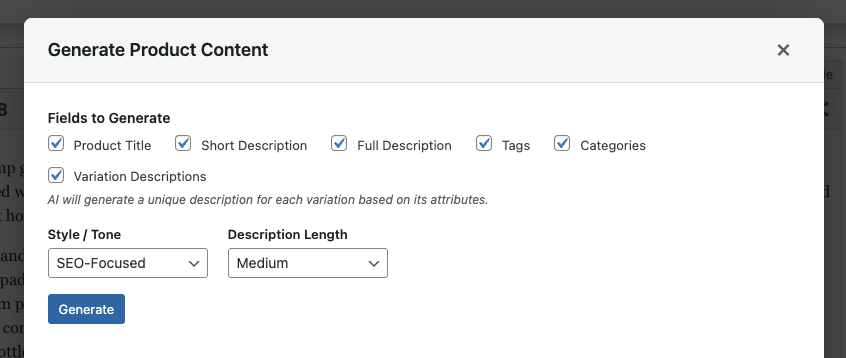
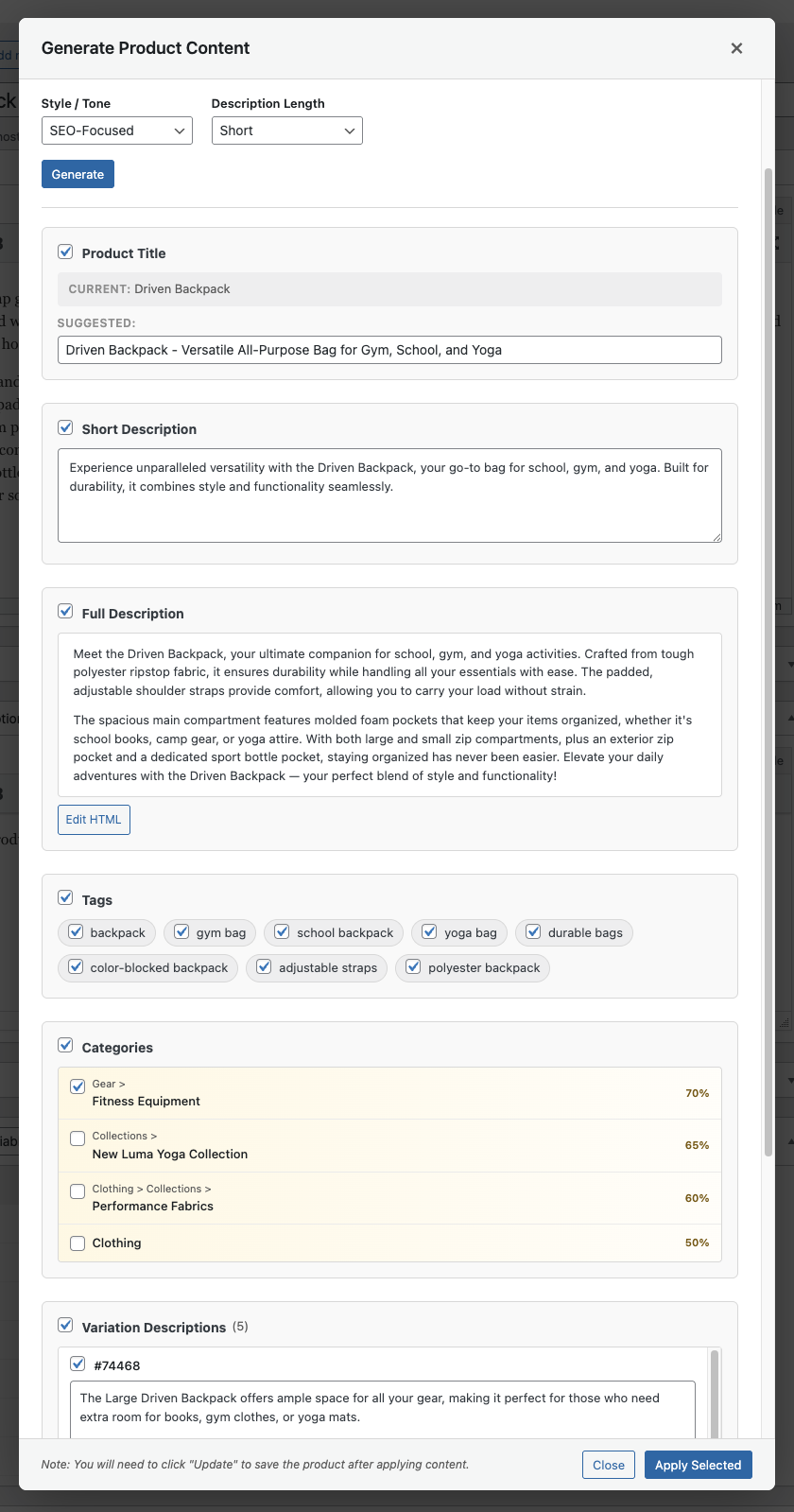
- AI Content Generator - Generate title, short description, full description, tags, categories, and variation descriptions from a single modal
- Multiple AI Providers - Supports OpenAI, Anthropic (Claude), and Google Gemini APIs
- WordPress AI Connector Support - On WordPress 7.0+, use the site-wide AI connector configured under Settings > Connectors instead of a plugin API key; automatic mode prefers the connector when one is configured
- Category Suggestions - AI analyzes your product content and suggests matching categories from your store's existing taxonomy, with confidence scores
- Variation Descriptions - Unique AI-generated descriptions for each product variation
- Style & Length Controls - Choose tone and length before generating
- AI Effort Setting - Choose Economy, Balanced, or Thorough reasoning effort on models that support it; the Economy default keeps API costs down
- Estimated Cost Display - See an estimated USD cost alongside the token count after each generation
- Manual Apply – Review, select, and apply generated content with one click; nothing is applied automatically
- Customizable Prompts - Advanced users can adjust the AI prompt template
- Rate Limiting - Built-in usage warnings to help manage API costs
- Developer Friendly - Includes filters and actions for customization
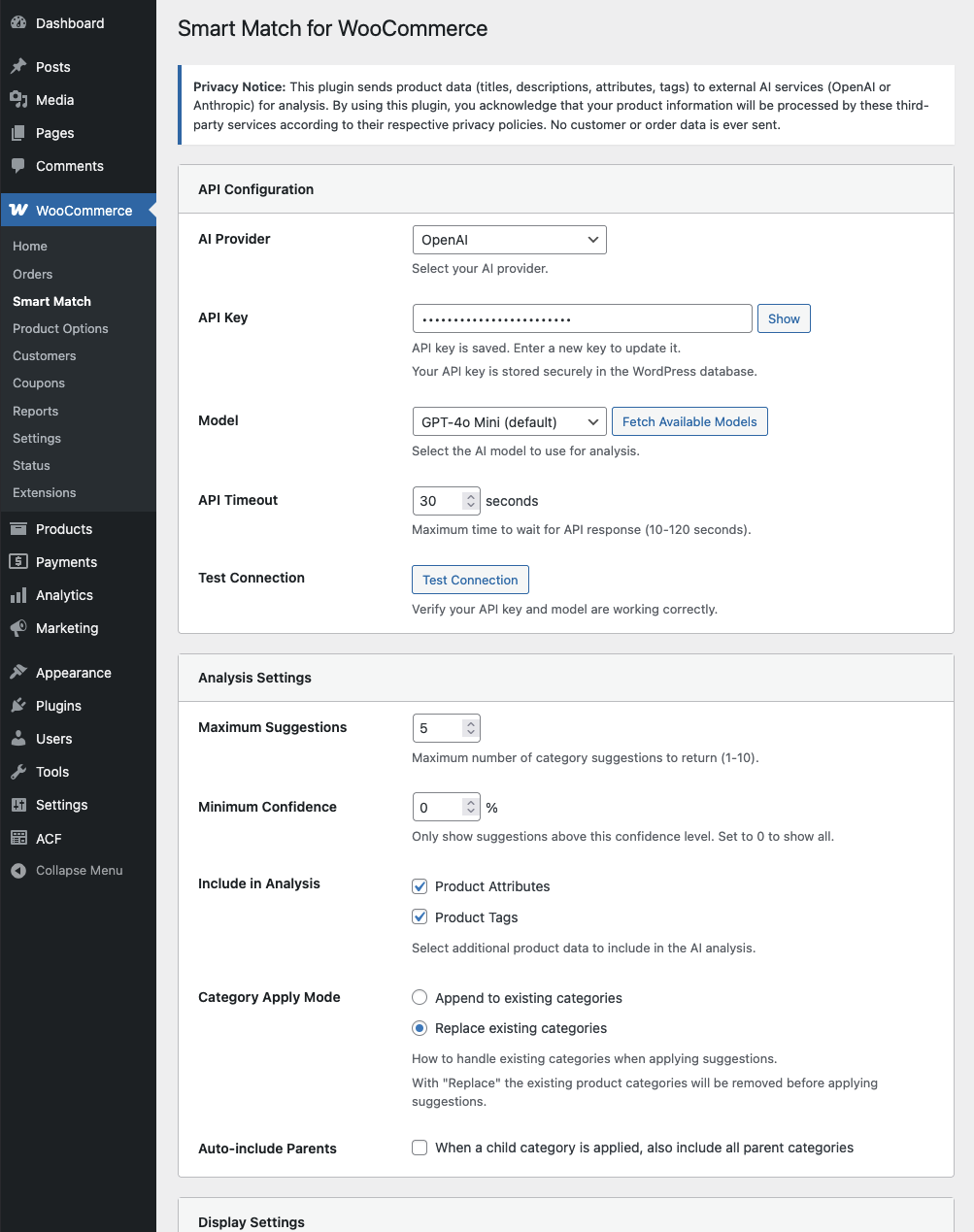
- Configure your preferred AI provider (OpenAI, Anthropic, or Google Gemini) in settings
- Navigate to any product edit screen
- Click "Generate with AI ✨" in the Smart Match AI metabox
- Choose which fields to generate and your preferred style/length
- Click Generate and review the results
- Select the content you want and click Apply
- WooCommerce 8.0 or higher
- PHP 7.4 or higher
- An API key from OpenAI, Anthropic, or Google AI Studio — or, on WordPress 7.0+, a site-wide WordPress AI connector configured under Settings > Connectors
- Service Website: https://openai.com
- Terms of Use: https://openai.com/policies/terms-of-use
- Privacy Policy: https://openai.com/policies/privacy-policy
- Service Website: https://www.anthropic.com
- Terms of Use: https://www.anthropic.com/legal/consumer-terms
- Privacy Policy: https://www.anthropic.com/legal/privacy
- Service Website: https://ai.google.dev
- Terms of Use: https://ai.google.dev/gemini-api/terms
- Privacy Policy: https://policies.google.com/privacy
- Product title
- Product short description
- Product full description
- Product attributes (if enabled in settings)
- Product tags (if enabled in settings)
- Your store's category names and hierarchy
安装:
- Upload the
smart-match-for-woocommercefolder to/wp-content/plugins/ - Activate the plugin through the 'Plugins' menu in WordPress
- Go to WooCommerce > Smart Match to configure your API key
- Navigate to any product edit screen to start generating content
- Visit https://platform.openai.com/api-keys
- Create a new API key
- Copy and paste it into the plugin settings
- Visit https://console.anthropic.com/settings/keys
- Create a new API key
- Copy and paste it into the plugin settings
- Visit https://aistudio.google.com
- Click "Get API key"
- Copy and paste it into the plugin settings
屏幕截图:
常见问题:
Do I need an API key to use the plugin?
Usually, yes — you provide your own API key from OpenAI, Anthropic, or Google AI Studio. On WordPress 7.0 or later, you can instead use a site-wide WordPress AI connector configured under Settings > Connectors, in which case no plugin API key is needed. The plugin does not include API access or credits.
Which AI provider should I use?
All three providers work well. OpenAI's GPT-5.6 Luna is a fast, affordable all-rounder. Google Gemini 3.7 Flash is quick and inexpensive, and Google AI Studio offers a free tier — ideal if you want to try the plugin at no cost. Anthropic's Claude Haiku 4.5 is an excellent alternative with strong writing quality.
How much does it cost to use?
The plugin itself is free. You pay only for API usage to your chosen provider. A typical content generation costs less than $0.01 with the fast models such as GPT-5.6 Luna, Gemini 3.7 Flash, or Claude Haiku 4.5 — and the plugin shows an estimated cost after each generation so you can keep an eye on it.
Is my product data secure?
Your API key is encrypted before storage using WordPress security keys. Product data is sent directly to your chosen provider via HTTPS. No data is stored on third-party servers beyond what's needed for the API request.
Can I customize the AI prompt?
Yes. Advanced users can customize the prompt template in Settings > Advanced Settings.
What if the generated content isn't right?
All generated content is shown for review before applying. You choose which fields to apply and can edit the content directly in the modal. Nothing is changed on your product until you click Apply.
Does this work with variable products?
Yes. For variable products, the plugin can also generate unique descriptions for each variation tailored to its specific attributes.
Can I exclude certain categories from suggestions?
Yes, you can exclude specific categories in the plugin settings.
What happens if I reach the rate limit?
The plugin includes configurable rate limiting. You'll see a warning when approaching your limit. You can adjust the threshold in settings.
更新日志:
- Added an AI Effort setting (Economy, Balanced, Thorough) that controls how much reasoning the AI spends per analysis on models that support it. The Economy default reduces API cost and speeds up analyses.
- Product analysis and content generation now show an estimated USD cost alongside the token count, so you can judge the real cost of a generation at a glance instead of calculating it from tokens yourself.
- Added support for the site-wide WordPress AI connector (WordPress 7.0+). A new AI Connection setting chooses between the connector and a plugin API key, with automatic mode preferring the connector when one is configured — no plugin API key required in that case.
- Made it clear which AI provider, model, and connection the plugin will use: the settings page now shows a live "Currently active" summary and per-provider connector status, greys out the API key field when the site-wide WordPress AI connector handles authentication, and the analysis results show which connection served each request.
- Refreshed the AI model lists to the current provider lineups: OpenAI GPT-5.6 family, Anthropic Claude 5 family, and Google Gemini 3.x, with previous-generation models kept as legacy options. A previously selected model that is no longer listed stays selected instead of being switched silently.
- The content generator now shows the same "Continue anyway?" confirmation as the category analyzer when the rate-limit warning threshold is reached, instead of a dead-end "please wait" error.
- Fixed "Content applied!" being shown even when saving the selected categories failed. The success message now appears only after categories are actually saved, and a failure shows an error and lets you try applying again.
- Fixed the icon on the "Generate with AI" button sitting slightly too high instead of being vertically centered with the button label.
- Fixed long product descriptions in non-Latin languages (Cyrillic, CJK, Arabic, emoji) potentially being cut mid-character when shortened for the AI request.
- Fixed requests silently routing to a different AI provider than the one selected when the chosen provider had no site-wide connector configured; an explanatory error is now shown instead.
- Fixed OpenAI reasoning models (GPT-5 family) failing with an API parameter error when analyzing products, generating content, or testing the connection.
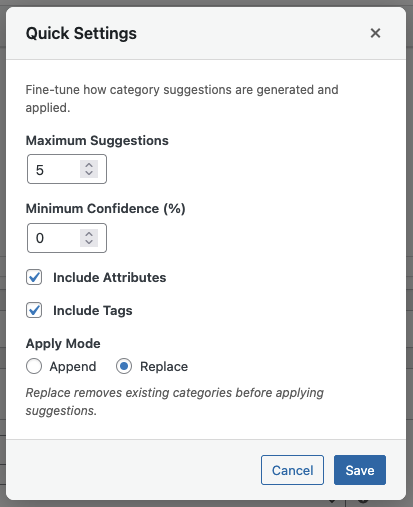
- Fixed the Quick Settings modal closing with no confirmation after saving, and silently discarding changes when the save failed. Saving now shows a confirmation message, and a failed save keeps the modal open with an error so changes are not lost unnoticed.
- Fixed "Test Connection" testing the previously saved configuration instead of the one currently selected on the settings page. The test now uses the provider, model, and AI Connection mode shown in the form, so switching options and testing before saving gives an accurate result.
- Fixed API keys remaining in the database after plugin uninstall — all per-provider keys (OpenAI, Anthropic, Google Gemini) are now removed when the plugin is deleted.
- Fixed content generation failing with a "Bad Request (400) – Unsupported parameter: 'temperature'" error when using the WordPress AI connector with newer OpenAI models such as GPT-5.x.
- Fixed the connection test always failing with a "max_output_tokens" error when using the site-wide WordPress AI connector with OpenAI.
- Fixed AI requests through the site-wide WordPress AI connection timing out after 5 seconds regardless of the API Timeout setting, causing "Operation timed out" errors during analysis and content generation.
- API key encryption upgraded to authenticated AES-256-GCM with a unique random IV per key (existing keys migrate automatically). If a saved key can no longer be decrypted — typically after the site's WordPress salts change — the settings page now clearly asks you to re-enter it instead of failing silently, and keys are never stored unencrypted.
- The Google Gemini API key is now sent via a request header instead of the URL, so it can no longer appear in proxy or server logs. Debug-log redaction also covers all provider key formats (OpenAI, Anthropic, Google).
- AI analysis, content generation, and category application now verify that the user can edit the specific product, not just products in general. On stores with restricted roles (e.g. vendors), users can no longer run these actions on products they are not allowed to edit.
- New: AI Content Generator — generate product title, short description, full description, tags, categories, and variation descriptions from a single modal
- New: Google Gemini provider support (Gemini 2.0 Flash, 2.5 Flash, 2.5 Pro)
- New: Variation descriptions — unique AI-generated descriptions per product variation
- New: Style and length controls for content generation
- New: Persistent form preferences — modal remembers your last used settings
- Updated: OpenAI model list — added GPT-4.1 family (nano, mini, full) and GPT-5.x reasoning models (nano, mini, 5.2)
- Updated: Anthropic model list — updated to Claude Haiku 4.5, Sonnet 4.6, Opus 4.6
- Improved: Metabox renamed to "Smart Match AI" to reflect full feature set
- Fixed: Various code quality improvements from full code review
- Initial release
- Support for OpenAI and Anthropic AI providers
- Product analysis metabox on edit screens
- Category suggestions with confidence scores
- One-click category application
- Customizable settings and prompts
- Rate limiting and usage warnings
- API key encryption
- Full internationalization support