
SmartCloud Agent Composer
| 开发者 | smartcloud |
|---|---|
| 更新时间 | 2026年10月14日 18:40 |
| PHP版本: | 8.1 及以上 |
| WordPress版本: | 7.1 |
| 版权: | MIT |
| 版权网址: | 版权信息 |
详情介绍:
/wp-json/mcp/smartcloud-agent-composer. A compatible authenticated MCP client can connect directly; an OpenAI Connector tunnel is optional and is not bundled.
For remote or multi-user clients, Composer can validate Amazon Cognito access tokens and intersect group roles, per-App-Client role ceilings, granted Composer scopes, and the active content contract. This protected mode does not create shadow WordPress users. The backward-compatible dedicated WordPress user path remains available when MCP protection is Open.
Core operation runs inside WordPress without requiring a WP Suite account, subscription, hosted service, provider plugin, or proprietary theme. Optional integrations are disclosed under External Services.
Key features
- Draft-only agent execution with separate WordPress authorship and Composer ownership.
- Explicitly validated and activated Config Sets; imports and edits never activate automatically.
- Optimistic concurrency for configuration and draft changes.
- Gutenberg block-tree, pattern, template, post-type, language, excerpt, field, and relation validation.
- Document and structured-record Blueprints, including registered REST-visible fields approved by the Site Contract.
- Human-readable, ordered relation editing constrained by allowed target types, statuses, and cardinality.
- Existing-image assignment, optional bounded Contributor raster ingestion from approved HTTPS hosts, and separately enabled Publisher-only public Media Library image upload with governed SEO metadata.
- Short-lived preview drafts with ownership-checked cleanup.
- Bounded, sanitized static HTML previews with optional inline MCP Apps rendering in compatible clients.
- Redacted, tamper-evident audit events in an append-only SHA-256 hash chain.
- Checksum-protected Config Set lifecycle and active-theme/provider discovery.
- Provider-neutral language discovery that distinguishes authored-language policy from actual site language switching.
- Optional Polylang and WPML draft-language assignment and explicit linking of separately authored translations without publishing them.
- Human review can return the same update proposal for changes with an audited instruction, without creating another draft.
- Versioned Structure Contracts protect semantic Gutenberg structure while keeping approved content and extension slots editable.
- Synced structural patterns use native Pattern Overrides so shared layout can evolve without copying per-page values.
- Single-item and bounded bulk Blueprint migrations produce deterministic previews and separate review proposals instead of rewriting published content.
- Optional or required WP-admin creation policy starts human-created CPT items from a validated managed Blueprint instead of an ungoverned blank document.
- Optional fail-closed Cognito MCP access with public OAuth discovery, PKCE S256, group roles, per-client ceilings, Composer scopes, filtered tools, and redacted audit evidence.
- Publisher-only handoff lets an authorized reviewer inspect and submit another principal's ordinary Composer-owned draft without taking edit ownership.
- Revision-bound inline MCP App approval in compatible clients, with human-only decision controls and a WordPress-admin fallback.
安装:
- Install the plugin ZIP through Plugins -> Add New -> Upload Plugin and activate it.
- Open SmartCloud -> Agent Composer and review runtime, theme, and provider status.
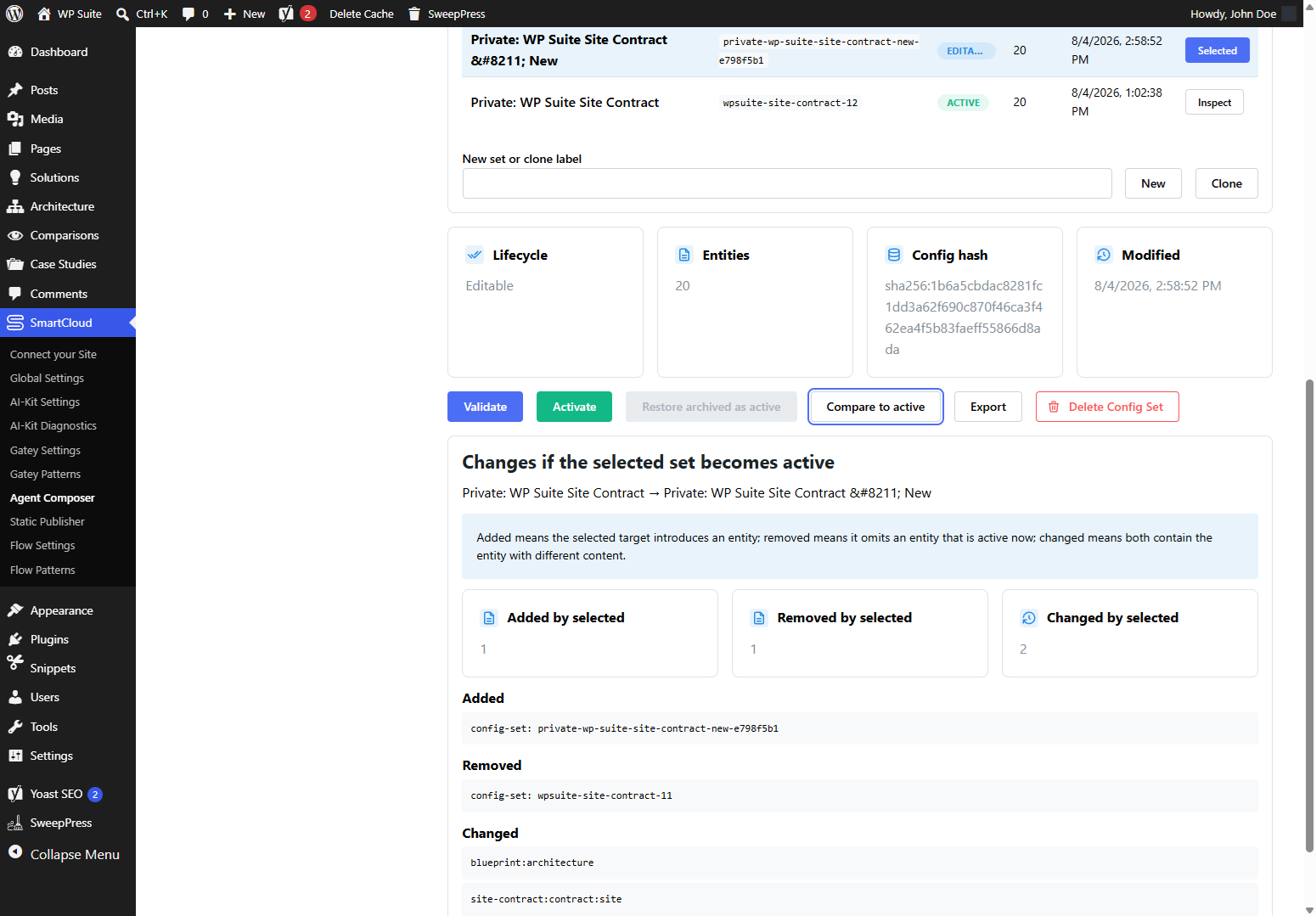
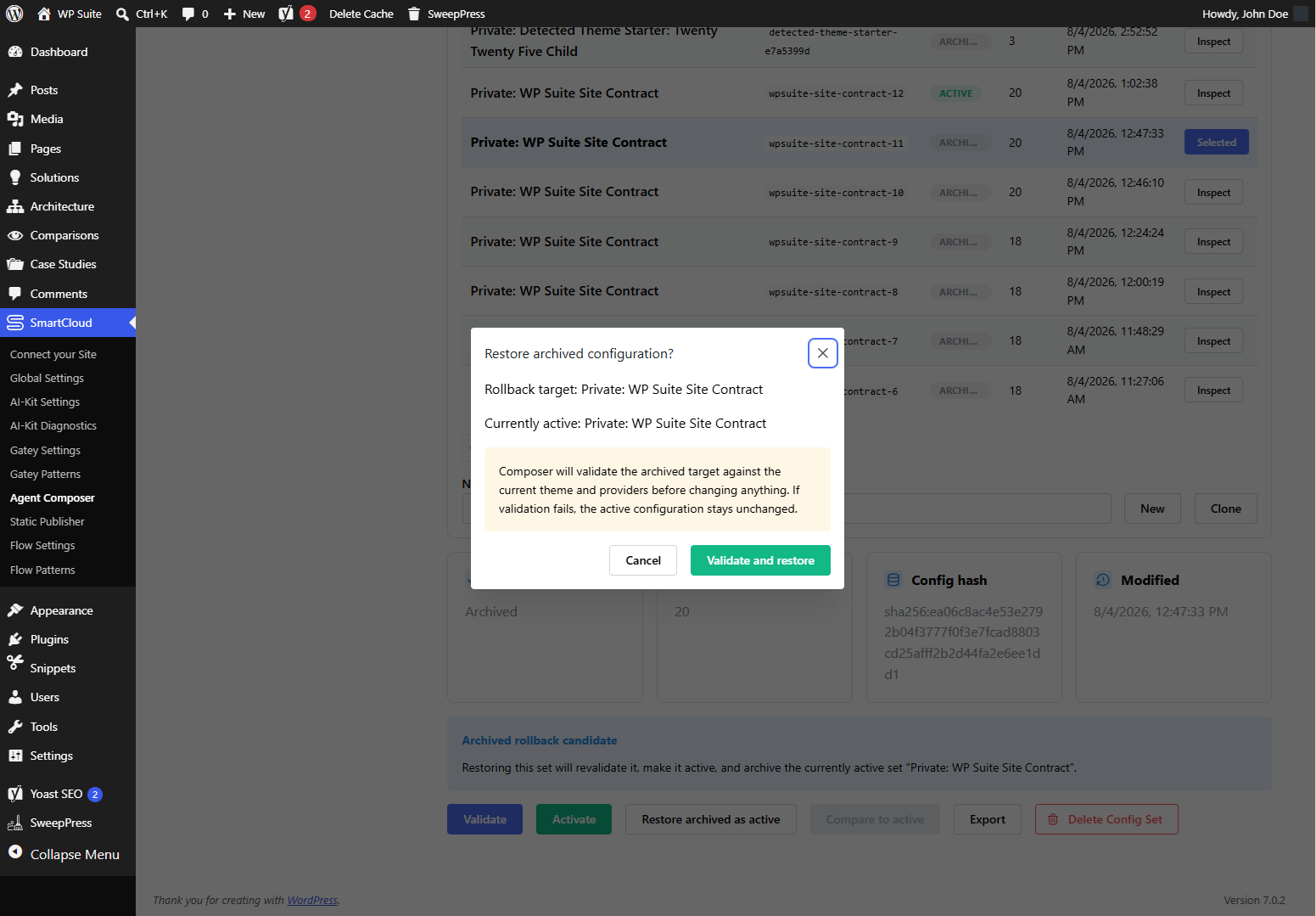
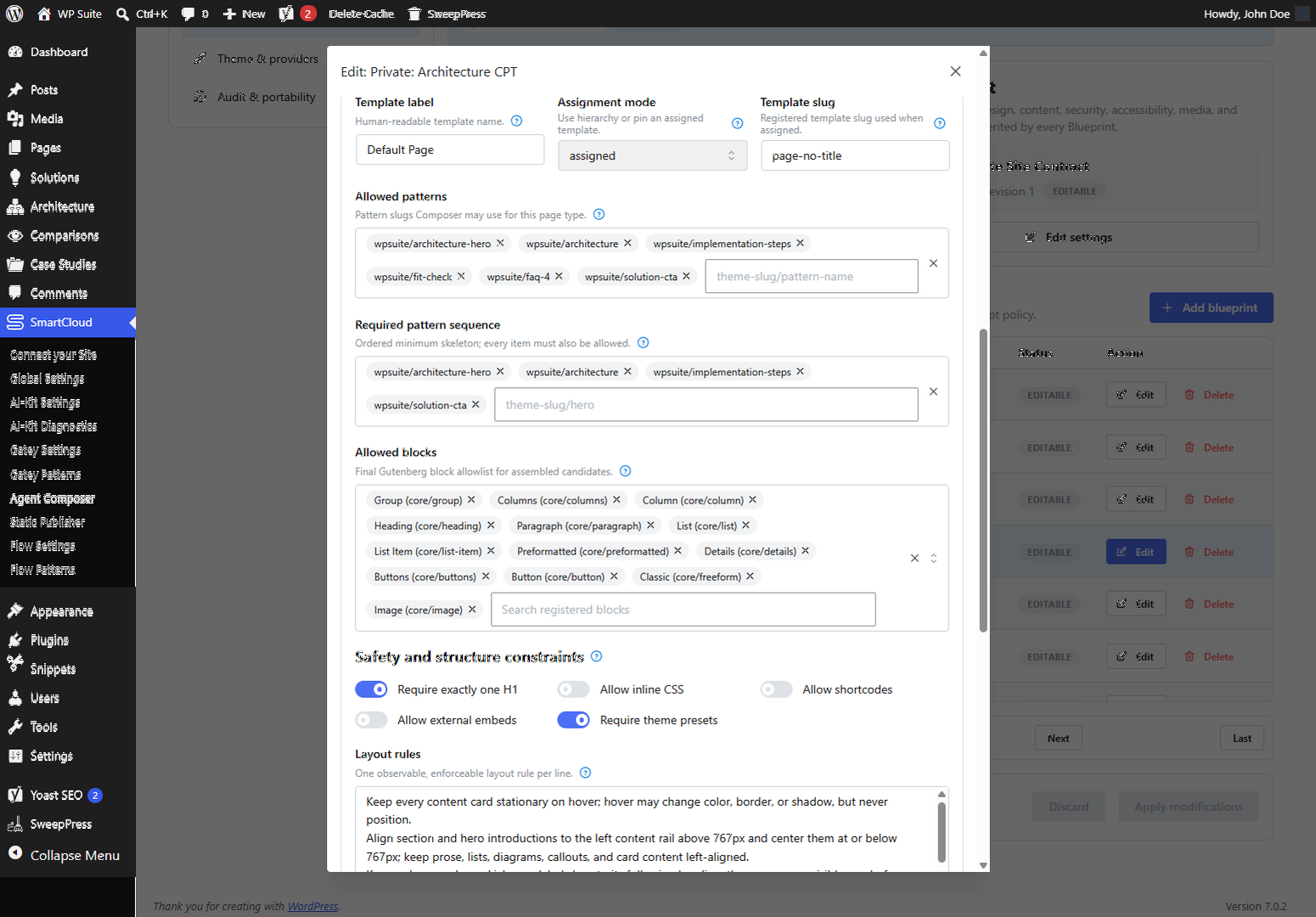
- Create or import an inactive Config Set, review its Site Contract and Blueprints, then validate and explicitly activate it.
- Install and activate the separate WordPress MCP Adapter if an MCP client will use Composer.
- For remote or multi-user MCP access, configure MCP Access with a Cognito User Pool, Hosted UI domain, public authorization-code plus PKCE App Client, exact client callback, external MCP resource URI, group-role mappings, client ceiling, and optional URI-bound Composer scopes. Keep protection Open until the OAuth round trip succeeds.
- For the backward-compatible Open path only, create a dedicated WordPress user with the
smartcloud_agentrole and store its Application Password in the client secret store.
屏幕截图:
常见问题:
Can Composer publish or delete site content?
The model cannot publish or delete normal content. A Publisher may request human approval for one exact Composer-owned draft revision, including a draft assigned to another Composer principal, without receiving edit ownership. Publication occurs only after an authorized person explicitly approves the still-current revision in the inline MCP App or WordPress fallback. Only expired, Composer-owned temporary previews are removed automatically.
How does an agent connect?
Install WordPress MCP Adapter 0.6.1 or newer and connect to /wp-json/mcp/smartcloud-agent-composer. For protected remote access, configure Cognito access-token validation and use a public authorization-code plus PKCE client; a firewalled site needs an HTTP Secure MCP Tunnel profile because STDIO cannot forward the OAuth challenge or bearer token. Use the tunnel client's OAuth/DCR HTTP profile for protected access and its remote-no-auth HTTP profile while Composer intentionally remains Open without an identity provider. Open mode may instead use a dedicated authenticated WordPress user. The get-rendered-preview tool returns a sanitized, template-aware HTML snapshot when the selected WordPress singular template can render. Compatible MCP Apps clients can display it inline, and its bounded local image, WOFF/WOFF2 font, stylesheet, and import bridge does not require direct browser access to a private WordPress origin.
How does media handling work?
Composer can search readable Media Library images and assign an existing image as the featured image of a Composer-owned draft. If an administrator explicitly enables remote ingestion and allowlists an exact HTTPS host in the active Site Contract, a Contributor can download one bounded raster image, validate it, store it locally, and assign it to that draft. Separately, a protected Publisher may upload one new immediately public image only when the active Site Contract enables Publisher uploads. That operation requires a semantic SEO slug, title, explicit alt policy, rights and publication confirmations, and bounded validated bytes from base64 or safe HTTPS. Readers and Contributors cannot discover or call it. No Composer role can edit or delete existing Media Library items.
How can configuration be preserved before uninstalling?
Open SmartCloud -> Agent Composer -> Audit & portability and export all configuration. The checksum-protected JSON contains Config Sets but excludes credentials and site-specific audit history. Restored sets remain inactive until reviewed, validated, and activated.
What happens on multilingual and monolingual sites?
The list-supported-content-languages Ability reports the Site Contract's authoring policy separately from provider-backed language switching and draft linking. Without an active localization bridge, Composer does not claim that the site can switch or link languages; a wildcard Site Contract may still permit an agent to author copy in the language requested by the user. With Polylang or WPML and its matching optional Composer bridge active, newly created drafts receive a configured language. Two or more separately authored drafts can be linked explicitly, or one owned draft can be added to an empty language slot in an existing translation group without changing any existing member, regardless of its status. Composer does not translate copy and never publishes those drafts. TranslatePress is treated like an ordinary WordPress site until a stable content-translation Ability becomes available, so agents can still author drafts while editors translate them in WordPress.
What happens when a proposal needs another editing pass?
An authorized human reviewer can return a submitted or rejected proposal for changes with a required reason. Composer reopens the same agent-owned working copy with new concurrency tokens, exposes the instruction to the assigned agent, and requires the revised proposal to be validated and submitted again. Proposal working and audit copies remain available under Content proposals; ordinary post and custom-post-type lists hide them by default and provide an explicit filter to reveal them with their proposal state.
更新日志:
- Fix native Classic, Quick Edit, Bulk Edit and opted-in Gutenberg published saves on sites protected by web-server HTTP Basic Auth.
- Retain same-user WordPress cookie, native nonce, capability and Blueprint checks; continue excluding Bearer, MCP and authenticated Application Password requests from browser-editor authorization.
- Compatibility: Bundle shared Hub 2.6.1 with correctly scoped PHP translations and literal configuration-reset messages, preserving capability, nonce, revision and ownership safeguards.
- PHP compatibility: Protect direct admin-file access, use WordPress URL parsing and preserve raw structured diagnostics while keeping actual HTML output escaped.
- Documentation: Preserve complete historical upgrade guidance alongside concise directory notices.
- Serialize concurrent audit appends to preserve the audit hash chain and reduce database deadlocks.
- Retry transient audit transaction failures within bounded limits without repeating content changes.
- Preserve original operation errors if secondary diagnostic auditing fails, and return clearer missing-Blueprint diagnostics.
- Keep all preset choices visible and selectable in the setup dialog.
- Improve shared navigation alignment, connection details, inline help and setup field guidance.
- Keep discovery rescans in Theme & providers and explain their inventory-only purpose.
- Keep AI Editing status and detailed editing on one page, with site rescanning and initial presets when no configuration exists.
- Preserve configuration validation, activation and editing permissions in the detailed interface.
- Add shared product navigation and separate Platform Settings with reCAPTCHA, Styling and Translations tabs.
- Preserve existing admin links, permissions and compatibility with older plugin menus.
- Restore Composer MCP connectivity with WordPress MCP Adapter 0.7.0 by using its revision-aware protocol processor; retain support for MCP Adapter 0.6.1.
- Keep Composer's external-principal transport request-authenticated without using WordPress-user MCP sessions.
- Share editorial, relation, taxonomy assignment, and public term-definition validators across agent and native editing integrations.
- Validate classic admin, Quick Edit, and Bulk Edit document changes before core writes using the real native editor session and nonce, preserving the explicit published-edit opt-in.
- Validate complete stored editorial fields and the active Blueprint on partial Gutenberg saves, including metadata-only requests, while retaining separate agent proposal permissions.
- Reject relations to the edited document or its proposal source, allow empty taxonomy replacements, and report actual stored content-field values after updates.
- Allow an explicitly opted-in, cookie-authenticated WordPress editor to save a published managed document through Gutenberg while retaining full Blueprint and Structure Contract validation.
- Keep Composer/MCP agent updates on the separate human-reviewed proposal path; native editing remains blocked by default.
- Expose the native published-edit policy in Blueprint configuration.
- Allow registered block union types and schema defaults during validation, so optional unsaved attributes do not prevent existing managed documents from being edited.
- Gutenberg editing: Edit per-post content inside synced structural patterns inline, including nested instances. Add, remove, and reorder approved content from the block sidebar's List View tab within the configured contract limits.
- Pattern instances: Preserve each post's content and native Pattern Overrides without changing shared patterns or other instances.
- Blueprint migrations: Refresh exact, reviewed synced-pattern revision attestations through proposal-only migrations while preserving Pattern Overrides, instance slots, and stable instance identities.
- Block serialization: Exclude empty block separators from content counts and prevent them from becoming invalid blocks.
- Managed documents: Initialize required content slots in WordPress admin while respecting section and per-pattern limits.
- Provider discovery: Initialize lazy-loaded WordPress Ability providers before validating managed documents and improve creation failure diagnostics.
- Update proposals: Request a protected, revision-bound human approval card from ChatGPT or another MCP Apps client after submission. The card displays the WordPress-rendered post-type preview and lets the reviewer merge, return for changes, or reject; every decision rechecks the proposal and source.
- Shared styling: Bundle WP Suite Hub 2.5.17 and the updated shared settings so administrators can list additional absolute or site-relative stylesheet URLs for supported frontend Shadow DOM components alongside the WP Suite Theme CSS.
- Rendered previews: Resolve the WordPress singular template for each post type, including block templates, dynamic blocks, synced patterns, overrides, and classic PHP templates. Preserve the content-only fallback with a clear warning when a full template cannot render.
- Publication review: Show the same template-aware rendered snapshot in the inline approval card, with a full WordPress preview link for comparison.
- Preview assets: Carry private images and fonts as verified base64 data in JSON-safe MCP responses. The v8 preview Apps display images through CSP-compatible data URLs and reject empty or mismatched assets. The assigned agent can reopen a submitted proposal's read-only rendered preview without receiving a new submission token.
- MCP integration: Allow site plugins to register their own guarded tools and UI resources with the Composer server.
- Instance slots: Render saved per-instance extension-slot content in public page bodies and rendered previews.
- Repeated patterns: Keep slot content attached to the correct synced-pattern reference while preserving native Pattern Overrides.
- Preview stability: Keep rendered-draft and publication-approval MCP Apps at a host-bounded height with fixed chrome, preview-only scrolling, asset/font readiness, and v6 resource URIs.
- Pattern instances: Give every governed synced pattern a stable instance identity and address field, media, and pattern-owned slot updates by pattern instance plus semantic ID.
- Repeated modules: Allow multiple instances of the same synced pattern to retain independent native Pattern Overrides with instance-scoped structure validation.
- Slot contracts: Add explicit synced-pattern allowlists and per-pattern minimum/maximum occurrence bounds to configuration, runtime validation, semantic operations, and the Gutenberg editor projection.
- Pattern integrity: Recursively enforce reference, contract-version, and content-hash metadata with cycle and nesting-depth protection.
- Dependencies: Bundle WP Suite Hub 2.5.16 so Static Publisher is notified when the shared translation catalog changes.
- Publisher media: Add an explicitly enabled, protected Publisher-only MCP tool for publishing one governed raster image to the Media Library without granting general WordPress upload access.
- SEO and accessibility: Require a semantic filename slug, title, descriptive-or-decorative alt decision, rights confirmation, and immediate-publication confirmation.
- Validation and privacy: Bound base64 or safe HTTPS input, verify signature/MIME/size/dimensions/idempotency, and keep raw bytes and source URLs out of the audit log.
- Operational Abilities: Admit a bounded list of registered external tools to the Composer MCP surface, including the Static Publisher job scheduler and its read-only target, rule, and job-status tools.
- Publisher reads: Classify the explicit Static Publisher read tools at the read boundary while retaining provider-enforced Publisher-only discovery and job-specific status authorization in protected modes.
- MCP surface: Refresh tool-list cache identity while preserving Composer's prohibition on direct agent publication.
- MCP security boundary: Add optional Cognito access-token validation, group roles, per-client ceilings, optional scopes, filtered discovery, invocation enforcement, principal-bound ownership, and actor-aware audit context on WordPress MCP Adapter hooks.
- Human publication: Add Publisher-only, revision/hash-bound requests, cross-principal read-only handoff, an inline MCP App with app-private human decision tools, and a WordPress-admin fallback; agents never receive direct publication or model-visible approval tools.
- MCP administration: Add a guided MCP Access screen, automatic Cognito provider discovery with manual override, Site Contract-required authenticated mode, and fail-closed status guidance.
- MCP OAuth discovery: Advertise protected-resource metadata, PKCE S256, public-client token authentication, and Cognito authorization-code plus refresh-token grants for direct and HTTP-tunneled clients.
- OAuth resource binding: Configure the exact external MCP resource URI, advertise its URI-bound scopes, and reject access tokens whose audience does not match that resource.
- MCP diagnostics: Record token-free transport denial details, including the stable validation error and whether an Authorization header was present, in the append-only audit chain.
- MCP audit trail: Record accepted MCP requests and completed tool calls without storing bearer values, request arguments, or tool results.
- Structure Contracts: Add independently versioned semantic structure policy, protected editor projection, managed baselines, typed override manifests, drift detection, and machine-readable violations.
- Semantic agent editing: Add contract and document reads plus field, media, and extension-slot operations that use stable semantic IDs instead of serialized Gutenberg paths.
- Synced patterns: Materialize approved local synced patterns with native Pattern Overrides and validate their expanded structure without copying shared markup into each post.
- Versioned migrations: Add exact source/target baselines, historical contract verification, deterministic section and field operations, override-aware rebasing, zero-write previews, and plan-bound update proposals.
- Bulk migrations: Add bounded planning and compatibility reports for up to 100 items per page and idempotent proposal creation for up to 25 explicitly reviewed items.
- Administration and documentation: Clearly separate human Migration guidance from executable migration policy and document the complete what, why, how, and recovery workflow.
- Administration feedback: Keep refreshed content in place, use dimension-preserving skeletons for initial data loads, and show pending state on the button that started each operation.
- Pattern diagnostics: Distinguish registry patterns from synced structural wp_block records and reserve Missing for genuinely unavailable sources.
- Site Contract policy: Treat explicit list values as replacements, so removing a default block prohibition such as
core/embedno longer leaves a trailing numeric-list entry active.
- WP Suite Solution workflow: Enable human-reviewed published-content update proposals in the Solution Blueprint and Site Contract.
- WP Suite preset: Add Config Set 8 with Site Contract policy 1.0.46; the imported set remains inactive until validation and explicit activation.
- Rendered preview localization: Preserve the source content language on published-update proposals and recover it from the proposal localization snapshot for existing working copies.
- Rendered preview localization: Make the draft's authored content language available to frontend render integrations so localized links are not rewritten using the MCP request locale.
- Preview policy: Add a Site Contract switch that keeps rendered HTML preview required by default for existing configurations and allows administrators to make it optional.
- Draft workflow: Keep rendered preview as the recommended default while allowing an explicit user request to skip it.
- Proposal review: Allow an optional-policy update proposal to be submitted with fresh concurrency tokens and no preview token; continue validating any supplied token against the exact current revision.
- MCP discovery: Expose the effective policy through descriptions, input schemas, and runtime capabilities so clients do not repeatedly request a preview when the user opted out.
- WP Suite preset: Set rendered preview to optional and allow existing category/tag assignment for posts plus the four content CPTs in policy 1.0.45.
- Preview backgrounds: Let the recreated frontend body grow with long content, and publish the fix under a v5 resource URI with v1-v4 compatibility aliases.
- Rendered preview: Return sanitized frontend HTML without Gutenberg serialization comments, and publish the corrected ChatGPT viewer under a fresh MCP Apps resource URI.
- Preview assets: Flatten bounded local CSS imports and proxy local stylesheet images plus WOFF/WOFF2 fonts through private revision-bound assets, with strict path, type, size, cycle, and count guards.
- Preview compatibility: Serve the current viewer through the legacy v1 and v2 resource URIs, and keep exact revision-bound assets readable after proposal submission or closure.
- Preview performance: Cache the authorized revision-bound asset map for 30 minutes, deduplicate repeated host deliveries, and limit concurrent private asset calls so each CSS, image, or font read stays lightweight.
- Preview transport: Read valid top-level MCP resource content even when an adapter also returns an empty compatibility result, and deliver ordered preview CSS through one private resource instead of one call per input stylesheet.
- Preview fidelity: Recreate the frontend body and WordPress content wrappers inside the isolated viewer, preserve safe Gutenberg inline styles, and prioritize explicitly selected theme CSS before fallback scanning.
- Preview layout: Keep long rendered pages and warning lists in bounded scrolling areas instead of stretching the conversation indefinitely.
- Preview cache compatibility: Publish the bounded viewer under a v4 resource URI and keep v1-v3 aliases serving the latest app.
- Preview backgrounds: Let the recreated frontend body grow with long content, and publish the fix under a v5 resource URI with v1-v4 compatibility aliases.
- Proposal review: Require the exact short-lived, agent- and revision-bound token from the final rendered preview before an update proposal can be submitted.
- Blueprints: Enable governed update proposals for the homepage and product pages, and accept the homepage Playground CTA used by the published site.
- Dependencies: Update Agent Composer Core to 1.2.2 and the bundled WP Suite Hub to 2.5.15 with the Amplify preview.3 Authenticator translation corrections.
- Preview: Reliably initialize the inline MCP Apps viewer, accept ChatGPT tool output, and require a rendered preview after the final draft write.
- Preview assets: Expose bounded, allowlisted same-origin stylesheets and images through the rendered-preview asset tool so compatible clients can display previews when the WordPress site is private.
- Blueprints: Preserve complete Contact details and normalized Flow success actions, allow authored offer actions to remain optional, and govern About page updates through proposals.
- Config Sets: Ship a new 26-Blueprint WP Suite preset for theme 1.0.59 without overwriting an installed working set.
- Dependencies: Update the bundled WP Suite Hub to 2.5.14 with the shared site translation catalog and corrected Amplify translations.
- Localization: Attach an inspected draft or published item to an empty language slot, and safely merge two exact non-conflicting translation groups without changing publication state.
- Safety: Require content concurrency tokens, complete relationship snapshots, edit permission for every member, provider-side verification, idempotent replay, and verified rollback.
- Blueprints: Add dedicated Contact, Privacy Policy, Terms of Use, and Blog index contracts, expand Flow form and comparison preservation, and enable all five site languages.
- Query Loops: Govern author and sticky include, exclude, or only behavior and preserve localized archive destinations.
- Cloning: Allow an inspected source to be copied into a separately governed target content language while verifying byte-exact source preservation.
- Preview: Return bounded and sanitized static HTML for Composer-owned drafts with validation, concurrency metadata, a digest, and approved asset origins.
- MCP Apps: Expose an inline rendered-preview resource for compatible clients while retaining the structured tool result for every MCP client.
- Dependencies: Refresh the Composer admin application and public core contract while retaining React 18 compatibility.
- Proposals: Allow agents to prepare durable working copies for published content while keeping merge and rejection human-only.
- Localization: Add a provider-neutral localization contract, a manifest-driven provider selector, and separately installable WPML and Polylang bridges for existing translations and separately authored multilingual drafts.
- Safety: Recheck source, proposal, Blueprint, localization, metadata, and taxonomy state under a locked human merge transaction.
- TypeScript: Use NodeNext-compatible declaration imports in the separately published core package.
- Languages: Add generic supported-language discovery with distinct authoring, language-switching, and localized-draft-linking signals.
- Drafts: Store an immutable BCP 47 content language on new Composer drafts and keep every translation as a separate draft.
- Polylang and WPML: Let each optional bridge assign configured languages and explicitly link an exact set of Composer-owned drafts without publishing them.
- Policy: Support the
*Site Contract and Blueprint language wildcard while allowing a Blueprint to narrow it.
- Compatibility: Declared compatibility with WordPress 7.1.
- Compatibility: Allow governed draft creation on SQLite-backed WordPress installations with an atomic, expiring idempotency lock.
- Taxonomies: Add a governed search, optional creation, draft assignment, and read-back workflow for Site Contract-approved public terms.
- Administration: Discover attached taxonomies and configure search, assignment, creation, limits, assignment mode, and hierarchical parent policy in the guided Site Contract editor.
- Safety: Keep term creation confirmation-gated and idempotent, restrict relationships to Composer-owned assigned drafts with optimistic concurrency, and expose no term edit or deletion operation.
- Relations: Make field contracts identify the required relation lookup, write, and verification workflow.
- MCP: Add concrete result schemas and stronger descriptions, including the editable-content alias, so clients use
search-relation-targetsfor post IDs. - Discovery: Count and paginate
list-content-draftsonly after Composer policy and WordPress capability filtering.
- Multisite: Store shared Hub ownership per site and recognize network-activated owners.
- Hub admin: Load the WebCrypto vendor before the shared admin bundle.
- Dependency: Rebuilt the bundled WP Suite Hub and Amplify vendor runtime with exact supported SmartCloud Amplify UI 6.15.5/3.6.5/6.15.5 versions.
- Compatibility: Restored ownership-safe WP Suite Theme CSS fragment updates on WordPress-managed Custom CSS storage.
- Initial public release.
- Fixed guided rule-list editing so spaces and new lines remain available while typing, and added pointer feedback to enabled switches.