
SmartCloud Flow – Block‑based Forms & Workflow Automation
| 开发者 | smartcloud |
|---|---|
| 更新时间 | 2026年10月16日 21:25 |
| PHP版本: | 8.1 及以上 |
| WordPress版本: | 7.1 |
| 版权: | MIT |
| 版权网址: | 版权信息 |
标签
下载
详情介绍:
<dialog>-based light-DOM modal block, and an optional AWS backend, so site owners can design forms and supporting UI in WordPress while choosing where submissions should be posted and, in Pro, running submissions, templates, workflows, and integrations in their own AWS account.
Flow is part of the WP Suite product family by Smart Cloud Solutions, Inc. WP Suite keeps WordPress as the CMS and editing layer, while optional connected features can extend selected workflows into modular AWS-backed services for identity, AI, APIs, workflows, protected routes, and static delivery. The free Flow features described here do not require a WP Suite account, subscription, or AWS backend unless you explicitly configure an external service or upgrade-only backend feature.
Free mode
Flow does not require a hosted SaaS backend or a WP Suite connection to render forms.
In Free mode, each form can post directly from the browser to a URL you define per form. That endpoint may be:
- your own custom endpoint,
- a WordPress-side endpoint you implement yourself, or
- the Flow backend submission endpoint, if you later deploy it.
- deploy the Flow backend to AWS,
- add the published backend API base URL to Gatey as a separate API,
- choose the desired protection mode for that API (
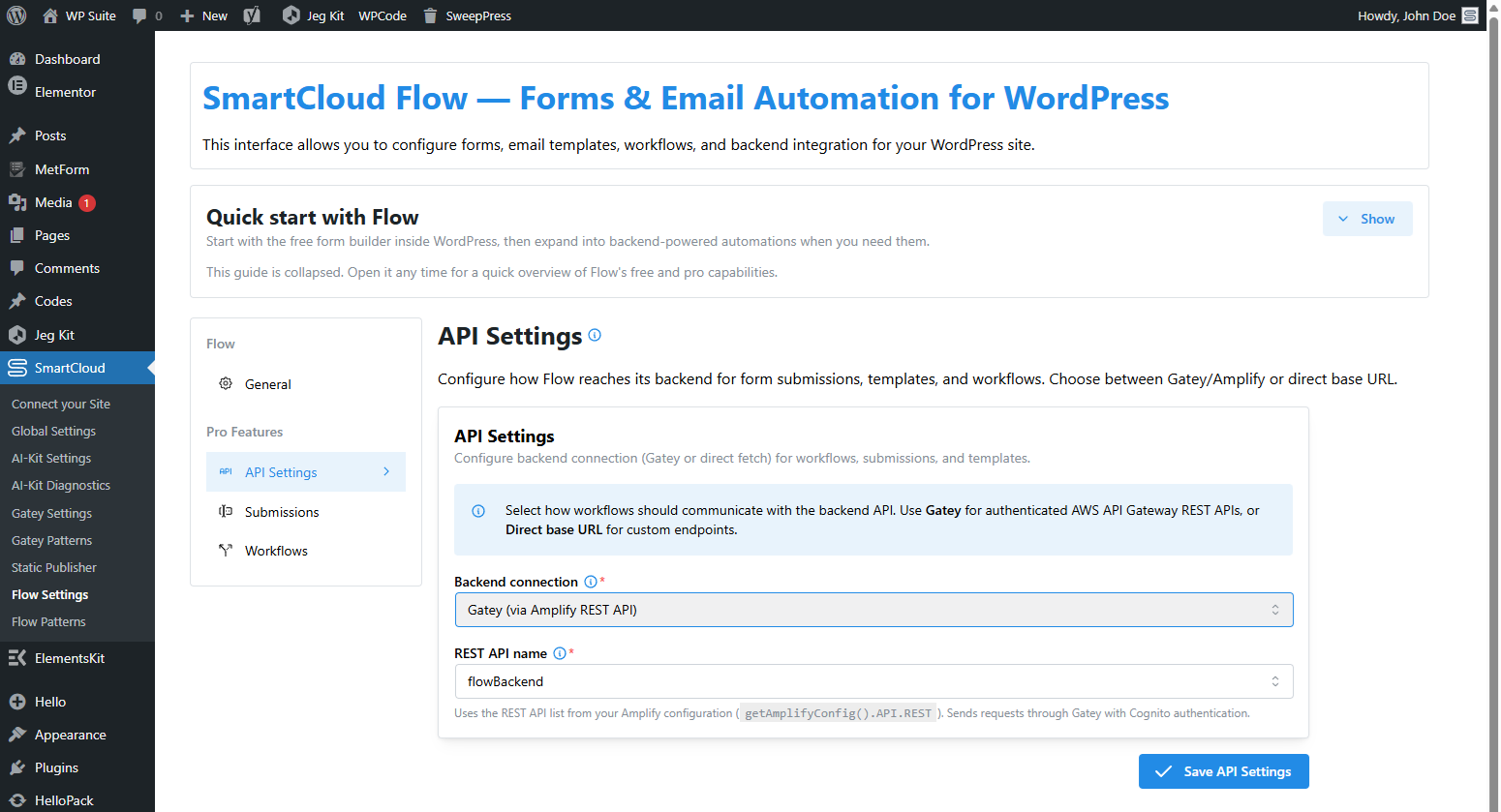
IAMorCOGNITO, matching the backend deployment), - then select that API in SmartCloud → Flow Settings → API Settings.
- 22-language frontend localization — Frontend controls include 22 built-in languages, follow the active WordPress or multilingual-provider locale, and support RTL where applicable.
- Shared WP Suite translation catalog — Override matching strings once for Gatey, AI-Kit, and Flow, set a site-wide fallback locale, or add further locales from SmartCloud → Global Settings → Custom Translations without editing plugin files.
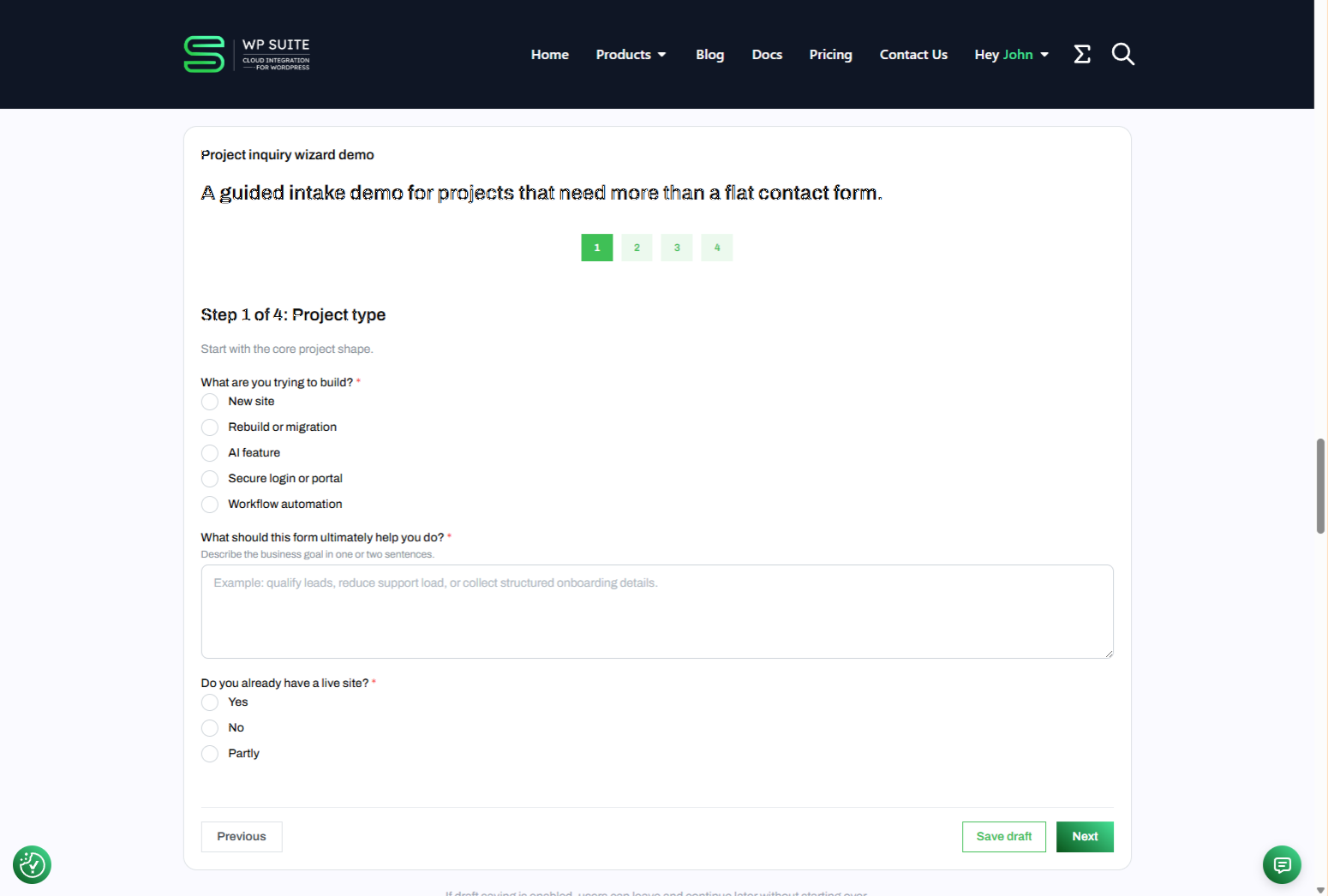
- Gutenberg form builder — Build forms with a dedicated Form block, layout/container blocks, and rich field blocks.
- Single React runtime per form — Front-end forms run as one mounted React tree.
- Discussion and rating surfaces — Publish threaded discussions, collect ratings through a Form, and place a standalone Rating Summary block anywhere the same content target needs an aggregate score and distribution.
- Light-DOM modal block — Wrap any Gutenberg content in a native dialog with class and data-attribute triggers, hash opening, default header/body/actions slots, action-role aware buttons, and a stable browser API on
WpSuite.plugins.flow.modals. - Light-DOM gallery block — Build a Mantine-free gallery/lightbox from core Image blocks with previous/next controls, optional thumbnails, optional captions/counter, and modal-aware start positions driven by outer trigger classes.
- Rich display & content blocks — Use styled content primitives such as blockquotes, marks, badges, code blocks, spoilers, lists, tables, timelines, and overflow lists alongside inputs.
- API-backed options & request controls — Load select, radio, checkbox-group, and tags options from API/autocomplete endpoints with configurable methods, headers, parameters, selected-value mapping, and runtime interpolation.
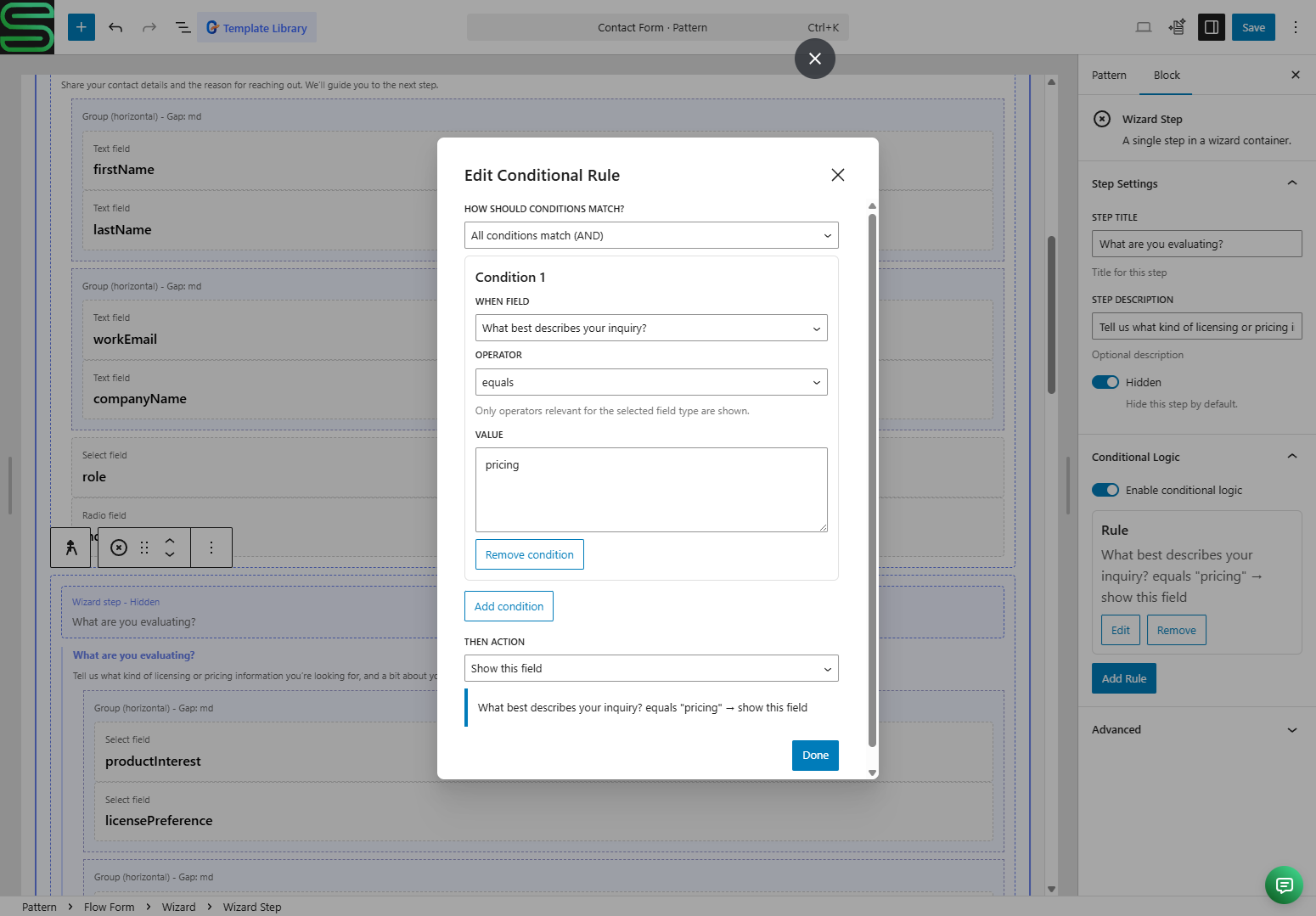
- Conditional logic & validation — Show/hide, enable/disable, require/optional, and other rule-based field behavior.
- Theme overrides & design tokens — Theme both interactive controls and display/content blocks inside the Shadow DOM with Mantine variables and stable
--flow-*CSS tokens. - Shortcodes & Elementor support — Reuse forms or content roots via shortcode and Elementor integrations.
- Flexible submission target model — Submit directly from the browser to a per-form endpoint URL with configurable HTTP methods, optional request headers, and runtime interpolation.
- Runtime events & host-page integration — Listen for submit, draft, wizard, modal, and API-loading error events from outer-page JavaScript.
- Pro: backend-aware operation — Connect Flow to the AWS-hosted Flow backend for durable submissions, admin tooling, templates, workflows, and webhook-driven automation.
- Pro: backend form sync — Optionally sync Gutenberg-defined forms into canonical backend form definitions stored in AWS.
- Pro: admin application — Manage submissions, templates, workflows, and backend/API settings from WordPress admin.
- Pro: workflow automation — Event-driven automation for emails, webhooks, status changes, and related operational flows.
- Pro: security & ownership — Deploy into your own AWS account and choose auth modes such as
IAMorCOGNITO.
安装:
- Upload the plugin ZIP (or install from the WordPress plugin repository).
- Activate the plugin through the “Plugins” screen in WordPress.
- Go to WP Admin → SmartCloud → Flow Settings, review the configuration.
- Build a form in Gutenberg and configure its submission target.
- Optionally, for Pro:
- connect the site to a WP Suite workspace,
- deploy the WP Suite Flow Backend into AWS,
- add the backend API to Gatey,
- then select that API in SmartCloud → Flow Settings → API Settings.
屏幕截图:
常见问题:
Does Flow work without an AWS backend?
Yes. Flow can render forms and submit them directly from the browser to any endpoint URL you configure for the form.
Does Flow store submissions in WordPress?
Not by default. Flow posts to the configured endpoint. If you want WordPress to receive and store submissions, you need to implement a receiving endpoint on the WordPress side yourself.
Does Flow send my data to third parties?
Only when your configured submission target or protection settings require it. For example, if you enable reCAPTCHA or post to an external backend endpoint, the browser will make external network calls. See External Services below.
What is the easiest Pro setup?
Deploy the WP Suite Flow Backend into your own AWS account, register its API base URL in Gatey as a separate API, configure the matching protection mode (IAM or COGNITO), and then select that API in SmartCloud → Flow Settings → API Settings.
What happens if I disable the backend?
Forms can still work as long as they submit to another valid configured endpoint. Backend-dependent features such as submissions management, templates, workflows, and related admin tooling will no longer be available through that backend connection.
Will it work with static exports?
Yes. Flow runs in the browser and can submit directly to the configured endpoint, so WordPress/PHP does not need to proxy the request.
Does this work outside Gutenberg?
Yes. Use the [smartcloud-flow-form] or [smartcloud-flow-content-root] shortcode, or the Elementor Flow Form / Flow Content Root widgets. Developers can also integrate the JavaScript APIs directly.
Can Flow load field options from my API?
Yes. Select, radio, checkbox-group, and tags fields can fetch options from API or autocomplete endpoints. You can configure request methods, headers, parameters, response mapping, selected-value mapping, and runtime interpolation tokens.
Can host-page JavaScript react to Flow runtime errors?
Yes. Flow emits browser events such as smartcloud-flow:submit-success, smartcloud-flow:error, smartcloud-flow:options-request-error, and modal lifecycle events so host pages can show custom UI, analytics, or recovery flows.
Can I reuse a Flow Content Root outside Gutenberg?
Yes. Use [smartcloud-flow-content-root id="123"] with a reusable block / pattern that contains a Flow Content Root block.
Can Flow open Gutenberg content in a modal?
Yes. Flow includes a dedicated Modal top-level block that renders in the light DOM with the native <dialog> element. You can open it from class-based triggers, data-wps-flow-* attributes, URL hashes, or the browser API on WpSuite.plugins.flow.modals. The editor can seed header, body, and actions sections, and action buttons inside the modal actions area can be assigned primary, secondary, or dismiss behavior from the core/button toolbar.
Can Flow open a shared gallery at a specific image?
Yes. Put a Gallery block inside a Flow Modal, give the gallery a galleryId, and open the modal from a neighboring core Image or core Button block whose wrapper includes wps-flow-modal-open--{modalId}, wps-flow-gallery-target--{galleryId}, and wps-flow-gallery-index--N. The gallery starts on the requested 1-based image and visitors can keep browsing with previous/next controls and optional thumbnail navigation.
更新日志:
- Keep workflow steps collapsed into readable summaries and independently open as many steps as needed.
- Edit expanded steps directly in the unsaved workflow draft; confirm step removal with a full-screen overlay, and keep confirmation-dialog Escape from closing the workflow editor.
- Preserve workflow execution, step order and existing saved definitions; this release changes the admin editing experience only.
- Refresh the shared AI Kit Core build dependency to 1.5.21 for compatible block builds.
- Preserve existing block definitions, authored copy, serialization and frontend shadow-asset declarations.
- Refresh the shared AI Kit core dependency for compatibility with verified structured-content presentation contracts.
- Preserve existing block definitions, authored copy, serialization and frontend shadow-asset declarations.
- Static export: Declare form and frontend Operations stylesheet dependencies before initialization while preserving shadow DOM isolation.
- Compatibility: Update AI Kit Core to 1.5.19 and shared Hub to 2.6.1; improve placeholder translation guidance and shared PHP translation domains.
- Dependencies: Update the shared AI Kit Core dependency to 1.5.18 for compatible block builds.
- Show backend mode, resolved API URL and saved workflow, template and webhook counts in one compact Status panel.
- Load resource counts only when expanded and reuse cached results; show unavailable counts separately from successful zero results.
- Show current form and editor screenshots in the Getting started guide, with accessible image dialogs.
- Improve shared navigation alignment, connection details, inline help and setup field guidance.
- Bring Forms & Workflows guidance and detailed settings together, with real scoped block-usage counts and Patterns access.
- Explain supported blocks, widgets and shortcodes through contextual help without repeating generic editor links.
- Security: Update the bundled ProseMirror editor and DOMPurify sanitizer to patched releases.
- Add shared product navigation and separate Platform Settings with reCAPTCHA, Styling and Translations tabs.
- Preserve existing admin links, permissions and compatibility with older plugin menus.
- Styling: Load the shared WP Suite Theme CSS and any additional stylesheet URLs configured in WP Suite General Settings, in order, inside the form, content, discussion, and rating shadow roots.
- Dependencies: Bundle WP Suite Hub 2.5.17 and refresh the shared core packages.
- Dependencies: Refresh the AI Kit core package used by Flow blocks for compatibility with the category-path knowledge contract.
- Dependencies: Refresh the AI Kit core package used by Flow blocks for compatibility with the updated chatbot contract.
- Dependencies: Bundle WP Suite Hub 2.5.16 so Static Publisher is notified when the shared translation catalog changes.
- Email templates: Edit a default locale and any number of localized subject, HTML body, and text body variants in one template editor.
- Compatibility: Require Flow backend template capability 2 before saving localized variants, while keeping legacy single-language templates editable against older backends.
- Template editor: Keep the locale menu usable when many language variants are configured.
- Form options: Apply matching shared-catalog translations to labels loaded from API and autocomplete endpoints while preserving option values and unmatched labels.
- Localization: Use consistent formal address across the updated German, Spanish, and Hungarian frontend catalogs.
- Dependencies: Bundled WP Suite Hub 2.5.15 with the Amplify preview.3 runtime that supplies the corrected Authenticator translations.
- Compatibility: Guard shared Hub constants when another WP Suite plugin already owns the runtime, avoiding duplicate-constant warnings during updates and CLI operations.
- Forms: Include the resolved Flow locale in the submission identity as well as the existing submission and saved-draft context.
- Localization: Added the shared site translation catalog so custom strings resolve consistently across WP Suite plugins and site locales.
- Forms: Apply matching shared-catalog translations to authored labels, placeholders, descriptions, actions, and success-state content while preserving unmatched authored text.
- Dependencies: Updated WP Suite Core to 2.4.2, Flow Core to 1.1.12, and the bundled WP Suite Hub to 2.5.14.
- Packaging: Reissued the governed form registration and localization fixes from 1.2.4 as a clean WordPress.org release.
- Composer: Corrected the registered Group, Stack, and Grid block contracts used for governed Flow materialization.
- Composer: Allows canonical headings, paragraphs, and Buttons inside governed success states so complete localized contact forms validate without Custom HTML.
- Fix: Registered the shipped Checkbox Group and Hidden Field blocks in the WordPress bootstrap so governed forms using them can be validated, inserted, and rendered.
- Maintenance: Added release checks that keep the PHP registration list aligned with block metadata, editor imports, implementations, and packaged WordPress build output.
- Maintenance: Made every Stylelint gate deterministic and excluded generated admin bundles from source CSS linting.
- Localization: Uses the shared site locale and text direction for frontend runtimes while preserving authored block labels and current form state.
- Maintenance: Refreshed the shared WP Suite cores, Amplify preview packages, WordPress packages, and build dependencies with React 18 pinned for WordPress compatibility.
- Compatibility: Added backend capability discovery and per-operation enforcement so unsupported Pro functions stay unavailable until the connected backend advertises them.
- Admin: Shows backend compatibility and disables unsupported submissions or workflow screens while preserving configuration access.
- Packaging: Added the Rating Summary block files omitted from the previous WordPress.org package.
- Feature: Added a standalone Rating Summary block for backend-calculated averages, counts, and optional rating distributions.
- Integration: Refreshes matching summaries after successful Flow submissions and supports current WordPress or explicit content targets on dynamic and static pages.
- Documentation: Made multi-step, save and resume, discussions, ratings, static WordPress, and AWS workflows explicit in the plugin short description and opening overview.
- Compatibility: Declared compatibility with WordPress 7.1.
- Feature: Added optional or required Gatey/Cognito identity for discussions, backend-enforced group access, verified author-name templates, owner edit/delete, moderator delete, confirmation, and per-viewer action capabilities.
- Feature: Added locale-aware discussion dates, edited indicators, and a reusable add-another-comment action after successful submission.
- Fix: Resolved synchronized form IDs correctly in dynamic form and discussion renderers.
- Fix: Passed synchronized form IDs to shortcode-rendered forms using the supported formId attribute.
- Fix: Used the current site's Flow REST URL for editor sync metadata so subdirectory multisite forms synchronize against the correct site.
- Compatibility: Matched Composer-generated field payloads to the current Gutenberg save contract so generated Flow forms open without block recovery.
- Submission: Allowed non-file forms to post directly to an absolute custom endpoint without requiring a backend form ID.
- Editor: Bypassed backend form sync and backend workflow controls when a form uses a custom endpoint.
- Multisite: Store shared Hub ownership per site and recognize network-activated owners.
- Feature: Added content-bound submissions, nested public discussions, moderation, tombstones, reply counters, and backend-powered discussion rendering.
- Reliability: Added idempotent transactional discussion writes, per-form retention, TTL payload cleanup, and operational alarms.
- Admin: Added content-target filters, publication moderation, privacy purge, and thread context navigation.
- Fix: New Flow Form blocks no longer receive a default endpoint path.
- Accessibility: Scroll the form status alert into view after a failed final submission while respecting reduced-motion preferences.
- Localization: Completed submission, validation, human-verification, and runtime interface translations across every bundled locale.
- Dependency: Replaced the deprecated SmartCloud Amplify UI 6.16.0 package line with exact supported 6.15.5/3.6.5/6.15.5 versions and rebuilt the shared vendor runtime.
- Reliability: Preserved reCAPTCHA classification and retryability metadata, and report temporary provider outages separately without exposing sensitive response data.
- Compatibility: Restored ownership-safe WP Suite Theme CSS fragment updates on WordPress-managed Custom CSS storage.
- Feature: Added native, server-rendered Gutenberg fallback content for Flow Form and Content Root while their React interfaces initialize.
- Fix: Preserved native rendered Gutenberg child markup inside server-rendered Flow fallback content.
- Performance: Mounted React into dedicated child roots so authored fallback content remains visible until React commits.
- Compatibility: Preserved pattern-ID shortcode and Elementor rendering without requiring fallback content outside Gutenberg patterns.
- Compatibility: Allowed authored React fallback blocks and their native Gutenberg content in Form and Content Root Abilities validation.
- Safety: Kept fallback blocks restricted to their supported direct parent roots.
- Packaging: Renamed the bundled shared runtime directory to
smartcloud-wpsuite. - Migration: Made
smartcloud-wpsuitethe canonical admin, option, and REST namespace while retaining legacy aliases for rolling upgrades. - Cleanup: Added multisite-aware uninstall removal for Flow settings and backend-sync metadata without touching shared WP Suite licences.
- Maintenance: Refreshed the Flow package chain, AWS Amplify UI integration, WordPress build tooling, and dependency security fixes.
- Compatibility: Updated the bundled shared Hub runtime to 2.5.7.
- Fix: Added visible, localized, and accessible failure feedback across public form submission, wizard, draft-resume, and AI-suggestion actions while preserving entered values for retry.
- Fix: Added distinct handling for human-verification, validation, authorization, throttling, network, backend, and cancellation outcomes with safe status, error-code, and request-ID diagnostics.
- Theming: Aligned submit, save-draft, wizard, and draft-resume action states with resolved Mantine primary and contrast colors and shared WP Suite shadow-root styling.
- Shared Hub: Added ownership-safe WP Suite Theme CSS fragment updates and hardened the frontend settings bootstrap for CSS-rich configuration values.
- Compatibility: Updated the bundled shared Hub runtime to 2.5.6.
- Fix: Made the shared WP Suite Abilities foundation safe to load from multiple product plugin paths without redeclaring its base provider class.
- Compatibility: Updated the bundled shared Hub runtime to 2.5.5 so existing sites re-elect a current Hub owner after upgrading.
- Feature: Added an optional native WordPress Abilities API provider for Flow component discovery, schema inspection, validation, materialization, runtime capability reporting, and safe backend status inspection.
- Compatibility: The provider loads only when the WordPress Abilities API and the shared WP Suite Hub abilities layer are available, so existing Flow behavior is unchanged on older WordPress runtimes.
- Integration: Added a private provider profile for SmartCloud Agent Composer without adding a product-level MCP server or public MCP exposure.
- Safety: Flow does not register a server-side sync-form ability; backend synchronization remains the existing editor-save workflow.
- Compatibility: Refined paid-feature handling in preparation for upcoming WP Suite Agency subscriptions.
- Docs: Updated WP Suite brand wording and platform positioning across the readme.
- Performance: Added schedule-after-initial-paint mounting so frontend UI yields the main thread sooner and improves early paint metrics where supported.
- Feature: Added the Gallery block with modal-aware start-position support, so outer trigger CSS/classes can open a Flow modal directly on a selected gallery item.
- Feature: Flow now loads shared WP Suite Theme CSS inside supported shadow-root UI for reusable site-wide styling alongside per-block overrides.
- Feature: Added pattern override support so synced patterns can override selected original block attributes without duplicating the whole pattern.
- Performance: Moved frontend runtime scripts and shared vendor assets to the footer and enabled deferred loading where safe, reducing render-blocking work during initial page load.
- Internal: Improved script loading order so lightweight bootstrap data can be available early without forcing heavier frontend dependencies into the page head.
- Fix: Added explicit escaped output handling for the modal block rendered content template to satisfy WordPress plugin security checks.
- Fix: Added explicit escaped output handling for the Flow Patterns shortcode column markup in wp-admin to satisfy WordPress plugin security checks.
- Fix: Async modal actions now expose a generic pending state on the active trigger while awaited handlers are running.
- Fix: Modal header spacing now only reserves room for the built-in close button when that button is actually rendered.
- Docs: Expanded the modal API documentation for dismiss lifecycle handling, role-based actions, and async action behavior.
- Fix: Modal triggers now detect class-based hooks on Gutenberg button wrapper elements more reliably.
- Fix: Modal dismiss and default actions now run more consistently for overlay clicks, Escape, close buttons, and other close paths.
- Fix: Modal sizing and scroll behavior are more stable for full-height dialogs, sticky header/actions slots, background scroll locking, and slot wrappers converted between Group/Stack layouts.
- Fix: The modal editor now seeds safer default header/body/actions sections and adds toolbar actions to insert or replace those sections.
- UX: Modal action behavior is now edited on the selected core/button toolbar, with clearer current-state feedback for primary, secondary, and dismiss roles.
- Feature: Added the new light-DOM Modal top-level block with native
<dialog>runtime, class/data/hash triggers, and browser helpers onWpSuite.plugins.flow.modals. - Fix: Custom submit endpoints now support configurable
GET/POST/PUT/PATCHmethods, optional browser-side request headers, and runtime interpolation for endpoint paths and header values. - Fix: API/autocomplete-backed select, radio, checkbox-group, and tags fields now interpolate endpoint URLs, headers, and parameters from runtime values and avoid repeated option-endpoint refetch loops.
- Fix: Flow now emits
smartcloud-flow:options-request-errorfor API-backed option failures, and field-level errors show a user-facing message instead of raw JSON responses. - Fix: Multi-select option UIs now support clear-all behavior for API-backed checkbox groups, improve checkbox pointer affordance, and stop hidden-field wrappers from affecting runtime layout gaps.
- Fix: Added legacy Gutenberg save deprecations for older serialized Flow block payloads so previously saved blocks no longer require recovery after serializer changes.
- Docs: Expanded plugin, shortcode, JavaScript API, and knowledge-base documentation for the modal runtime, custom endpoint request settings, interpolation, and runtime error handling.
- Fix: Flow Patterns now includes reusable blocks that contain either a Flow Form or a Flow Content Root block.
- Fix: The shortcode column now shows the matching copy-ready shortcode for each Flow pattern, including content-root entries.
- Docs: Expanded the readme shortcode guidance to cover Flow Content Root reuse outside Gutenberg.
- Fix: JavaScript-set field defaults are now scoped by
formId, so prefilled values no longer bleed across multiple forms on the same page. - Fix: Flow now publishes browser helper methods on
WpSuite.plugins.flowfor setting, clearing, and reading per-form field defaults. - Maintenance: Updated the Flow JavaScript API and field-default documentation for the new form-scoped default-value model.
- Fix: Admin-side form sync now resolves the correct source entity in WordPress 7.0 Site Editor, including template and template-part contexts.
- Fix: Validation now uses the current field values on submit, including minimal or unlabeled text/email fields.
- Fix: Custom submit endpoints now handle absolute URLs correctly and support runtime interpolation tokens from WordPress, location, query string and host-page globals.
- Fix: Flow design token selectors now align with the emitted runtime class names, so theme overrides apply more reliably to submit buttons and field controls.
- Fix: Backend form sync now resolves the correct numeric source ID in WordPress 7.0 Site Editor and template part contexts.
- Fix: Sync metadata requests now guard against invalid source IDs and use the current editor entity metadata more reliably.
- Fix: Flow design token selectors now align with the runtime class names, so theme overrides apply more reliably to action buttons and field controls.
- Maintenance: Updated the admin UI dependency stack, including the shared UI React packages used by WP Suite admin screens.
- Maintenance: Updated shared Gatey Core and WP Suite Core dependencies used by Flow integrations.
- Compatibility: Updated the "Tested up to" value for WordPress 7.0.
- Internal cleanup: Refreshed related frontend and shared runtime dependencies for better alignment across WP Suite plugins.
- Fix: The optional "Powered by" attribution now renders correctly below the Flow content root / form when
enablePoweredByis enabled in the admin settings.
- Initial release.
- Gutenberg form builder with React/Mantine runtime.
- Conditional logic, shortcode support, and Elementor integration.
- Flexible per-form submission target model.
- Optional Pro integration with the WP Suite Flow Backend and Gatey-aware authenticated API access.