SmartTags AI – WooCommerce Product Tags & SEO Automation
| 开发者 | zaiyiqi0604 |
|---|---|
| 更新时间 | 2026年9月11日 19:32 |
| 捐献地址: | 去捐款 |
| PHP版本: | 7.4 及以上 |
| WordPress版本: | 7.1 |
| 版权: | GPLv2 or later |
| 版权网址: | 版权信息 |
详情介绍:
SmartTags AI for WooCommerce helps you find missing and weak product tags using real Google search suggestions and optional AI models.
Instead of manually guessing keywords or changing your whole catalog at once, SmartTags shows which products need attention and lets you preview suggested fixes before anything is applied.
The plugin works out of the box with Google Search Suggestions (no API key required) and supports optional AI-based tag generation using your own API keys.
Why Use SmartTags?
- Discover real search terms based on Google autocomplete data
- Improve product discoverability with relevant long-tail tags
- Reduce manual tagging work across large product catalogs
- Keep product tags consistent and up to date
- Maintain full control over when and how tags are applied
- Automatically find products with missing or weak tags
- Preview suggestions for a small product sample before updating your catalog
- SEO-Friendly Tag Generation – Generate product tags based on real Google search suggestions
- No API Key Required – Works immediately using Google Search Suggestions
- Optional AI Tag Generation – Use your own API keys (Google Gemini, Groq, OpenAI)
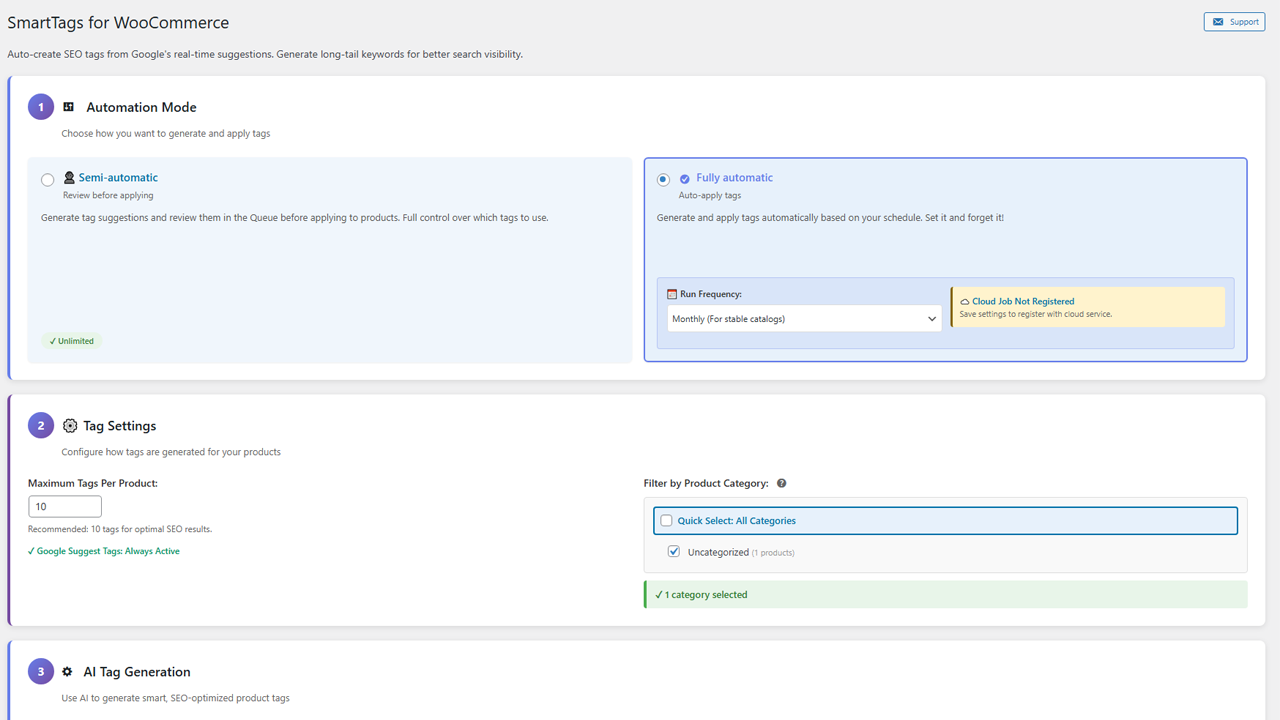
- Two Automation Modes
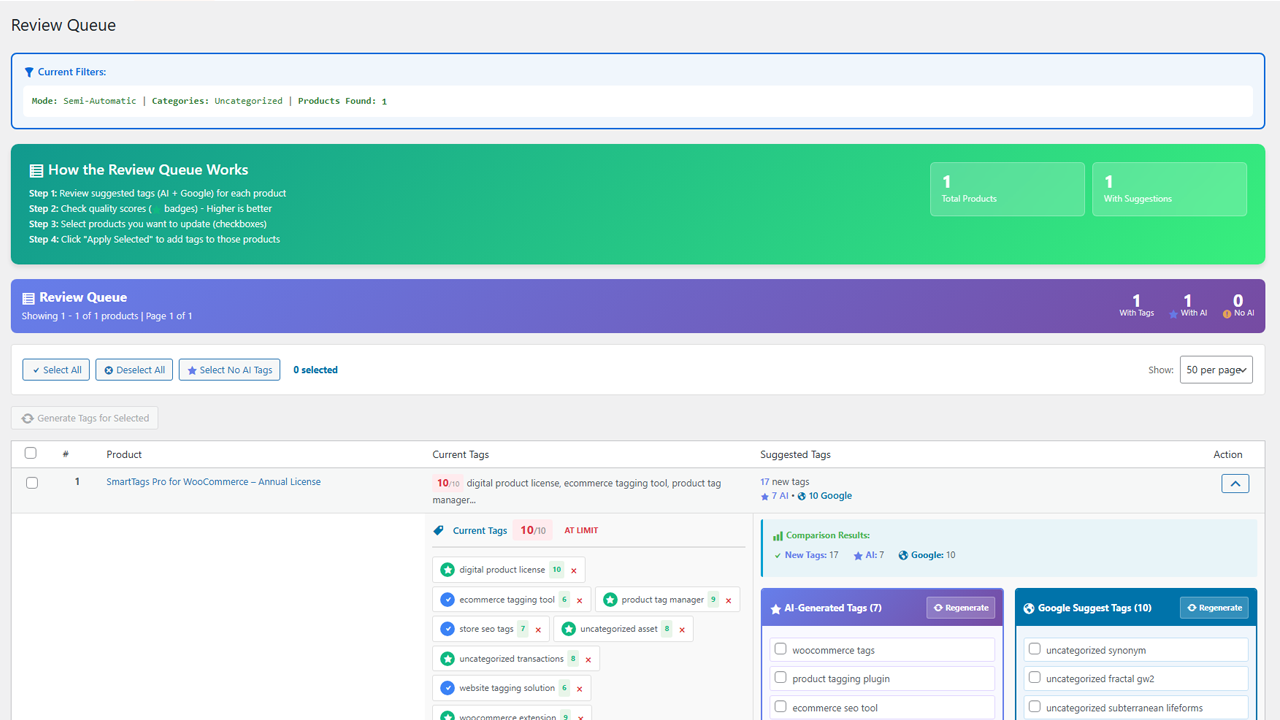
- Semi-automatic mode – Review generated tags before applying
- Fully automatic mode – Apply tags automatically using WordPress cron
- Category Filtering – Select which product categories should be processed
- Tag Limits – Set a maximum number of tags per product (configurable between 3 and 30)
- Tag Quality Management – Automatically replace low-quality tags when limits are reached
- Stopwords Filtering – Built-in filtering removes unwanted or low-quality terms
- Scheduling – Run automation on a weekly or monthly schedule
- Testing Tools – Test tag generation on individual or sample products
- First Run Catalog Scan - Automatically see products with missing, thin, or weak tags
- Safe Preview Run - Preview fixes for up to 5 products and save them to the Review Queue
- Review Queue – Review and approve tags before publishing (semi-automatic mode)
- Google Search Suggestions (no API key required)
- Local automation using WordPress cron
- Optional AI-powered tag generation using your own API keys
- Semi-automatic and fully automatic modes
- Category filters, tag limits, and review tools
- Automatic first-run catalog scan and safe 5-product preview
- Pro prompt templates for stronger AI tag recommendations
- Cloud-based fully automatic mode (not dependent on WordPress cron)
- Reliable scheduling and execution monitoring
- Job execution logs and status tracking
- Improved reliability for large catalogs
- Priority support The free version remains fully functional without Pro.
- Open SmartTags and let it scan your product catalog
- See which products have no tags, too few tags, or weak tag quality
- Preview fixes for up to 5 sample products
- Review and approve saved suggestions in the Review Queue
- Configure tag limits, category filters, and automation after you have seen the first results
- Generate product tags based on real Google search suggestions
- Improve WooCommerce SEO with long-tail keywords
- Maintain consistent tagging across large product catalogs
- Reduce repetitive manual tagging work
- Replace outdated or low-quality tags automatically
- WordPress 5.8 or higher (tested with WordPress 7.1)
- WooCommerce 5.0 or higher (tested with WooCommerce 11.0)
- PHP 7.4 or higher
安装:
- Upload the plugin files to the
/wp-content/plugins/smarttags-ai-for-woocommercedirectory, or install the plugin via the WordPress Plugins screen. - Activate the plugin.
- Ensure WooCommerce is installed and activated.
- Go to Woo-SmartTags in the WordPress admin menu.
- Let SmartTags scan your catalog and preview fixes for the first sample products.
- Review suggestions before enabling automation.
屏幕截图:
常见问题:
Does this plugin require an API key?
No API key is required for Google Search Suggestions.\ AI-based tag generation requires API keys for the selected provider.
What data leaves my site?
By default, only product titles or keywords are sent to Google Search Suggestions or selected AI providers for tag generation.\ No customer or order data is transmitted. Telemetry is optional and disabled by default.
Can I review tags before they are applied?
Yes. Semi-automatic mode allows you to review and approve tags before applying them.
How many tags can be generated per product?
You can configure a maximum tag limit between 3 and 30 tags per product.
Is this plugin compatible with WordPress 7?
Yes. SmartTags is tested with WordPress 7.1 and requires WooCommerce 5.0 or higher.
更新日志:
1.1.1
- Protect license operations against concurrent activation and stale verification responses.
- Resume partial deactivation using saved cloud cancellation progress and sanitize propagated cloud errors.
- Keep the last confirmed expiration date visible when Pro is unavailable.
- Show the verified license expiration date in UTC below its status, with an explicit no-expiration label when applicable.
- Fixed validation of purchased SOLD and DELIVERED licenses with valid activations.
- Added strict activation, site binding, license status and expiry response checks.
- Enable Pro only after successful verification; retain saved tokens for verification retries.
- Deactivate using the activation token and cancel cloud jobs before remote deactivation.
- Preserve recovery data on failure and distinguish missing tokens from confirmed deactivation.
- Bound valid caches by UTC expiry dates and use short retry intervals for temporary failures.
- Invalidate old caches and prevent reuse when credentials or site identity change.
- Removed sensitive license and cloud response logging and bundled credential initialization.
- WordPress 7.1 compatibility
- Updated the tested WordPress and WooCommerce versions
- Loaded translations at the supported WordPress lifecycle boundary
- Replaced external Emoji image dependencies with local Dashicons in admin UI
- Added protection against WordPress 7.1 Twemoji CDN conversion on SmartTags pages
- First-run experience
- Reworded the first-run card around products ready to improve
- Simplified catalog opportunity labels
- Changed the primary action to preview tags before applying them
- Clarified that only approved tags are applied
- First Run experience
- Added a catalog scan that highlights products with no tags, fewer than 3 tags, or weak tag quality
- Added a safe preview action that generates suggestions for 5 sample products and saves them to the Review Queue
- Added a clearer empty Review Queue state that sends users back to the preview flow
- Free vs Pro positioning
- Clarified that the free version includes Google Search Suggestions, local automation, Review Queue, and optional BYO AI keys
- Clarified Pro value as better prompt templates, cloud automation, job logs, monitoring, and priority support
- Compliance, safety, and performance
- Added nonce and capability-protected AJAX endpoints for the First Run flow
- Cached catalog opportunity scans to reduce repeated database work on the settings page
- Removed dynamic inline styling from admin JavaScript and moved UI state styling into CSS classes
- Updated external service disclosure for Pro prompt/model configuration requests
- Review Queue refinements
- Tag quality scoring now accepts preloaded popularity data to avoid redundant lookups per product row
- Reused page-level tag popularity when rendering quality scores in the Review Queue
- Product validation improvements
- Strengthened get_product_safe() with instanceof WC_Product checks for more reliable product object validation
- Documentation
- Added FAQ entry confirming WordPress 7.0 compatibility
- Verified compatibility with WordPress 7.0 “Armstrong”
- Review Queue performance improvements for large catalogs
- Paginated product queries now load only the current page of product IDs instead of the full catalog
- Added get_products_count_optimized() for lightweight, cached pagination counting
- Skipped online popularity HTTP requests when calculating quality scores on the queue page
- Reused tag popularity data across product rows instead of fetching per row
- Automatically skipped the missing-products diagnostic when the queue exceeds 3,000 products
- Reduced timeout risk on large WooCommerce stores
- Theme and plugin compatibility improvements
- Added defensive product validation to prevent crashes when themes or plugins modify WooCommerce product objects
- Introduced get_product_safe() helper to validate product instances before calling methods
- Improved Job Logs page for better WooCommerce product SEO workflow
- Execution logs are now always visible for easier monitoring of AI product tag generation
- Enhanced UI consistency across Cleanup Status, Job Status, and Execution History sections
- Improved visual layout and usability for bulk product tag optimization tasks
- Fixed license activation failures caused by incorrect domain detection
- Improved license activation reliability by normalizing domain values before validation
- Fixed pagination issues in the review queue
- Improved pagination reliability when navigating between pages
- Fixed scheduled jobs not processing products that already have existing tags
- Performance optimizations for the review queue page
- Optimized statistics calculation to only process current page products
- Limited missing products query to 50 products to improve performance on large stores
- Added batch loading of post meta and terms to reduce database queries
- Improved page load times for stores with large product catalogs
- Fixed slow page loads when accessing the review queue with many products
- Initial release
- Automatic tag generation using Google Search Suggestions
- Optional AI-powered tag generation
- Semi-automatic and fully automatic modes
- Category filtering and tag limits
- Review queue and testing tools
- Telemetry disabled by default
- Compatible with WordPress 5.8+ (tested up to 7.0) and WooCommerce 5.0+