Table of Contents Generator - SmartTOC Lite
| 开发者 | sinergodata |
|---|---|
| 更新时间 | 2026年1月28日 18:07 |
| PHP版本: | 7.2 及以上 |
| WordPress版本: | 6.8 |
| 版权: | GPLv2 or later |
| 版权网址: | 版权信息 |
详情介绍:
- ⚡ Lightweight & fast — built for performance, won’t slow down your site.
- 🔍 SEO-friendly — semantic HTML with clean anchor links.
- ♿ Accessibility-first — designed to work for all users.
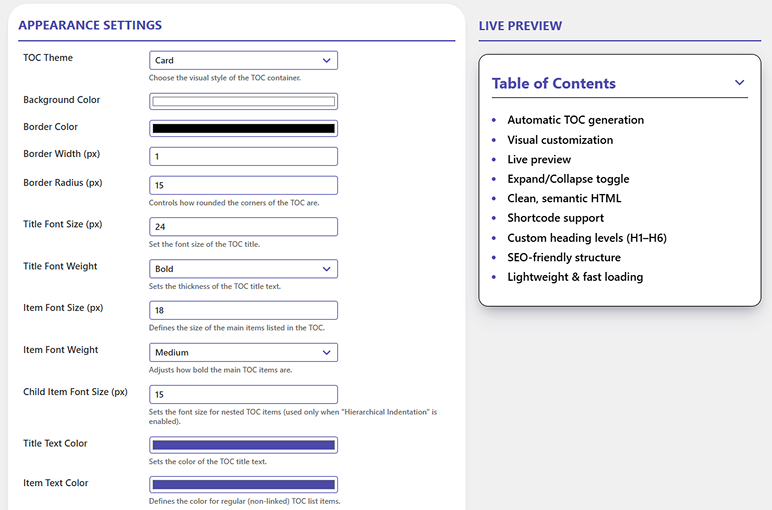
- 🎨 Flexible design options — customize fonts, colors, borders, and spacing.
- 🧪 Instant live preview — see your changes before publishing. Key features:
- ✅ Automatic TOC insertion into posts, pages, or custom post types
- 🔠 Custom heading levels — choose which headings (H1–H6) to include
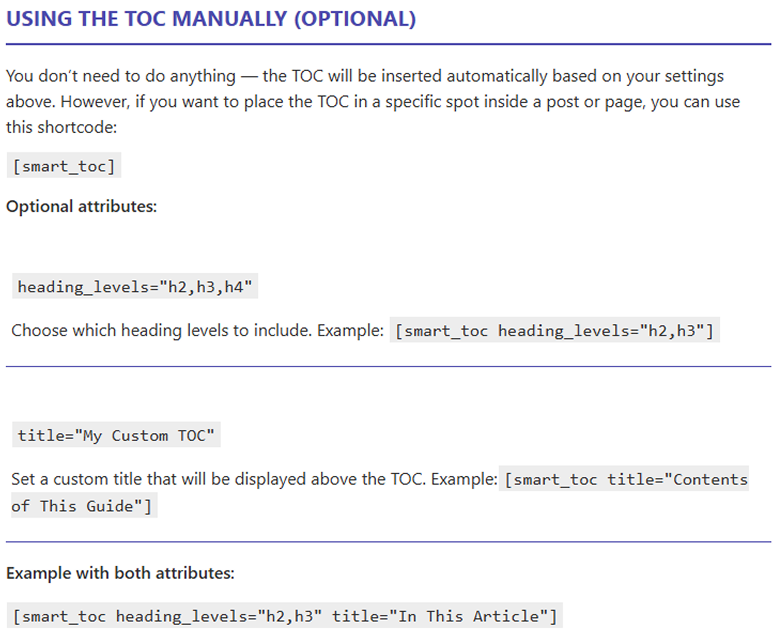
- ⚙️ Shortcode support —
[smart_toc]for full manual control - 🧭 Expand/Collapse toggle with multiple display options
- 🧩 Theme-independent output — clean, responsive HTML that fits any design
- 🖌️ Visual customization — adjust fonts, colors, spacing, and more from settings Shortcode example:
[smart_toc heading_levels="h2,h3" title="On this page"]
安装:
- Upload the plugin folder to
/wp-content/plugins/or install it from the WordPress Plugins screen. - Activate the plugin through the ‘Plugins’ menu in WordPress.
- Go to SmartTOC Lite to configure your preferences.
- Optionally, use
[smart_toc]shortcode anywhere you want a manual TOC.
屏幕截图:
常见问题:
Will it slow down my website?
= Can I use it manually only? =\
Yes. Just disable auto-insert and use the [smart_toc] shortcode wherever you need.
= Is it compatible with all themes? =\
Yes. The plugin outputs clean, theme-independent HTML and CSS, and includes enough styling options to match most designs.
= Can I hide the TOC on a specific post? =\
Yes. You can disable it per post using the checkbox in the post editor.
= Does it work with the block editor (Gutenberg)? =\
Yes. SmartTOC Lite works seamlessly with both Gutenberg and the classic editor.
No. The plugin is lightweight, uses clean HTML/CSS, and adds minimal overhead.
Can I customize the styles?
Yes. You can change fonts, colors, borders, spacing and more directly from the settings.
Is it SEO-friendly?
Yes. The TOC is generated with semantic HTML and anchor links that help search engines better understand your content.
更新日志:
- Fix: TOC no longer appears in excerpts.
- Update: improved TOC list in live preview
- Added per-side padding controls (top/right/bottom/left)
- Updated live preview & dynamic CSS to use per-side padding
- Back-compat: automatic migration for old numeric padding option
- Updated plugin name for SEO
- Updated CSS styles for better theme compatibility
- Added "Settings" link in plugin list
- Initial release.