SmartVideo - Video Player and CDN
| 开发者 |
kinggmobb
jdadmin chris10sen |
|---|---|
| 更新时间 | 2026年10月7日 02:12 |
| PHP版本: | 7.3 及以上 |
| WordPress版本: | 7.1 |
| 版权: | AGPL-3.0-or-later |
| 版权网址: | 版权信息 |
详情介绍:
- The SmartVideo player loads only on pages with video, unlike YouTube embeds which add weight to every page — pages load faster and PageSpeed scores improve
- Video hosting with global CDN delivery
- Auto-converts existing YouTube and Vimeo embeds with zero manual work
- Only loads its player on pages that actually have video — no player script on the rest of your site
- Lightweight video player loads significantly faster than standard YouTube/Vimeo embeds
- Improve Core Web Vitals and page speed performance
- Global CDN delivers video from the nearest edge server
- Lazy load video — defer video loading until needed
- Optimized for mobile, desktop, and tablet viewing Complete Brand Control
- Remove YouTube or Vimeo branding, overlays, and distracting related videos
- Custom player branding with your colors and watermark
- Professional, distraction-free playback environment
- Prevent traffic leaks to competitor content WordPress Integration Made Simple
- Native widgets for Elementor, Gutenberg, Beaver Builder, Bricks, Breakdance, and Divi 5
- Auto-converts existing YouTube and Vimeo embeds instantly (no workflow changes)
- Embed videos in seconds with shortcodes or blocks
- Responsive design adapts to any theme
- Per-page disable toggle when you need the original embed
- 📹 Video Hosting: Generous bandwidth, automatic encoding, and CDN delivery included
- ⚙️ Playback Customization: Autoplay, loop, mute, hide controls, play inline, video speed control
- 🎨 Visual Enhancement: Add poster images and custom branding
- 🧩 Page Builder Support: Native widgets for Gutenberg, Elementor, Beaver Builder, Bricks, Breakdance, and Divi 5
- 🎯 Conditional Loading: Player script only loads on pages with video content
- 🔒 Per-Page Control: Disable SmartVideo on individual pages or posts
- 💰 Monetization Ready: VAST ad support for revenue generation
- 📁 Format Support: MP4, HLS adaptive bitrate streaming (M3U8), MPEG-DASH, WEBM, VP8/9, MP3, AAC, OPUS
- 📊 Video Schema & SEO: JSON-LD VideoObject video schema auto-generated for pages with SmartVideo
- 🛠️ Developer Friendly: Filters, shortcodes, and extensive customization options
- 🤖 Automatic Encoding: Uploads are optimized for web delivery
- 🌍 Global CDN: Routes video from the nearest edge server for fast playback
- 📱 Responsive Rendering: Adapts to any device or screen size
- 📦 Generous Limits: Bandwidth, encoding, and storage included with every plan
- 📥 Install the SmartVideo plugin from your WordPress dashboard
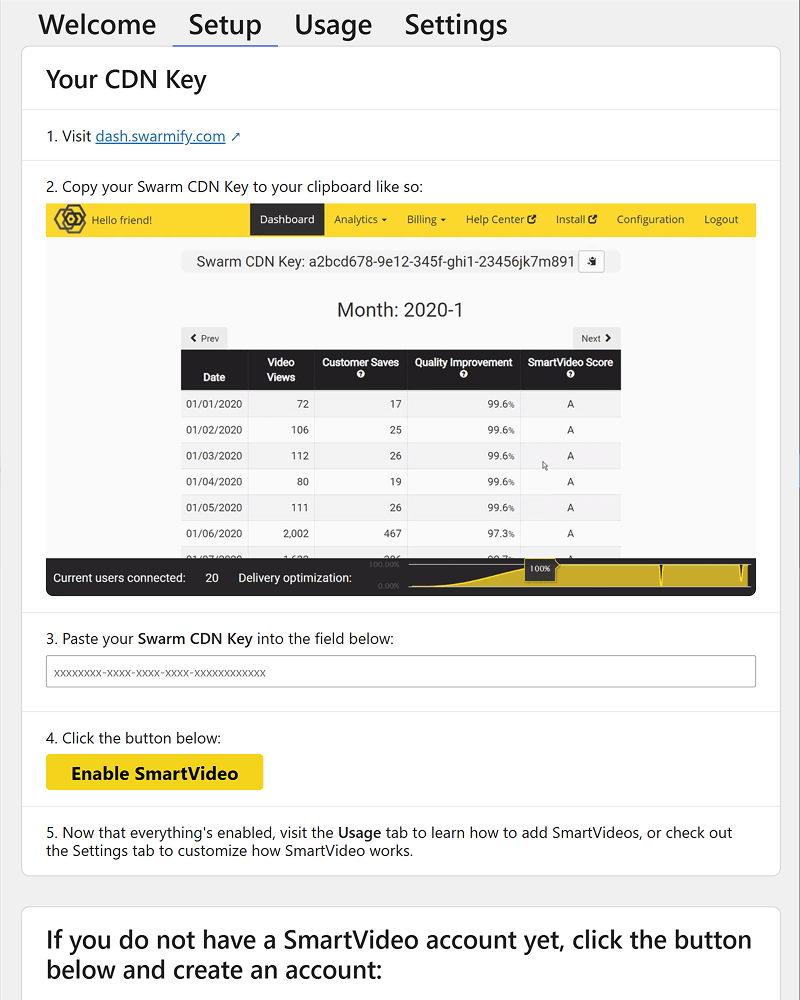
- 🔗 Connect your free Swarmify account (14-day trial included)
- 👀 Watch your existing embeds automatically convert to the clean SmartVideo player
- 📈 Upgrade when you're ready for more hosting and advanced features
安装:
- Upload the plugin files to the
/wp-content/plugins/SmartVideodirectory, or install the plugin through the WordPress plugins screen directly. - Activate the plugin through the 'Plugins' screen in WordPress.
- Use the Settings->SmartVideo screen to configure the plugin.
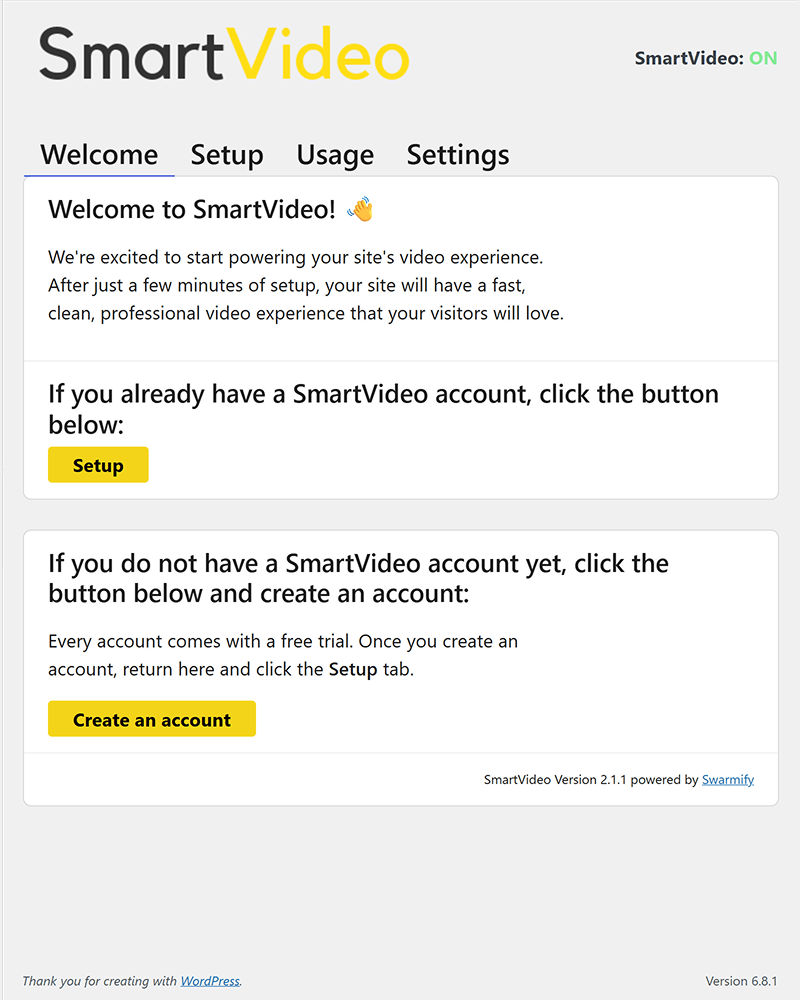
- You will need to sign up for an account at Swarmify.
屏幕截图:
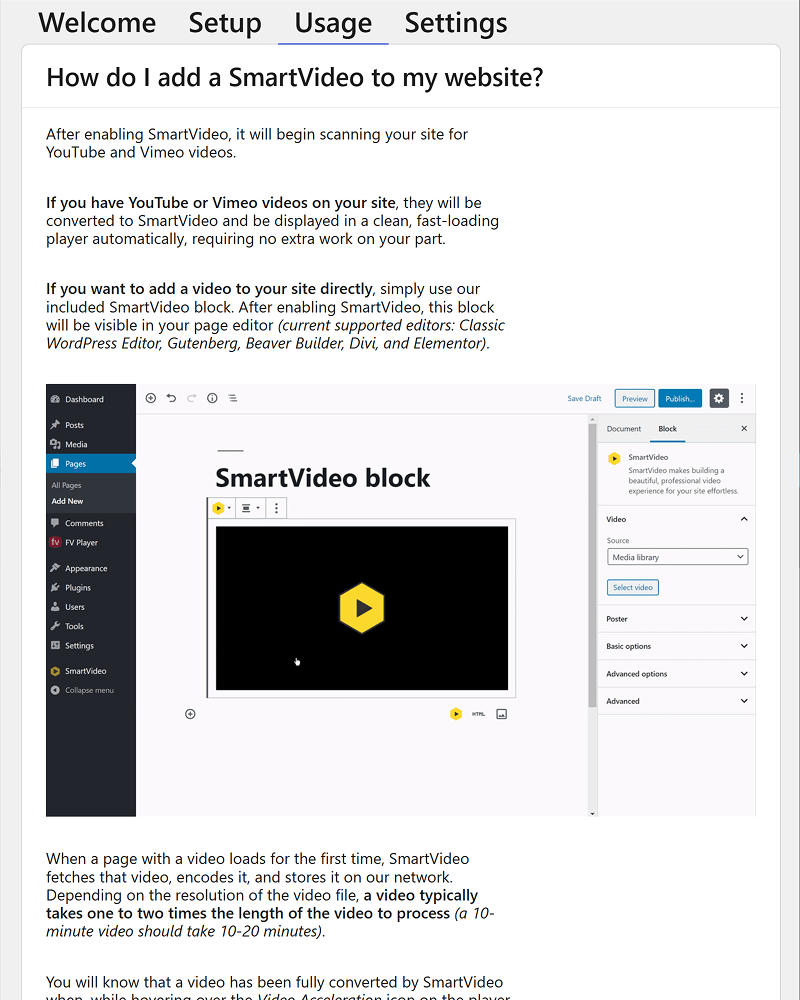
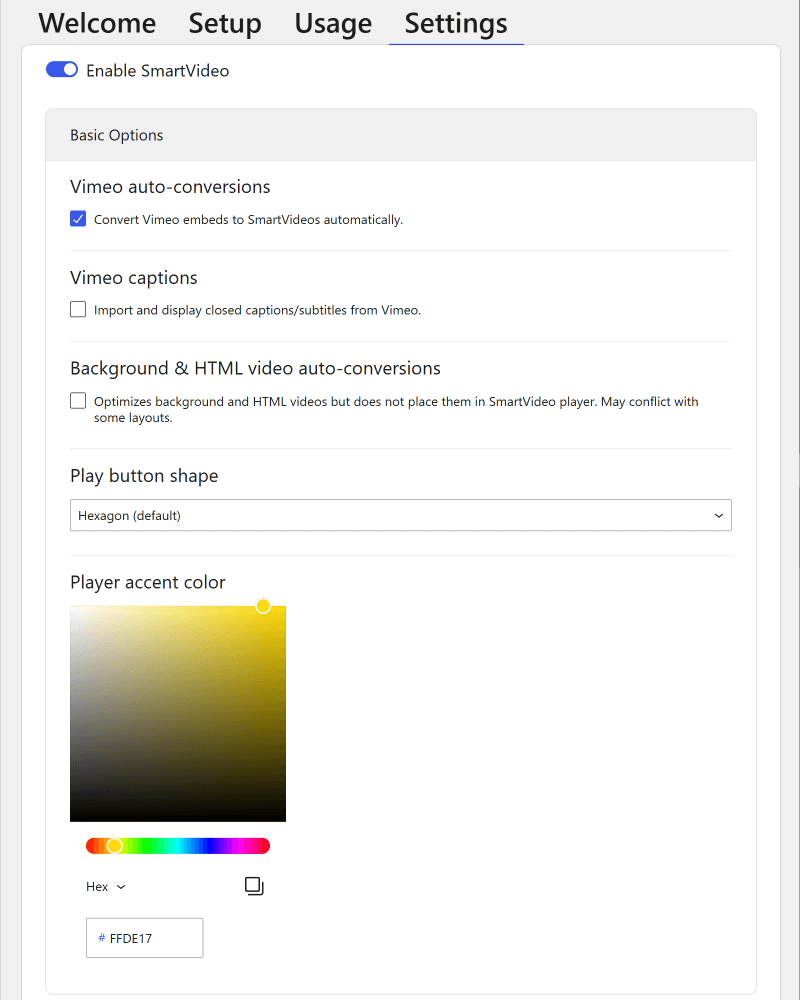
常见问题:
How does SmartVideo speed up videos on my WordPress site?
SmartVideo replaces heavy YouTube/Vimeo embeds (hundreds of KB of JavaScript) with a lightweight player served from a global CDN. Pages load faster, Core Web Vitals and PageSpeed scores improve, and videos start playing sooner. The plugin also uses conditional loading — the player script only loads on pages that actually have video.
Which page builders does SmartVideo support?
SmartVideo includes native widgets for Gutenberg (block editor), Elementor, Beaver Builder, Bricks, Breakdance, and Divi 5. Each widget supports full visual editing with an in-canvas preview. You can also use the [smartvideo] shortcode in any builder or the classic editor.
How does auto-conversion from YouTube/Vimeo work?
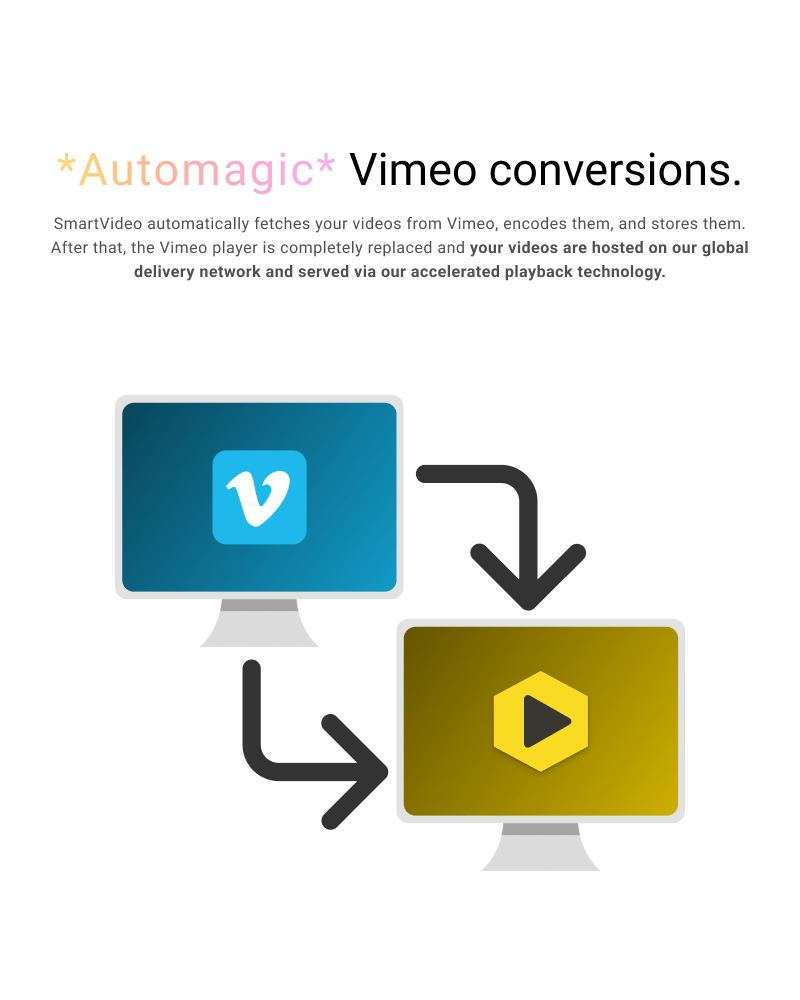
When you enable auto-convert in settings, SmartVideo detects YouTube and Vimeo embeds on your pages and serves them through the SmartVideo player instead. For Vimeo, the video file is re-encoded and delivered via our CDN. Visitors see a clean, ad-free player with no "Recommended Videos" or third-party branding.
I use Vimeo on my site. How do I switch to SmartVideo?
Install the plugin and enable Vimeo auto-convert in settings. All your existing Vimeo embeds will be automatically converted — no need to re-embed anything. Your workflow stays the same.
What video and audio formats are supported?
Video: MP4, HLS (M3U8), MPEG-DASH, WEBM, VP8/9. Audio: MP3, AAC, OPUS.
Can I disable SmartVideo on specific pages?
Yes. SmartVideo 2.2.0 adds a per-page disable toggle in both the Gutenberg editor sidebar and the classic editor. This lets you keep the original embed on specific pages while SmartVideo handles the rest of your site.
Who is Swarmify?
Swarmify is a video acceleration company focused on making fast, professional video accessible to any website owner. SmartVideo is our flagship product, combining a clean video player with CDN-powered delivery.
Who is SmartVideo for?
SmartVideo is built for site owners who want fast, professional video without the complexity of managing encoding, CDNs, and player configuration. Whether you're hosting self-hosted video files or replacing YouTube/Vimeo embeds, SmartVideo handles delivery and keeps visitors on your site.
Who is SmartVideo not for?
SmartVideo requires a paid account for ongoing use (14-day free trial to start). If you need a completely free solution and are willing to accept third-party branding and related video recommendations, YouTube or Vimeo embeds may be a better fit.
Why choose SmartVideo as a Vimeo alternative?
Vimeo places its branding, overlays, and recommendations in your video experience, which can distract viewers and redirect traffic away from your site. As a Vimeo alternative, SmartVideo removes those elements and gives you full control of the player appearance and your brand.
Can I use SmartVideo for live video?
SmartVideo currently supports on-demand video only. Live streaming is not yet available. Contact our support team if you'd like to be notified when live streaming support is added.
Are there any content restrictions?
You may use SmartVideo to deliver any content that is legally permissible under United States law and for which you have the appropriate usage and distribution rights. Swarmify adheres to DMCA procedures and responds to takedown requests.
更新日志:
- Fixed older SmartVideo blocks showing as invalid in the block editor, including blocks saved by 2.0.x and 2.1.x. Saved video sources, dimensions, and playback choices are preserved.
- Restored playback when a WordPress HTML filter removed the swarmify:// scheme from a saved video source, without changing the video's other settings.
- Fixed Elementor re-saves dropping playback choices that matched the current site defaults. Re-save affected widgets to preserve their current choices; settings already omitted from older saves cannot be recovered automatically.
- Fixed opening a saved Gutenberg block with the intro clip replacing its playback choices with today's site defaults.
- The Classic editor dialog now percent-encodes quotes and closing brackets in video and poster URLs so WordPress parses them correctly. URL sanitization is unchanged, including removal of literal backslashes. Previously inserted shortcodes are not changed automatically.
- Fixed a security issue in call-to-action overlays on sites using the new player. Shortcode
overlay_textandoverlay_urlfields, and block CTA text and link fields, could carry markup that ran in visitors' browsers. These fields now preserve text safely. Updating is recommended.
- Fixed SmartVideos disappearing from pages after they were saved
- WordPress strips out HTML it doesn't recognise whenever someone without full editing permissions saves a page, and it was removing the SmartVideo from the saved copy. A single save could take out a whole batch of pages at once, and the video stopped playing for your visitors. WordPress now leaves the video in place when the page is saved.
- Pages that already lost their video are playing again
- Nothing was ever really lost: every setting for the video survived in the saved page, so SmartVideo now rebuilds the player from those settings when the page is displayed. Affected pages started working the moment you updated - there's nothing to edit or re-save.
- The block editor stops reporting those pages as broken
- Affected pages no longer show "This block contains unexpected or invalid content" with an "Attempt Recovery" button. The editor now reads the video's settings straight from the saved page, and the next time you save that page as you normally would, the video is written back into it. SmartVideo never rewrites your saved pages on its own.
- Stopped publishing the underlying file address for SmartVideo-hosted videos
- Video structured data for an embed added by its swarmify:// link included the directly playable file address - the very thing a swarmify:// link exists to keep out of your page's source. Videos added that way no longer publish video structured data.
- Fixed the SmartVideo block showing an empty space in the block editor. Current WordPress versions draw the editor preview inside a frame of its own, and the player wasn't loading there, so the block looked blank while you were editing it. Published pages were never affected — they played normally throughout. The preview now shows the real player again.
- Fixed vertical videos still rendering widescreen on embeds added before 2.4.1
- 2.4.1 corrected new embeds only, because the block editor stores the widescreen shape in the saved block and never revisits it. SmartVideo now corrects that shape when the page is displayed, so switching an embed's link to the youtube.com/shorts/... form is enough — you no longer have to remove and re-add the block. Nothing in your saved pages is changed.
- Removed the
[smartvideo]shortcode's rawdata-swarm-setupattribute - WordPress ends a shortcode at the first
], so a real player configuration written there was cut off partway — which could stop the video playing, leave stray text on the page, or add bad entries to your video structured data. Use the shortcode's ownoverlay_*attributes for call-to-action overlays. Settingdata-swarm-setupon a hand-written<smartvideo>tag is unaffected and works as before. - Housekeeping
- The player script no longer loads on classic editor screens in the admin, where it was never used.
- Fixed deprecation notices on sites running PHP 8.4.
- Vertical videos keep their true shape. YouTube Shorts and other vertical or 4:3 embeds now render at their real aspect ratio instead of being squeezed into a widescreen 16:9 frame. Embeds added with a youtube.com/shorts/... link pick this up automatically; if a vertical video still shows widescreen after updating, remove that embed block and paste the Shorts link in fresh.
- New player, ready when you are
- A new, faster player is now available — and entirely opt-in. Your site keeps playing videos on the classic player when you update, so playback stays exactly as it is today. When you're ready, switch under Player → Version in the SmartVideo settings — Legacy is the classic player, Stable is the new one, and Beta previews what's next. A later release will make the new player the default.
- While you stay on the classic player, the new player-only controls appear disabled with a "Legacy player" note. Any values you set are kept and start applying when you switch.
- New appearance controls (new player)
- Secondary color, glass tint, corner radius, and a separate play-button corner radius
- Watermark opacity and position
- New playback and behavior controls (new player)
- Keyboard shortcuts, with an adjustable arrow-key seek step and individual toggles for mute, fullscreen, number-key jumps, and captions
- Google Analytics events — optional playback events at a reporting interval you choose
- Lazy-load player toggle
- Some player features vary by Swarmify plan; the settings page shows what applies to yours
- Per-video call-to-action overlay
- Add a clickable overlay with your own text and link to individual videos. Available in the block editor and the
[smartvideo]shortcode for now — support in the other page builders comes in a later release. - Breakdance builder support
- Native SmartVideo element for Breakdance, joining Gutenberg, Elementor, Beaver Builder, Bricks, and Divi
- Fixes
- Fixed the "iFrame player" setting having no effect on Vimeo embeds on the new player
- Fixed "Could not save settings" appearing after resetting a settings section
- YouTube start times (
?t=/?start=) are now preserved in the block editor too - The settings status panel now checks the exact player file your site loads, so it can no longer report OK while the player is blocked
- Fixed SmartVideo elements collapsing to nothing on Bricks 2.x pages
- Removed a harmless but noisy missing-file error on every Divi 4 page
- Fixed videos never loading on sites with WP-Optimize's "Delay JavaScript" feature enabled
- Notes
- The poster-first fast-load mode built for this release ships disabled — it depends on player-side support that lands in an upcoming player release, and will be switched on in a later plugin update
- Tested with WordPress 7.0.2
- Fixed uploads failing on hosts where the wp-content folder is not writable
- On managed hosts that keep the plugin folder read-only, every media upload since 2.3.0 stopped with "Upload service unavailable". Uploads now fall back to your uploads folder.
- Fixed large uploads being saved damaged when another plugin also manages uploads
- If a second upload or media plugin set its own transfer size, the pieces of the file were reassembled in the wrong places and the finished file was unusable, with no error shown. The pieces are now placed using the size actually sent.
- Fixed YouTube links that stopped working after 2.3.0
- Saved links that were not in the most common form, such as those starting with "//", with capital letters in the address, with extra spaces, or from a channel-specific address, were no longer recognized and the video did not play.
- Fixed being unable to add Swarmify-hosted videos in the classic editor
- The "Add SmartVideo" window rejected swarmify:// addresses as invalid, even though they are the plugin's own format.
- Fixed slow pages on sites that block outside connections
- Where a Vimeo thumbnail could not be fetched, every page view retried and waited. The result is now remembered briefly.
- Fixed "Reset advanced settings" undoing the 2.3.1 video repair
- On a site repaired by 2.3.1 or 2.3.2, resetting that section could switch conditional loading back on and blank the videos again. Reset now leaves that setting alone.
- Fixed the 2.3.1 repair being skipped on sites that were deactivated before updating
- If you deactivated SmartVideo before updating and reactivated it afterward, the 2.3.1 fix for conditional loading did not run, so videos could still be missing on sites built with WPBakery, Oxygen, ACF, or custom theme templates. Updating to 2.3.2 completes that repair. If videos already came back on 2.3.1, nothing changes for you. If you deliberately set conditional loading to strict, that choice is kept.
- Housekeeping
- Uninstalling now removes one leftover setting it previously left behind.
- Fixed video display after updating to 2.3.0
- Some videos appeared much smaller than usual, or looked empty, after the 2.3.0 update. This reverts the player-loading change that caused it, so videos display as they did in 2.2.2. Most affected are embeds that do not set an explicit width and height.
- Fixed conditional loading switching itself on when you update
- Updating to 2.3.0 could quietly turn on conditional loading (only load the player on pages where a video is detected) even if you never chose it. On sites that build pages with WPBakery, Oxygen, ACF, or custom theme templates, the detection cannot see those videos, so the player stopped loading and videos did not appear. Updating to 2.3.1 turns conditional loading back off once, so the player loads everywhere as it did in 2.2.2. If you deliberately set conditional loading to strict, that choice is kept. You can change the setting at any time under Settings.
- Enhanced Video SEO
- JSON-LD VideoObject schema now auto-fills description, thumbnail, duration, page URL, and publisher from your existing content (post excerpts, SEO plugin meta — Yoast, Rank Math, AIOSEO, SEOPress, and more — featured images, Media Library)
- The classic widget and Divi modules now emit schema too, joining the other builders
- New
smartvideo_schema_datadeveloper filter - Divi 5 modules go live
- Modules now render on the live site (previously editor-only) — modules you've already built start appearing to visitors automatically, no changes needed
- Responsive modules reserve a 16:9 ratio to prevent layout shift
- Modernized classic-editor video dialog
- Redesigned popup with live YouTube/Vimeo thumbnail preview, a poster-source dropdown, keyboard-navigable tabs, and fields pre-filled from your site defaults
- Security
- Chunked uploads now accumulate in a private, server-only directory (closing an attack vector on shared hosting), with permission and nonce checks before any file handling, bounds-checked chunk indices, and hourly cleanup of stale chunks — nothing changes in how you upload videos
- REST settings writes hardened — inputs restricted to known settings keys, and every setting now runs both validate and sanitize callbacks
swarmify://dropped from the globalwp_ksesallowlist; Vimeo oEmbed thumbnails validated and fetched viawp_safe_remote_get- Broad input-validation, output-escaping, capability-check, and nonce hardening from extensive code review
- Player loading fixes
- Stable player loads
swarmcdn.jsdirectly (replacing the deprecatedswarmdetect.jsproxy), fixing playback on sites where the proxy was blocked - Conditional loading now reads post content from the database (so Divi 5 runtime swaps are detected) and no longer false-loads on non-video iframes such as Google Maps
- Pages with Beaver Builder videos picked from the Media Library now load the player script, so those videos play
- Responsive iframe CSS now applies even when YouTube auto-conversion is off, so converted Vimeo embeds are responsive
- Upload accelerator fixes
- Fixed silent corruption on chunk-0 retries and same-filename collisions between browser tabs
- Added a server-side upload size cap based on free disk space; failed uploads now report a reason
- Builder & editor fixes
- Empty SmartVideo blocks/modules no longer show the "No video selected" placeholder to site visitors — it now appears only in the builder editor (all builders + shortcode)
- Beaver Builder/Elementor modules missing width/height no longer render 0×0 or trigger PHP 8 warnings
- YouTube Shorts and live-stream URLs are now recognized, and
?t=/?start=start times are preserved when links are converted via the shortcode or page-builder modules; negative dimensions are clamped - The Gutenberg per-page "disable" toggle now saves, and the classic widget's Controls toggle now sticks when unchecked
- Settings & admin polish
- Quick link to your Swarmify dashboard from the plugin settings
- Unsaved edits persist on navigation, the CDN key field trims whitespace, the status panel now probes
swarmcdn.js(the script the player actually loads), the conflict-plugin check covers more plugins, and the dashboard help link is fixed - Improved ARIA roles, keyboard navigation, focus management, and contrast across the admin settings and the classic-editor dialog
- All user-facing strings audited and made translatable; the translation template is now populated
- Complete data cleanup on uninstall, including multisite
- Compatibility
- Tested with WordPress 7.0; minimum supported version raised to 6.6
- Notes for existing installs
[smartvideo]shortcodes without explicit attributes now follow your site-level defaults (autoplay/muted/loop/controls/playsinline/responsive) instead of fixed built-in values, so existing bare shortcodes may behave differently after updating. Add attributes to any individual shortcode to pin its behavior.- Per-module
preloadsettings have been removed from all builders — the player now manages preloading itself, and any preload value you previously set in a builder is ignored. The shortcode still accepts an explicitpreloadattribute for backward compatibility. - Classic-editor SmartVideo Widget instances saved before the controls setting was tracked now render with player controls enabled, restoring the historical default. Widgets saved with controls explicitly unchecked since 2.x are unaffected.
- Beta player toggle
- Added beta player toggle in Advanced settings for testing upcoming player builds
- Hardened build pipeline for more reliable releases
- Bug fixes for 2.2.0
- Fixed conditional loading edge cases introduced in the 2.2.0 overhaul
- Fixed block migration issues when editing legacy Gutenberg blocks
- Divi 5 + Bricks Builder support
- Native SmartVideo module for Divi 5 Visual Builder with live preview
- Native SmartVideo element for Bricks Builder
- Divi 5 video blocks detected by conditional loading
- Conditional loading overhaul
- Standard mode: loads on any page with video content (safe default)
- Strict mode: only loads when features that will convert content are enabled
- Elementor content scanning rebuilt to read the widget tree directly — eliminates false positives
- Per-builder native detection for Elementor, Beaver Builder, Bricks, and Divi
- Builder edit modes (Divi VB, BB editor, Bricks editor, Elementor preview) always load the player
smartvideo_force_load_scriptfilter for themes/plugins to force-load the player- Modernized admin settings
- Rebuilt settings page with React — cleaner UI, better defaults display
- Dashboard widget showing video stats at a glance
- Reset buttons for each settings section with branded confirm dialog
- Gutenberg block improvements
- Unified video URL field replaces source-type dropdowns
- Legacy blocks migrate automatically on first edit — no "invalid content" errors
- Per-page SmartVideo disable toggle in the editor sidebar
- Responsive auto-converted YouTube/Vimeo iframes scale properly at all widths
- New features
- Preload attribute support across all builders and shortcode
- Per-page SmartVideo disable via post meta (classic editor + Gutenberg)
- JSON-LD VideoObject schema auto-generated for pages with SmartVideo
- Aspect ratio helper class for responsive embeds
- Security & bug fixes
- Fixed XSS vulnerabilities in all builder render paths (URL sanitization, poster escaping)
- Fixed poster leak when poster source set to "none" but stale URL remained
- Empty video source now shows placeholder instead of broken tag
- Invalid YouTube/Vimeo URLs return empty output instead of malformed tags
- Improved YouTube URL normalization (short URLs, privacy-enhanced, already-embedded)
- Fixed upload accelerator corrupting temp file paths during chunked uploads
- Per-page disable meta no longer saved on revisions or autosaves
- Elementor widget frontend script now loads reliably via proper dependency registration
- Fixed Fancybox conflict bug
- Fixed a bug where old Fancybox versions were conflicting with SmartVideo
- Improved BuddyBoss compatibility
- Bugfixes for Elementor
- Added 'swarmify://' protocol type to allowed list in Elementor
- Also fixed a broken link to the settings page
- Improved New Admin Interface
- The same top-notch video playing and CDN, with a more modern admin panel
- WordPress 6.3 Updates
- Updated for enhanced compatibility with the latest version of WordPress 6.3
- WordPress 5.9 Updates
- Updated for enhanced compatibility with the latest version of WordPress 5.9.3
- Welcome Tatum(WP 5.8)
- WordPress 5.8 is out with many new and awesome features. SmartVideo fully supports this new version so worry not. Have your cake and eat it too! Yum
- Fixing an Elementor bug that caused unseemly warnings to appear while in dev mode. Can't have that now.
- Added some minor fixes for 5.8.1
- Fairy dust magic for better PageSpeed Scores (FCP, LCP, CLS)
- We're going to be straight with you, this brings some magic pixie dust which will boost your Web Vitals. But you are boosting the score only and not actually changing anything real with the performance of the site. So if the score is important to you, then this will make you happy. But don't fool yourself into thinking anything changed in actual speed, it just tests better and unfortunately a lot of people are judging yours and our works by a number generated by Google which currently doesn't have a basis in reality. Hence us putting out this update because fair or not, people gonna judge.
- For more reading on the current problems in Web Vitals:
- Framehole: PageSpeed 6.0 loophole for easy perfect score
- Get a perfect Largest Contentful Paint (LCP) time with a single line of code
- Also fixed a minor bug(z-index) in the layout of our Classic Widget causing you to be unable to pick from your Media Library. Sorry about that and hat tip to Mirco for pointing it out!
- You're among friends here. You are going to update for the PageSpeed Score improvement aren't you? No judgement here, do what you need to do because business is a contact sport.
- 2020 is nevermore, so it's time for 2.0.21
- Look, everyone wants to forget 2020 and move forward to a better future in 2021. But our developers had one problem, Some how, some way, our plugin just happened to be at version 2.0.20. It was like a continuous nightmare where everytime we thought we were done with 2020, there it is again in our face. So what do developers do when faced with a problem......they solve it. We present the fresh new version 2.0.21. And just like the new year brings fresh optimism, so too did this version for our developers. Now they feel cheery, and ready to take on the world. Basically like they just finished a double espresso.
- Features....well this version brings inspiration, hope, and......some minor housekeeping fixes. Really let's be honest, we are all ready for change, so here it is, version 2.0.21. Can't be any worse than the last one right?
- CSS Conflict resolution update
- What happens when different plugins have a CSS conflict? If you answered Style Battle Royale, well then you are an interesting person who is probably fun at parties. But if you answered, "shrug things probably break?" You would be correct. Our new release prevents these style sheet conflicts where our player and your theme's video player just couldn't get along. Now they at least they are divided by a wall and can only stare angrily across the room.
- Namespaced the SmartVideo player CSS styles so that conficts between our video player and those included via your theme or other plugins should be eliminated. But there may be some sneaky conflicts we missed and if you see them, just reach out to support so we can take care of them. Thanks!
- No need to fear, dynamic tags are here
- Need to template up your massive video archive so that each post displays with the associated video in a SmartVideo tag. Easy breezy if you are an Elementor Pro user. Our SmartVideo widget can now dynamically load both the video source and/or poster image from any Elementor Pro dynamic tag. Quick, efficient, and beautiful
- Elementor SmartVideo widget supports dynamic tags for Elementor Pro users
- Now you see me, now you don't
- Sometimes it's fun to revert to our inner child and play games like hide & seek. Try it, we'll wait. You really needed that, right? While games are good for humans, it's not good for our Gutenberg block editor to play hide & seek with your block attributes. Naughty code was hiding the URL you set when you specified direct video URL's in our SmartVideo block. Don't worry we had a talk with the code, and it will never hide this data again. Also, rest assured everything is in there from previous blocks you have inserted, it was just.....hidden.
- Gutenberg block editor was not showing the URL's you previously set for videos when you chose the "Another source" option. This has been fixed.
- Crouching tiger, hidden classic
- Fixed issue with SmartVideo Classic widget where you would click to specify a YouTube video and the popup to enter it would never show up
- For those without that problem, well now is a great time to turn on automatic updates for our plugin if you have the new WordPress 5.5 release. That way if a future update fixes a problem you have, then it gets installed automatically. Like robots, but in the cloud...
- Adjusted for deprecated jquery functionality
- Tested for the fresh WordPress release coming soon ... WP 5.5 Codename: WFH -- Stay Safe & Sane
- Updated testing for the latest WordPress builds so you can confidently install and get your video on
- Disclaimer: Not responsible for overconfidence or lack there of in the actual videos. That part is up to you. We believe in you though!!!
- Trimming down for speed
- Fixed a bug causing extra stylesheets to get included in frontend output. I mean we're stylish, but no need for excess styling!
- Pro lovin, for our Pro Customers
- All of the Swarmlings: Moved lesser used options to a collapsed
Advanced Optionspanel because everyone likes a tidy settings page, right? - Pro Customers: Configure a watermark for your video. It can be your logo, your friends logo, or even a disco dancing dog gif if that's your style
- Pro Customers: Looking to level up your YouTube revenue and take control of your own ads. Well we made that simple with our javascript snippet, but who wants to figure out that gobbledy gook. You are using our WordPress plugin to simplify, and now you can configure your ad platform URL directly in the plugin.
- Sometimes you need MOAR POWER
- You can now statically configure the Swarmify CDN key in advance from your 'wp-config.php' file. Just define the constant
SWARMIFY_CDN_KEYand set it to your key. Config->Done - Elementor Pro giving you heartburn when used with our widget, antacid has arrived. We worked out an issue causing Elementor Pro's form widget to run itself out of memory.
- WordPress host wants you to upload slower, fine we can make that happen
- Added a toggle in the settings to disable our upload acceleration if your WordPress host has issues with it.
- We wish they would just adjust on their side, but we can be flexible so now you can turn this off in the settings if its giving your web host heartburn ;)
- Watch video faster for those who enjoy chipmunk voices
- Why would you want the video to play at 1.25x, 1.5x, 2x speeds? Well because you were a fan of those Chipmunk albums where you could listen to popular music sung in a high squeaky voice.
- Or it may just be your customers enjoy watching at differing paces. That must be the reason because nobody likes chipmunks, right? Alvin, alvin, ALVIN?
- All SmartVideo players now allow viewers to change the playback speed to suit their preferences.
- Too much speed!!!
- Some hosts weren't ready for maximum upload acceleration so they put on the brakes and prevented media file uploads. Now we detect these slowpokes and kindly slow down from insanely fast to somewhat crazy fast upload speeds.
- If you were having trouble with uploads after previous update, that should be fixed now ;)
- Closed minded no more
- Display closed captions on all YouTube source videos... Or don't. It's up to you with a new plugin setting that enables imported captions from your YouTube videos to be shown at the click of a button. (Don't worry, manual closed caption config is coming soon......)
- Accelerate your video uploads with new faster, better, stronger video uploading behind the scenes. Uploading videos to use in your WordPress media library will be faster and smoother than ever
- Elementary my dear Beaver
- Quoting for the SmartVideo widget in Elementor and Beaver Builder was not so smart. But we educated it and all of your quoting issues have been resolved.
- Oldie but goodie
- Fixed a bug causing WordPress versions < 4.9 to have issues with our plugin. We're sorry Classic, you are still loved!
- Hex a Gone?: Some users have a dislike for 6 sided polygons. We are partial to them ourselves, but realize everyone has the right to the basics of life, liberty, and choice of play button shapes.
- Change play button shapes:
- Hexagon - Our personal favorite
- Circle - For those inclined to a single side
- Rectangle - Do you like 4 sides and the golden ratio, then this is for you!
- Divi'ded we fall: If your theme colors weren't working properly in Divi, they are now!
- Vime 'ode to our customers: It would be really neat if this could autoconvert all Vimeo videos like it does for YouTube, you said. Well maybe not you, but some people said this. And our answer, done! Our global autoconvert toggle now handles converting Vimeo and YouTube videos throughout your site. All without needing to get your hands dirty with any pesky template editing.
- Classic is still cool: Fixed a bug with our Classic Editor widget where the edit window wouldn't close when you clicked "Insert into Post". That wasn't very awesome at all. So we fixed it, and now our classic widget is 20% cooler.
- Fixed some minor casing inconsistencies so that we can be more consistent :)
- Codename: Van Gogh
- All of the pretty native widgets you want
- Less of those pesky ears!!
- You wanted modern native widgets for all your favorite page builders, and we are here to deliver.
- Native widgets for:
- Gutenberg - For when blocks are your thing
- Divi Builder - Fancy style, drag and drop, and now the world's fastest video
- Elementor - Adding the best video is now elemental my dear Watson
- Beaver Builder - Chuck slow wooden, video players out the window. And upgrade your video to the player that will make you say dam
- Automatic Vimeo Import - All widgets allow for simple import of your legacy Vimeo content. This is of course in addition to our existing support for YouTube, Amazon S3, Media Library, and more!!
- Easier to find Settings Panel - If you ever forgot where to configure your account, we feel you. We always lost track of where the settings were at. No more searching in menus for settings. Now it's front and center in your WordPress Admin
- Awesome Color Picker for video player color customization now in settings
- Significantly increased Lighthouse & Pagespeed scores with our enhanced embed engine
- Extreme Video Theme Optimization - Automatically optimize and accelerate your theme's background videos. Never face slow loading video again