S/MIME Email Signing
详情介绍:
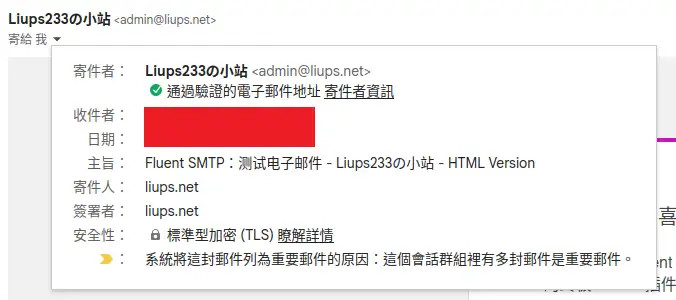
This plugin is for signing all outbound emails with an S/MIME certificate.
It uses phpmailer to automatically sign emails. Here are the prerequisites to use this plugin:
- This plugin is for single-user WordPress site, such as a personal blog. I don't know what will happen if you put it in a multi-user site.
- PHP 8.3 and above are recommended. Make sure your PHP has openssl extension, which is usually installed by default.
- You should use another plugin, such as FluentSMTP, to send emails through an external SMTP server.
安装:
Get a S/MIME certificate
You can go to Actalis to apply for a free S/MIME certificate for one year.
After applying, you can download a p12 certificate file, which contains public key, private key, and certificate chain.
The password to the p12 file will be sent to your email.
Split the p12 file
In case the p12 file is named "smime.p12", do the following commmands to split it into seperated keys.
- Export the private key:
openssl pkcs12 -in smime.p12 -nocerts -out smime.key - You will be asked for the Import password, which is the password to the p12 file.
- Then, you need to enter a password to protect the exported private key. This password is what we will fill in the plugin setting.
- Enter twice to confirm it.
- Export the public key:
openssl pkcs12 -in smime.p12 -clcerts -nokeys -out smime.crt - You will be asked for the Import password, which is the password to the p12 file.
- Export the certificate chain:
openssl pkcs12 -in smime.p12 -cacerts -nokeys -out certchain.pem - You will be asked for the Import password, which is the password to the p12 file.
- Private key:
chmod 640 smime.key - Public key:
chmod 644 smime.crt - Certificate chain:
chmod 644 certchain.pem
屏幕截图:
更新日志:
1.0
- Initial release.