SniffPress
| 开发者 |
wpwebguru
vivekkumarsahu0 devshubham715 |
|---|---|
| 更新时间 | 2026年7月19日 11:54 |
| PHP版本: | 7.4 及以上 |
| WordPress版本: | 6.9 |
| 版权: | GPLv2 or later |
| 版权网址: | 版权信息 |
详情介绍:
- Completely redesigned admin UI with a modern violet/indigo theme, custom icon set, and Inter/JetBrains Mono typography
- Dark mode toggle with saved preference (persists across sessions)
- Results are now grouped by theme/plugin, then by file, in a collapsible tree instead of one long flat list
- Live match counter: see an estimated match count as you type, before running the full search
- Redesigned Search In box, file type filters, and Select All / Select None controls for better usability Key Features:
- Search across multiple themes/plugins at once
- Case-sensitive and whole word matching options
- Regular expression support
- Filter by file type (PHP, JS, CSS, etc.)
- Grouped, collapsible results (by theme/plugin, then by file)
- Live match count preview as you type
- Dark mode toggle
- Direct links to edit found files (works with any theme/plugin)
- Search limits: control maximum file size and results count
- Exclusion patterns: skip vendor folders, cache directories, etc.
- Clean, intuitive interface
- Fast AJAX-powered searching
- Search completion statistics Perfect for:
- Debugging theme/plugin issues
- Finding specific functions/hooks
- Locating text strings for translation
- Code audits and maintenance
安装:
- Upload the
sniffpressfolder to your/wp-content/plugins/directory - Activate the plugin through the 'Plugins' menu in WordPress
- Navigate to SniffPress (top-level menu) to start searching
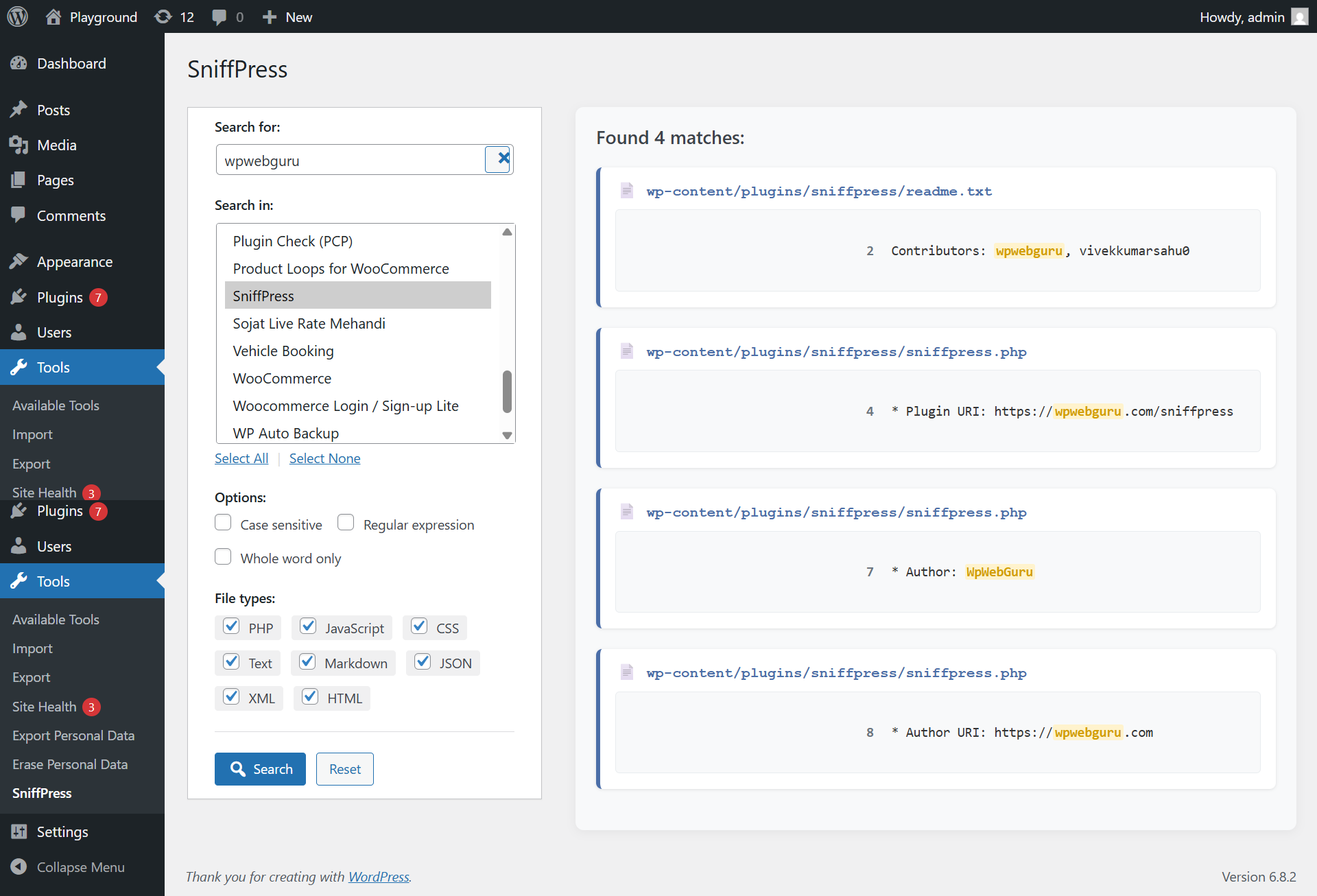
屏幕截图:

常见问题:
What file types are searched by default?
The plugin searches:
- PHP (.php)
- JavaScript (.js)
- CSS (.css)
- Text (.txt)
- Markdown (.md)
- JSON (.json)
- XML (.xml)
- HTML (.html)
Why are some files missing from results?
The plugin automatically skips:
- Binary files (images, fonts, etc.)
- Files over 2MB in size (configurable)
- Vendor directories (node_modules, vendor, .git, etc.)
- Files matching your exclusion patterns
Can I search WordPress core files?
Currently the plugin only searches theme and plugin files. Core file search may be added in future versions.
How do I use exclusion patterns?
Enter comma-separated patterns in the "Exclude patterns" field. Examples:
node_modules, vendor- skip these common directories*.log, cache/- skip log files and cache directoryassets/css, includes/- skip specific folders
What are the recommended search limits?
For large sites, we recommend:
- Max file size: 2-5MB
- Max results: 100-200 This prevents timeouts and memory issues.
How are results grouped?
Results are grouped first by theme/plugin name, then by individual file within that group. Click any group or file header to collapse or expand it.
How does the live match counter work?
As you type (2+ characters) with at least one location selected, the plugin runs a quick background count and shows it under the search field, before you click Search. It's capped at 500 for speed on large codebases; run the full search to see everything.
How do I enable dark mode?
Click the moon/sun icon at the top right of the SniffPress page. Your choice is saved in your browser and applied automatically next time you visit.
更新日志:
- Redesigned admin UI: new color palette, custom icon set, Inter/JetBrains Mono typography
- Added dark mode toggle with saved preference
- Results are now grouped by theme/plugin, then by file, in a collapsible tree
- Added live match counter (debounced preview count) as you type
- Reworked Search In box, file type checkboxes, and Select All/None controls
- Various small UX and accessibility improvements
- Added top-level admin menu for easier access
- Added search limits: control max file size and results count
- Added exclusion patterns to skip specific folders/files
- Improved theme editor links for both active and inactive themes
- Enhanced user interface with search statistics
- Added welcome message with usage tips
- Fixed exclusion pattern matching for directories
- Improved plugin main file detection
- Better error handling and user feedback
- Performance optimizations for large codebases
- Initial release with core search functionality
- Support for both themes and plugins
- Case-sensitive and whole word matching
- File type filtering options