
Sobi Forms
| 开发者 | alesas |
|---|---|
| 更新时间 | 2026年11月4日 20:35 |
| PHP版本: | 7.4 及以上 |
| WordPress版本: | 7.1 |
| 版权: | GPLv2 or later |
| 版权网址: | 版权信息 |
详情介绍:
- Contact forms and lead capture forms
- Quote request forms and support forms
- Registration forms and newsletter signups
- Job application forms and file upload forms (resumes, PDFs, images)
安装:
- Upload the
sobi-formsfolder to/wp-content/plugins/or installsobi-forms.zipfrom Plugins -> Add New -> Upload. - Activate Sobi Forms through the Plugins menu.
- Go to Sobi Forms -> Forms and create your first form.
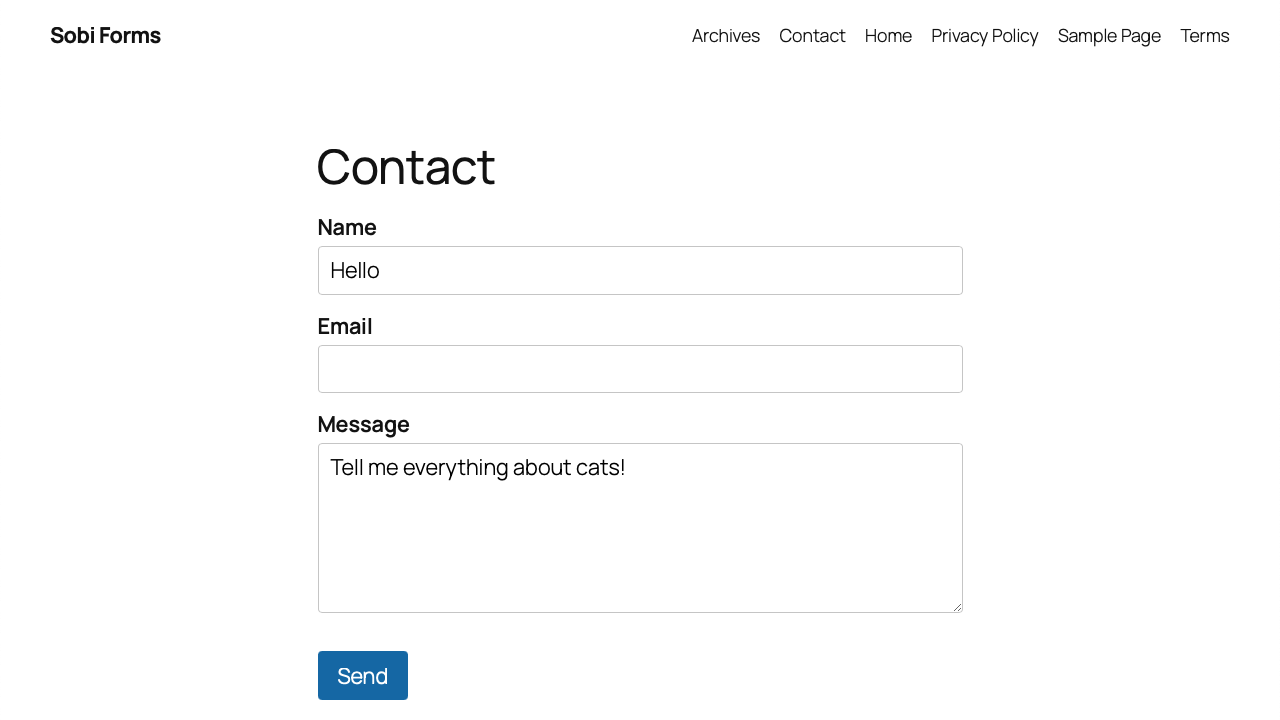
- Click Embed in the form editor to copy the shortcode, or insert the Sobi Forms block in the block editor.
- Paste the shortcode into any page (Gutenberg, Elementor, Divi, widget, etc.).
屏幕截图:

常见问题:
How do I create a contact form in WordPress?
Install and activate Sobi Forms, then go to Sobi Forms → Forms → Add New. Use the drag and drop form builder to add fields, configure After submit actions, and click Embed to copy the shortcode or insert the Gutenberg block on any page.
Can I create a job application form with file upload?
Yes. Add text and email fields plus a file upload field for resumes or PDFs. Pick allowed file types in the field settings. Submissions with files are saved to the inbox (required for uploads); download attachments from the submissions inbox (admin only).
Can I customize notification email subject and body?
Yes. In the form builder, open After submit → Email (Admin) or Email (Visitor) → Content tab. Set a custom subject and/or HTML body with placeholders such as {{field.email}} or {{all_fields}}. Leave either field empty to use the default template for that part. Use Send test email to preview with sample data (sent to your WordPress account email only).
Can visitors upload files?
Yes. Each form can include one or more file upload fields (one file per field). Files are stored privately, validated server-side, and downloaded only by admins from the inbox.
Does Sobi Forms support SMTP email?
Yes. Sobi Forms → Settings → SMTP — enter your host and credentials, test the connection, then turn on Enable Custom SMTP. Notification and visitor confirmation emails use SMTP when it is on; otherwise Sobi Forms falls back to WordPress wp_mail(). Failed sends appear under Logs with Retry.
Can I connect Sobi Forms to Zapier?
Yes. Open Automations in the form builder and add one or more Webhook automations with your Zapier catch hook URL (or Make, n8n, etc.). Submissions are POSTed as JSON in the background. Failed deliveries appear under Settings → Webhooks → Logs with Retry.
Can I sync form signups to Brevo or Mailchimp?
Yes. Add your API key under Settings → Integrations → Brevo or Mailchimp, then add a Brevo or Mailchimp automation on the form. Map the email field and list/audience attributes. Optional Require double opt-in sends a confirmation email for new subscribers (Brevo: pick a double opt-in template + redirect URL). Use Add test contact / Add test member in the builder to verify before go-live.
Can I require double opt-in for Brevo list signups?
Yes. In the form builder, open your Brevo automation and enable Require double opt-in. Pick a Brevo DOI confirmation template (create one in Brevo under Marketing → Templates with a Double opt-in link button) and set the redirect URL visitors land on after confirming. Brevo sends the confirmation email; the contact joins the list only after they click the link. Use Add contact in the automation test panel to send yourself a confirmation.
Is Sobi Forms GDPR friendly?
Sobi Forms is designed for privacy: submissions stay on your server, raw IP addresses are not stored (hashed IP only for rate limiting), there are no tracking pixels, and you can use inbox-only delivery with no email. You are responsible for your site privacy policy and lawful basis for collecting data — see the Privacy Policy section below.
Does Sobi Forms work with WooCommerce?
There is no dedicated WooCommerce integration, but you can embed any form with the shortcode or Gutenberg block on WooCommerce pages, product descriptions, or sidebars that support blocks or shortcodes.
Can I export form submissions to CSV or JSON?
Yes. Sobi Forms → Settings → Exports — pick a form, choose CSV or JSON, optionally filter by inbox view or search. Exports run as background jobs; download securely when ready (files kept 7 days).
Can I copy a form to another WordPress site?
Yes. On Sobi Forms → Forms, use Export on a form, then Import on the other site. The JSON file includes the form title and fields (not submissions). Import creates a new form and opens the builder.
Can I link to my privacy policy in a consent checkbox?
Yes. Edit the checkbox label in the builder, select the text, click Link, and pick a published WordPress page or paste a URL. Links open in a new tab; clicking the link does not toggle the checkbox.
Can I require terms acceptance but keep newsletter optional?
Yes. Add a multi-checkbox field with two or more options. On each row, set Required for terms and Optional for newsletter. Visitors must check required options to submit; optional boxes stay unchecked unless they opt in. Works with linked labels (privacy policy URL).
Can I sync to Brevo or Mailchimp only when the newsletter checkbox is checked?
Yes. On each Brevo or Mailchimp automation, set Only add to list if to any checkbox on the form — including one option in a multi-checkbox group (e.g. newsletter on the Contact template). Unchecked submissions are not synced (no API call) and do not appear in connector Logs — that tab is for failed deliveries you may want to retry. Leave it on Always sync for dedicated newsletter signup forms.
Do existing forms change checkbox validation automatically?
No. Forms saved before 1.7.1 without per-option flags keep the previous rules until you open the form in the builder and save again. Single consent checkboxes behave as before.
Can I show or hide fields based on other answers?
Yes. Open a field’s settings (gear icon) and enable Show only when…. Add one or more rules (e.g. show VAT number when Country equals France). Choose Match all or Match any when you have multiple rules. Number fields support equals, greater than, less than, and similar comparisons. Hidden fields are not validated and their values are not saved or sent in emails, webhooks, or CRM syncs. Title and paragraph blocks can use the same rules. On multi-step forms, a field can only depend on answers from the same or earlier steps.
Can I create a multi-step form?
Yes. Add a New step layout block between fields (Layout category in the field picker). Visitors see one step at a time with Next and Back; required fields are validated before moving forward. The last step shows your submit button. One submission is stored — same inbox, emails, and automations as a single-page form. Forms without a step break behave exactly as before.
Can I place two fields on the same row?
Yes. Drag a field beside another in the builder to create a multi-column row (up to 3 columns). Drag the separator to resize; double-click the separator to equalize column widths. On narrow screens, columns stack vertically.
Can I recover deleted form submissions?
Yes. Delete moves submissions to Trashed (soft delete). Open the Trashed tab in the inbox to restore them or delete permanently. Exports skip trashed rows by default.
Does Sobi Forms work with Elementor?
Yes. Paste [sobiforms id="3"] or [sobiforms slug="your-form"] into an Elementor Shortcode widget, or use the Gutenberg block in the block editor. Front-end assets load only when the form is rendered.
Does Sobi Forms slow down my site?
On pages without a form, Sobi Forms adds no front-end CSS or JavaScript. On pages with a form, only ~5 KB gzipped combined — no jQuery, no front-end React, no Bootstrap.
Where is the form builder JavaScript loaded?
The admin builder (~39 KB gzipped, plus WordPress-bundled React via wp-element) loads only on Sobi Forms → Forms → Edit. It never runs on the front-end.
Can I use Sobi Forms with Divi or other page builders?
Yes. Use the shortcode or Gutenberg block anywhere your page builder supports them.
Is database storage required?
No. Choose inbox save, admin notification, webhook, or any combination under After submit. New forms default to inbox save plus admin notification.
Does Sobi Forms include reCAPTCHA?
No. Honeypot, WordPress nonces, rate limiting, and optional Cloudflare Turnstile or Akismet — kept lightweight by design.
Does Sobi Forms work with Akismet?
Yes. Enable Akismet under Settings → Spam protection when the Akismet plugin is active. Spam is quarantined in the inbox; visitors still see a normal success message.
Can I pause a form or close it after a deadline?
Yes. Under Availability, pause immediately or set a Schedule close date. Visitors see your unavailable message instead of the form.
Can I disable the plugin stylesheet and use my theme styles?
Yes. Dequeue the sobiforms stylesheet in your theme (see Resources → Custom styling in wp-admin). The sobiforms_enqueue_front_assets filter disables both CSS and JavaScript — use it only if you replace submission handling entirely.
Where can I suggest features or see what is planned?
Visit sobiforms.com/roadmap or the WordPress.org support forum (Sobi Forms → Resources → Feedback).
更新日志:
- Require login — optional per-form setting so only logged-in WordPress users can see and submit the form (custom message + login link for guests).
- Export column picker — choose which system columns and form fields to include when starting a CSV/JSON export under Settings → Exports.
- Forms list — refreshed admin list UI aligned with Settings / Inbox chrome.
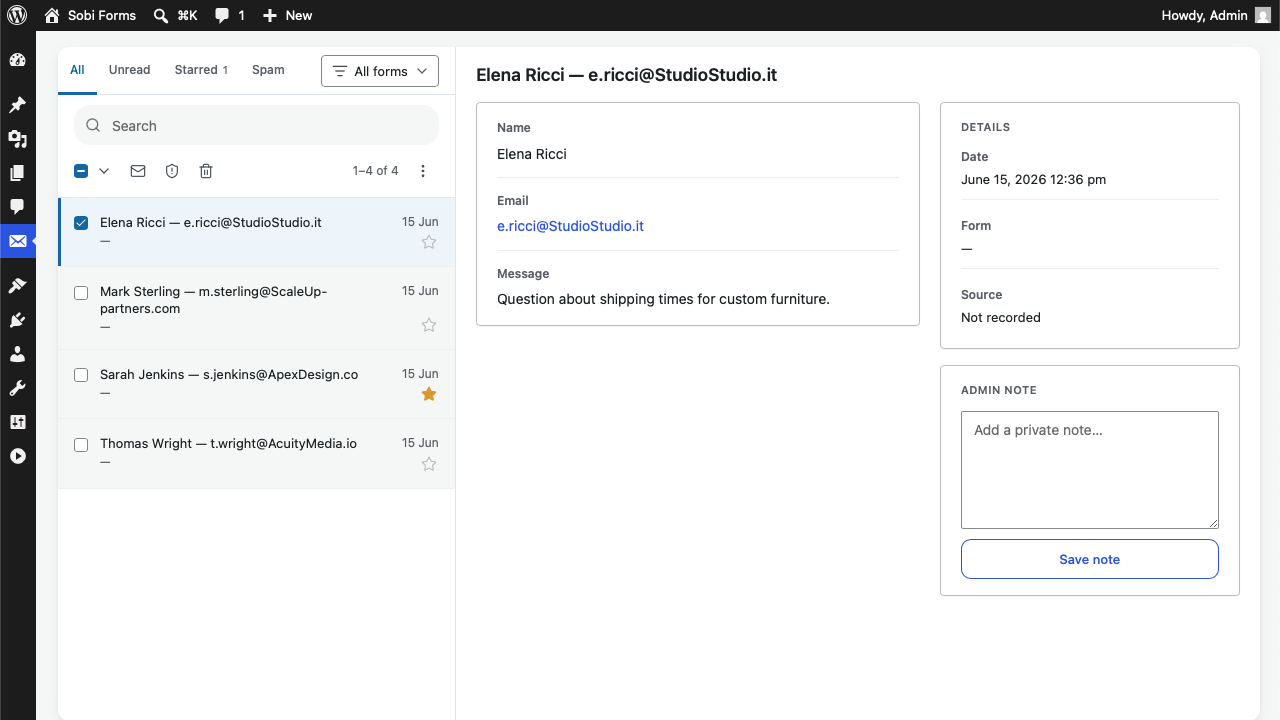
- Submissions inbox — UX polish (attachment indicator, starring, detail layout, locale-aware dates, clearer meta).
- Improved — more reliable capture of the page where a form was submitted (for admin context and privacy exports).
- Translations — French wording polish (inbox labels aligned with WordPress “Étiquettes”).
- Fixed — inbox (and export) file download links no longer break with “Invalid download request” (URL encoding).
- Privacy — registers with WordPress Tools → Export Personal Data and Tools → Erase Personal Data for matching inbox submissions (and uploaded files). See Resources FAQ.
- Form builder — UX polish across the settings sidebar, automation editors, condition rules, field insertion (slash menu), and tooltips. Clearer tabs and spacing.
- Submissions inbox — denser list rows (detail-first), search suggestions, and clearer detail sections.
- Form export / import — download a form as JSON from the Forms list (Export), then Import on another site to recreate it (title + fields). Opens the builder after import. Distinct from Settings → Exports (submission CSV/JSON).
- Settings — clearer layout and save feedback across Integrations and related screens.
- Conditional logic — Show only when… in the field settings menu: show or hide fields and layout blocks (title, paragraph) based on earlier answers. Match all or Match any rules; up to five conditions per field; number fields support greater than, less than, and related comparisons. Instant updates on the front-end; server re-validates on submit and drops hidden field values before inbox, emails, webhooks, and Brevo/Mailchimp — so conditional fields never leak into exports or integrations. Multi-step aware (rules can only reference the same or earlier steps). Existing forms unchanged until you add visibility rules.
- Multi-step forms — New step layout block in the builder splits a form into multiple visitor steps with Next / Back, per-step validation, and a segment progress bar. Submit on the last step only; one complete submission for inbox, emails, webhooks, and Brevo/Mailchimp. Existing single-page forms unchanged.
- Brevo connector — API key under Settings → Integrations → Brevo. Per-form Automations → + Brevo: pick a list, map email and attributes, optional Require double opt-in, optional Only add to list if (any checkbox — including one option in a multi-checkbox group). Delivery logs with Retry in Settings → Brevo → Logs.
- Mailchimp connector — API key under Settings → Integrations → Mailchimp. Per-form Automations → + Mailchimp: pick an audience, map merge fields, optional Require double opt-in, optional Only add to list if consent checkbox. Logs with Retry in Settings → Mailchimp → Logs.
- Custom notification emails — edit admin notification and visitor confirmation subject and HTML body per form under After submit → Content tab. Placeholders:
{{form.title}},{{form.slug}},{{submission.id}},{{meta.source_page}},{{field.<id>}}, and{{all_fields}}. + Var picker in the builder. Leave subject or body blank to keep the default for that part — existing forms behave as before until you customize.
- Webhook signing (HMAC) — every webhook request is now signed by default (
X-Sobi-Signatureheader). Each automation has its own secret in the Security tab (copy, regenerate). Re-save your form after upgrade to generate secrets for existing webhooks. Receivers that ignore extra headers keep working unchanged. - Webhook Run test — sends sample field values in the same JSON shape as a real submission, so you can map keys in Zapier, Make, or webhook.site before go-live. Save the form first if you added new fields.
- Automations (webhooks) — new Automations section in the form builder. Add unlimited webhook URLs per form (custom label, pause, test send, default JSON payload). Existing single-webhook forms migrate automatically.
- Multisite — network activation and Add form on subsites no longer show permission errors or broken redirects on fresh installs.
- Per-option required checkboxes — multi-checkbox fields: each option row has an inline Required / Optional control (e.g. mandatory terms plus optional newsletter). Single consent checkboxes still use one field-level Required toggle. HTML5 and server validation enforce each mandatory option.
- Inbox — submission detail lists every checkbox option with checked / unchecked state (not only selected labels).
- Form builder sidebar — WordPress panel layout; compact tertiary buttons for setting values; full-width Add action; success, error, and inactive messages in popover textareas with multiline previews.
- Forms list — Status column (Active, Paused, Closed, Limit reached).
- CSV and JSON export — Settings → Exports: background export jobs per form. Filter by view (all, unread, read, starred) and search; optional email when ready (your account only). Secure download; files kept 7 days. CSV flat columns with JSON-encoded multi-values; JSON structured records with native types.
- Inline links — add hyperlinks in Paragraph text, consent checkbox labels (terms & conditions), and multi-checkbox option labels (builder: select text → Link). Links open in a new tab; clicking a link does not toggle the checkbox.
- Inline link page picker — pick a published WordPress page from the link bubble (privacy policy, terms, etc.) or paste an external URL. Page selection auto-applies the permalink.
- Submission trash — delete moves submissions to Trashed (recoverable). Trashed inbox tab to restore or delete permanently; exports skip trashed rows.
- Form templates — five starters (Contact, Quote, Job, Event, Support) from the forms list. New forms start with an empty canvas; use a template for a ready-made field set.
- Multi-column layout — place up to 3 fields side by side in the builder (e.g. First name | Last name). Drag a field beside another to create a row; drag column separators to resize; double-click a separator to equalize widths. Visitor forms use a responsive grid; columns stack on narrow screens.
- Fixed — After submit redirect to a WordPress page kept the selected page on save.
- Builder — consistent Add field control in the empty canvas and footer.
- Forms list — sort by last updated (most recently edited first).
- Submissions inbox — discreet Leave a review, Get help, and Share an idea links in the empty detail panel (including when no message is selected).
- SMTP — custom outbound mail under Sobi Forms → Settings → SMTP: host, credentials, Enable Custom SMTP, test connection/email. Falls back to
wp_mail()until it is on. Logs tab (30 days) for failed notification and confirmation emails with Retry. - Webhooks — send ham submissions as JSON to an external URL (async). Set the URL per form under After submit; Settings → Webhooks lists configured forms. Logs tab (30 days) for failed deliveries with Retry.
- Spam protection — Settings → Spam protection: configurable rate limit (default 10/hour per hashed IP; 0 = off), Akismet toggle (moved from Resources → Usage), optional Cloudflare Turnstile (invisible mode).
- Settings — new menu for SMTP, Webhooks, and Spam protection (no separate install step).
- After submit (builder) — clearer post-submit setup: visitor message or redirect, plus actions (inbox, admin email, confirmation, webhook). Existing forms migrate automatically.
- Onboarding — redirect to the form builder after activation when no forms exist; dashboard widget CTA to create the first form.
- Date field — optional min/max in field settings.
- Form builder — always-visible Add field above submit; sidebar and context menu polish; After submit action list styling.
- Submissions inbox — React app: open messages, filter, and paginate without full page reload; toast feedback for actions; toolbar bulk actions when a message is open; full-row click target.
- Settings — toast feedback on save (SMTP, Spam protection).
- Fixed — MariaDB activation error on reserved index name
purge
- Security — File upload: removed archive and web-active formats from the allowed picker (zip, rar, gzip, svg, html, xml).
- Form builder — Title and Paragraph layout blocks for section headings and instructions (not collected on submit).
- URL parameter prefill — optional per-field query-string prefill for text, email, phone, link, number, and long text (client-side; cache-friendly).
- Hidden fields — compact sidebar table to pass invisible data (URL params and/or static defaults); invisible on the front; always submitted; visible in inbox.
- Availability — close form automatically after a set number of submissions.
- File upload — one file per field; pick allowed types by category (Application, Image, Text) or individual extensions (default 5 MB cap); secure server validation; files stored privately under
uploads/sobiforms/; download from the Submissions inbox (admin only). Save to database is required when a form includes a file field. - Inbox — see which page a submission came from (frozen page title and pathname in the detail sidebar). Useful when one form is embedded on multiple pages. Query strings (UTM, etc.) are not captured — use hidden fields. Older submissions show “Not recorded”.
- Performance & reliability — form loading and submission are more robust on cached sites, with a smoother experience for visitors.
- Admin speed — builder editing and submissions inbox are noticeably faster on larger forms and busier sites.
- Form builder — settings sidebar sections collapse and expand correctly again (1.4.2 kept them visually open in the WordPress admin).
- Form builder — fix settings (save to inbox, emails, pause, after-submit, etc.) being reset when saving with a collapsed sidebar section.
- Form builder — new fields are optional by default (not required).
- Submissions inbox — full-page layout (no card frame); Spam view tab after Starred; form filter as a dropdown button with filter icon; search field styling polish; more comfortable list row spacing.
- Submissions inbox — starred marker uses filled yellow star.
- Form builder — settings sidebar toggles fully clickable.
- Dashboard widget — unread submissions on the WordPress admin home screen.
- Visitor confirmation email — optional per-form thank-you to submitters (Notifications sidebar).
- Submissions inbox — split layout (list + detail), resizable columns, pagination, bulk actions, Gmail-style toolbar; All / Unread / Starred view tabs; form filter dropdown in the list header; spam via more menu; community links in the empty detail panel.
- Form emails use the site name as sender instead of "WordPress".
- Form builder — redesigned edit screen for more comfort: canvas plus settings sidebar, clearer toggles, and save without a full page reload.
- New Link field type — collect website or profile URLs with http/https validation.
- Form availability — pause or auto-close by date/time (site timezone).
- Configurable unavailable message when the form is not accepting submissions.
- Akismet spam filtering (global setting, spam queue in Submissions).
- Submissions inbox — Spam filter, mark as spam / not spam.
- Submissions — auto mark as read on open; Mark all as read.
- Form improvements — field min/max (number, text); multiple choice tiles; multi-option checkboxes with inline option editing in the builder.
- Custom submit button text per form (editor preview + front-end).
- Field settings: show/hide label, textarea resize toggle, max character limit.
- Per-form database storage and retention (moved from global settings).
- Submissions inbox always available in admin.
- Form builder UX polish — context menus, field contrast, layout fixes.
- Settings: removed global Privacy & Storage tab; Feedback links to WordPress.org forum and public roadmap.
- Initial release.
- Multi-form builder with shortcode
[sobiforms slug="…"]/[sobiforms id="…"]and Gutenberg blocksobiforms/contact. - Field types: text, email, textarea, phone, number, select, radio, checkbox.
- Multiple recipient emails, post-submit message or redirect.
- Optional DB storage, submissions inbox with notes and filters.
- Prefix
sobiforms_throughout (WordPress.org coding standards). - Conditional front-end assets - load only when a form is rendered.