
Softtrix Multilanguage
| 开发者 |
softtrix
Softtrix |
|---|---|
| 更新时间 | 2026年11月14日 01:06 |
| 捐献地址: | 去捐款 |
| PHP版本: | 7.4 及以上 |
| WordPress版本: | 7.1 |
| 版权: | GPLv2 or later |
| 版权网址: | 版权信息 |
详情介绍:
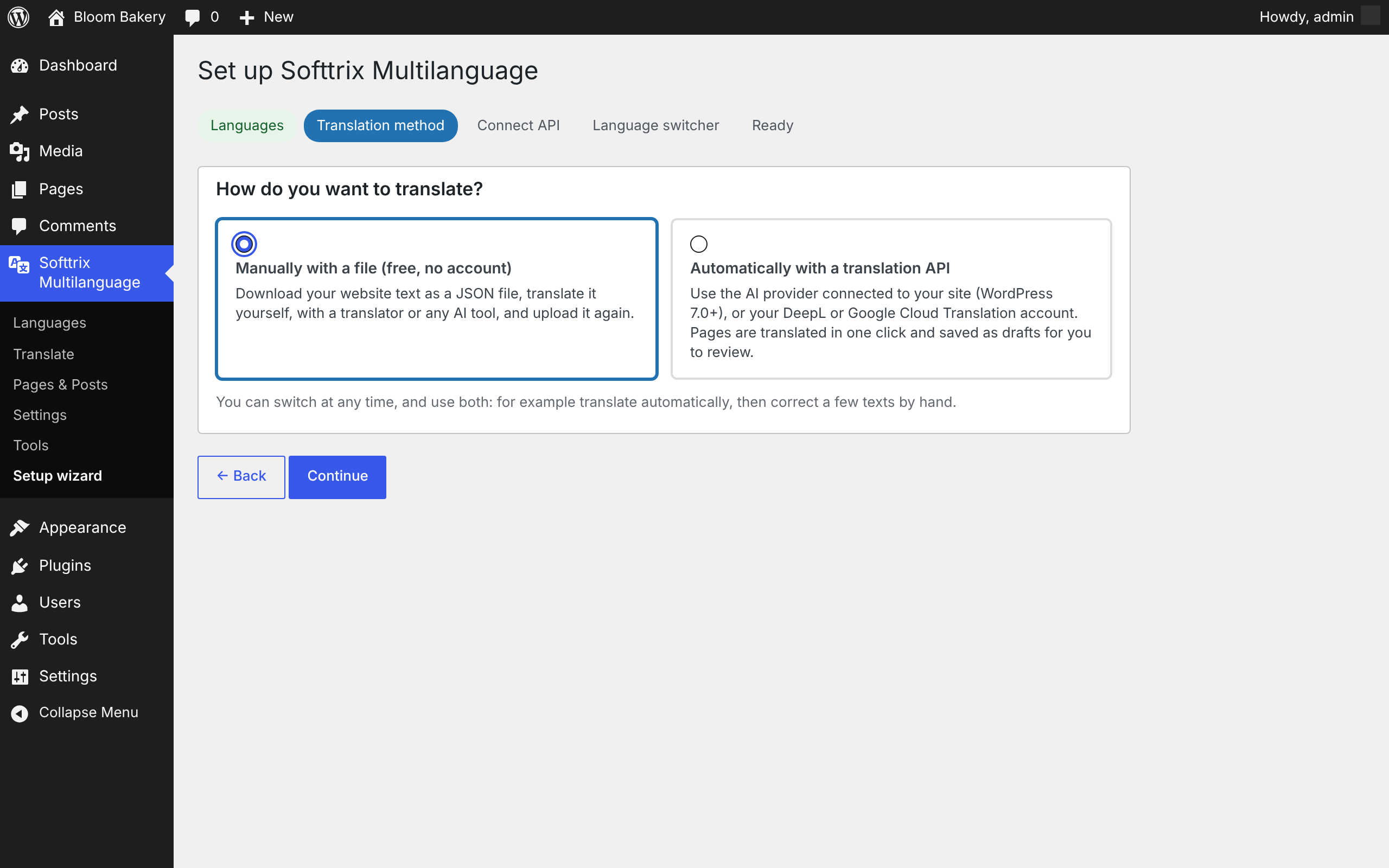
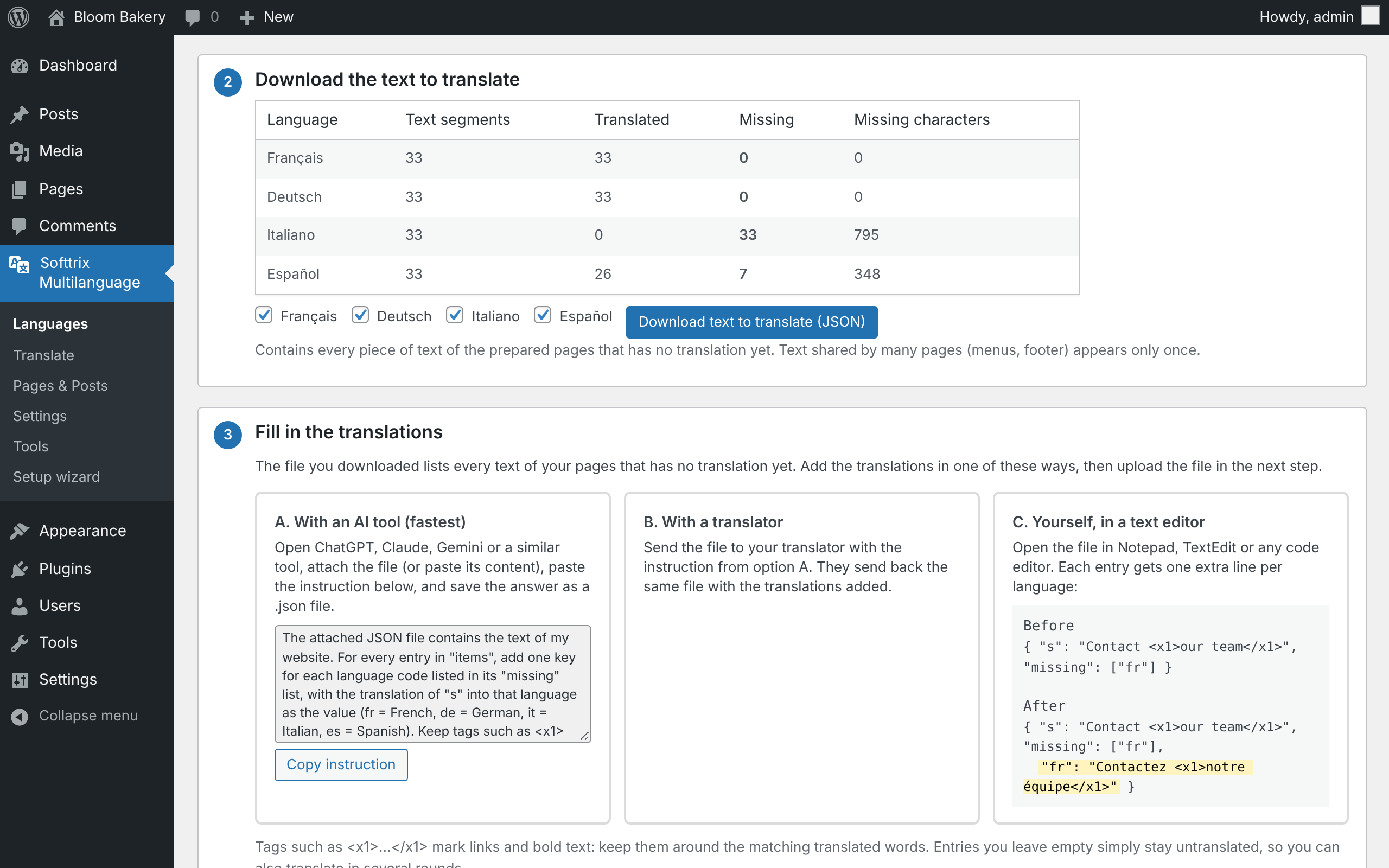
- By file, free and without any account. Download your website text as one file, fill in the translations yourself, send it to a translator or use any AI tool with the ready-made instruction, then upload it again.
- Automatically. Use the AI provider connected to your site through the WordPress AI Client (WordPress 7.0 or later, under Settings > Connectors), or your own DeepL or Google Cloud Translation account, and translate the pages you select in one click.
- Unlimited languages, picked from a list of nearly 70, or add your own
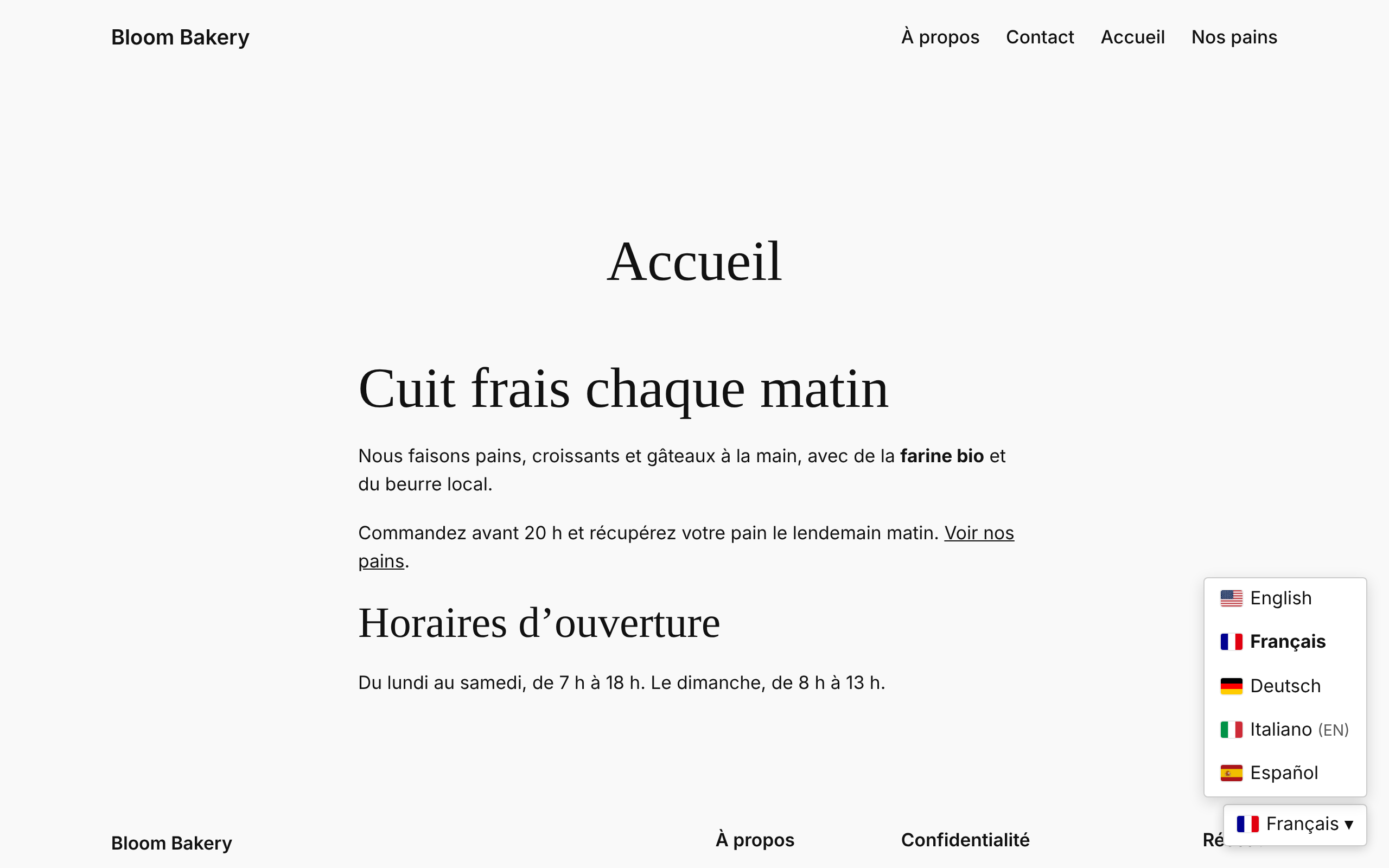
- SEO-friendly language addresses such as example.com/fr/ and example.com/de/about/
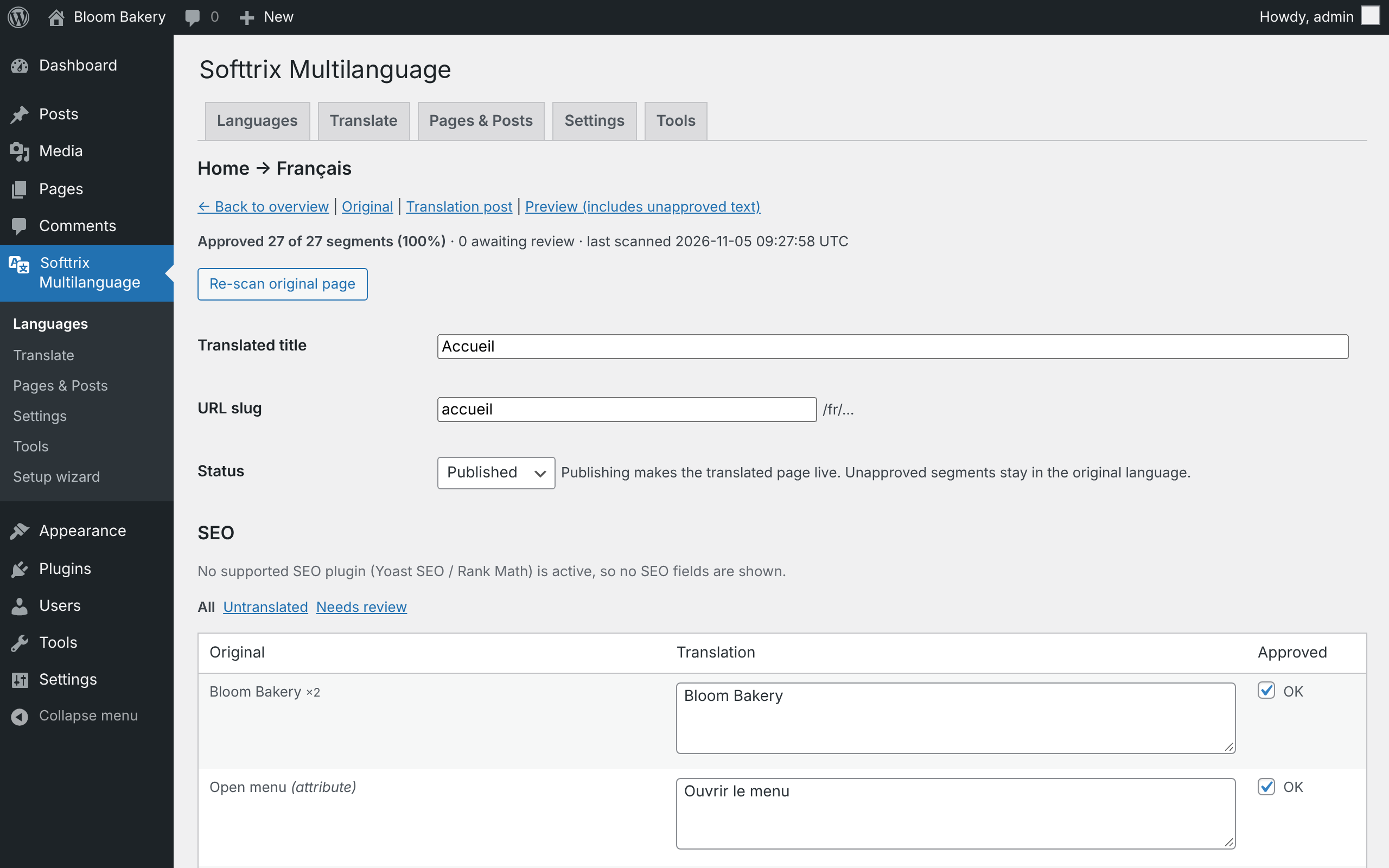
- Translated page addresses (slugs) for each language
- Language switcher with flags: floating button, menu item, widget, shortcode
[softml_switcher]or the PHP functionsoftml_language_switcher() - Visual translation editor with progress for every page and language
- Text shared by many pages, such as menus and the footer, is translated only once
- Brand names, email addresses and links are never translated
- Choose which pages to translate, and take a page out again at any time
- Multilingual SEO: hreflang and x-default tags, self-referencing canonical,
<html lang>and Open Graph locale - Works with Yoast SEO and Rank Math: every translation keeps its own SEO title and description
- Translated sitemaps (WordPress core and Yoast SEO)
- Posts by language: the blog, archives, search and widgets show the posts of the current language
- Right-to-left languages (Arabic, Hebrew, Persian, Urdu), including RTL support for Slick sliders
- Custom CSS for each language
- Translations are normal WordPress pages: no lock-in, and your data stays when you deactivate the plugin
- AI translation uses the WordPress AI Client, so no AI key is stored by this plugin. DeepL and Google keys are stored encrypted, or can be kept in wp-config.php
- Automatic visitor language detection by browser language and/or country, never applied to search engines or to visitors who already chose a language
- Custom post types such as WooCommerce products, portfolios and locations
- SEO tools: export and import every page's SEO title and description in one file, and a live canonical and hreflang check for each page
安装:
- In your dashboard, go to Plugins > Add New, search for "Softtrix Multilanguage", then install and activate it.
- The setup wizard opens. Choose your languages, your translation method and where the language switcher appears.
- Go to Softtrix Multilanguage > Translate and follow the numbered steps.
屏幕截图:
常见问题:
Do I need a translation API account?
No. The file method works without any account: download the text, translate it, upload it.
Which translation services work?
- WordPress AI: on WordPress 7.0 or later, the AI provider you connected under Settings > Connectors (for example OpenAI, Anthropic or Google). No key is entered in this plugin.
- DeepL: a Free or Pro API key.
- Google Cloud Translation: an API key with the Cloud Translation API enabled.
Will I pay twice when I change a page?
No. Only text that has no translation yet is sent. Text you already translated, and text shared by several pages, is not sent again.
Does it work with my theme or page builder?
Yes. Softtrix Multilanguage translates the finished page, so Elementor, the block editor, classic themes and hand-written theme templates all work.
Can I stop translating a page?
Yes. Under Softtrix Multilanguage > Translate, every prepared page has a Remove button. It deletes the page's draft copies and takes its text out of the download. Your original page is never changed.
How do I show the language switcher?
Choose a floating button or a menu location in the setup wizard or under Softtrix Multilanguage > Settings. You can also use the "Language Switcher (Softtrix Multilanguage)" widget, the shortcode [softml_switcher], or <?php softml_language_switcher(); ?> in a theme template.
Can visitors be sent to their own language automatically?
Yes. Under Softtrix Multilanguage > Settings, choose a detection mode: browser language, visitor country, or both. Only first-time visitors to the homepage are redirected. Search engines and visitors who already picked a language are never redirected.
What happens if I deactivate the plugin?
Your original pages are not changed. Translated pages are normal WordPress pages. Before deactivating, use Softtrix Multilanguage > Tools > "Unpublish all translations" so they do not stay online at their internal address.
Can I keep my API key out of the database?
Yes. Define it in wp-config.php, for example define( 'SOFT_ML_DEEPL_API_KEY', '...' ); or SOFT_ML_GOOGLE_API_KEY. Keys saved in the settings are stored encrypted.
Is my data deleted when I uninstall?
Only if you enable "Delete all plugin data" in the settings. Translated pages are WordPress pages and are never deleted automatically.
更新日志:
- Renamed to Softtrix Multilanguage (slug and text domain softtrix-multilanguage).
- AI translation now uses the WordPress AI Client (WordPress 7.0 or later) and the AI provider connected under Settings > Connectors. The plugin no longer calls OpenAI or Anthropic directly and no longer stores AI keys.
- Every form and AJAX handler checks both its security token and the user's permissions directly.
- The translation preview link now carries a security token.
- Every form and AJAX request now checks its security token directly in the handler (fixes the Plugin Check warnings).
- Removed set_time_limit(): long jobs run in short steps instead.
- Security hardening for the WordPress.org review: every database query is prepared, all output is escaped, and every file blocks direct access.
- Tested with WordPress 7.1. Now requires WordPress 6.2 or later.
- Every feature is now free: AI translation with OpenAI and Anthropic Claude, automatic visitor language detection, custom post types (such as WooCommerce products) and the SEO tools.
- Removed all upgrade prompts.
- Fix: page menus of block themes listed every page once per language.
- Fix: long language names no longer overflow the switcher dropdown.
- Readme and listing assets for WordPress.org.
- Setup wizard: Back button on every step, and finished steps can be reopened.
- Flags are now images, so they show on Windows too (emoji flags showed as empty boxes).
- Clearer "Fill in the translations" step with a ready-made instruction for AI tools.
- Totals update as soon as pages are prepared, without reloading.
- Prepared pages can be removed from translation again.
- First public release.