Speed Auditor
| 开发者 | JRMora |
|---|---|
| 更新时间 | 2026年5月20日 21:18 |
| PHP版本: | 7.4 及以上 |
| WordPress版本: | 7.0 |
| 版权: | GPLv2 or later |
| 版权网址: | 版权信息 |
详情介绍:
Speed Auditor helps WordPress site owners identify performance bottlenecks in real-time while browsing their site. It generates a downloadable technical report that pinpoints critical elements for Core Web Vitals and structural efficiency.
Speed Auditor now includes a powerful Visual CLS Highlighter. Stop guessing which elements are causing layout shifts; activate the real-time radar from your Admin Bar to see problematic elements highlighted with red boxes as you browse.
Main Features:
- **Visual CLS Radar: Activate a real-time toggle to draw red boxes around elements causing layout shifts. Perfect for catching unstable ads, images, or jumping text.
- Visual Performance Signal: Real-time color-coded icons (Green/Yellow/Red) in the Admin Bar based on LCP optimization status.
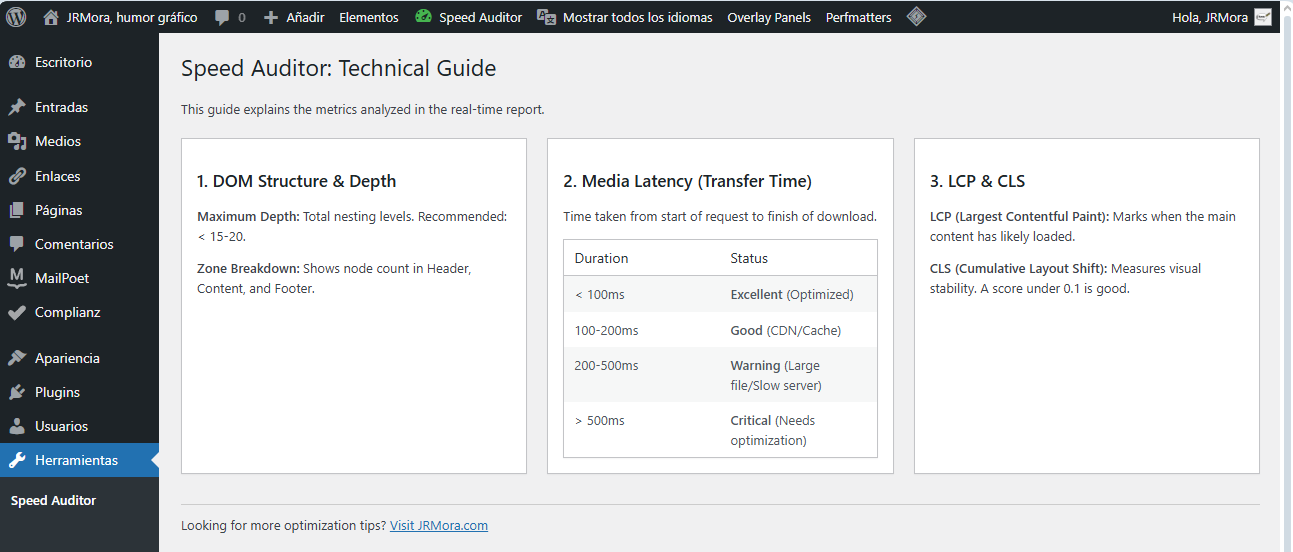
- Technical Knowledge Base: New guide under Tools > Speed Auditor to help users understand metrics like DOM depth, LCP, and Media Latency.
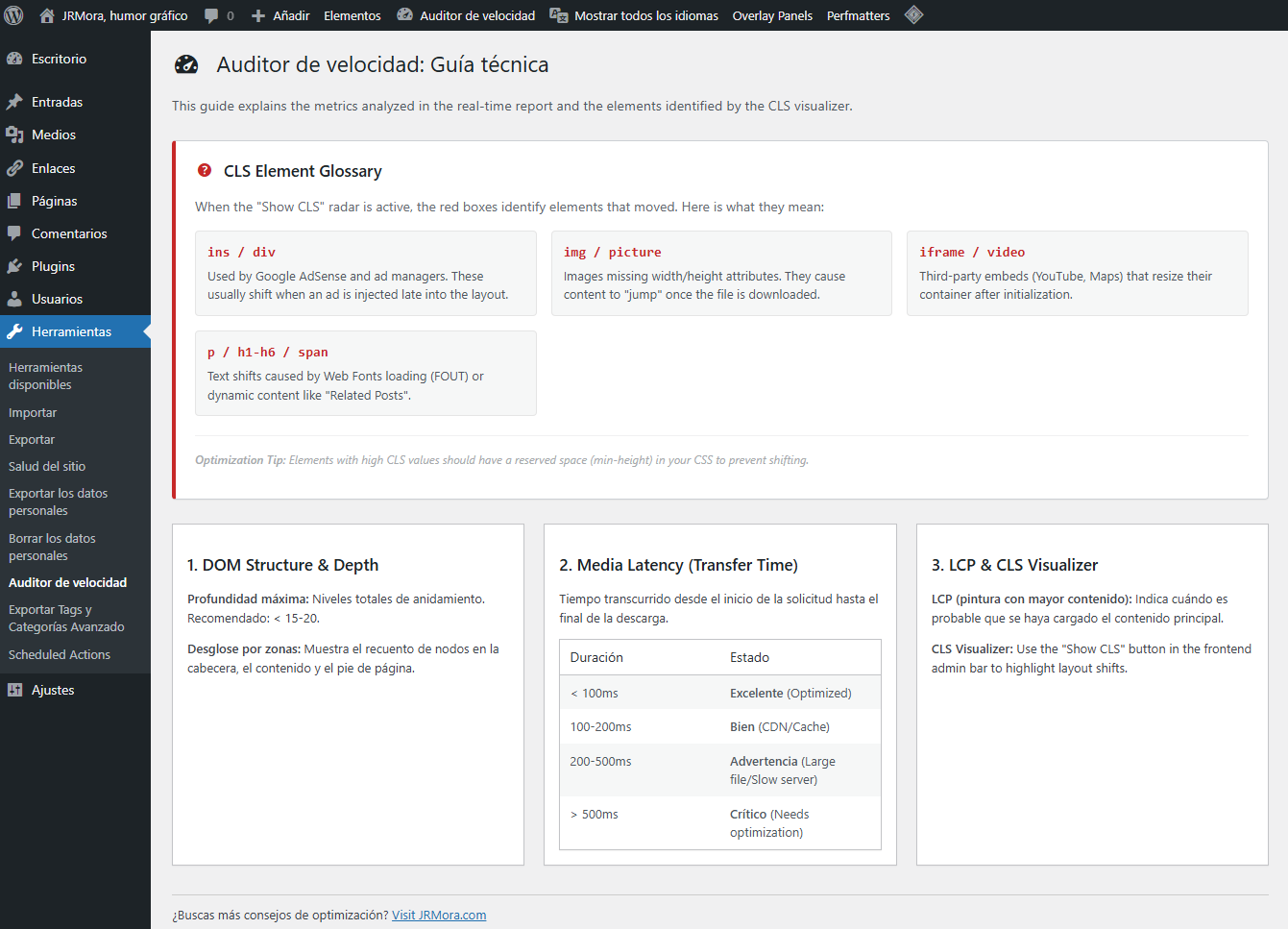
- **Technical Glossary: A new built-in guide explaining HTML tags like , , and specifically in the context of CLS and performance.
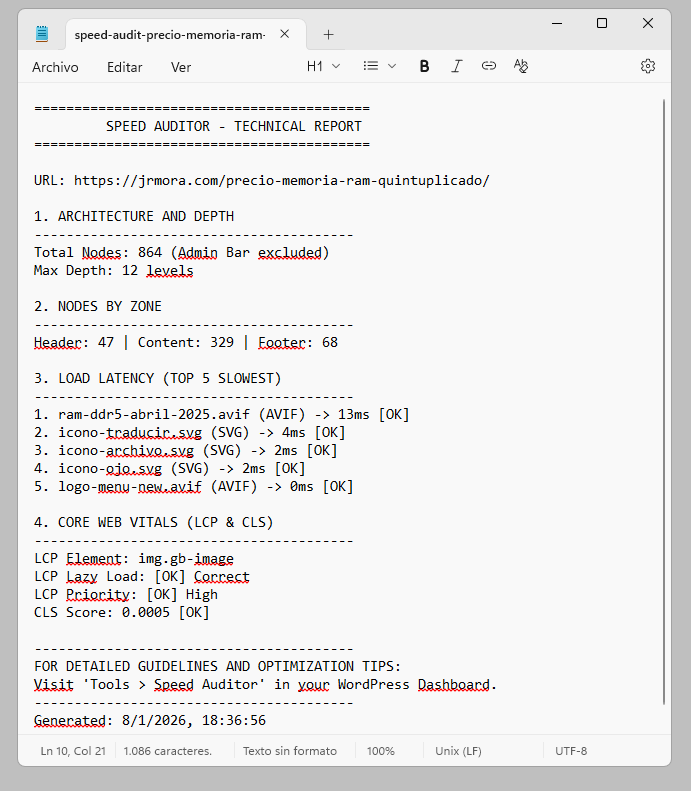
- Accurate LCP Identification: Detects the Largest Contentful Paint element and validates its optimization.
- Structural DOM Audit: Breakdown of nodes by zones (Header, Content, Footer) and maximum nesting depth analysis.
- Media Latency Monitor: Identifies the slowest loading images on the page by measuring real-time transfer duration.
- Dynamic Reporting: Generates a .txt report with a smart filename including the page slug and date for easy tracking.
- Privacy Focused: Works entirely in the browser using the Performance API. No data is saved to the database.
- Translation Ready: Fully compatible with WordPress internationalization (i18n) standards.
安装:
- Upload the
speed-auditorfolder to the/wp-content/plugins/directory. - Activate the plugin through the 'Plugins' menu in WordPress.
- You will see a new "Speed Auditor" link in your top admin bar (Admin only).
- Access the technical guide under Tools > Speed Auditor.
屏幕截图:
常见问题:
What does "ins" or "div" mean in the red boxes?
These are HTML tags often used by ad networks like Google AdSense. If you see a red box labeled "ins", it means an advertisement is shifting your content and hurting your CLS score.
Why do the red boxes appear only after I scroll?
The browser's Performance API often detects layout shifts only when the element enters the viewport or when dynamic content (like ads) is triggered by scrolling. This ensures the auditor shows you real-world user experience impacts.
Does the "Show CLS" feature affect my site speed?
No. The visualizer only runs for logged-in administrators and uses the browser's native Performance API, which is extremely lightweight and has zero impact on your visitors.
How do I stop the red boxes from appearing?
Simply click the "Show CLS" button again in the Admin Bar to toggle it off. The plugin will remember your preference for the next page you visit.
更新日志:
1.1.10
- Fixed: All output strings in the Technical Guide are now properly escaped using esc_html_e() to comply with Plugin Check security requirements.
- Improved: Confirmed full compatibility with WordPress 7.0.
- Improved: Declared explicit PHP version requirements in the plugin headers.
- New: Visual CLS Highlighter button. Added Toggle button in the Admin Bar to activate/deactivate visual boxes. Persistent visualizer mode using localStorage. Audit multiple pages seamlessly. Identify exactly which elements are moving on your page. Stop guessing which elements are moving; see them highlighted in red boxes.
- Improved: Boxes now follow elements during scroll and stay above ads using extreme z-index.
- New: Technical Glossary in the admin guide explaining HTML tags like , and in the context of CLS.
- Improved: Technical report now includes detailed actionable tips to optimize LCP elements (Lazy load and Fetchpriority).
- Improved: Better differentiation between Image and Text LCP elements in reports.
- Fix: Restricted performance monitoring and report generation to the frontend only.
- Improved: Admin Bar icon remains inactive in the dashboard to ensure audit accuracy.
- New: Technical Guide page added to Tools > Speed Auditor with explanations for all audited metrics.
- New: Media Latency threshold table added to the knowledge base.
- Improved: Internalization (i18n) support for interface and reports.
- Improved: Report footer now includes a direct link to the WordPress dashboard guide.
- Fix: Renamed to Speed Auditor to comply with repository trademark policies.
- New: Visual LCP status indicators (Green, Yellow, Red) in the Admin Bar.
- New: Auto-detection of text-based LCP for instant "OK" status.