
COD Deposits and Partial Payments for WooCommerce - Advance Payment on Cash on Delivery
| 开发者 | stackedboost |
|---|---|
| 更新时间 | 2026年8月29日 19:16 |
| PHP版本: | 7.4 及以上 |
| WordPress版本: | 7.1 |
| 版权: | GPLv2 or later |
| 版权网址: | 版权信息 |
详情介绍:
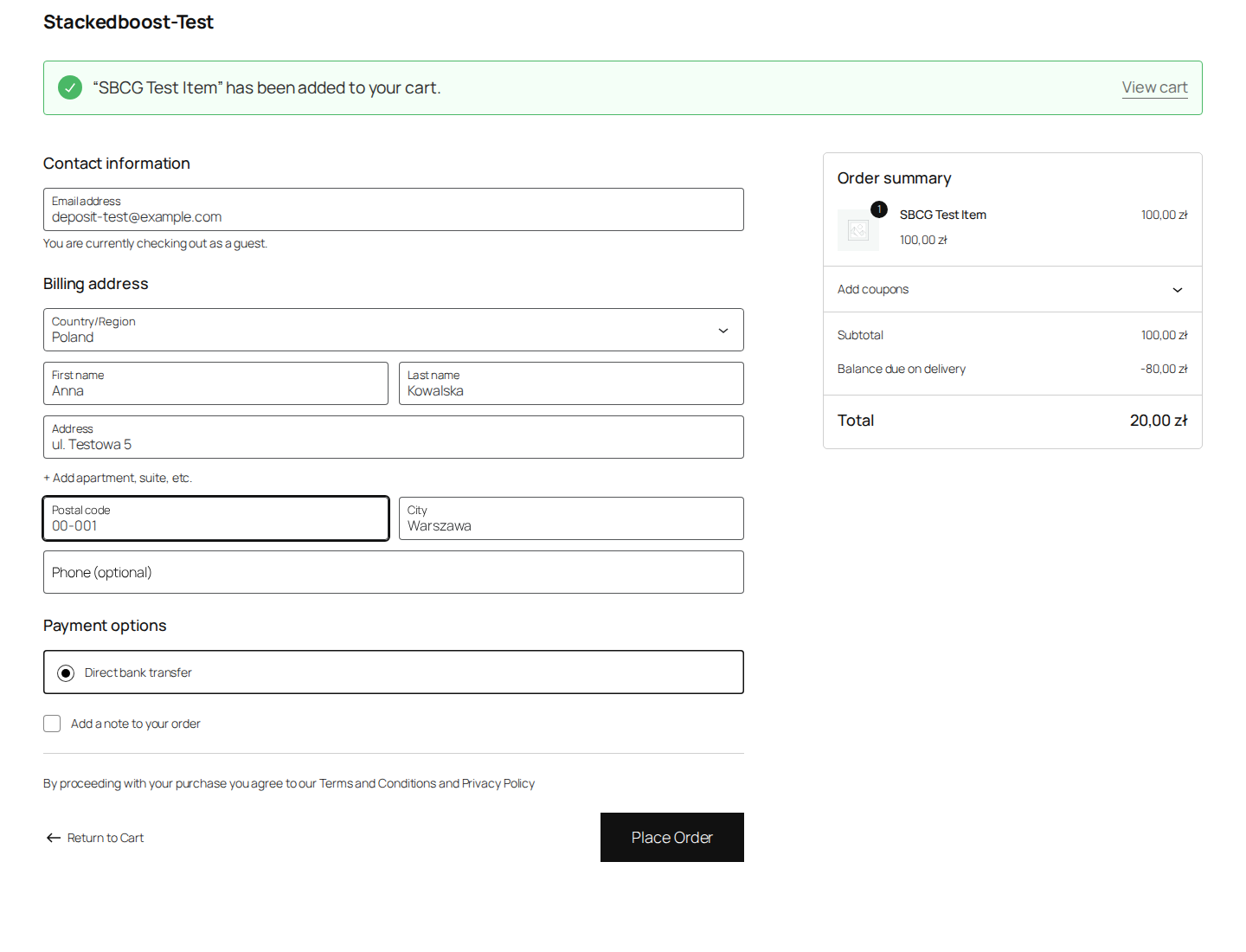
- Require an advance payment, as a percentage or a flat amount. When a rule matches, the checkout total drops to the deposit, the customer pays that with any normal payment method, and the balance is collected on delivery as usual. Cash on Delivery itself is withdrawn for that order, because Cash on Delivery collects nothing at checkout and so cannot take a deposit.
- Or skip the deposit entirely and simply hide COD when a rule matches, so the customer pays the full amount up front.
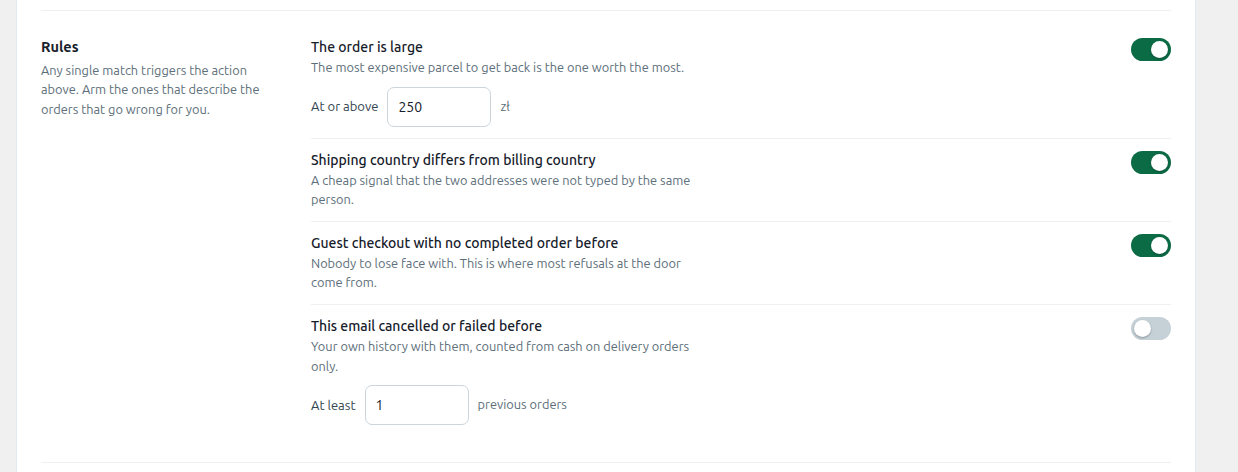
- Rules you can combine, all checked locally:
- Cart total is above a threshold you set
- Shipping country is different from billing country
- Guest checkout with no previous completed order on the store
- Customer has a previous order that was cancelled or failed while paying by COD
- Works with the classic checkout and the block based checkout.
- Compatible with High-Performance Order Storage (HPOS).
- Shows the balance still due on delivery on the order screen, in the admin order list, and in the order emails sent to the customer.
- A customer who has completed orders with you and never refused a delivery can pay no deposit at all.
- A customer who has refused deliveries before pays more up front, or loses cash on delivery for that order.
- Every order shows you the record the decision was made on.
安装:
- Upload the
stackedboost-cod-deposit-rulesfolder to/wp-content/plugins/, or install it through the Plugins screen in WordPress by searching for "Stackedboost COD Deposit Rules". - Activate the plugin through the Plugins screen.
- Go to WooCommerce > Settings > COD Deposit Rules to set your rules and your advance payment amount or percentage.
- Save. The rules take effect on the next checkout that matches them.
屏幕截图:


常见问题:
Does this work with the WooCommerce block based checkout, or only the classic shortcode checkout?
Both, and the block checkout needed real work rather than a claim. The advance payment is applied as a cart fee, which both checkouts calculate the same way. Hiding Cash on Delivery is different: the block checkout does not honour the usual payment gateway filter, so a plugin that only filters the gateway will appear to work on the classic checkout and quietly do nothing on the block one. This plugin publishes the decision onto the Store API cart and registers the front end callback WooCommerce documents for this, so the method is genuinely withdrawn in both. The gateway filter stays in place as well, so even if the script fails to load, an order cannot be placed with Cash on Delivery when a rule matched.
Does this plugin send any of my store or customer data anywhere?
No. Every rule is evaluated using data already stored in your WordPress database, on your own server. There is no external API call, no license check that phones home for the free version, and no analytics collection. Nothing about your orders or customers leaves your site.
What actually happens to the advance payment and the balance?
The advance payment is charged at checkout through whichever payment gateway you already use for prepaid methods on your store, exactly like a normal order paid in full. The remaining balance is recorded as a separate amount on the order (visible on the order screen, in the admin order list, and in the emails sent to the customer) so you and the customer both know what is still owed on delivery. The plugin does not automatically charge the balance. Collecting it on delivery is a manual, real-world step, the same as any other COD order.
Does it work with my payment gateway?
Yes, with any gateway. The advance payment is simply charged as the order total at checkout, using whatever gateway is enabled for that order. COD Deposit Rules does not require a specific gateway or add one of its own.
Will this affect my sales reports or accounting?
Be aware of this before you rely on it: when an advance payment applies, the order total recorded in WooCommerce is the amount actually charged at checkout, not the full cart value. The remaining balance is recorded separately, not folded into the order total. If you build reports directly off order totals, a COD order with an advance payment will show the deposit amount, not the full order value, so factor that in when reading revenue reports for COD orders.
Can I set different rules for different amounts or countries at the same time?
In the free version, all your active rules are checked together and if any one matches, the action you configured (require advance payment or hide COD) applies. Combining rules with AND/OR logic, so you can require different behavior depending on which combination of conditions is met, is a Pro feature.
Does this stop chargebacks or guarantee I won't get a fake order?
No. Nothing can guarantee that. This plugin reduces the financial exposure of a refused COD delivery by collecting part of the payment before the order ships. It does not detect fraud, verify identity, or block anyone from ordering.
更新日志:
- Renames the plugin so the listing leads with what it does, and targets the words merchants actually search: deposits and partial payments, not only "COD deposit". No code change.
- The per-customer deposit rules are no longer part of this plugin. They now ship as a separate add-on, COD Deposit Rules Pro, available from stackedboost.com. Nothing in this plugin is locked or limited: everything here is free and fully functional, as the WordPress.org guidelines require.
- Removed the licence key field and all licence checking.
- Settings-screen CSS and JavaScript are now enqueued files rather than inline blocks.
- Tested up to WordPress 7.1.
- Describes the plugin as partial COD, which is what merchants in cash on delivery markets actually call it, and explains RTO, which is the cost it exists to reduce.
- No code changes.
- The balance and the deposit are now available as export columns in Advanced Order Export For WooCommerce, for merchants who create labels from a CSV rather than one order at a time.
- Both columns are off by default, so an existing export keeps exactly the shape whatever you upload it to expects.
- The outstanding balance is now printed in a bordered box at the top of the packing slip and the invoice, when using WooCommerce PDF Invoices & Packing Slips. It states the amount to collect and warns against collecting the full order total.
- This closes the one place the plugin could cost you money: a label created from the reduced order total tells the courier to collect the deposit again instead of the balance.
- No carrier integration, and none planned. The document is the surface every carrier has in common.
- New in Pro: the deposit now follows each customer's own record in your store. Customers who have completed orders and never refused a delivery can pay nothing up front; customers who have refused before pay more, or lose cash on delivery for that order.
- The record each decision was made on is now shown on the order screen.
- Free is unchanged. Every rule still runs against your own store data with no external requests.
- New settings screen, built around the split this plugin creates: money taken at checkout against money still due on delivery, read from your own orders.
- Added a breakdown of which rules actually matched, so you can see which risk is real in your store.
- Before any order has matched, the screen now previews the split your current settings would produce on an example order.
- The order screen panel now shows the same two figures in the same layout.
- New plugin icon and banner.
- No changes to how deposits are calculated or collected.
- Initial release.
- Advance payment (percentage or flat amount) before COD is allowed.
- Option to hide COD entirely when a rule matches.
- Built-in rules: cart total threshold, shipping/billing country mismatch, guest checkout with no prior order, prior cancelled or failed COD order.
- Classic checkout and block checkout support.
- HPOS compatible.
- Balance due on delivery shown on the order, in admin, and in order emails.