
Staging Shield
| 开发者 | davidshum98 |
|---|---|
| 更新时间 | 2026年9月26日 20:13 |
| PHP版本: | 7.4 及以上 |
| WordPress版本: | 7.1 |
| 版权: | GPLv2 or later |
| 版权网址: | 版权信息 |
详情介绍:
- It compares the site's address with your real site's address, stored in a way that migration tools can't rewrite when they clone the database.
- It reads the signals hosts and tools leave on copies: WP_ENVIRONMENT_TYPE, local domains (.local, .test, localhost) and the staging domains of Kinsta, WP Engine, Pantheon, Flywheel, Pressable, InstaWP and others.
- When it isn't sure, it asks. Until you tell it which site is the real one, it protects nothing, so activating it can never break a live site.
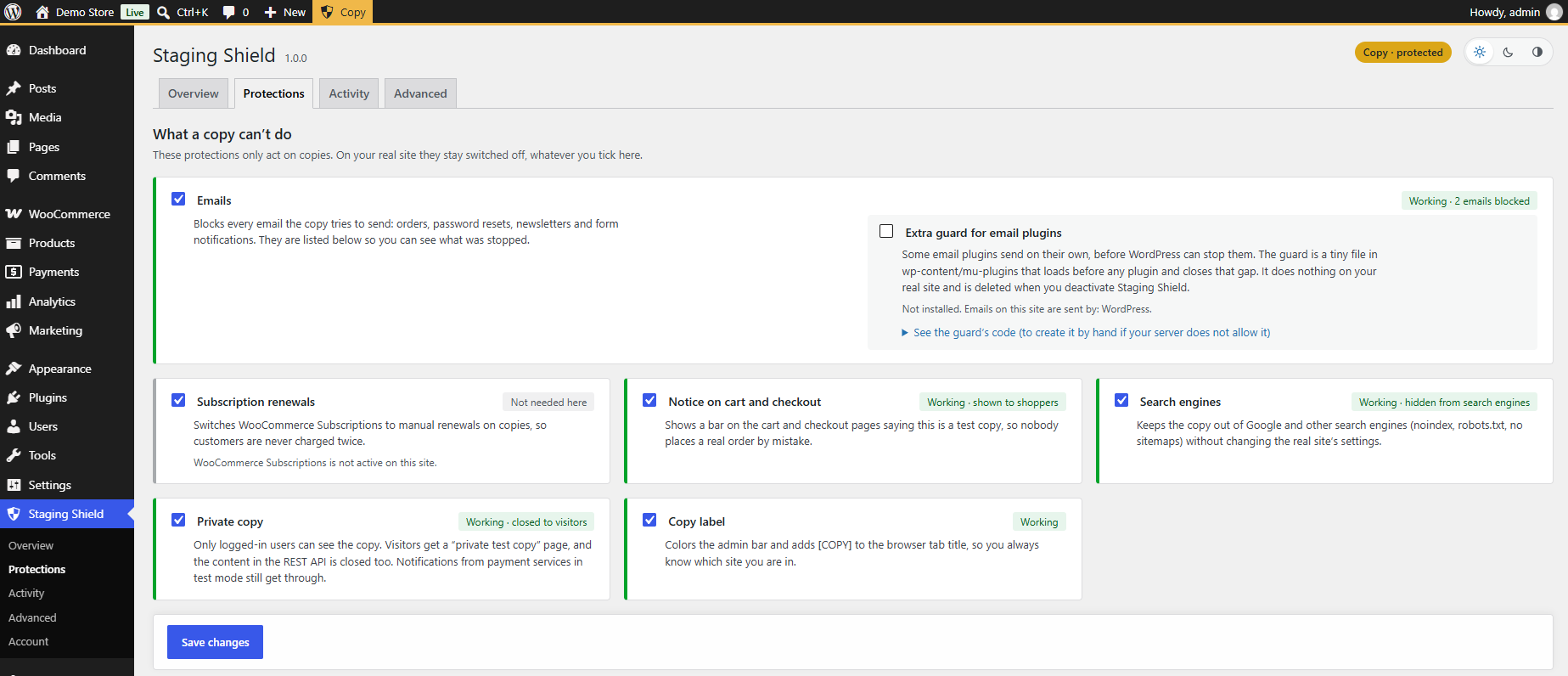
- Send emails. Order emails, password resets, newsletters and form notifications are blocked and listed, together with the plugin that tried to send them. It covers WordPress, SMTP plugins such as WP Mail SMTP, FluentSMTP and Post SMTP, and the APIs of email services like SendGrid, Mailgun, Brevo, Postmark and Amazon SES. An optional early guard also stops plugins that try to send on their own.
- Charge subscription renewals twice. WooCommerce Subscriptions switches to manual renewals on copies.
- Show up in search engines. noindex, X-Robots-Tag, a closed robots.txt and no sitemaps.
- Be seen by anyone who finds it. Optionally, only logged-in users can see the copy; visitors get a "private test copy" page.
- Be mistaken for the real site. The admin bar turns yellow, the browser tab says [COPY], and the cart and checkout show a "test copy" bar.
- Payments in test mode on copies: WooPayments, Stripe, Redsys and any gateway with a test mode switch. Methods that can only charge real money are hidden at checkout.
- Scheduled tasks (WP-Cron) and background queues (Action Scheduler) paused, so renewals, syncs and imports don't run from the copy.
- Connections cut off: email marketing, CRMs, automation webhooks (Zapier, Make), ad conversions, shipping, invoicing and live payment servers, plus WooCommerce webhooks.
- Plugins turned off only on copies: backups that would upload to the real site's storage, analytics, caching, remote management. Nothing is saved, so they stay active on the real site.
- A share link to show a private copy to a client without creating a user.
- Emails sent to your own test inbox, or only to your team, instead of blocked.
- The self-test for all of the above, a report of what can't be stopped from WordPress on your site, WP-CLI commands (including
wp staging-shield testfor deploy scripts) and translations in 12 languages.
安装:
- In your dashboard, go to Plugins > Add New and search for "Staging Shield", or upload the zip file.
- Activate it on your real site and keep it active when you copy the site.
- Open Staging Shield in the dashboard menu and follow the first steps: confirm that this is your real site. From then on, every copy of it is protected automatically.
屏幕截图:



常见问题:
Will it block emails or payments on my live site?
No. Protections only run on sites Staging Shield considers copies. On a site that hasn't been set up yet it does nothing at all, and it only treats an address as your real site after you confirm it (or add it in wp-config.php).
How do I know it's working?
Open Staging Shield > Overview on the copy and run the self-test. Every check tells you what it tried and what happened.
My real site changed its domain and now it says "Is this a copy?"
That's expected: the address is no longer the one you confirmed, so Staging Shield protects the site to be safe. Click "This is now my real site" in the notice, or add the new address in Staging Shield > Overview. Until you confirm it, it is never hidden from search engines or closed to visitors.
How do I turn it off in an emergency?
Add this line to wp-config.php. Staging Shield, and its email guard, stop doing anything:
define( 'SSHIELD_DISABLE', true );
Can I set the real site's address in wp-config.php?
Yes, and it's the safest way, because a copy always has a different address:
define( 'SSHIELD_PRODUCTION_URL', 'https://example.com' );
You can also force the decision with define( 'SSHIELD_ENVIRONMENT', 'staging' ); (or production), but be careful: if wp-config.php is copied to other environments, they inherit it.
An email plugin still sends from my copy
Some email plugins replace how WordPress sends email. Turn on "Extra guard for email plugins" in Staging Shield > Protections: it adds a tiny must-use plugin that loads before any plugin. It does nothing on the real site and is removed when you deactivate Staging Shield.
I made the copy private. Will test payments still work?
Yes. The notifications payment services send in test mode still reach the copy. What is closed are the pages and the parts of the REST API that show content or let people buy.
Does it work with my host's one-click staging?
Yes. Staging Shield doesn't depend on how the copy was made. It recognizes the staging domains of many hosts, and for the rest it compares the address with your real site's.
Does it work on multisite?
Yes, site by site: each site has its own real address and its own protections.
Does it send any data anywhere?
Staging Shield itself doesn't send your site's data anywhere. The Freemius SDK, used for the free trial and Pro licenses, only sends data if you start the trial, buy Pro or activate a license. See "External services" below.
Does the Pro license count my staging copies as extra sites?
No. Local and staging addresses (localhost, .local, .test, staging. and dev. subdomains, and the staging domains of hosts such as WP Engine) don't use up license activations, so a one-site license covers your real site and its copies.
更新日志:
- The settings form is now sanitized as soon as it is read, before any of it is used.
- First release.