
Static Porter
| 开发者 |
kturgutoglu
Kayıhan Turgutoğlu Kaya Turk |
|---|---|
| 更新时间 | 2026年10月22日 06:29 |
| PHP版本: | 7.0 及以上 |
| WordPress版本: | 7.1.3 |
| 版权: | GPLv2 or later |
| 版权网址: | 版权信息 |
详情介绍:
- Deploy anywhere: Not locked into one platform. Serve statically from your own Apache server, push to Cloudflare Workers, upload to AWS S3 with automatic CloudFront cache invalidation, or export a portable ZIP — pick whichever fits your infrastructure.
- Built for real-world WordPress: Works with page builders, shortcodes, and JavaScript-driven widgets. A built-in Documentation tab explains exactly what works out of the box and what needs a small adjustment first (forms, WooCommerce checkout, etc.).
- Tells you what won't work before you crawl: A built-in Compatibility check tests your real site for blocked crawling, plain permalinks, form and shop plugins, and pages that contain forms or checkout content, and can add the right exclusions for you.
- Safe by default: Every feature that could meaningfully change your site's output — Cloudflare deployment, S3 deployment, asset mirroring — is hidden until you explicitly turn it on. Nothing surprises you.
- One-Click Full Crawl: Generate a static version of your entire site in one click.
- Server-Safe Crawling: A real-time "Peak Memory" monitor and an emergency "Stop Crawl" button, designed for budget shared hosting where resources are limited.
- Smart Refresh: Publishing or updating a post regenerates that page, your homepage, and its archives in the background. Unpublished, trashed, and renamed posts have their old files removed.
- Crawl Health Report: After every crawl, see exactly how many pages were cached and which failed, with the reason for each (timeout, HTTP 500, HTTP 403) and one-click Retry. Error pages are never saved as static files.
- Orphan File Cleanup: Finds static files whose source page was deleted, unpublished, renamed, or excluded, explains why, and removes them manually or automatically after each crawl.
- Advanced Optimization: Built-in HTML minification and Gzip compression.
- Security & Caching: Automatically configures .htaccess with security headers and browser caching rules.
- NGINX Support: Detects NGINX and generates the exact server rule your site needs, with a copy button. The Dashboard status is honest about whether pages are actually being served. Deploy anywhere
- Cloudflare Deployment: Push your static files straight to a Cloudflare Worker, serving your site from Cloudflare's global edge network. Hidden until you enable it.
- AWS S3 + CloudFront Deployment: Upload directly to an S3 bucket, with automatic CloudFront cache invalidation on every deploy. Hidden until you enable it.
- Asset Mirroring: Optionally copy your CSS, JavaScript, images, and fonts locally too, so a deployed or exported site works completely standalone — no dependency on your WordPress server staying online.
- Download as ZIP: Export your entire static site as a single ZIP file — perfect for local browsing, migrating hosts, or keeping an offline snapshot. Visibility & control
- Persistent Cache Table: See every cached page with five independent actions per row: View, Recrawl, Copy URL, Exclude, and Delete — each with clear confirmation and feedback.
- File Storage Location: See exactly where your static HTML files live on disk, with a one-click "Copy path" button and a writable/not-writable status check.
- Compatibility Check: A dedicated tab that scans your site before the first crawl and flags anything that behaves differently as static pages, with a one-click button to add suggested exclusions.
- Built-in Documentation: A dedicated Documentation tab covers every feature — how it works, file locations, compatibility, deployment options, and FAQs — without ever leaving wp-admin.
安装:
- Upload the
static-porterfolder to the/wp-content/plugins/directory. - Activate the plugin through the 'Plugins' menu in WordPress.
- Go to the 'Static Porter' menu in your sidebar.
- Open the 'Compatibility check' tab to see whether anything on your site needs attention.
- Configure your excluded paths and click 'Start full crawl'.
- On NGINX, add the server rule shown on the Dashboard (Apache and LiteSpeed work automatically).
屏幕截图:
常见问题:
Will Static Porter really make my site faster?
Yes! Traditional WordPress pages require the server to process PHP and query a MySQL database every time a visitor arrives. Static Porter converts these into flat HTML files. Your server can then deliver these files instantly, bypassing the "heavy lifting" entirely. This often results in a nearly instant Time to First Byte (TTFB).
Will my URL structure or permalinks change?
No. This is one of the core strengths of Static Porter. The plugin generates a static mirror of your site that follows your existing WordPress permalink structure perfectly. Your visitors (and search engine bots) will continue to see the same clean URLs they always have, but the pages will simply load much faster.
Do I have to manually recrawl my site every time I write a post?
No. Smart Refresh automatically regenerates the post, your homepage, and its category and tag archives when you publish or update it, and removes the old file if you unpublish, trash, or rename it. A full crawl is only needed after changes it can't see, such as menus, widgets, your theme, or permalinks. The Dashboard shows a banner when that happens.
Can I use this on a low-resource budget server?
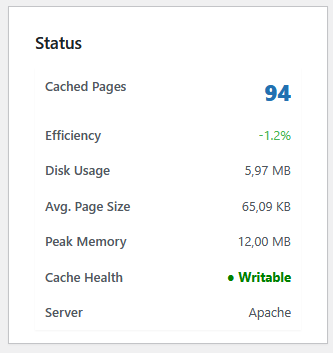
Absolutely. Static Porter is designed to be resource-efficient and includes a built-in "Peak Memory" monitor in the dashboard so you can track its impact. If the crawl is too heavy for your server, you can use the "Stop Crawl" safety button at any time to immediately halt the process.
Does this plugin improve my site's security?
Yes. In addition to serving static files (which are inherently more secure than dynamic PHP), Static Porter automatically injects security headers into your .htaccess file. This includes protection against clickjacking (X-Frame-Options) and MIME-type sniffing (X-Content-Type-Options).
Will this help my Google search rankings (SEO)?
Speed is a major ranking factor for Google, especially with Core Web Vitals. By serving ultra-fast static HTML and enabling Gzip compression and browser caching automatically, your site will likely see improved performance scores, which can lead to better visibility in search results.
What happens if I want to remove a single page from the cache?
Unlike simple "purge all" plugins, Static Porter gives you a persistent cache table. You can view a list of every cached URL and use individual "Delete" or "Recrawl" buttons for precise control without affecting the rest of your static site.
Can I choose which parts of my site to make static?
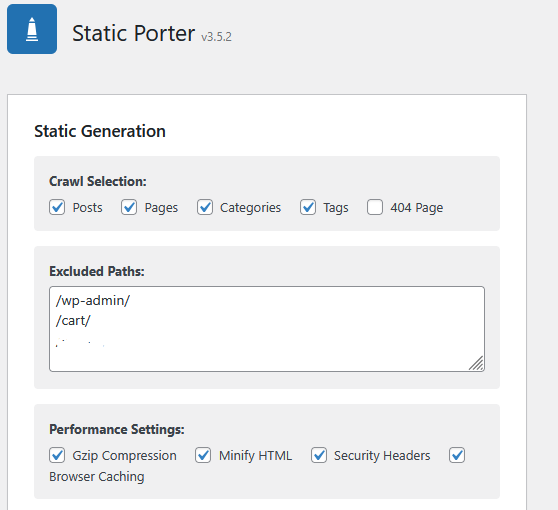
Yes. The dashboard allows you to toggle the crawling of Posts, Pages, Categories, and Tags independently. You can also use the "Excluded Paths" box to prevent specific directories from ever being turned into static files.
How do I know if it's working?
Enable the "HTML Attribution" setting. View your website's source code, and you will see a comment at the top confirming the page is being served as static HTML.
Does this work with WooCommerce?
It is recommended to exclude checkout, cart, and account pages using the "Excluded Paths" setting to ensure dynamic functionality remains intact.
Can I deploy my static site to Cloudflare or AWS?
Yes. Both are optional, hidden-by-default features. Cloudflare deployment pushes your static files to a Cloudflare Worker, serving your site from Cloudflare's global edge network. AWS S3 + CloudFront deployment uploads directly to your own S3 bucket, with automatic CloudFront cache invalidation on every deploy. Enable whichever fits your infrastructure from the dashboard settings.
Do I need my WordPress site to stay online after deploying to Cloudflare or S3?
By default, yes — only your HTML is deployed, so CSS, JavaScript, images, and fonts still load from your live WordPress site. Turn on Asset Mirroring if you want a fully standalone deployment that doesn't depend on WordPress staying online.
Will lightbox and gallery images work in a static export?
Yes, with the "Also mirror links to images" option under Asset Mirroring. Page builders such as Divi open the large photo from an ordinary link around the thumbnail, and by default that link keeps its original address. With the option on, those links point at local copies, so the lightbox works in a ZIP export or a Cloudflare or S3 deployment. Your canonical URLs, social sharing images, and structured data keep their absolute addresses, so SEO metadata is unaffected.
What is Asset Mirroring?
An optional setting that copies your CSS, JavaScript, images, and fonts locally alongside your static HTML, instead of leaving them to load from your live WordPress site. It's useful before deploying to Cloudflare, S3, or exporting a ZIP, since it makes the result fully self-contained. It's off by default because it increases crawl time and disk usage. Only images, fonts, stylesheets, and scripts are copied, each one is checked before it is saved, and external files are fetched only from public addresses.
Do I need a new sitemap.xml after using Static Porter?
No. Static Porter only crawls your posts, pages, categories, tags, and 404 page — it never generates or touches sitemap.xml itself. Since no static copy of your sitemap exists, the .htaccess rule finds nothing to serve for that path and simply passes the request through to WordPress as normal. Your existing sitemap (from Yoast, RankMath, or whichever SEO plugin you use) keeps generating itself dynamically and staying current, completely independent of Static Porter.
Does Asset Mirroring affect my sitemap or its image links?
No. Asset Mirroring only rewrites the src/href references inside your crawled static HTML pages, pointing them at locally mirrored copies of your CSS, JS, and images. It does not modify your sitemap file, and the live image URLs your sitemap already lists continue to work exactly as before on your WordPress server, whether or not mirroring is enabled.
Will using Static Porter affect my SEO rankings?
Static Porter's main SEO benefit is indirect but real: faster page loads improve your Core Web Vitals, which is a direct Google ranking factor, and you get that automatically just from running a crawl — no extra configuration needed. Your URLs, permalinks, and sitemap are unaffected either way. Two things worth checking after your first crawl:
- Browse your site logged out (or in an incognito window), since that's exactly what Googlebot sees. Confirm nothing looks broken or missing compared to the logged-in, dynamic version.
- Make sure anything duplicate, private, or irrelevant (like WooCommerce cart or checkout pages) is listed in "Excluded Paths," so it's never accidentally served as a static page to search engine crawlers.
Does Static Porter work on NGINX?
Yes, with one extra step. NGINX ignores .htaccess, so Static Porter detects it and shows an equivalent server rule on the Dashboard, generated for your site's real paths, with a copy button. Add it to your NGINX configuration (or send it to your host's support on managed hosting) and static files are served exactly as they are on Apache. Until then your files are still generated, and the status badge says "Generated" rather than claiming the site is being served statically.
What happens if a page fails during a crawl?
Nothing is silently lost. The crawl report lists every failed page with the reason (a timeout, HTTP 500, HTTP 403, and so on) and a Retry button for each, plus Retry all failed. A page that returns an error is never saved as a static file, and if a refresh fails, the previous good copy is kept.
What are orphaned files?
Static files that your site wouldn't produce any more: a page you deleted, unpublished, or renamed, or a path you excluded after it was cached. Static files are served before WordPress runs, so an orphan keeps showing visitors stale content. The Orphan File Cleanup card lists them with the reason, and can remove them automatically after each crawl. Pages that still exist are never deleted this way.
How do I know if my site is compatible?
Open the Compatibility check tab. It tests that your site can crawl itself, checks your permalinks and server type, detects form, shop, and membership plugins, and scans your actual pages for forms and checkout content (including Divi and Elementor forms). It changes nothing unless you click the button to add its suggested exclusions.
更新日志:
- New: "Also mirror links to images" option under Asset Mirroring. Page builders such as Divi wrap thumbnails in a link to the full-size photo (for example the Divi lightbox). With this option on, those links are rewritten to local paths and the full-size images are saved, so lightboxes work in ZIP exports and in Cloudflare and S3 deployments. Only links that go straight to an image on your own site are changed. Page links, documents, other sites' images, canonical URLs, og:image tags, and structured data keep their absolute addresses. It is off by default because it downloads full-size images. Thanks to the user who suggested it.
- Security: Asset Mirroring now saves only known static file types (images, fonts, stylesheets, JavaScript and SVG). Each download must match its file type, contain no server-side code, and stay within a size limit. Executable and configuration file types, hidden files, and unsafe or traversal-style paths are refused.
- Security: External asset mirroring now contacts only public internet addresses, with HTTPS certificates verified. Internal network addresses and this server's own other ports are never requested, and the number of downloads per request is capped.
- Security: Crawl, retry, and exclude actions now accept only URLs that belong to this site. A redirect is followed only while it stays on this site, and every destination path is checked to stay inside the cache folder.
- Security: AWS S3, CloudFront, and Cloudflare settings are validated before they are used to build requests, and request data handling in the settings screen was tightened.
- Fix: Asset Mirroring no longer rewrites link tags such as canonical and alternate URLs, and relative URLs inside a mirrored external stylesheet now resolve against that stylesheet's own address.
- Changed: Files whose names contain spaces or encoded characters are no longer mirrored; they keep pointing at their original address. Loopback requests to your own site still accept self-signed certificates, as WordPress does by default (adjustable with the https_local_ssl_verify filter).
- Fix: AWS S3 uploads and CloudFront cache invalidation could fail with a signature error. A second copy of the Content-Type header, differing only in letter case, was being sent alongside the signed one, which invalidates the request signature. Thanks to the user who reported it.
- Fix: S3 object keys are now encoded the way AWS requires when signing a request. Files with characters such as @, spaces, parentheses, + or non-English letters in their names (for example logo@2x.png) now upload correctly instead of failing with SignatureDoesNotMatch.
- New: Crawl health report. When a crawl finishes you see pages cached, pages failed, and duration, with every failure listed alongside its reason (timeout, HTTP 500, HTTP 403) and a Retry button, plus Retry all failed. The report is saved, so it is still there after a reload.
- New: Orphan file cleanup. Detects static files whose source was deleted, trashed, unpublished, scheduled, made private, renamed (shown with the new URL), excluded, or switched off under Content to crawl. Delete or Ignore each one, Delete all, or tick "Auto-delete orphans after each crawl". Deletion is re-verified on the server and empty folders are removed.
- New: NGINX support. NGINX is detected, and a ready-to-copy server rule equivalent to the .htaccess rule is generated for your site's real paths, including subdirectory installs. The status badge now reads "Generated" instead of "Active" on NGINX, because nothing is served statically until the rule is added.
- New: Compatibility check tab. Tests that crawling works (and explains HTTP 401 and 403 blocks), flags plain permalinks, checks the server type, cache folder, and .htaccess rules, detects form, shop, membership, and competing page-cache plugins, and scans your pages for forms, cart, checkout, and login content, including Divi and Elementor forms. One click adds the suggested exclusions. The homepage is never suggested for exclusion.
- Improved: Smart Refresh now also regenerates the posts page and the post's category and tag archives, removes the old file when a post is unpublished, trashed, deleted, or its URL changes, refreshes a post when a comment is approved, handles scheduled posts going live, and runs after the editor has saved so you never wait on it. It respects Content to crawl and Excluded paths. A "full crawl recommended" banner appears when menus, widgets, the theme, permalinks, or active plugins change, since Smart Refresh can't see those.
- Fix: Pages that return an HTTP error (404, 500, and so on) are no longer saved as static files. Previously an error page could be cached and served to visitors. If a refresh fails, the existing good copy is now kept.
- Fix: Deploying to Cloudflare or S3 with Asset Mirroring on now actually uploads the mirrored CSS, JavaScript, images, and fonts, not just the HTML, and sends each file with the correct content type instead of labeling everything as HTML.
- Fix: Asset Mirroring now also covers responsive images (srcset), no longer skips re-downloading assets after the cache is purged, and no longer logs a PHP warning on every asset.
- Security: Every crawl, delete, and stats request now checks administrator capability as well as the nonce, and file paths from the browser are validated to stay inside the cache folder.
- Requirement: Smart Refresh relies on a hook introduced in WordPress 5.6, so the minimum WordPress version is now 5.6.
- Redesign: Cloudflare deployment is no longer shown as an always-visible settings card. It now appears as a compact "Enable" card by default, and only expands into the full account ID / API token / worker name settings — and only shows the "Deploy to Cloudflare" button in the actions row — once you explicitly enable it. Existing Cloudflare credentials are preserved if you disable and later re-enable it.
- New: Added a Cloudflare-branded icon to the deployment card in place of the generic cloud icon.
- New: Added a "Documentation" tab directly on the plugin's own dashboard page (next to "Dashboard"), covering how the plugin works step by step, exact file storage locations, a compatibility guide (shortcodes, forms, sliders, WooCommerce, NGINX), and frequently asked questions — no need to leave wp-admin to understand what the plugin does.
- Redesign: The Cached pages table's single Delete/Recrawl toggle button has been replaced with five independent row actions: View (opens the generated static file directly), Recrawl (regenerates that page without deleting it first), Copy URL, Exclude (adds the page's path to Excluded Paths and removes its static file in one step), and Delete. Delete now shows an inline "Delete this static file?" confirmation in place of the row instead of deleting immediately, Recrawl shows a spinning icon and briefly disables the row while it runs, and Copy/Exclude flash a green checkmark to confirm the action completed.
- Expanded: The Documentation tab now covers every feature in the plugin across nine sections — How it works, Crawling and content, Performance and output, File locations, Cached pages actions, Cloudflare deployment, Download ZIP, Compatibility, and FAQ — instead of the original four thin sections.
- New: Added a red "New" badge on the Documentation tab, and a dismissible callout banner on the Dashboard pointing new users to it. Both automatically stop showing once you've visited the Documentation tab at least once, or if you dismiss the banner directly.
- New: Added optional AWS S3 + CloudFront deployment. Enable it from a collapsed settings card (matching the Cloudflare card's pattern, but visually distinct with an AWS-branded bucket icon and navy color treatment) to reveal fields for your AWS Access Key ID, Secret Access Key, S3 bucket name, region, and an optional CloudFront distribution ID. Deploying uploads your static files to S3 using hand-implemented AWS Signature Version 4 request signing (no AWS SDK dependency), and automatically invalidates your CloudFront cache afterward if a distribution ID is set.
- New: Added optional Asset Mirroring. When enabled, Static Porter downloads a local copy of every CSS, JavaScript, image, and font file a page references — including assets referenced inside CSS via url() and @import — and rewrites the page to point at those local copies. This makes ZIP exports and Cloudflare/S3 deployments fully standalone, no longer dependent on your WordPress site staying online to serve styling and images. A separate sub-option extends mirroring to external, third-party assets like Google Fonts. A warning banner appears near the deploy and download buttons whenever this is off and a deployment feature is active, so you know before you deploy rather than after.
- Fix: The "Download ZIP" button is now disabled and labeled "Crawl first to download as ZIP" until at least one page has been crawled, instead of being clickable and failing with an error afterward.
- Docs: Expanded the Documentation tab with two new sections, Asset Mirroring and S3 + CloudFront, and corrected the Cloudflare and Download ZIP sections to reflect that assets can now be included when Asset Mirroring is turned on.
- Docs: Added a new SEO section to the FAQ answering whether a new sitemap.xml is needed (no — Static Porter never touches it), whether Asset Mirroring affects sitemap image links (no), and what to check for SEO after using the plugin.
- New: Added a "File storage location" settings card showing the full server path and browser-accessible URL of the static file cache, a writable/not-writable status indicator, a one-click "Copy path" button, and a direct "Open in browser" link.
- New: Added a "Download ZIP" button that packages your entire static HTML output into a single ZIP file and triggers an automatic browser download. Useful for local site browsing, migrating to a different host, or sharing a snapshot of the static output. Requires PHP's ZipArchive extension (available on all major hosts).
- New: Added a "Deploy to Cloudflare" option that uploads your generated static HTML files to a Cloudflare Worker, so they can be served entirely from Cloudflare's global edge network. Configure your account ID, API token, and worker name in the new "Cloudflare deployment" settings card.
- Layout: Moved Start full crawl and Stop crawl next to Purge cache in the main action row, instead of the page header.
- Security: The Cloudflare API token field no longer echoes the saved token back into the page source; leave it blank to keep the existing value.
- Redesign: Rebuilt the dashboard with a clearer status header, grouped settings cards (Content to crawl, Excluded paths, Performance & caching, HTML attribution), and icon-labeled toggles in place of the old stacked gray boxes.
- No more page reloads: Replaced the post-crawl countdown/reload with a "Refresh stats" action that updates the coverage, requests-avoided, memory, and disk-size figures in place via AJAX, with no full page reload at all.
- Cached pages table: Added a live search box to filter cached URLs, and fixed a bug where the "Start full crawl" button could stay stuck on "Crawling..." after a natural completion.
- Bug Fix: Fixed an infinite reload loop on the dashboard after a crawl completed. The post-crawl countdown timer was never stopped, so once it reached zero it kept counting into negative numbers and repeatedly tried to reload the page, leaving the browser stuck refreshing with no way to stop it short of closing the tab. The countdown now stops itself after triggering a single, clean reload.
- UX Improvement: Dashboard now clearly indicates active/inactive status with a "reassurance" message for new users.
- Workflow: Removed automatic page reload after crawling to allow reading of statistics.
- Privacy: HTML attribution comment is now opt-in by default.
- HTML Attribution Fix: Correctly outputs the verification message as an HTML comment on the first line of static pages.
- New Icon: Updated plugin branding to a professional "Porter/Package" box icon.
- UI Refresh: Restored sidebar labels and updated dashboard header icons.
- Timer Update: Reduced post-crawl auto-refresh from 10 seconds to 5 seconds for a faster workflow.
- Major fixes
- Added Stop Crawl functionality.
- Added individual row Delete and Recrawl buttons.
- Added 10-second auto-refresh after crawl.