
StaticGuard
| 开发者 | staticguard |
|---|---|
| 更新时间 | 2026年8月31日 22:49 |
| PHP版本: | 8.1 及以上 |
| WordPress版本: | 7.1 |
| 版权: | GPLv2 or later |
| 版权网址: | 版权信息 |
详情介绍:
- a five-step first-run setup assistant with actionable diagnostics;
- manual full-site static publication;
- local discovery and copying of pages, styles, scripts, fonts, images and videos;
- Elementor-aware asset discovery and validation;
- frontend support for menus, galleries, lightboxes and common interactions;
- classic Elementor Pro form delivery through the site's own AJAX endpoint;
- form origin checks, a honeypot and essential rate limiting;
- validation before activation and anonymous verification after activation;
- automatic recovery to the previous public copy when a new publication fails;
- daily local integrity checks that rebuild or restore the public copy when it is damaged;
- two locally stored, restorable versions, with a configurable retention of 2 to 20 copies;
- hosting diagnostics for Apache, LiteSpeed and common proxy configurations.
uploads/staticguard/. Private releases live in uploads/staticguard/data and the active public copy lives in uploads/staticguard/static/current. Already-deployed wp-content/wordpress-shield-data and wp-content/wordpress-shield-static trees can still be read so a live publication is not moved, but new files are never created there. If uploads are offloaded or stored outside the WordPress web root, StaticGuard reports a blocking admin diagnostic instead of writing to wp-content. On supported servers it adds a clearly delimited routing block to the WordPress .htaccess file. Disabling the plugin removes this managed routing and restores ordinary WordPress delivery.
Security scope
Static publication substantially reduces the code exposed on ordinary public pages, but it does not make the complete WordPress installation invulnerable. Keep WordPress, themes and plugins updated; use strong passwords, backups and HTTPS; and protect the hosting account itself.
Free and Pro
StaticGuard Free contains no paid-feature code and does not contact a license or update server. StaticGuard Pro is a separate GPL extension.
Pro adds:
- automatic publication
- integrity monitoring and repair
- a private back-office address
- email two-factor authentication
- login protection
- multipage Elementor audits
- extended publication history
安装:
- Upload the
staticguardfolder to/wp-content/plugins/or install the ZIP from Plugins > Add New > Upload Plugin. - Activate StaticGuard.
- Open StaticGuard in the WordPress administration menu.
- Follow the five setup steps shown by StaticGuard.
- Select Check my site and use the recommended action displayed below any blocking diagnostic.
- Select Protect my site to build and publish the first static version.
- Open the site in a private browser window and check navigation, images, videos, galleries and lightboxes.
- Send a real test message through every Elementor form, verify receipt and complete the setup checklist.
.htaccess rules. Apache and LiteSpeed are the primary supported targets. A pure Nginx or IIS setup requires server rules that this first release does not install automatically.屏幕截图:
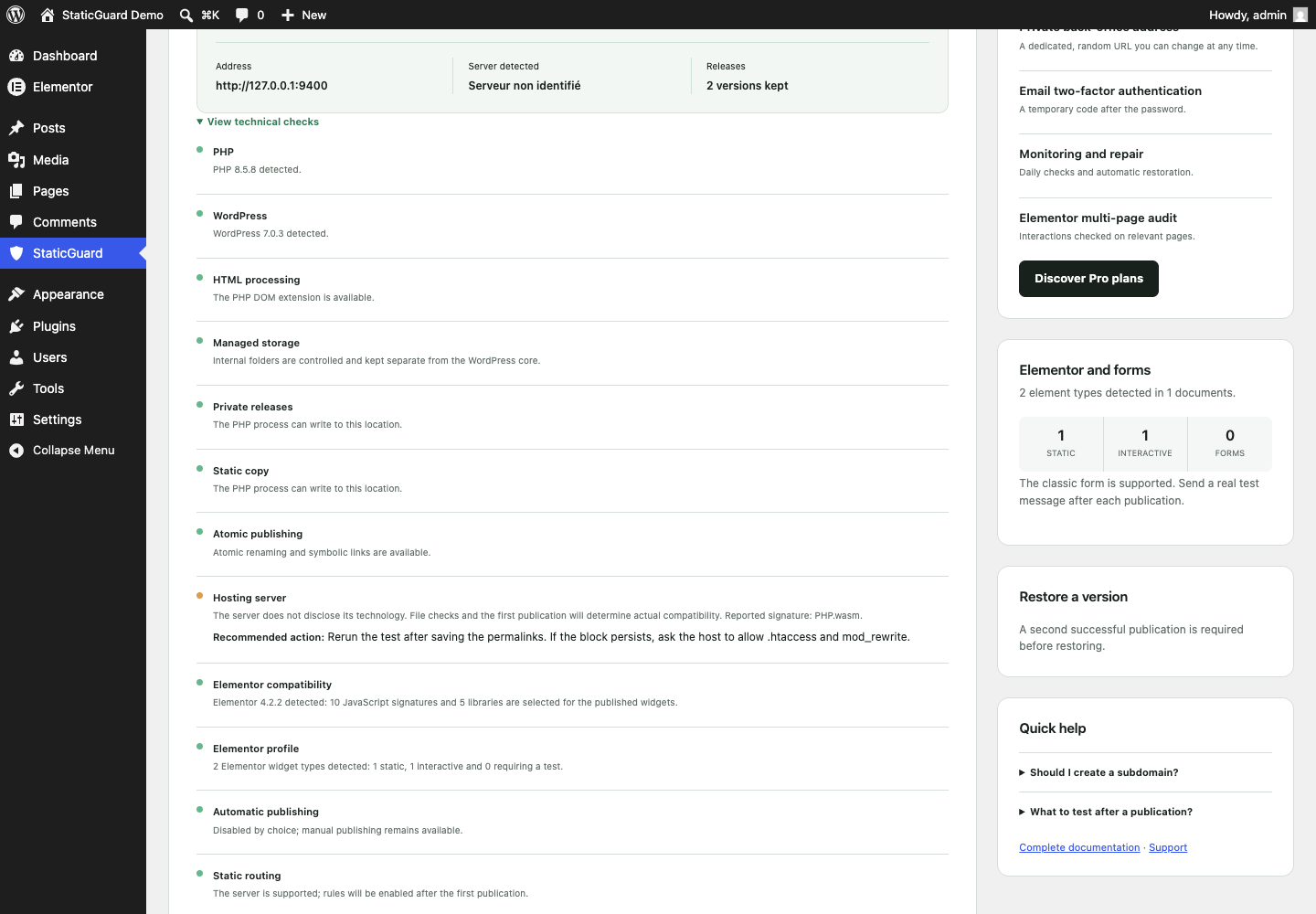
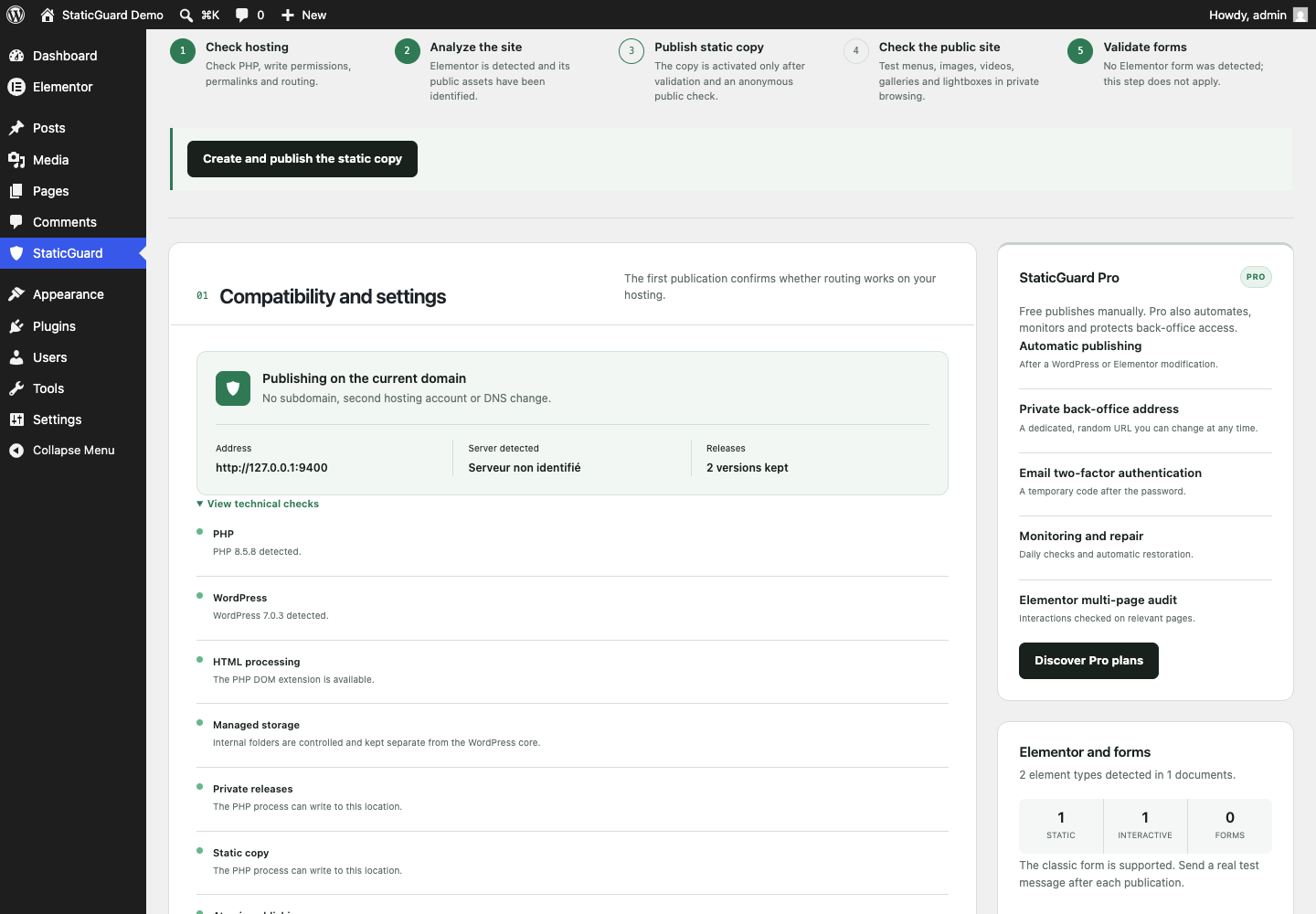
常见问题:
Do I need a subdomain or a second hosting account?
No. StaticGuard publishes on the current WordPress domain and hosting account.
Can I continue to use WordPress and Elementor?
Yes. Logged-in administrators keep the normal WordPress and Elementor experience. Logged-out visitors receive the static copy.
Does the Elementor contact form work in Free?
Yes. The classic Elementor Pro form is supported. StaticGuard keeps its own-site AJAX delivery available and adds an origin check, honeypot and essential rate limiting. Always complete a real delivery test after publication. Atomic forms, third-party form widgets and custom endpoints are outside the guaranteed scope of this first release.
What happens if a publication fails?
The new build is not activated. If failure happens during public activation, StaticGuard attempts to restore the previous verified copy. The failure remains visible in the deployment history.
Does StaticGuard work with every hosting provider?
StaticGuard does not depend on a specific hosting brand or LiteSpeed. It relies on PHP, writable local storage, readable permalinks and Apache-compatible .htaccess routing. The built-in diagnostic checks the detectable prerequisites, and the first public publication is the final compatibility test.
Does StaticGuard send site data to StaticGuard?
No. The Free plugin does not send site content, form submissions, telemetry or license requests to StaticGuard. Generated files remain on the WordPress hosting account. Links to documentation and Pro pricing open only when an administrator chooses them.
Is my WordPress administration completely isolated?
No. The Free edition reduces exposure of ordinary public pages. WordPress administration and selected dynamic endpoints still exist. Strong passwords, updates and backups remain essential. The optional private back-office address and additional login protections are provided by the separate Pro extension.
更新日志:
- Elementor form rate limits now reserve one slot per request with add_option instead of a get-and-increment transient.
- The shared generation lock now uses add_option plus a compare-and-set replace so an expired lock cannot delete a lock another request just acquired.
- New releases, probe files and generated data are written only under
uploads/staticguard. - Offloaded or non-local uploads now fail in the administration screen instead of writing to
wp-content. - Existing
staticguard-*trees remain readable so a live publication is not moved. - Replaced leftover historical option, hook and define prefixes with
staticguard_, including form rate-limit transients.
- Sanitized Free settings in the same assignment before save.
- Stopped calling load_plugin_textdomain; WordPress.org loads translations by slug.
- Wired daily integrity monitoring and repair in Free, including a manual check from the administration screen.
- Allowed administrators to keep between 2 and 20 local versions in Free.
- Sanitized settings form input before it is stored or passed to extension filters.
- Stopped shipping an en_US translation catalog; translate.wordpress.org remains the source for locale packs.
- Stored new generated files under
uploads/staticguard, with a fallback for already-deployedstaticguard-*folders.
- Recognized StaticGuard frontend assets independently of the plugin installation folder name.
- Stopped requiring the Pro-only multipage functional audit asset in Free builds.
- Added a regression test covering the packaged Free folder and Elementor validation profile.
- Cleared interrupted generation locks safely when upgrading from the former monolithic plugin.
- Repaired pending publications when their WP-Cron event is missing or late.
- Added live publication status polling and automatic page refresh after completion.
- Improved WP-Cron diagnostics for manual Free publications.
- Created a standalone Free distribution with no license client, private updater or paid-feature code.
- Added manual verified static publication on the existing WordPress domain.
- Added Elementor-aware page, media, style and script discovery.
- Preserved menus, galleries, lightboxes and common Elementor interactions.
- Included the classic Elementor Pro form with origin checks, honeypot and essential rate limiting.
- Kept two restorable local versions and automatic recovery when activation verification fails.
- Added Apache, LiteSpeed and proxy-aware hosting diagnostics.
- Added a guided first-run assistant, actionable fixes and automatic French/English administration localization.