
StatJolt Analytics – Simple, GDPR Compliant & Lightweight Website Stats
| 开发者 | mitrillhu |
|---|---|
| 更新时间 | 2026年10月29日 11:37 |
| PHP版本: | 7.0 及以上 |
| WordPress版本: | 7.1 |
| 版权: | GPLv2 or later |
| 版权网址: | 版权信息 |
详情介绍:
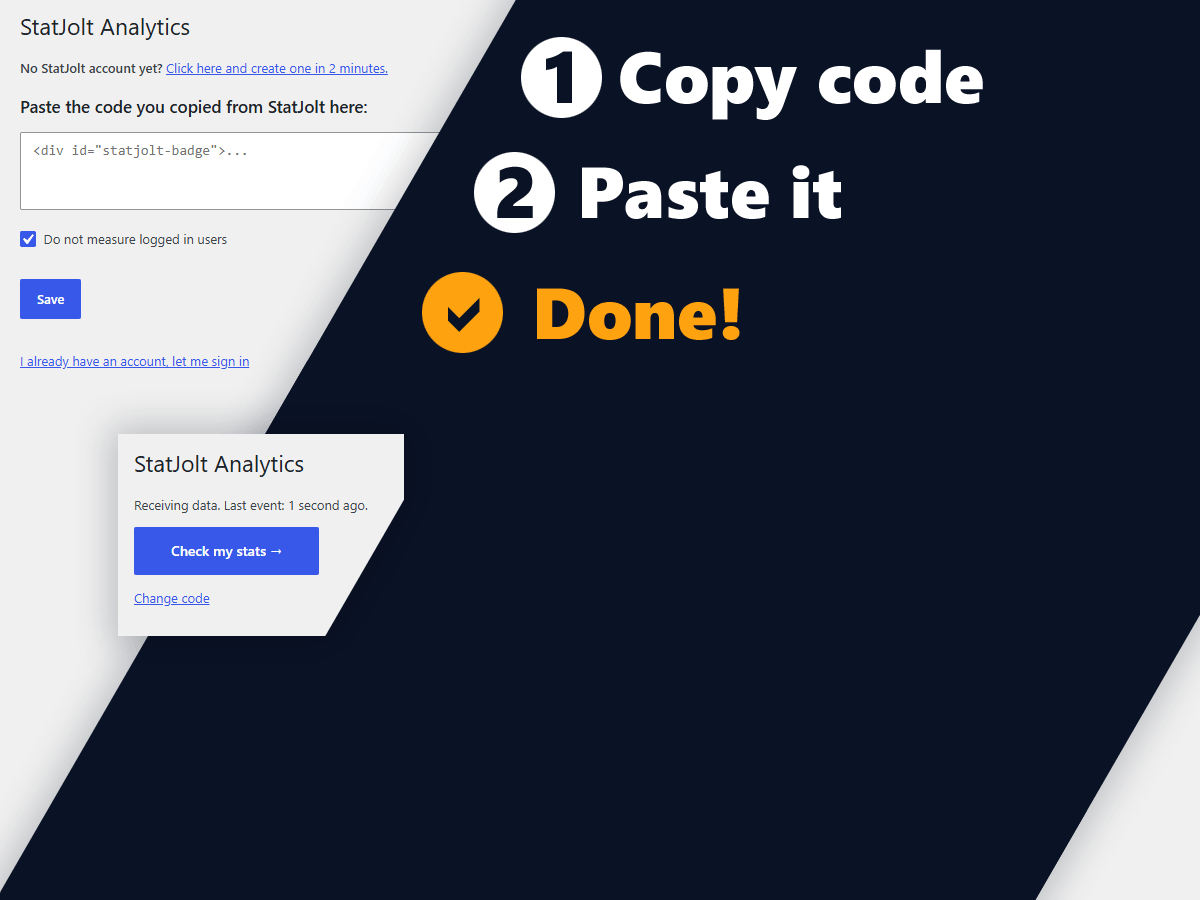
- One field. Paste the whole snippet.
- Placed for you. The code goes before the closing body tag and on WordPress 6.9 or newer it also works on themes that never call
wp_footer. There is nothing to configure and no compatibility mode to find. - Cache cleared automatically. WP Rocket, LiteSpeed, W3 Total Cache, WP Super Cache, Super Page Cache, WP Fastest Cache, SiteGround Optimizer, Hummingbird, Breeze, Cache Enabler, Autoptimize and WP Engine are all handled. If you use something else, the plugin says so plainly and keeps saying it until data arrives.
- Honest status. The settings screen tells you whether StatJolt is genuinely receiving data from this site, not merely that a code is saved.
- Safe to paste twice. StatJolt runs once per page, so you cannot accidentally double count.
- Unique visitors and pageviews, as a trend rather than noise
- Where traffic comes from: search, social, direct and UTM campaigns
- Which pages people actually read
- Devices, browsers and countries
- Live visitors, right now, with no report processing delay
- No cookies. StatJolt does not need them, so it does not use them.
- No consent banner required in most countries.
- No personal data collected. You get the insight, your visitors keep their privacy.
- Nothing to configure to stay compliant.
- Bloggers and creators who want to know which posts landed, without a course in analytics.
- Small business owners who need answers this afternoon, not a certification.
- Agencies and freelancers running many sites. One StatJolt account covers all of them and the same snippet works on every one.
- Anyone tired of cookie banners who would rather not ask every visitor for consent to count them.
[statjolt_badge] shortcode. Pages that do not render your chosen container still get the tracking code, so nothing goes unmeasured.
Who is not counted
Logged in users are skipped, which you can turn off with a single checkbox. Feeds, REST responses, previews and the login page are never touched.
安装:
- Install and activate the plugin.
- The plugin takes you to Settings, StatJolt.
- Open your StatJolt account, copy your code with the copy button, then paste it into the field and save.
- Open your site in a private window. The status turns green once your first visitor arrives and you press "Check again".
屏幕截图:
常见问题:
I do not have a StatJolt account yet.
The settings screen has a link that takes you to the sign up page.
Where exactly does the code go?
You don't have to worry about that, the plugin handles this. The rule is simple: where it appears the code went there. In case of floating it is before the closing body tag.
What if my theme does not call wp_footer?
On WordPress 6.9 or newer the plugin puts the code before the closing body tag. If there is none, it goes at the very end of the page. On older versions the theme must call wp_footer.
Does this work with caching plugins?
Yes. The code the plugin adds is the same for every visitor, so there is nothing to exclude from the cache. After you save your ID, the plugin clears the cache of WP Rocket, LiteSpeed Cache, W3 Total Cache, WP Super Cache, Super Page Cache, WP Fastest Cache, SiteGround Optimizer, Hummingbird, Breeze, Cache Enabler, Autoptimize and WP Engine, if you use one of them. If it finds none of them, it tells you to clear the cache yourself and keeps saying so until data starts arriving.
Does it work on multisite?
Yes. The network settings screen sets one StatJolt ID for every site and each site can override it. StatJolt identifies a site by its domain.
Can I put the badge somewhere specific?
Use the [statjolt_badge] shortcode. On a block theme, drop the Shortcode block into your footer template part in the Site Editor.
更新日志:
- Added Dutch, Polish, Swedish, Italian and Portuguese translations.
- Added Hungarian, German, French and Spanish translations.
- First release.