
StatPriv - All Your Site and WooCommerce Insights in One Place
| 开发者 | getstatpriv |
|---|---|
| 更新时间 | 2026年9月14日 02:01 |
| PHP版本: | 7.4 及以上 |
| WordPress版本: | 7.1 |
| 版权: | GPLv2 or later |
| 版权网址: | 版权信息 |
详情介绍:
- Chat with your data — ask questions like "How did my traffic change last week?", "What are people searching for on my site?", or "Which goals are converting best?" and get answers based on your real, live StatPriv numbers — never invented or estimated.
- One-click Full Analysis reports — generate a structured report with Summary, Key Findings, and Recommendations, based on a complete analysis of your available site data.
- Bring your own API key — connect your API key from Claude, OpenAI, or Gemini. StatPriv does not operate its own AI service or store your API key. Requests are sent from your server to the AI provider you select.
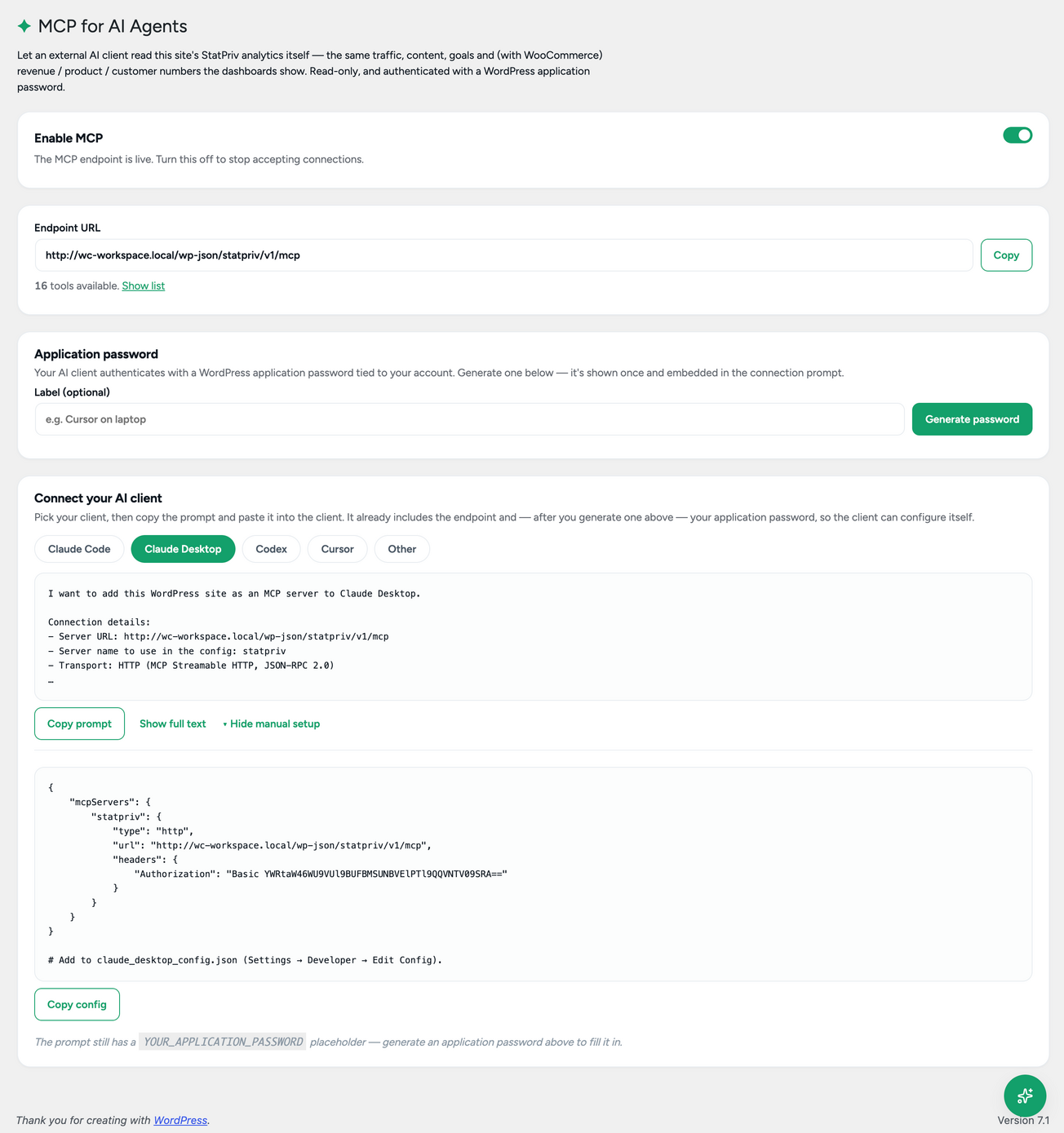
- MCP for AI Agents — connect Claude Code, Cursor, or any MCP-compatible client directly to your StatPriv analytics through the Model Context Protocol. Authentication uses a standard WordPress application password. Access is read-only, and you control which client is authorized.
- Honest about its limits — when you ask about data that isn't available on your current plan — such as revenue analytics, cohorts, or forecasting — the Assistant clearly tells you what's unavailable and which StatPriv PRO feature provides it, rather than guessing or making up numbers.
- Site Pulse — visitors, sessions, pageviews, average engagement time, and bounce rate for the last 7 days, site-wide
- Shop Snapshot — revenue, orders, top products, and average order value at a glance when WooCommerce is active
- Status strip — tracking status, WooCommerce detection, PRO status, and data freshness in one glance
- Report navigation — quickly access every available report, including PRO features, so you always know what you can explore
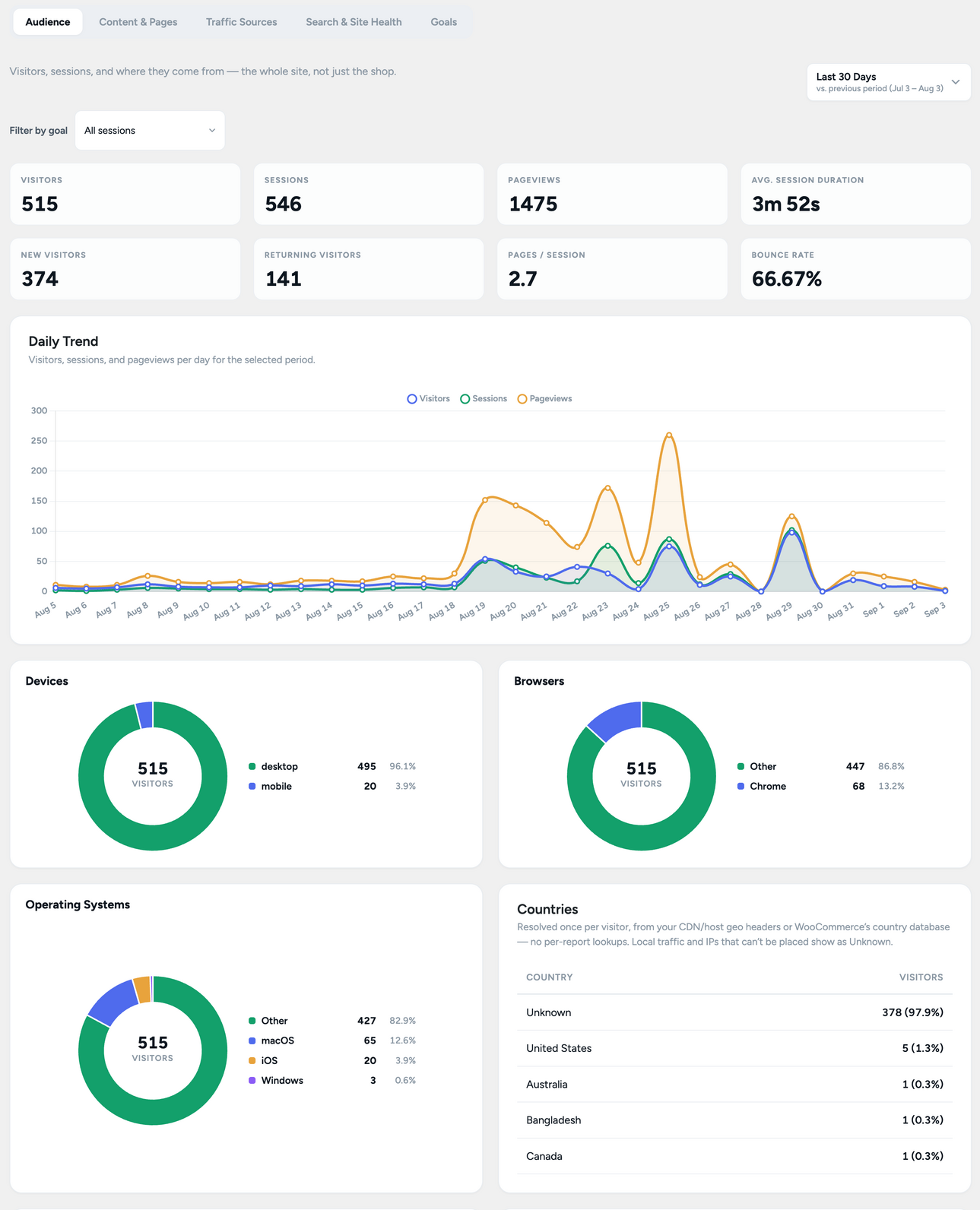
- Audience — visitors, sessions, returning vs. new visitors, and device breakdown
- Content & Pages — top pages and posts by views and engagement
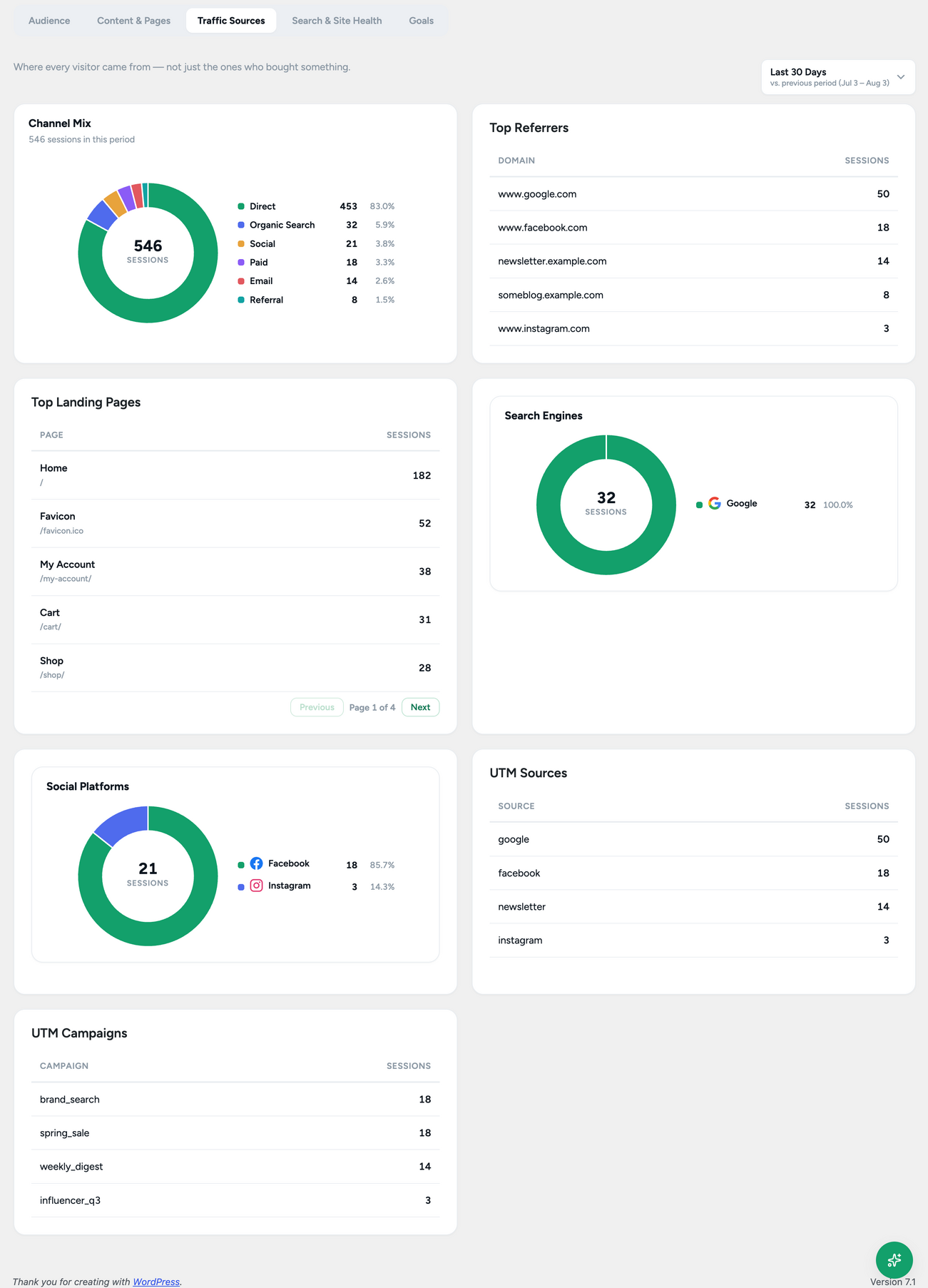
- Traffic Sources — understand where your visitors actually came from
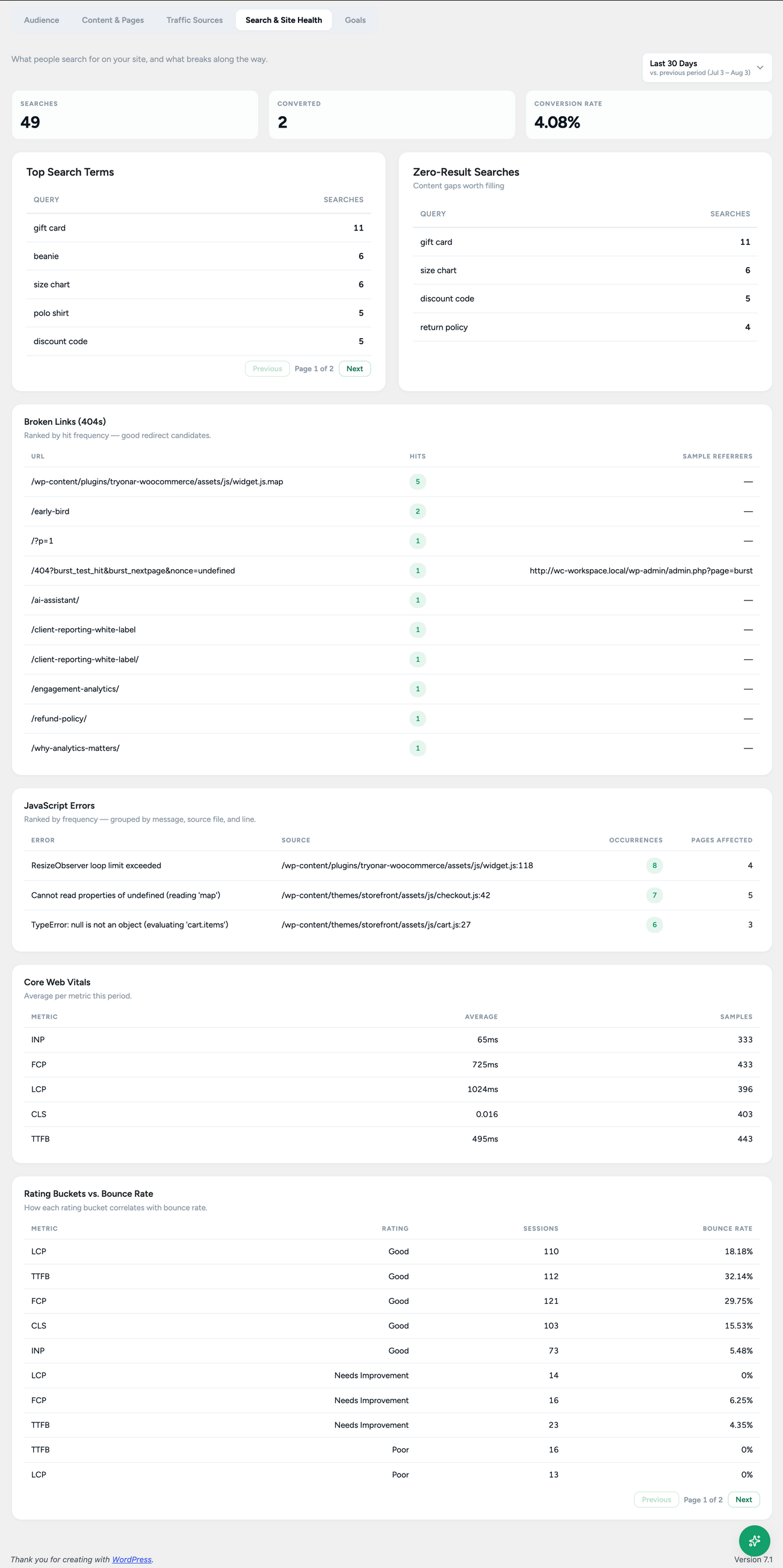
- Search & Site Health — on-site search terms, 404s, Core Web Vitals, and JavaScript error tracking
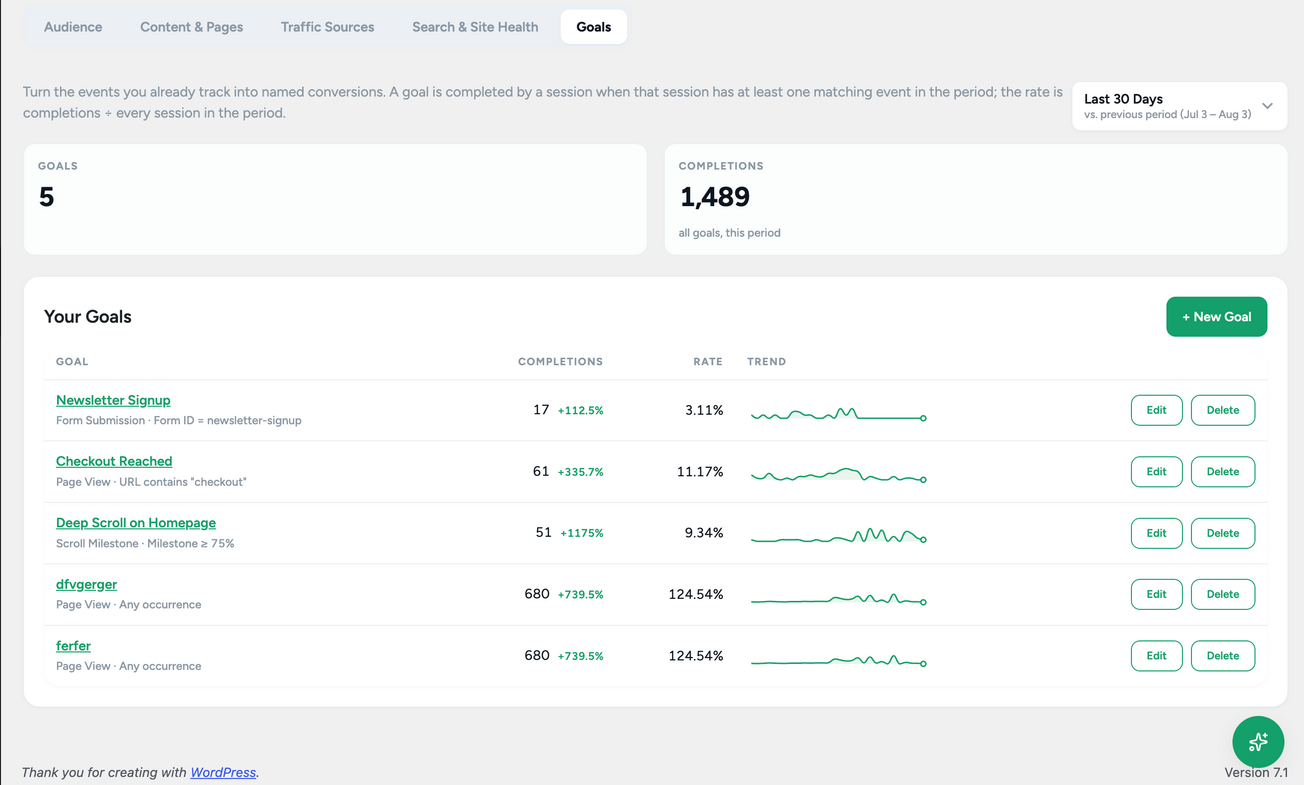
- Goals — define custom conversion and event goals such as clicks, page views, form submissions, downloads, and video plays, then track completions over time
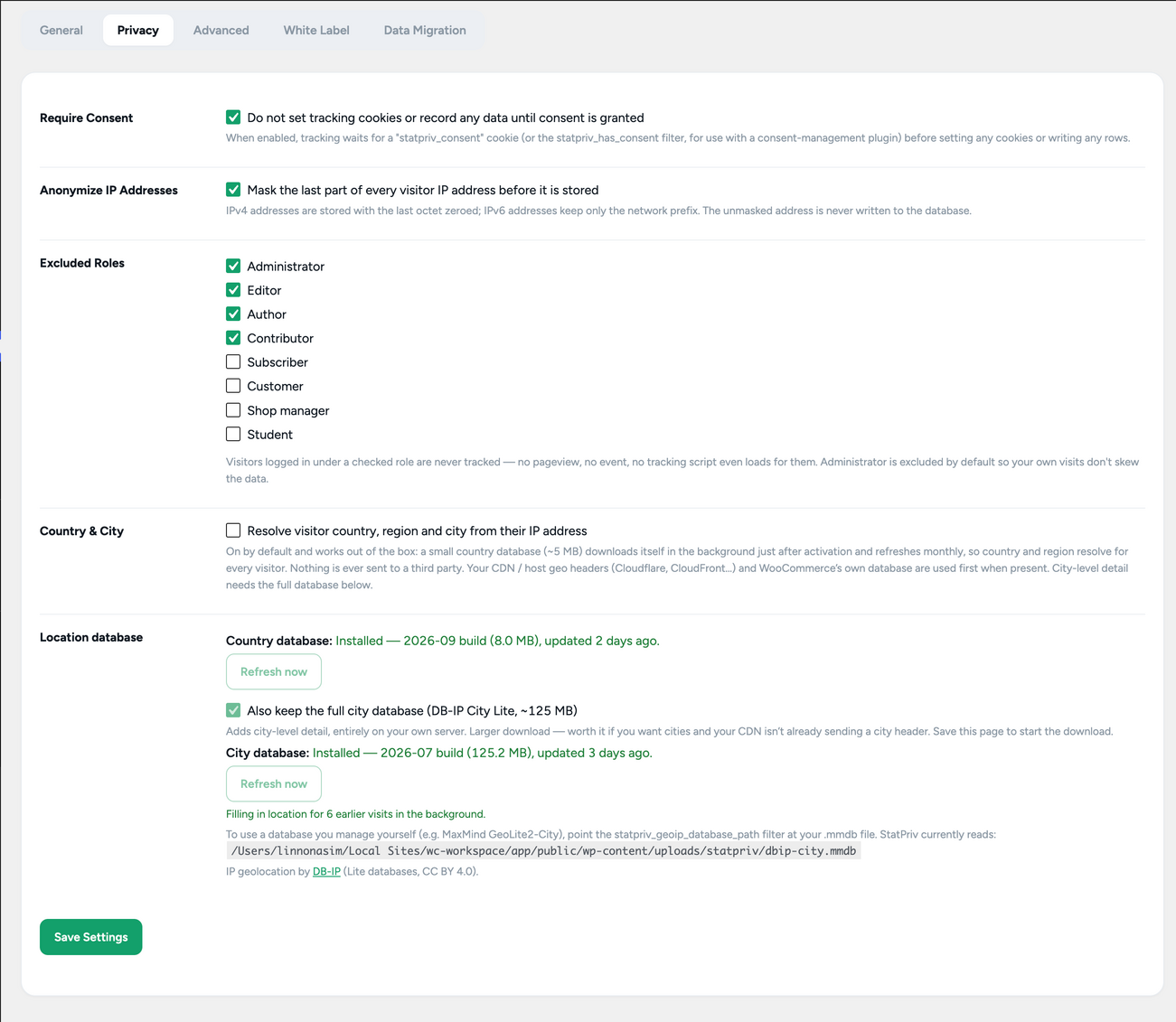
- Consent-aware tracking — nothing is tracked until consent is granted, when you enable that setting
- Optional IP anonymization — anonymize visitor IP addresses when needed
- Flexible data retention — choose how long data is kept, with automatic scheduled purging, or keep it indefinitely
- Your own WordPress database — StatPriv does not send your analytics data to StatPriv or use a third-party analytics server
- Control your data on uninstall — choose whether to permanently delete StatPriv data when uninstalling the plugin
- Revenue & Orders — gross and net revenue, tax, shipping revenue, refund rate, order status funnel, and revenue by hour and day
- Cart & Checkout — understand cart and checkout abandonment
- Coupons & Promotions — track redemptions, discounts given, and revenue influenced
- Payments & Fulfillment — analyze payment gateway performance, decline rates, shipping methods, and refund reasons
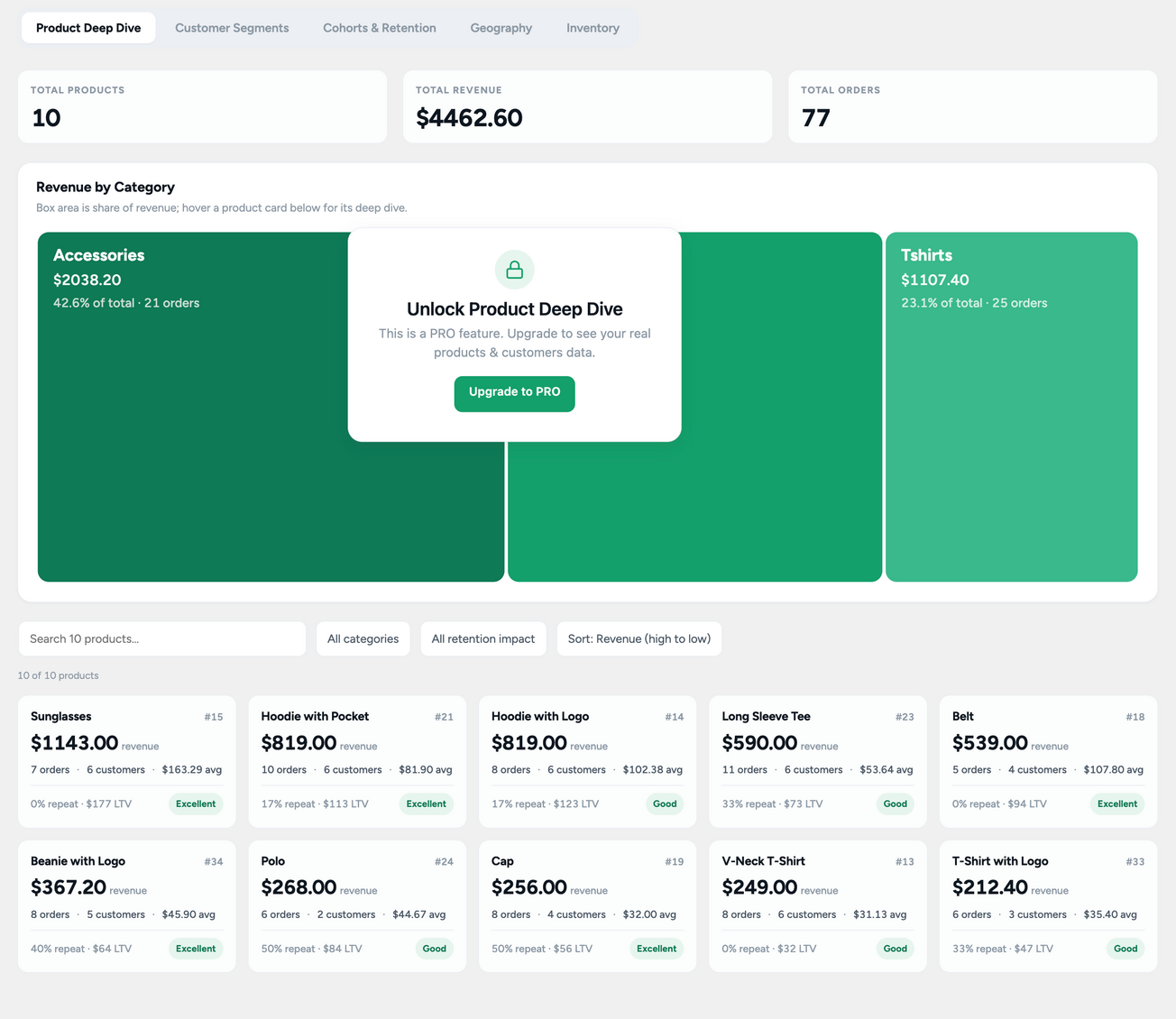
- Product Deep Dive — per-product revenue, lifetime value, repeat-purchase rate, retention impact, and category breakdown
- Customer Segments — identify high-value, repeat, one-time, at-risk, and inactive customers
- Cohorts & Retention — understand how customer groups return and retain over time with monthly cohort analysis
- Geography — visualize revenue by country on a world map
- Inventory — identify restock priorities, low-stock products, and revenue at risk from out-of-stock items
- Funnel Analytics — analyze step-by-step conversion funnels and identify where visitors drop off
- Profit Analytics — track costs, profit trends, and product-level margins
- Predictive Analytics — forecast sales, estimate customer lifetime value and churn probability, and predict product demand
- A/B Testing — run experiments against a target conversion event
- Heat Maps — visualize click density on tracked pages
- Session Recordings — review masked page-snapshot recordings to understand visitor journeys and behavior
- Real-Time — see active visitors and the pages they're viewing right now
- Clicks — outbound link clicks and file downloads
- Campaigns — traffic attributed to a UTM campaign, by source, medium, and landing page
- User Journeys — individual visitor sessions and the path each one took through your site
- Export Manager — export reports to CSV or PDF
- Scheduled Email Reports — automatically deliver daily, weekly, or monthly reports
- Scheduled AI Reports — automatically generate and deliver the AI Assistant's Full Analysis report on a schedule (the one AI feature that stays PRO — chat and on-demand Full Analysis don't require PRO)
- Shared Reports — create a read-only, expiring link to a report for clients or stakeholders without requiring a WordPress admin login
- Integrations — forward order-completion events to Google Analytics 4 and Meta Conversions API using server-side requests
- Webhooks — send tracked events to your own endpoint, CRM, or business intelligence platform
- White Label — replace StatPriv branding with your own brand name and accent color throughout WordPress admin
- Bloggers & solo site owners — understand what people are reading, where visitors come from, and which content performs best — without needing to become an analytics expert. When you want a quick answer, simply ask the AI Assistant.
- WooCommerce stores — track visitors, orders, revenue, products, and conversions from the same WordPress dashboard. When you need deeper business intelligence, PRO adds profit analysis, customer segments, cohorts, retention, forecasting, inventory insights, and more.
- Agencies & freelancers — give clients clear, understandable analytics and reports without requiring them to navigate complicated analytics platforms. PRO also provides scheduled reports, AI reports, shared reports, exports, and white-label options.
- Developers — work directly with the site's analytics data through the plugin's complete source code, webhooks, and MCP support. Connect an AI coding agent such as Claude Code or Cursor to query real StatPriv analytics while you work.
安装:
- Upload the plugin files to
/wp-content/plugins/statpriv, or install directly through Plugins → Add New - Activate the plugin through the Plugins menu in WordPress
- Follow the short setup wizard, or skip it — either way, go to StatPriv → Overview to see your dashboard
- Visit StatPriv → Settings to configure tracking, consent, data retention, and caching
- Optional: visit StatPriv → Settings → AI Assistant and add your own Claude, OpenAI, or Gemini API key to start asking questions about your data
屏幕截图:
常见问题:
Do I need a StatPriv account?
No. There's no account to create and nothing to connect. Tracking data is stored in your own WordPress database from the moment you activate the plugin.
Where is my data stored?
In your own WordPress database, in tables this plugin creates. Nothing is sent to StatPriv or any third-party analytics service.
Is the AI Assistant really free, or is that a Pro upsell?
It's genuinely free. Chat and on-demand Full Analysis reports both work in the free plugin with no Pro purchase required — you only need to supply your own API key from Claude, OpenAI, or Gemini. The only AI feature that stays in StatPriv PRO is Scheduled AI Reports (the same Full Analysis report, generated automatically on a recurring schedule and delivered for you).
Do I need to pay Claude, OpenAI, or Google to use the AI Assistant?
You need your own API key from whichever provider you choose, and that provider bills you directly for usage — StatPriv doesn't mark it up or add a fee on top. If you'd rather not use the AI features at all, they simply stay off; every other part of the plugin works exactly the same without them.
What data does the AI Assistant send to Claude, OpenAI, or Gemini?
Only the aggregate numbers the same tool already shows on your own dashboard — visitor counts, traffic sources, page performance, on-site search terms, and goal completions in the free plugin. Nothing per-visitor, no names, no email addresses, no IP addresses. Requests go directly from your server to the provider you chose using your own API key; StatPriv doesn't run a proxy or see the traffic.
Can the free AI Assistant answer questions about my WooCommerce revenue?
The free tier's AI tools cover site traffic, content, search, and goals. Questions about revenue, profit, customer segments, cohorts, or forecasting need StatPriv PRO at the Growth plan or higher. If you ask about one of those without the plan that unlocks it, the Assistant tells you plainly and names the plan you'd need — it never guesses or fabricates a number to answer anyway.
What is "MCP for AI Agents"?
MCP (Model Context Protocol) is an open standard that lets AI tools like Claude Code or Cursor read data from an application directly, instead of you copy-pasting numbers into a chat. StatPriv's MCP endpoint lets an MCP-compatible agent query your site's real StatPriv data — read-only, and authenticated with a standard WordPress application password you generate and can revoke at any time. It doesn't require StatPriv PRO either, with the same plan-based limits on which figures it can return as the in-admin Assistant.
Is this GDPR-friendly?
StatPriv supports consent-gated tracking (nothing is recorded until consent is granted, if you enable that setting) and optional IP anonymization. Whether that's sufficient for your specific site depends on your overall setup — this plugin gives you the tools, but compliance is still your call.
Does this work with page or object caching?
Yes — tracking is a separate request from the cached page itself, so it works alongside standard page-caching plugins.
Does this require WooCommerce?
No. Core tracking, Site Analytics, Goals, and the AI Assistant all work on any WordPress site. Shop Snapshot and the other shop-specific reports only appear when WooCommerce is active.
How does StatPriv resolve visitor countries and cities?
Locally, from a small geolocation database (DB-IP Lite, free and open, CC BY 4.0) that StatPriv downloads once automatically and refreshes monthly. Nothing about your visitors is sent anywhere to do this lookup — each visit is matched against the local database already sitting in your uploads folder.
What's the difference between the free plugin and PRO?
The free plugin covers whole-site analytics — visitors, pageviews, traffic sources, search, Core Web Vitals, custom goals, basic WooCommerce revenue and order tracking, and the full AI Assistant + MCP. PRO adds the deeper shop-analytics suite (funnels, profit, forecasting, cohorts, segments, geography), Engagement Studio (A/B testing, heat maps, session recordings), Visitor Activity (real-time, clicks, campaigns, user journeys), reporting and sharing (scheduled email and AI reports, exports, client share links), and integrations/white-labeling. Every PRO page is visible even without PRO active, showing the real UI with sample data, so you can see what you'd be getting first.
What happens to my data if I uninstall the plugin?
By default, nothing is deleted — your tracking data and settings stay in your database in case you reinstall later. If you'd rather have it fully removed, there's a "delete all data on uninstall" option in Settings you can turn on before uninstalling.
Where is the source code, and how do I build it?
The complete, human-readable source ships inside this plugin package — nothing is obfuscated:
- Admin app (React) —
assets/js/admin/andassets/js/shared/ - Front-end tracking beacons —
assets/js/tracking.js(loaded as-is, unminified) andassets/js/web-vitals-tracking.js - Styles —
assets/css/ - Build configuration —
webpack.config.jsandpackage.json(thebuildscript)
dist/ are generated from that source with:
npm install && npm run build
Bundled third-party libraries (npm packages, exact versions pinned in package.json):
- Chart.js and react-chartjs-2 — MIT — https://www.chartjs.org/
- web-vitals (Google) — Apache-2.0 — https://github.com/GoogleChrome/web-vitals
- react-simple-maps — MIT — https://www.react-simple-maps.io/
- world-atlas — ISC — https://github.com/topojson/world-atlas
- WordPress
@wordpress/*packages (element, components, api-fetch, i18n) — GPL-2.0-or-later
Where can I get help?
Post a question in this plugin's support forum here on WordPress.org.
更新日志:
- New: "Visitor Activity" is a new PRO page (Real-Time, Clicks, Campaigns, User Journeys), split out of the former "Engagement Tools" page — the tools that stayed behind (A/B Testing, Heat Maps, Session Recordings) are now "Engagement Studio"
- New: the PRO teaser previews for A/B Testing, Heat Maps, and Session Recordings are now fully interactive — "View Heat Map" and "Play" open a real preview of the actual page instead of a static mockup, and "+ New Experiment" opens the same builder shown in PRO
- Improvement: AI Assistant and MCP for AI Agents are now tabs on the Settings page instead of their own sidebar pages
- Improvement: redesigned tab navigation — underline-style tabs, full width, replace the previous pill style across every tabbed screen
- Improvement: Settings page reorganized — Privacy is now the last tab, "Advanced" is renamed "Cookie Settings", and the old "Data Migration" tab is now a "Data Sync" section inside General
- Improvement: sidebar item renamed from "Tools" to "Integrations/Webhook" for clarity
- Improvement: Funnel Analytics' step visualization, and the Revenue by Category / RFM Analysis charts, now render as bar charts instead of the previous step-block and treemap designs
- Improvement: the floating AI Assistant launcher now shows an icon and label instead of an icon-only button
- Change: consent-gated tracking and IP anonymization are now off by default (previously on) — turn either on from Settings → Privacy, or during the setup wizard, if you need them
- Fix: removed a redundant "Overview" row from the sidebar (the top-level StatPriv menu item already opens it)
- Fix: removed the non-functional "Refresh" button from the Overview page header
- New: the Command Center dashboard's top row now shows a "Live" active-visitor count, a New vs. Returning Visitors chart, and a compact "Quick Actions" list, with Site Pulse and Goals each getting their own full-width row below
- New: the real-time active-visitor count is now a free feature — only the deeper Real-Time page (trending pages, referrers, running live feed) requires PRO
- Improvement: Content & Pages' "Views By" chart and "Content Performance" table now sit side by side instead of stacked full-width
- Improvement: narrower page container with consistent left/right padding across every admin screen, on wide and ultrawide monitors
- Improvement: tighter spacing throughout the admin UI — less empty white space in cards, grids, and section headers
- Improvement: the active tab now uses the brand color consistently on every tabbed report page and PRO teaser preview
- Fix: the admin UI no longer loads a Google Fonts stylesheet — it uses the browser's own system font
- Fix: tab strip alignment with the page content below it on every tabbed report page
- Fix: the "Live" card's activity link no longer shows as locked when PRO isn't active
- New: visitor, session, and pageview tracking, stored entirely in your own database
- New: Command Center dashboard — Site Pulse, Shop Snapshot, status strip, and a jump-off grid to every report
- New: Site Analytics — Audience, Content & Pages, Traffic Sources, Search & Site Health
- New: custom Goals — track clicks, page views, form submissions, downloads, and video plays as conversion events
- New: AI Assistant — chat with your own data and generate on-demand Full Analysis reports, no StatPriv PRO required, using your own Claude/OpenAI/Gemini API key
- New: MCP for AI Agents — connect an external MCP-compatible AI client to your StatPriv data over a read-only, application-password-authenticated endpoint, no StatPriv PRO required
- New: Core Web Vitals and JavaScript error capture and reporting
- New: on-site search-term, click/download/video, and form-submission capture
- New: local geo-IP resolution for visitor location, with no external lookups per visit
- New: consent-gated tracking and optional IP anonymization
- New: configurable data retention with a scheduled automatic purge
- New: response caching with an admin toggle
- New: guided first-run setup wizard, including historical WooCommerce order backfill
- New: PRO teaser pages — every PRO screen shows up in the sidebar with realistic sample data and an upgrade overlay, even without PRO installed
- Fix: revenue and order-count double-counting in the analytics REST endpoints