
Static Cache Wrangler - Headless Assistant
| 开发者 | derickschaefer |
|---|---|
| 更新时间 | 2026年5月18日 06:17 |
| PHP版本: | 7.4 及以上 |
| WordPress版本: | 7.0 |
| 版权: | GPLv2 or later |
| 版权网址: | 版权信息 |
详情介绍:
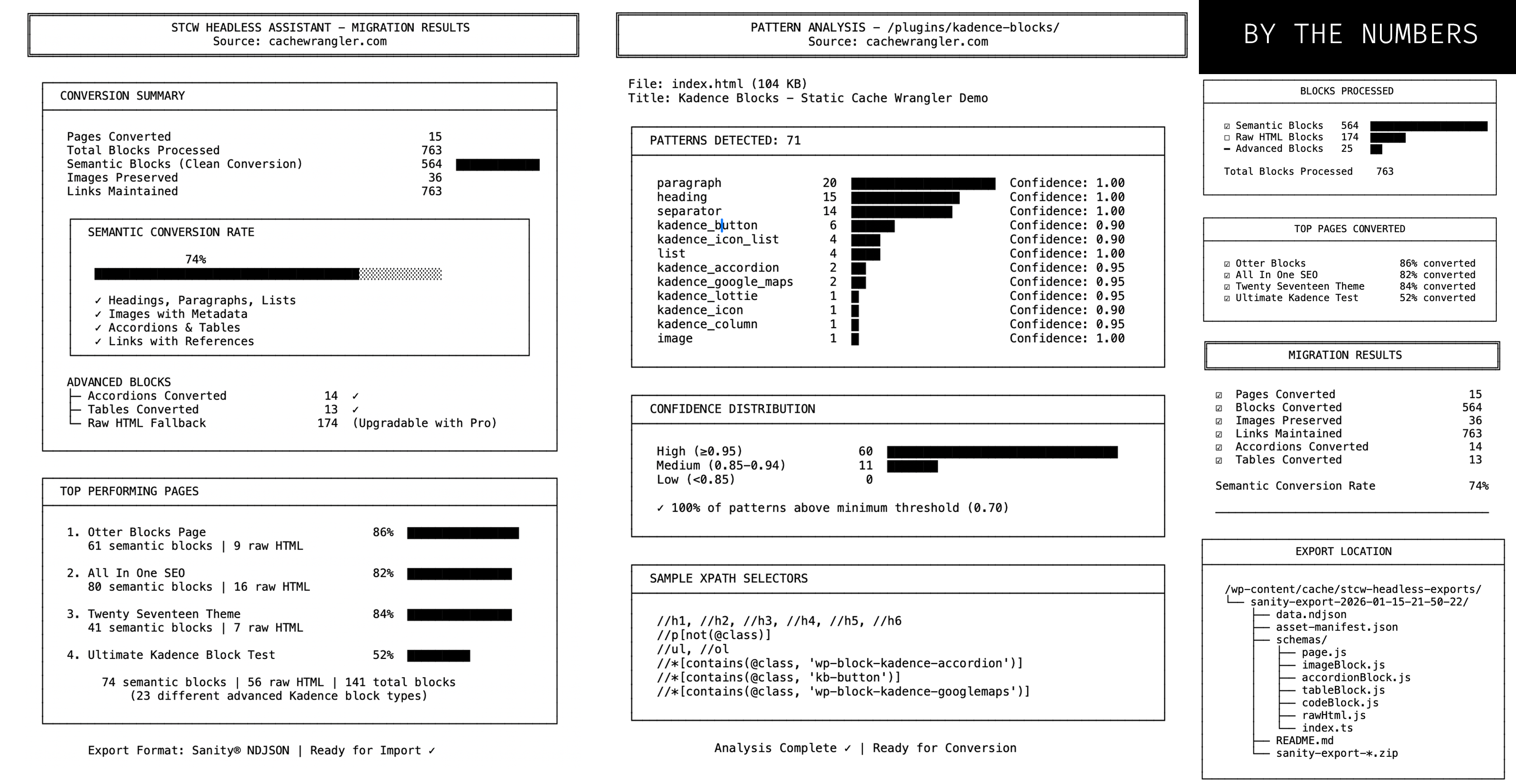
- ☑ 74% semantic conversion rate - 564 blocks converted to structured content
- ☑ 15 pages converted successfully to Sanity format
- ☑ 763 links preserved with proper structure and references
- ☑ 36 images tracked with migration metadata
- ☑ 14 accordions converted semantically
- ☑ 13 tables converted semantically
- Simple pages: 86% semantic conversion
- Complex pages with mixed content: 74-82%
- Ultimate test page (141 blocks, 23 different Kadence block types): 52% What Falls Back to HTML (requires custom hooks):
- Navigation menus (by design - preserves styling)
- Advanced Kadence blocks (countdown, forms, testimonials, maps, etc.)
- Premium block libraries (Otter, Spectra - requires additional detectors)
- WordPress → Sanity NDJSON export
- Pattern detection for Gutenberg blocks
- Schema generation for Sanity Studio
- Asset tracking and manifest
-
Command:
wp scw-headless convert --cms=sanitySmart Pattern Detection: - 12 core Gutenberg patterns
- 28 Kadence Blocks patterns
- XPath-based detection with confidence scoring
- Priority-based matching for nested structures
- Pattern inheritance system CLI-First Experience:
-
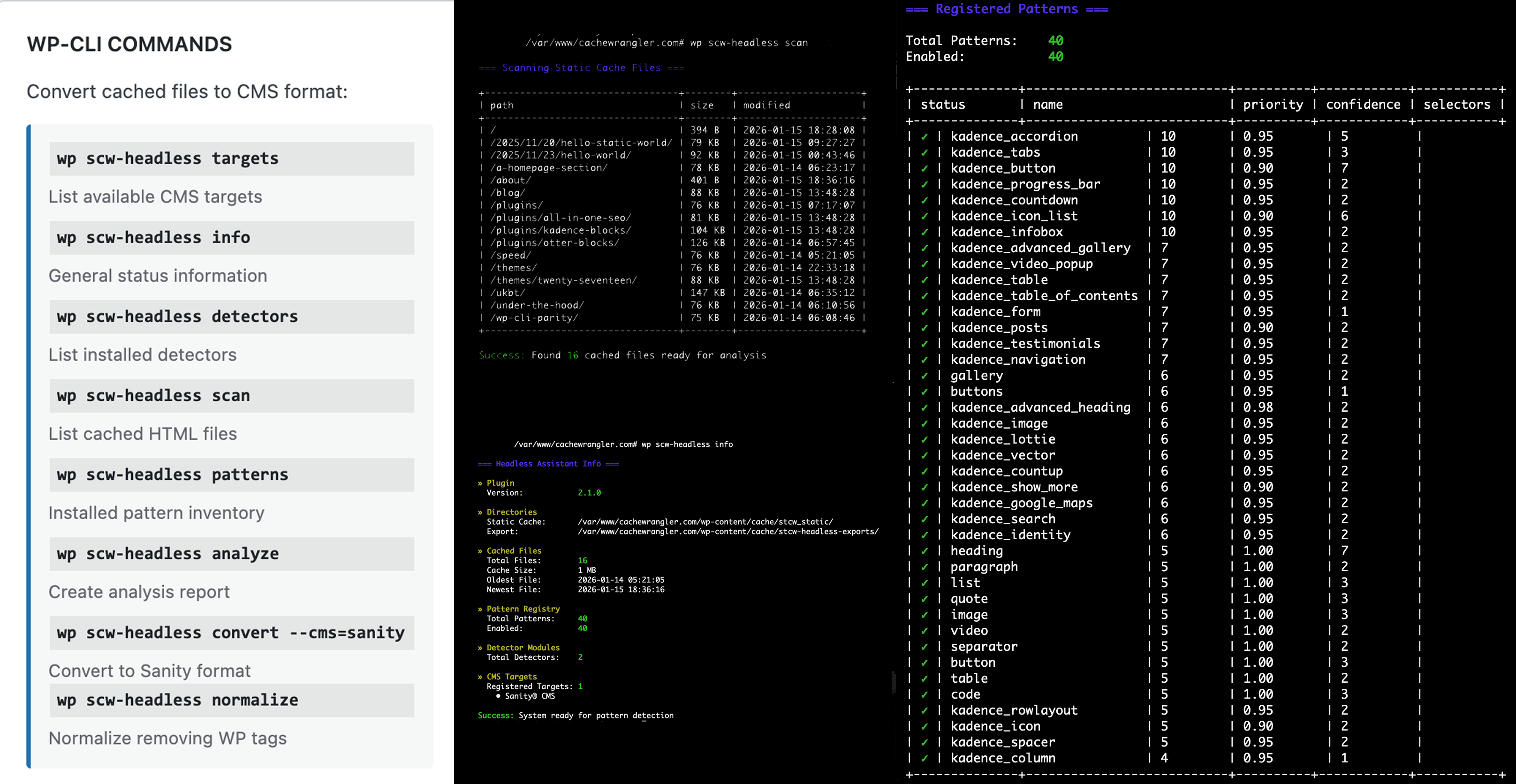
wp scw-headless scan- View cached files wp scw-headless analyze <file>- Detect patternswp scw-headless convert --cms=sanity- Export to Sanitywp scw-headless patterns- List registered patternswp scw-headless detectors- Show detector moduleswp scw-headless targets- List available CMS platformswp scw-headless info- Show plugin statistics
- CMS-agnostic JSON format
- Support for any Portable Text consumer
- Command:
wp scw-headless normalize - Non-WP analyzer and converter tooling Advanced Pattern Detection:
- 40+ patterns including Kadence Blocks
- ACF field support (roadmap)
- Page builder compatibility (roadmap)
- Custom pattern registration Multi-CMS Support:
- Sanity (today)
- Strapi (horizon)
- Contentful (horizon)
- Payload CMS (horizon)
- Any Portable Text consumer (roadmap) Learn more about planned features features
- This plugin is 100% free (true WordPress style)
- Want to make a donation? Consider purchasing a copy of the author's book on command-line interfaces for yourself or as a gift. Modern CLI Book
- heading, paragraph, image, gallery, video
- list (ordered/unordered), quote, code
- button, buttons, separator, table Kadence Blocks - 28 patterns:
- accordion, tabs, advanced_button, progress_bar
- icon_list, infobox, countdown, rowlayout
- column, advanced_heading, form, testimonials
- posts, table_of_contents, google_maps, lottie
- image, video_popup, advanced_gallery, navigation
- icon, spacer, show_more, search, identity
- table, vector, countup Extensible via Filters:
php
// Register custom patterns
add_action('stcw_headless_patterns_loaded', function() {
\STCW\Headless\Engine\Detector\PatternRegistry::register('custom_block', [
'selectors' => ['.my-custom-block'],
'extractor' => [MyExtractor::class, 'extract'],
'priority' => 8,
'confidence' => 0.95,
]);
});
How It Works
- Cache your WordPress site with Static Cache Wrangler
- Scan cached files:
wp scw-headless scan - Analyze patterns:
wp scw-headless analyze /page/ - Convert:
- Free:
wp scw-headless convert --cms=sanity
- Sanity CMS - Full Portable Text conversion with schema generation
- Migrating WordPress content to headless CMS platforms
- JAMstack architecture with WordPress as authoring tool
- SEO component analysis
- UI pattern analysis
- WordPress 6.0 or higher
- PHP 7.4+ (PHP 8.x fully supported)
- Static Cache Wrangler 2.0.5+ (must be installed and active)
- WP-CLI recommended for best experience
- Pattern Library Pro for enterprise features (optional)
安装:
- Install and activate Static Cache Wrangler
- Install (or confirm installation) WP-CLI
- Search "STCW Headless Assistant" in WordPress plugin directory
- Click "Install Now" and activate
- Generate cached pages by browsing your site
- Use WP-CLI:
wp scw-headless infoto verify installation
- Install and activate Static Cache Wrangler first
- Upload
stcw-headless-assistantfolder to/wp-content/plugins/ - Activate via WordPress admin
- Navigate to Static Cache > Headless Assistant
- Run:
wp scw-headless scanto verify setup
- Install WP-CLI (for CLI support)
- Install Static Cache Wrangler (for HTML caching)
- Install STCW Headless Assistant (this plugin)
- Cache your site:
wp scw enable - Test conversion:
wp scw-headless analyze /
屏幕截图:
常见问题:
Does this work without Static Cache Wrangler?
No, this is a companion plugin that requires Static Cache Wrangler to be installed and active. It converts the HTML files that Static Cache Wrangler generates.
What WP-CLI commands are available?
Commands:
wp scw-headless info- Show system status and statisticswp scw-headless scan- List all cached HTML files ready for conversionwp scw-headless analyze <file>- Detect patterns in specific filewp scw-headless patterns- List all registered patterns with confidence scoreswp scw-headless detectors- Show registered detector moduleswp scw-headless convert --cms=sanity- Convert all files to Sanity formatwp scw-headless targets- List available CMS targets All commands support--format=jsonfor automation.
What gets exported?
Current (Sanity conversion): The plugin creates a complete export package containing:
data.ndjson- Sanity import data in newline-delimited JSON formatasset-manifest.json- Asset references with URLs and metadataschemas/- Sanity Studio schema definitionsREADME.md- Import instructions for Sanity.ziparchive - Complete package for download
wp-content/cache/stcw-headless-exports/ .
How does pattern detection work?
The plugin uses a sophisticated multi-phase pipeline:
- HTML Normalization - Strips WordPress-specific classes, IDs, and attributes while preserving semantic HTML
- Pattern Detection - Uses XPath queries to find registered patterns (CSS selectors converted to XPath)
- Priority Sorting - Processes patterns by priority (10=highest) to handle nested blocks correctly
- Confidence Scoring - Each match includes confidence score (0.0-1.0) based on selector specificity
- Content Extraction - Registered extractor functions parse matched DOM nodes into structured data
- Conversion - Transform to target CMS format
How accurate is pattern detection?
Production Results (cachewrangler.com):
- Overall semantic conversion: 74%
- Core Gutenberg blocks: 100% accuracy (confidence: 1.00)
- Kadence Blocks: 90-95% accuracy (confidence: 0.90-0.98)
- 40 unique patterns registered
- 763 blocks processed across 15 pages
- 174 blocks fell back to raw HTML (navigation menus, advanced widgets) Per-Page Results:
- Simple pages: 82-86% conversion
- Mixed content pages: 74-82% conversion
- Complex pages (23 block types): 52% conversion
What if a pattern isn't detected?
Falls back to rawHtml block type with pattern metadata. You can:
- Add custom pattern definitions via filters
- Report missing patterns on GitHub
- Wire up existing extractors (many already exist)
Can I add support for more blocks?
Yes! Three ways:
1. Register patterns via filter:
php
add_action('stcw_headless_patterns_loaded', function() {
\STCW\Headless\Engine\Detector\PatternRegistry::register('my_block', [
'selectors' => ['.my-block-class'],
'extractor' => [MyExtractor::class, 'extract_my_block'],
'priority' => 8,
'confidence' => 0.95,
]);
});
2. Create detector modules (for larger block libraries)
3. Use pattern inheritance:
php
// Extend existing patterns
PatternRegistry::register('custom_button', [
'extends' => 'button',  // Inherits base button selectors
'selectors' => ['.my-custom-button'],  // Adds custom selectors
]);
Can I add support for other CMS platforms?
Yes! The plugin is designed with a pluggable architecture:
php
// Register custom CMS target
add_action('stcw_headless_register_targets', function() {
$my_target = new My_CMS_Target();
\STCW\Headless\Engine\Target\TargetRegistry::register($my_target);
});
Your target class must implement TargetInterface with methods for convert(), generate_schemas(), and export().
What paths are excluded from scans?
By default, these paths are excluded:
assets/- Static assets (CSS, JS, images)author/- Author archivescategory/,tag/- Taxonomy archivesindex.php/- WordPress quirksfeed/,wp-json/- API endpointssitemap/,404/- Utility pages- Blog index pages (Posts Page in Settings → Reading)
Filter via
stcw_headless_excluded_pathsto customize.
Why is the blog page not converting?
WordPress "Posts Page" archives (the page set as your blog index in Settings → Reading) are intentionally skipped because they contain dynamic post loops, not static content. Individual blog posts are converted successfully. To recreate your blog index in Sanity:
- Import individual posts (automatically converted)
- Use this GROQ query to fetch posts:
groq *[_type == "post"] | order(publishedAt desc) { title, slug, excerpt, publishedAt } - Build your blog index view in your frontend
Does this work with page builders?
Kadence Blocks is currently supported. Support is being considered for Elementor, Otter Blocks, Divi, and more.
What's the performance?
v2.1.0 Benchmarks (cachewrangler.com test site):
- 15 pages converted in ~6 seconds
- Small page (10 KB): ~0.2 seconds
- Medium page (50 KB): ~0.5 seconds
- Large page (100 KB): ~1.0 seconds
- Batch (100 pages): ~45 seconds
- Pattern detection: XPath-based (efficient)
- Memory: ~20 MB per page
Can I preview before converting?
Yes! Use wp scw-headless analyze <file> to see:
- Patterns detected
- Confidence scores
- Asset references
- Potential issues
- Extraction preview Example:
Pattern Analysis
File: index.html (104 KB) Patterns Found: 71 paragraph 20 Confidence: 1.00 heading 15 Confidence: 1.00 separator 14 Confidence: 1.00 kadence_button 6 Confidence: 0.90 kadence_accordion 2 Confidence: 0.95 ... Confidence Distribution: High (≥0.95): 60 Medium (0.85+): 11 Low (<0.85): 0 ```
How do I get support?
- Free users: GitHub Issues
- Documentation: wp2headless.com/docs
Why are some files showing as 140 B?
Static Cache Wrangler may create gzipped files or use compression. The plugin handles this automatically by reading the actual index.html files within cached directories.
更新日志:
- Tested: Full production testing on cachewrangler.com (15 pages, 763 blocks)
- Confirmed: 74% semantic conversion rate across mixed content
- Confirmed: 100% link preservation (763 links maintained)
- Confirmed: Zero data loss - all content captured
- Added: Generic Portable Text converter for CMS-agnostic output
- Added: Enterprise feature gating via
stcw_headless_is_enterprisefilter - Added:
normalizecommand for generic Portable Text export - Added: Support for Pattern Library Pro integration
- Added: Asset tracking in generic format with IDs and metadata
- Added: Block type statistics in verbose mode
- Added:
--verboseflag support for detailed output - Added:
--output=<path>flag to save JSON to file - Enhanced: CLI commands with better error messages
- Enhanced: Pattern detection tested with 40 unique patterns
- Enhanced: JSON output structure with version, format, generator
- Fixed: List item handling (array vs string support)
- Fixed: Image deduplication per page
- Fixed: Parser API consistency (
parse_file()) - Improved: Export now generates Sanity-native NDJSON format
- Improved: Asset manifest with usage tracking and priority levels
- Improved: Accordion and table semantic conversion
- Enhanced: Pattern detection confidence scoring
- Fixed: Slug deduplication prevents duplicate homepage exports
- Fixed: Parser file path resolution edge cases
- Improved: Normalizer statistics output formatting
- Fixed: Improved file path resolution for all URL formats (
/contact/,contact,/) - Fixed: Scanner now properly excludes junk paths (
index.php/,author/admin/) - Enhanced: Better error messages showing attempted path resolutions
- Enhanced: Homepage
/now resolves correctly toindex.html - Added: Filterable path exclusion list via
stcw_headless_excluded_paths
- Enhanced: CLI
infocommand shows full parity with admin dashboard - Added: Plugin version, directory paths, detector count, CMS targets to info output
- Added: Trademark symbol (®) for Sanity CMS throughout UI and CLI
- Enhanced: Better Scanner statistics with formatted file sizes
- Fixed: Admin dashboard cache size label clarity
- Added: Complete Kadence Blocks support - 28 block patterns registered
- Added: Advanced Kadence extractors (accordion, tabs, progress_bar, icon_list, and 24 more)
- Enhanced: Pattern registry now supports pattern inheritance
- Enhanced: Confidence scoring system for better pattern matching
- Added:
wp scw-headless detectorscommand to list detector modules
- Added: Pattern detection system with XPath-based queries
- Added: HTML Normalizer with configurable cleanup strategies
- Added:
wp scw-headless analyzecommand for pattern debugging - Enhanced: CLI commands now support
--verboseflag for detailed output
- Added: Pluggable CMS target architecture with TargetRegistry
- Added:
wp scw-headless targetscommand - Enhanced: Convert command now uses
--cms=<target>flag - Refactored: Sanity-specific code moved to Target/Sanity/ namespace
- Added: Admin dashboard with pattern statistics
- Added: Real-time cache file scanning
- Enhanced: WP-CLI output formatting with color codes
- Enhanced: Pattern priority system for nested block handling
- Fixed: Pattern detection order respects priority values
- Added: Detection statistics with confidence distribution
- Refactored: Complete namespace migration from
STCWSC_*toSTCW\Headless\* - Added: PSR-4 autoloader for WordPress naming conventions
- Fixed: CLI namespace changed from
wp scw-sanitytowp scw-headless - Enhanced: Plugin renamed to "Static Cache Wrangler - Headless Assistant"
- Major: Complete architectural refactor to pluggable system
- Breaking: CLI commands changed (backward compatibility via aliases)
- Breaking: Namespace changed to trademark-safe naming
- Added: Detector module system
- Added: Pattern registry with 12 Gutenberg patterns
- Added: HTML normalizer engine
- Enhanced: Sanity export generates complete schemas
- Initial proof-of-concept release
- Basic Sanity conversion support
- Simple block detection
- CLI commands: info, scan, convert