Sticky Menu & Sticky Header
| 开发者 | WebFactory |
|---|---|
| 更新时间 | 2026年8月17日 03:41 |
| PHP版本: | 5.2 及以上 |
| WordPress版本: | 7.1 |
| 版权: | GPLv2 or later |
| 版权网址: | 版权信息 |
详情介绍:
- Any element can stick: although common use is for navigation menus, or header the plugin will let you pick any unique element with a name, class or ID to stick at the top of the page once you scroll past it. Use it for sticky widget, sticky sidebar, sticky header, sticky menu, sticky header, sticky call-to-action box, sticky banner ad, etc. Need to make multiple elements sticky? Check out WP Sticky PRO.
- Positioning from top: optionally, you can add any amount of space between the sticky element and the top of the page, so that the element is not always stuck at the "ceiling" of the page.
- Enable for certain screen sizes only: optionally, you can set a minimum and/or maximum screen size where the stickiness should work. This can be handy if you have a responsive site and you don't want your element to be sticky on smaller screens, for example.
- Enable only on some pages: sometimes you don't want the element to be sticky on the entire site. WP Sticky PRO gives you the option to pick posts, pages, categories, tags and CPTs where you don't want the element to be sticky.
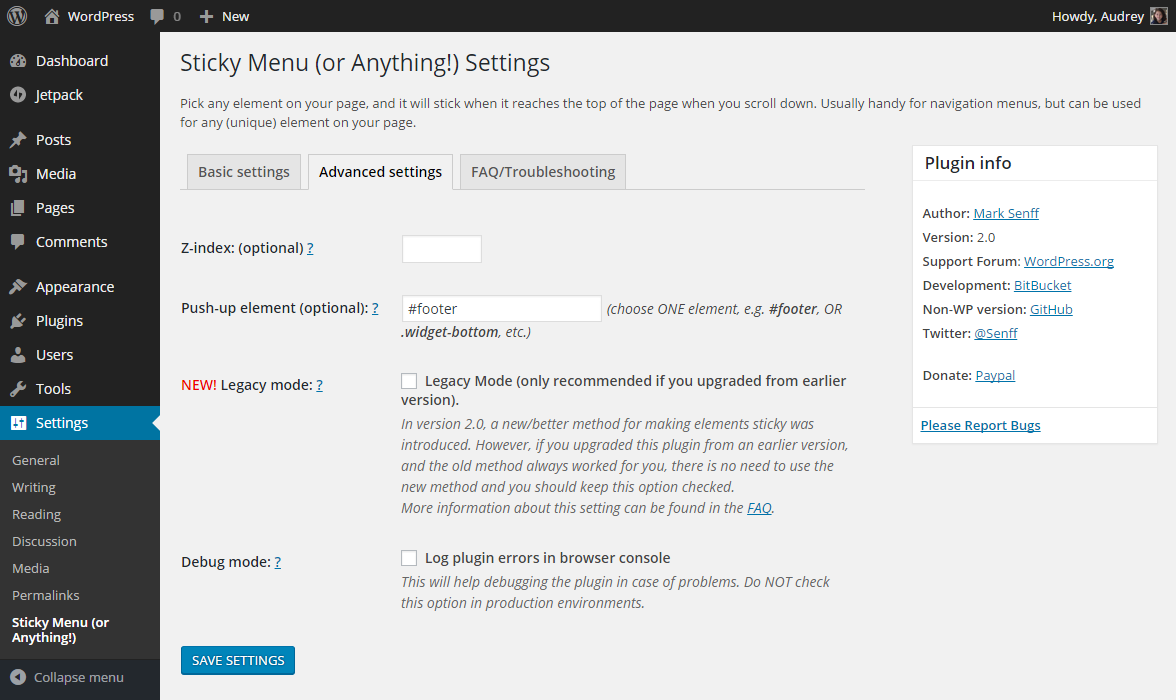
- Push-up element: optionally, you can pick any other element lower on the page that will push the sticky element up again (for example a sidebar widget).
- Admin Bar aware: checks if the current user has an Admin Toolbar at the top of the page. If it has, the sticky element will not obscure it (or be obscured by it).
- Z-index: in case there are other elements on the page that obscure or peek through your sticky element, you can add a Z-index easily.
- Legacy Mode: in 2.0, a new method of making things sticky was introduced. In Legacy Mode, the old method will be used. See FAQ for details.
- Dynamic Mode: some issues that frequently appear in responsive themes have been address by adding a Dynamic Mode (Legacy Mode only). See FAQ for details.
- Debug Mode: find out possible reasons why your element doesn't stick by switching on Debug Mode, and error messages will appear in your browser's console.
安装:
- Upload the "sticky-menu-or-anything" directory to your "wp-content/plugins" directory.
- In your WordPress admin, go to PLUGINS and activate "Sticky Menu (or Anything!)"
- Go to SETTINGS - STICKY MENU (OR ANYTHING!)
- Pick the element you want to make sticky
- Party!
屏幕截图:
常见问题:
I selected a class/ID in the settings screen, but the element doesn't stick when I scroll down. Why not?
= Can I make multiple elements sticky? Sure, WP Sticky PRO has that option. You can make as many elements sticky as you like and configure settings individually for each element. First, make sure that if you select the element by its class name, it is preceded by a dot (e.g. ".main-menu"), and if you select it by its ID, that it's preceded by a pound/hash/number sign (e.g. "#main-menu"). Also, make sure there is only ONE element on the page with the selector you're using. If there is none, or more than one element that matches your selector, nothing will happen.
Once the element becomes sticky, it's not positioned/sized properly at all.
Due to the nature of CSS, there are situations where an element will not stick properly, usually if it has specific properties that are used to manipulate its location and/or dimensions. If your sticky element has any of the following properties, this could cause conflicts:
- negative margins
- absolute positioning
- top/left/bottom/right properties
- "display: inline"
- "!important" applied to any of its properties
Once the element becomes sticky, there's a brief moment where you see it twice.
If you're using the plugin in Legacy Mode (see below), this happens when the sticky element (or any of its contents) has a CSS transition applied to it. Because the original element becomes invisible (and a cloned copy of it becomes visible), the visible-to-invisible status change will take place with a transition (ie. not instantly). Either remove any of the transitions the element has, or try disabling the Legacy Mode.
Still doesn't work. What could be wrong?
Check the "Debug Mode" checkbox in the plugin's settings. Reload the page and you may see errors in your browser's console window. If you've used a selector that doesn't exist, OR there are more of them on the page, you will be notified of that in the console.
Is it possible to have multiple sticky elements?
The current version only allows one sticky element, but this functionality will be implemented in the next major version. No expected release date, though.
How can I report security bugs?
You can report security bugs through the Patchstack Vulnerability Disclosure Program. The Patchstack team help validate, triage and handle any security vulnerabilities. Report a security vulnerability.
更新日志:
- 2026-07-25
- minor code fixes
- 2026-04-15
- minor code fixes
- 2025-08-10
- minor code fixes
- 2024-07-08
- minor security fixes
- 2022-11-20
- minor security fixes
- 2021-02-19
- fixed one really really visible typo
- added custom footer text on plugin's admin page
- lowered the price for the team package
- 2021-02-13
- better clean-up on delete and deactivate
- 2021-01-30
- added flyout menu
- added monthly price
- 2021-01-05
- minor bug fixes and improvements
- removed promo campaign for WP 301 Redirects
- 2020-10-16
- PRO version is here
- bug fixes and improvements
- 2020-10-01
- more CSS fixes
- added promo campaign for WP 301 Redirects
- 2020-09-08
- improvement for themes with !important rule at margin top and left within sticky element
- 2020-06-19
- security fix - thanks to Antony from Sucuri
- 2020-02-01
- bug fixes
- minor GUI improvements
- 100,000 users hit on 2020-01-31
- Fixed minification bug
- Sticky element has specific classes to target sticky/non-sticky state: ".element-is-sticky" and ".element-is-not-sticky"
- fixed padding calculation bug (percentages are off when sticky)
- fixed bug where assigned styles loop caused JS error
- Introduced a new/better method for making elements sticky
- Added Legacy Mode (for those who want to continue the old method)
- Split up settings screen in Basic and Advanced
- Debug mode uses uncompressed JS file for easier remote debugging
- Removed error notification if no pushup-element is selected
- Renaming class "cloned" to "sticky-element-cloned" and "original" to "sticky-element-original" to avoid conflicts with Owl Carousel
- Fixed bug where cloned element width would be rounded down if it contained sub-pixels
- Minor bug fix for push-up element
- Added functionality to move sticky element down in case there is an Administrator Toolbar at the top of the page
- Added functionality to push sticky element up by another element lower down the page
- Fixed small bug related to version number
- Bug with Dynamic Mode select box/label fixed
- Bug with Z-index fixed (thanks @aguseo for reporting)
- All text in plugin fully translatable
- Added FAQ tab to settings screen
- Added infobox to settings screen
- Added a few comments to source code
- Dynamic Mode added (addressing problems with dynamically created menus -- see Frequently Asked Questions above for details)
- Ready for WordPress 4.1 (and TwentyFifteen)
- Fixes issue when element has padding in percentages
- Fixes width calculation bug introduced in previous version (sorry about that), box sizing now supported
- Fixes element width calculation bug
- Fixes viewport calculation bug
- Added functionality for optional minimum/maximum screen size
- Initial release (using v1.1 of the standalone jQuery plugin)