
Stillgate — Editorial Freeze for Deployments
| 开发者 | twelvell |
|---|---|
| 更新时间 | 2026年10月20日 01:34 |
| PHP版本: | 8.1 及以上 |
| WordPress版本: | 7.1 |
| 版权: | GPLv2 or later |
| 版权网址: | 版权信息 |
详情介绍:
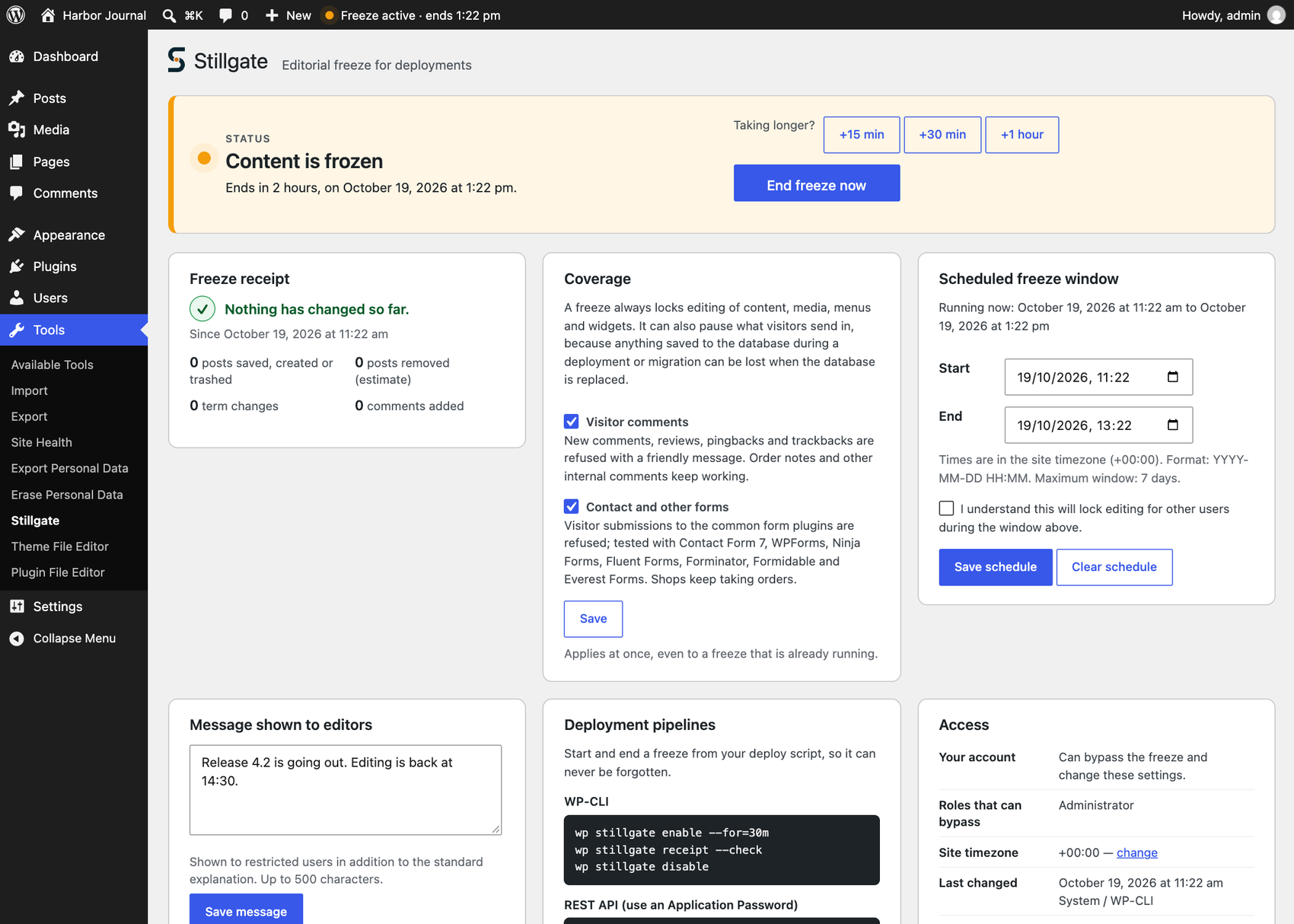
- A freeze with a timer. Start one for 15 minutes to 4 hours from a single screen, or with
wp stillgate enable --for=30m. It ends by itself, even if your deploy job dies, and you can extend it when the work runs long. - A receipt of what changed. Every freeze leaves a list of the posts saved, created or trashed while it was on, plus term changes, comments and paused visitors, so you know whether the database you copied at the start is still complete.
- Optional pause of comments and forms. Anything a visitor saves during a deployment can be lost too. Turn on Coverage and visitors are told clearly that comments or forms are paused. Off by default.
- Built for pipelines. WP-CLI commands and a REST API (Application Passwords) let a CI job freeze, extend, check and release a site without SSH.
- Calm and visible. A small status in the admin bar, a notice that explains the freeze to the people it affects and disappears when it ends, and a Site Health test that flags a freeze someone forgot.
deployment_guard_bypass capability cannot create, edit, delete or restore protected content — posts, pages, custom post types, media, revisions, taxonomies and terms, navigation menus, widgets, or the Customizer — through classic wp-admin, the block editor, the REST API and XML-RPC. WP-CLI commands and WP-Cron events are blocked from the same changes. Scheduled posts of a protected type stay scheduled and publish normally once the freeze ends.
A freeze can start now, run for a set time, or follow a scheduled window in the site's own timezone. Whether it is active is computed from the current time on every relevant request; it never depends on a WP-Cron event firing on time.
Pausing comments and forms
Under Coverage you can include visitor comments and form submissions in a freeze. People who can bypass the freeze can still submit, WooCommerce orders and checkout are never paused, and the check happens when a submission arrives, never when a page is shown, so page caches cannot serve a stale state.
Contact Form 7, WPForms, Ninja Forms, Fluent Forms, Forminator, Formidable and Everest Forms were each checked on a real site, and their visitors see the message in the form. A form set to submit without AJAX shows a plain WordPress notice page instead. Other forms can be added with a filter.
The freeze receipt
A clean receipt tells your deploy that nothing it can see changed while the freeze was on. Otherwise it lists exactly which posts to look at before anything is overwritten. It covers only the time the freeze was on, so run the check while the freeze is still running. It is a detector, not a synchronizer: it does not merge databases, and the documentation says plainly what it cannot see.
Bypass is capability-based, not role-based
Roles with manage_options (Administrator, by default) receive the deployment_guard_bypass capability on activation. The check is against the capability, never a role's name, so a custom role can be granted it too. A bypass holder keeps working during a freeze, though their own changes can still be lost if a deployment proceeds concurrently; the freeze protects everyone else's content.
WP-CLI is not exempt. wp post update, wp term create, wp media import and equivalent commands from other plugins are blocked the same way; --user=<account with bypass> is the explicit way to act as a specific person. Stillgate's own wp stillgate commands keep working, because they only change Stillgate's own state.
Security and privacy
Stillgate makes no outbound HTTP requests, sends no data anywhere, needs no account or license key, and collects no telemetry. It adds no database table: six small options, all removed on uninstall. Its activity log never stores request payloads, message bodies or IP addresses, and the receipt keeps counts, timestamps and post IDs only.
Known limitations, stated plainly
- A bypass holder's own changes are not protected from being overwritten.
- Freeze state lives in the database, so a database import during a migration can lift or copy it. The
DEPLOYMENT_GUARD_FORCEconstant inwp-config.php(the booleantrueorfalse) forces the freeze on or off independently of the stored state, for exactly this situation. - With a persistent object cache not shared between WP-CLI and web workers, a CLI-issued change may need
wp cache flushto take effect for web requests; a long-running PHP process keeps the state it read until it restarts. - Changes that go around WordPress's own content functions and capability checks are not blocked: direct database queries, third-party code that writes content without checking capabilities, plugin REST routes with controllers of their own, and direct
wp_publish_post()calls. - In WP-CLI and WP-Cron, post meta, term assignments to existing terms, widgets, menu locations, theme mods and other options are not blocked, nor are term updates and deletions made during a cron event.
- Automated writes to protected content fail while a freeze is active: cron jobs such as emptying the trash or updating products, and plugin activation routines run through WP-CLI.
- Restricted users cannot preview drafts of protected content during a freeze.
- Users, plugins, themes and general site settings are out of scope. Comments inserted directly with
wp_insert_comment()(importers,wp comment create) are not paused. - The receipt only sees content saved through WordPress. A change written straight to the database that does not touch a post's modified time is invisible to it, and orders kept outside the posts table are not listed.
- On Multisite, Stillgate works per site; there is no network-wide freeze screen yet.
安装:
- Upload the plugin files to
/wp-content/plugins/stillgate, or install it through Plugins > Add New > Upload Plugin. - Activate the plugin. Roles with
manage_optionsreceive thedeployment_guard_bypasscapability automatically. - Go to Tools > Stillgate to start a freeze, or use WP-CLI:
wp stillgate enable --for=30m.
屏幕截图:


常见问题:
Will this stop the public site from working?
No. Stillgate only restricts editorial writes from logged-in users without the bypass capability. Anonymous visitors, logged-in customers, and every other frontend read or write that is not editorial content stay unaffected. The only exception is one you choose: pausing visitor comments and form submissions for the length of a freeze, which is off by default.
Does this protect against database changes made outside WordPress?
No. Stillgate enforces its freeze through WordPress's own request handling (admin screens, REST, XML-RPC, WP-CLI, WP-Cron), capability checks and content functions. A direct database edit, a raw SQL script, or a separate application writing to the same database is outside anything a WordPress plugin can see or prevent.
Does this sync databases between environments?
No, and it deliberately does not try. Merging two databases that both changed needs knowledge of every plugin's tables and of which side wins each conflict; a plugin that guessed would eventually overwrite the wrong thing. What Stillgate does is make the risky moment safe: it keeps the database still while you copy it, and the receipt tells you afterwards whether anything changed, with the exact post IDs if it did. See the documentation in the repository.
Does this work with my form plugin?
Contact Form 7, WPForms, Ninja Forms, Fluent Forms, Forminator, Formidable and Everest Forms were each checked on a real site. Gravity Forms and Elementor Pro forms are recognized by their known request shapes but were not tested, because they are paid plugins. Any other form can be added with the deployment_guard_form_requests filter, which the repository documents.
Does this work with WooCommerce?
Checkout, orders and order notes keep working during a freeze. Pausing comments also pauses product reviews from visitors. Stock, sales counts and ratings change by themselves while a shop sells, so on a shop the receipt will list products as changed; the deployment_guard_receipt_post_types filter can leave them out.
Does WP-CLI bypass the freeze?
No. Commands that create, update or delete protected posts, pages, media and terms are blocked and exit with an error. Lower-level commands that write post meta, term assignments, widgets, menu locations, theme mods or other options directly are not blocked. Stillgate's own wp stillgate commands keep working because they only change the freeze state itself.
What happens to scheduled (future-dated) posts during a freeze?
A protected post scheduled to publish during an active freeze stays scheduled instead. It publishes normally, through WordPress's own mechanism, once the freeze ends.
Does this work on Multisite?
Yes, per site. Each site's freeze is configured and enforced independently; there is no network-wide screen in this version. A Super Admin is always treated as a bypass holder.
Does this send any data anywhere?
No. Stillgate makes no outbound HTTP requests and has no telemetry. Everything it stores stays in your own site's database.
I installed 0.1.0 as "Deployment Guard". How do I switch to Stillgate?
Stillgate keeps the earlier release's stored settings, so nothing needs to be reconfigured, but both copies share them and only one can run. Install the new ZIP without activating it, deactivate Deployment Guard (this ends a freeze that is active), activate Stillgate, and then delete the old copy while Stillgate is active: Stillgate keeps the freeze configuration, the activity log and every role's bypass capability through that deletion. Do not delete the old copy while Stillgate is inactive, which erases them. If you activate Stillgate first, it stays idle and says so on the Plugins screen until you deactivate the old copy. With WP-CLI: wp plugin install stillgate.zip, wp plugin deactivate deployment-guard, wp plugin activate stillgate, wp plugin delete deployment-guard.
I removed my own bypass capability by mistake. How do I recover?
WP-CLI (wp stillgate disable) and the DEPLOYMENT_GUARD_FORCE constant in wp-config.php both work independently of the deployment_guard_bypass capability.
更新日志:
- Added: timed freezes (
wp stillgate enable --for=30m, a duration picker on the settings screen) andextend, so a deployment that fails halfway can never leave editing locked. - Added: a REST API for pipelines at
stillgate/v1, authenticated with Application Passwords. - Added: an optional pause of visitor comments and form submissions during a freeze, off by default, checked on a real site for Contact Form 7, WPForms, Ninja Forms, Fluent Forms, Forminator, Formidable and Everest Forms.
- Added: a freeze receipt of what changed while the freeze was on (
wp stillgate receipt --check,wp stillgate drift, the settings screen and the REST API). It is a detector, not a synchronizer. - Added: a redesigned settings screen, an admin-bar status, a Site Health test, and new artwork for the plugin page.
- Changed: uninstalling also removes the coverage choice, the receipt and the refusal counters.
- Full changelog: https://github.com/digibold/wp-stillgate/blob/main/CHANGELOG.md