Storage for EDD via S3-Compatible
| 开发者 |
mohammadr3z |
|---|---|
| 更新时间 | 2026年10月18日 17:39 |
| PHP版本: | 7.4 及以上 |
| WordPress版本: | 7.1 |
| 版权: | GPL-2.0-or-later |
| 版权网址: | 版权信息 |
详情介绍:
- S3-Compatible Integration: Works with MinIO, DigitalOcean Spaces, Linode Object Storage, Cloudflare R2, and other S3-compatible services
- Secure File Delivery: Generates time-limited, secure download URLs with enforced timeout limits (1-60 minutes) for your digital products
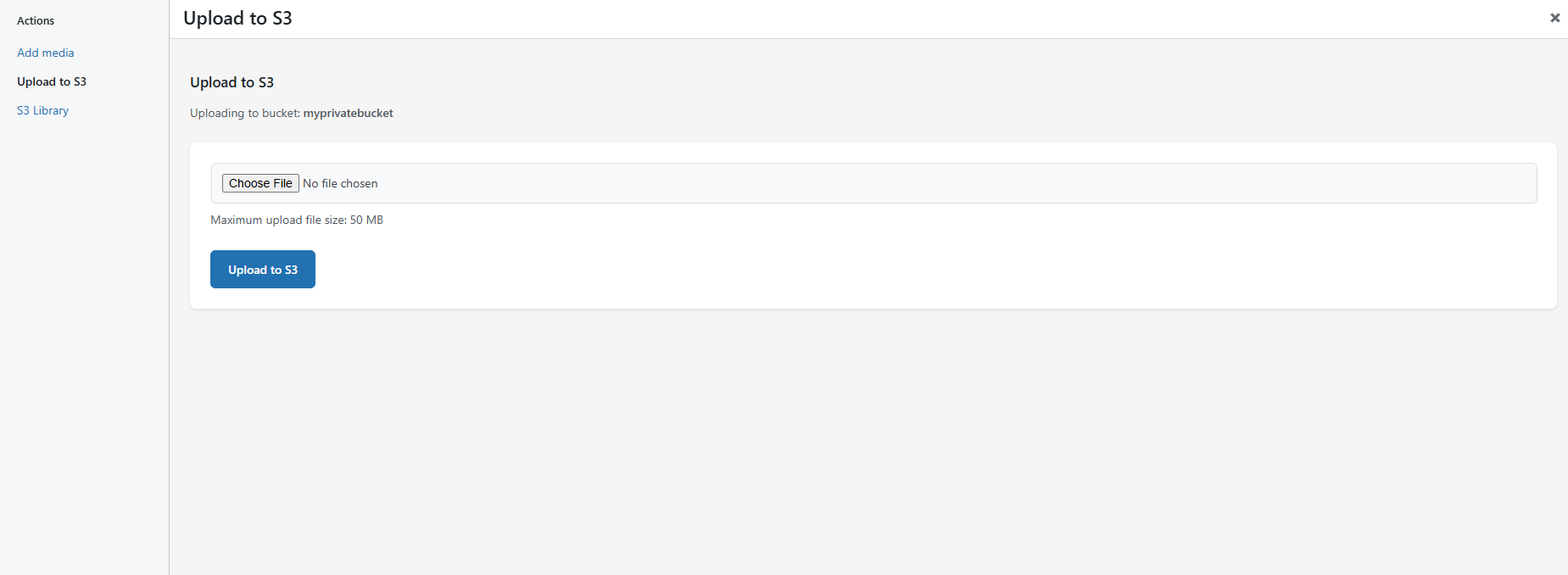
- Easy File Management: Upload files directly to S3 storage through WordPress admin
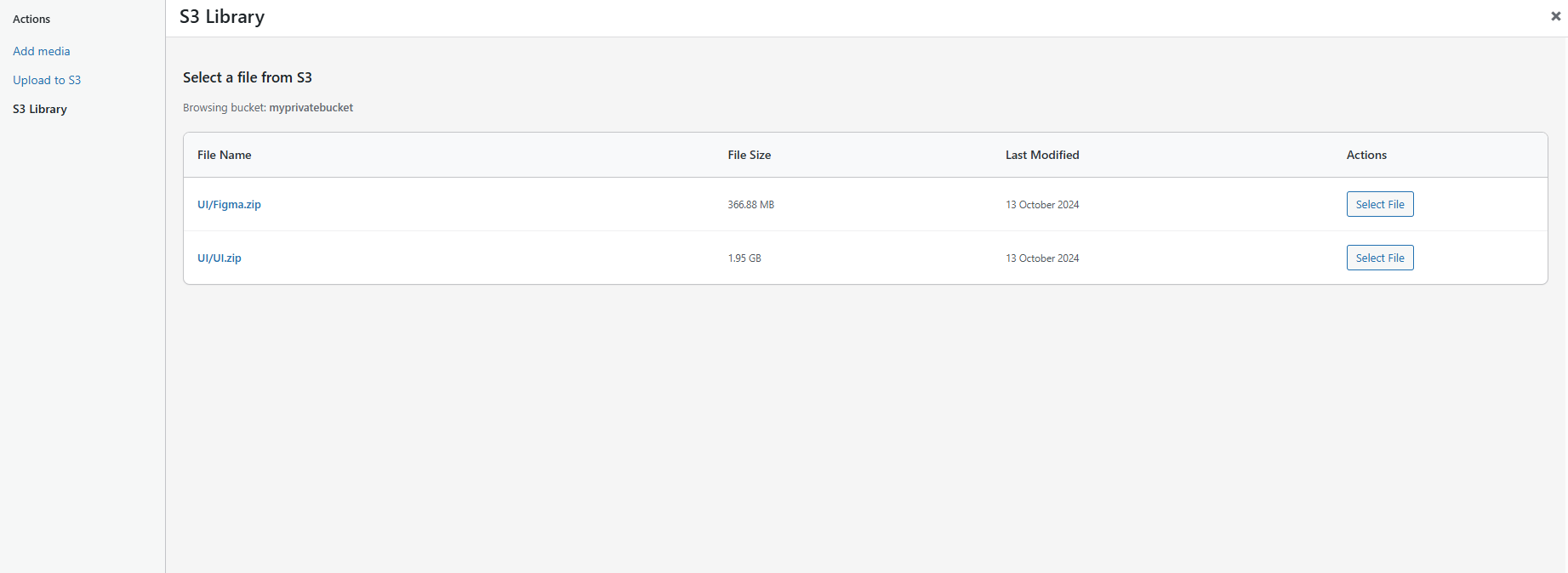
- Media Library Integration: Browse and select files from your S3 storage within WordPress
- Configurable Expiry: Set custom expiration times for download links with automatic validation
- Customizable URL Prefix: Developers can customize the URL prefix (default: edd-s3cs://) using WordPress hooks
- Custom Bucket: Manually enter bucket name (useful for Cloudflare R2 tokens with "Object Read & Write" permissions)
- Security First: Built with WordPress security best practices including timeout enforcement and input validation
- Developer Friendly: Clean, well-documented code with hooks and filters
安装:
- Upload the plugin files to the
/wp-content/plugins/storage-for-edd-via-s3-compatibledirectory, or install the plugin through the WordPress plugins screen directly. - Make sure you have Easy Digital Downloads plugin installed and activated.
- Run
composer installin the plugin directory if installing from source (not needed for release versions). - Activate the plugin through the 'Plugins' screen in WordPress.
- Navigate to Downloads > Settings > Extensions > S3 Storage to configure the plugin.
屏幕截图:
常见问题:
Which S3-compatible services are supported?
This plugin works with any S3-compatible storage service including:
- Amazon S3
- DigitalOcean Spaces
- Linode Object Storage
- Wasabi
- Backblaze B2 (with S3-compatible API)
- Cloudflare R2
- MinIO
- Storj
- ArvanCloud
- Hetzner Object Storage
- And many others
How secure are the download links?
The plugin generates presigned URLs with configurable expiration times (default 3 minutes). These URLs are temporary and cannot be shared or reused after expiration, ensuring your digital products remain secure. For enhanced security, the plugin enforces timeout limits:
- Minimum expiry time: 1 minute (ensures links work for legitimate downloads)
- Maximum expiry time: 60 minutes (prevents long-term unauthorized access)
- Even if you try to set values outside this range, the plugin automatically adjusts them to stay within safe limits This prevents abuse scenarios such as:
- Links that expire too quickly (0 minutes)
- Links that remain valid for days or weeks
- Unauthorized long-term access to your digital products
What file types are supported for upload?
The plugin supports safe file types including:
- Archives: ZIP, RAR, 7Z, TAR, GZ
- Documents: PDF, DOC, DOCX, TXT, RTF, XLS, XLSX, CSV, PPT, PPTX
- Images: JPG, JPEG, PNG, GIF, WEBP
- Audio: MP3, WAV, OGG, FLAC, M4A
- Video: MP4, AVI, MOV, WMV, FLV, WEBM
- E-books: EPUB, MOBI, AZW, AZW3
- Web files: CSS, JS, JSON, XML Dangerous file types (executables, scripts) are automatically blocked for security.
How does the plugin validate uploaded files?
The plugin implements multiple layers of security validation:
- Extension Validation: Checks file extensions against a whitelist of allowed types
- MIME Type Validation: Validates the actual file content type (not just the extension) to prevent file type spoofing
- Content-Type Matching: Ensures the file extension matches the actual MIME type to detect malicious files with fake extensions
- Size Validation: Enforces WordPress upload size limits
- Nonce Verification: Protects against CSRF attacks
Can I browse existing files in my S3 storage?
Yes, the plugin includes an S3 Library feature that allows you to browse and select existing files from your S3 bucket directly within the WordPress admin interface.
Can I customize the URL prefix for S3 files?
Yes, developers can customize the URL prefix using the s3cs_edd_url_prefix filter. Add this code to your theme's functions.php:
function customize_s3_url_prefix($prefix) { return 'edd-myprefix://'; // Change to your preferred prefix } add_filter('s3cs_edd_url_prefix', 'customize_s3_url_prefix');
Can I customize the allowed file types (MIME types)?
Yes, developers can customize the allowed MIME types using the s3cs_edd_allowed_mime_types filter. Add this code to your theme's functions.php:
`
function customize_allowed_mime_types($mime_types) {
// Add custom MIME types
$mime_types[] = 'application/x-rar'; // Add RAR support
$mime_types[] = 'video/x-matroska'; // Add MKV video support
// Or remove specific MIME types
$mime_types = array_diff($mime_types, array('video/x-flv')); // Remove FLV
return $mime_types;
}
add_filter('s3cs_edd_allowed_mime_types', 'customize_allowed_mime_types');
`
更新日志:
- Added: Option to enter S3 bucket name manually (Custom Bucket) for Cloudflare R2 tokens with "Object Read & Write" permissions.
- Updated: Internal vendor dependencies.
- Matched the loading skeleton search placeholder to the live search field.
- Rebuilt the file browser modal with the new shadcn-style interface.
- Improved upload feedback, keyboard focus states, and scrollbar stability.
- Updated: Internal vendor dependencies.
- Added: Custom Region configuration setting to manually define S3 regions for AWS S3 and custom S3 endpoints, ensuring accurate Signature V4 signing and bucket listings.
- Tested: Fully compatible with WordPress 7.0.
- Major Refactor: Replaced legacy iframe browser with modern AJAX implementation for improved performance.
- Fixed: Critical issue where S3 uploads were considered successful despite 4xx/5xx HTTP errors.
- Fixed: Signature mismatch in download presigned URLs for files with special characters or spaces.
- Added: Strict pre-upload file validation (hash, size, and stream) for enhanced reliability.
- Security: Sanitized
response-content-dispositionheader in download links to prevent header injection.
- Improved: UI styles and enhanced layout consistency for better harmony.
- Improved: Comprehensive code improvements and stability optimizations.
- Added: Skeleton loader with shimmer animation for better UX while loading S3 browser modal.
- Updated: Guzzle HTTP library to version 7.10.0 for PHP 8.5 compatibility.
- Use wp_enqueue commands: Replaced inline and in includes/class-media-library.php (admin media library)
- Added: New "Browse" button next to file inputs for easier file selection.
- Improved: Modernized file browser UI with a dedicated modal window.
- Improved: File browser is now context-aware, opening directly to the selected file's folder.
- Improved: Browse button is automatically hidden if the plugin is not configured.
- Improved: Removed legacy "S3 Library" tab from the standard WordPress media uploader for a cleaner interface.
- Added: Native search input type with clear ("X") icon support for a cleaner UI.
- Improved: Mobile breadcrumb navigation with path wrapping for long directory names.
- Improved: Reduced separator spacing in breadcrumbs on mobile devices.
- Improved: Standardized header row spacing and title font sizes for UI consistency.
- Improved: Enhanced notice detail styling for better error/success message readability.
- Security: Standardized use of wp_json_encode() for client-side data.
- Cleaned: Removed unused "Owner" metadata logic and legacy CSS rules.
- Improved: Media library table styling for more consistent file and folder display.
- Improved: Redesigned folder rows with better icons and refined hover effects.
- Improved: Enhanced mobile responsiveness for the file browser table.
- Fixed: Corrected file name and path display order in the media library.
- Added: Breadcrumb navigation in file browser - click any folder in the path to navigate directly.
- Improved: Integrated search functionality directly into the breadcrumb navigation bar for a cleaner UI.
- Improved: Better navigation experience without needing the Back button.
- Improved: Enhanced styling for search inputs and buttons, including compact padding.
- Fixed: RTL layout issues for breadcrumbs and navigation buttons.
- Cleaned: Removed legacy CSS and unused search container elements.
- Changed: Merged Upload tab into Library tab for a unified experience.
- Improved: Upload form toggles with a button in the header row.
- Improved: Back button moved to header row with new styling (orange for Upload, blue for Back).
- Improved: Success notice no longer persists after navigating back in the media library.
- Fixed: Critical issue with S3 uploads to folders with spaces in their names (AWS Signature V4 mismatch).
- Improved: Better RTL support for styling and layout.
- Fixed: Removed non-prefixed global variable to comply with WordPress coding standards.
- Improved: Optimized admin settings to only fetch bucket list when viewing the S3 settings section, preventing unnecessary API calls on other EDD settings pages.
- Improved: File display in S3 Library now shows filename prominently with path as a subtle subtitle for better readability.
- Improved: Enhanced visual hierarchy in file listings with larger, bolder filenames and cleaner path display.
- Improved: Better responsive design for file display on mobile and tablet devices.
- Improved: Simplified file path styling with better contrast and spacing for improved user experience.
- Security: Enforced timeout limits for presigned URLs (minimum 1 minute, maximum 60 minutes) to prevent abuse and ensure reasonable download link expiration.
- Security: Enhanced endpoint URL validation with SSRF protection, blocking private IP addresses, localhost, and internal networks to prevent server-side request forgery attacks.
- Security: Added comprehensive Content-Type (MIME type) validation to prevent file type spoofing attacks where malicious files are disguised with safe extensions.
- Security: Implemented multi-layered file validation including extension matching, MIME type verification, and content-type header validation for S3 uploads.
- Security: Added filter hook (s3cs_edd_allowed_mime_types) to allow developers to customize allowed MIME types while maintaining security.
- Added: URL prefix customization hook (
s3cs_edd_url_prefixfilter) for improved developer flexibility. - Added: Search functionality for S3 Library with real-time file filtering.
- Added: Clear search button and keyboard shortcuts (Ctrl+F/Cmd+F) for enhanced user experience.
- Improved: S3 Library interface with modern search container styling.
- Security: Added capability-based access control for S3 media library and upload functionality
- Security: Removed debug console.log statements to prevent file path exposure
- Security: Removed admin_post_nopriv_s3cs_upload action hook to restrict upload access to logged-in users only
- Security: Removed SVG from allowed file extensions to prevent XSS attacks via malicious SVG files
- Security: Replaced raw S3 error message display with generic user-friendly messages while logging detailed errors for debugging
- Security: Reduced XML parser logging to prevent sensitive server response data exposure in logs
- Security: Removed "No Auth" fallback from authentication methods to prevent unauthenticated requests
- Security: Deleted unused
makeRequestWithoutAuthmethod to enhance security posture
- Added: File type validation with enhanced security against dangerous file uploads
- Added: Translators comments for all internationalization strings with placeholders
- Improved: Better internationalization support for translators
- Improved: Debug logging now uses WordPress standards with proper sanitization
- Fixed: All output from internationalization functions properly escaped to prevent XSS vulnerabilities
- Fixed: Proper nonce verification for all form data processing to prevent CSRF attacks
- Fixed: Removed production-unsafe debug code and replaced with WordPress-compatible logging
- Automatically prepended
https://to Endpoint URL to prevent XML parsing errors. - Improved Endpoint URL validation and user guidance.
- XML parsing errors in S3 client and media library functions.
- Centralized version management using S3CS_EDD_VERSION constant
- Updated Persian translation files
- Removed: Dark mode support to simplify styling and improve consistency across all themes.
- Fixed: Responsive S3 file selection now displays file name, size, date, and select button on mobile.
- Fixed
WP_Scripts::localizeerror by usingwp_add_inline_script()for non-array values. - Separated all inline JavaScript into dedicated
.jsfiles for better maintainability and performance. - Separated inline CSS into dedicated
.cssfiles.
- Enhanced S3 upload section styling for a modern look and improved user experience.
- Improved responsive design for better display on various screen sizes.
- Refined the display of the current directory/bucket name in the S3 upload section.
- Added a non-dismissible admin notice to alert users when S3 Access Key or Secret Key are not configured, with a direct link to settings.
- Added Persian language support.
- Implemented direct file download functionality, preventing files like JSON or text from opening in the browser and forcing download.
- Initial release
- S3-compatible storage integration
- Secure presigned URL generation
- Media library integration
- File upload functionality
- Admin settings interface
- Security enhancements and validation
- Internationalization support