Store Restriction for WooCommerce – Advanced B2B, Wholesale & Content Visibility Control
| 开发者 | woosofts |
|---|---|
| 更新时间 | 2026年4月19日 21:34 |
| PHP版本: | 7.0 及以上 |
| WordPress版本: | 7.0 |
| 版权: | GPLv2 or later |
| 版权网址: | 版权信息 |
详情介绍:
🚀 Premium Addons for Your Store:
- Conditional Store Restrictions (PRO) - The ultimate access control engine for WooCommerce.
- Price & Cart Hider (PRO) - Professional Catalog Mode & B2B pricing control. Store Restriction for WooCommerce by VerseSofts is a high-performance visibility engine designed specifically for serious e-commerce businesses. Whether you are building a Private Wholesale Shop, a dedicated Membership-only Boutique, or a Global Store with regional compliance requirements, this plugin provides the professional architecture needed to hide products and categories with precision.
- Wholesale Catalog Management: Create a "Wholesale" role and show them bulk items while automatically hiding retail-only products from unauthorized eyes.
- Dealer-Only Sections: Restrict high-value or regulated products to manually verified dealers only, ensuring exclusive access to your most important inventory.
- Guest-Hidden Stores: Automatically hide your entire store catalog from guest users, forcing them to register or login to a "Private Shop" environment before viewing anything.
- B2B Catalog Mode: Use our logic beautifully alongside Price Hiding tools to create a powerful inquiry-only catalog for unauthorized users.
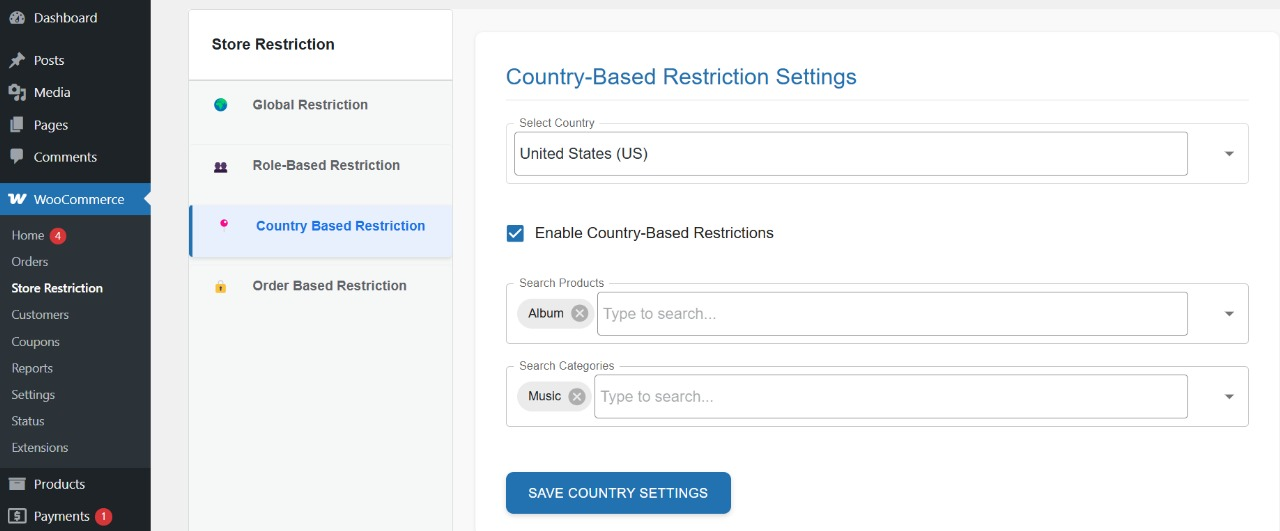
- Regional Exclusives: Show specific products exclusively to customers in the UK, USA, or any other defined region while hiding them elsewhere.
- Compliance Control: Automatically hide restricted items (like alcohol, regulated substances, or electronics with specific regional certifications) from countries where they cannot be legally sold.
- IP-Based Accuracy: Uses ultra-fast IP detection to ensure users are identified correctly instantly without slowing down your page load times.
- Native WooCommerce Integration: No custom database tables or slow queries. It works flawlessly within the native Woo infrastructure for maximum speed.
- Universal Compatibility: Rigorously tested with the most popular themes like Astra, Hello Elementor, Divi, and WoodMart.
- Premium Admin UI: Manage complex visibility rules through a beautiful, streamlined interface inside your WooCommerce settings panel.
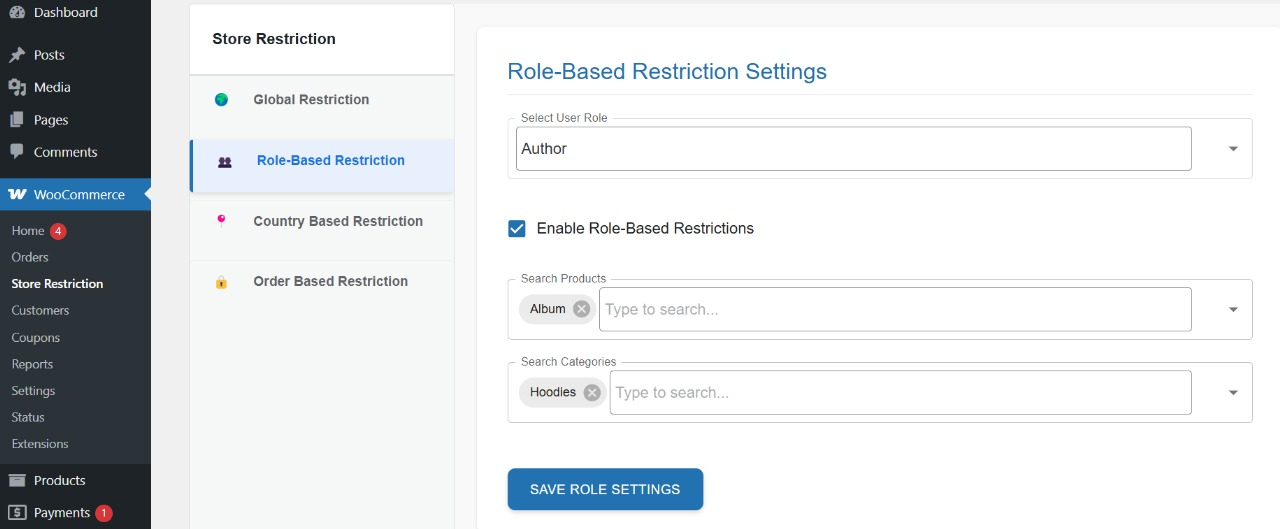
- Role-Based Category Hiding: Hide entire departments or nested categories with one click for specific customer groups.
安装:
- Go to Plugins > Add New in your WordPress dashboard.
- Search for Store Restriction for WooCommerce.
- Click Install Now and then Activate.
- Navigate to WooCommerce > Settings > Store Restriction to start configuring your access rules.
屏幕截图:
常见问题:
How do I hide WooCommerce products for specific user roles?
Navigate to the "Role Based" tab inside the WooCommerce settings. Select the target role (e.g., Guest or Customer), then search and select the exact products or categories you wish to hide.
Can I hide products from specific countries?
Yes! Using the "Country Based" tab, you can select any country and define which products or categories should be hidden from visitors in that region.
Is this compatible with HPOS (High-Performance Order Storage)?
Yes, the plugin is fully compatible with WooCommerce's latest standards, including HPOS and Blocks.
Can I hide my whole store and only show it to logged-in users?
Yes. Simply access the "Global Settings" tab and enable the master toggle to restrict all content for guest users.
更新日志:
1.4.1
- Updated: Fully tested and compatible with WordPress 7.0.
- Improved: Documentation links and official marketplace cross-promotion.
- New: Ultra-Premium UI Overhaul with SaaS-grade aesthetics.
- Improved: Sidebar hierarchy and admin console navigation speed.