
SuperBooking
| 开发者 | BlackBull81 |
|---|---|
| 更新时间 | 2026年9月5日 19:33 |
| PHP版本: | 8.1 及以上 |
| WordPress版本: | 7.1 |
| 版权: | GPLv2 or later |
| 版权网址: | 版权信息 |
详情介绍:
SuperBooking helps independent parking operators accept and manage reservations directly through their WordPress website.
Customers can select their arrival and departure dates and times, check availability, see the calculated price, and submit their booking through a clear step-by-step form. Existing customers can also access the reservation-management flow from the booking form.
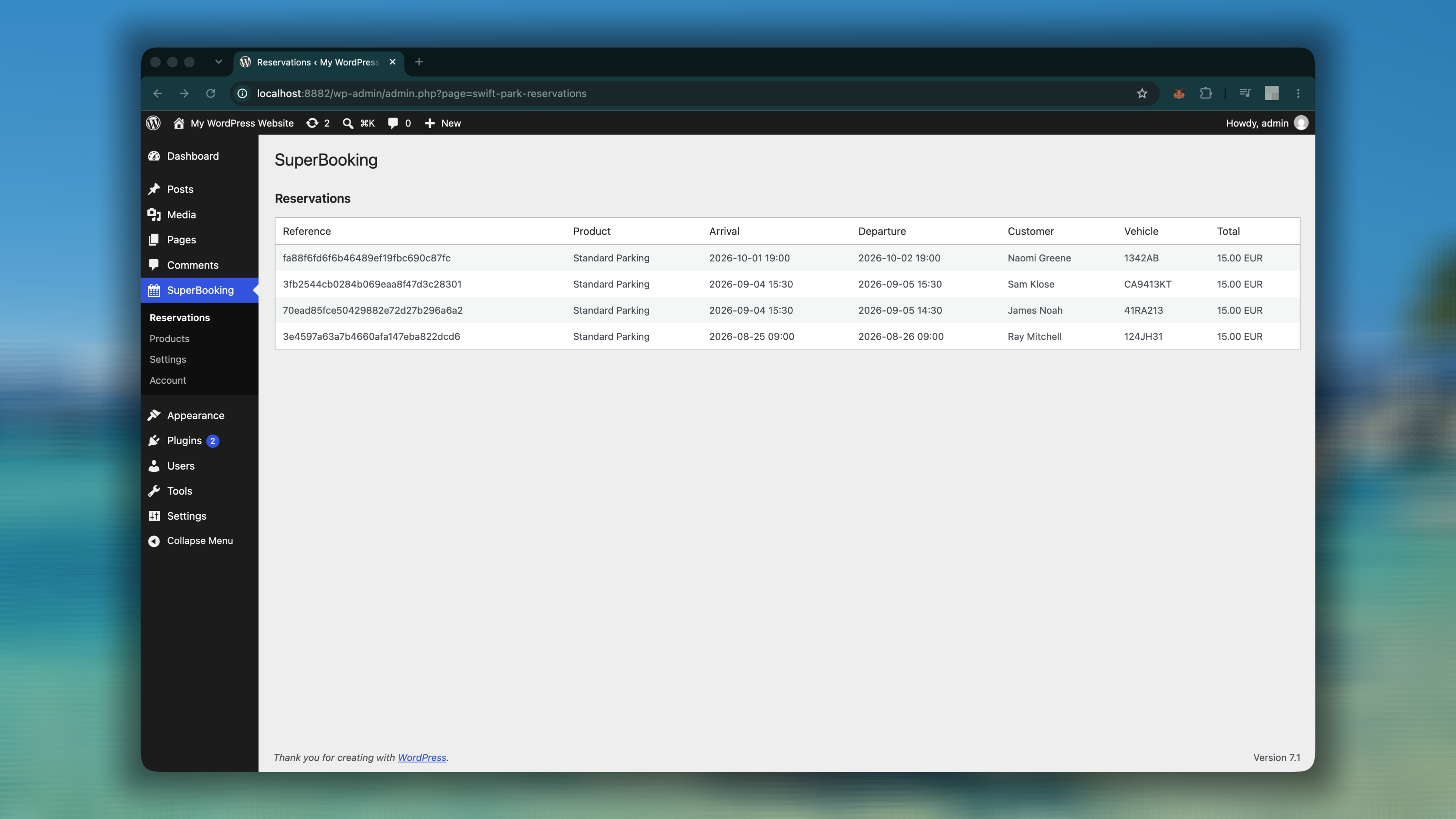
Reservations appear inside the familiar WordPress dashboard, with the booking reference, arrival and departure, customer, vehicle, and total displayed in one convenient overview. There is no separate booking dashboard to learn.
Easy to add to any page
Add the booking form using whichever editing method suits your website:
- Insert the SuperBooking block in the Gutenberg editor.
- Add the SuperBooking widget when building a page with Elementor.
- Place the
[superbooking]shortcode in a page, post, or compatible page builder.
- Easy to use, step-by-step booking form.
- Arrival and departure date and time selection.
- Availability checking based on the configured capacity.
- Price calculation before booking.
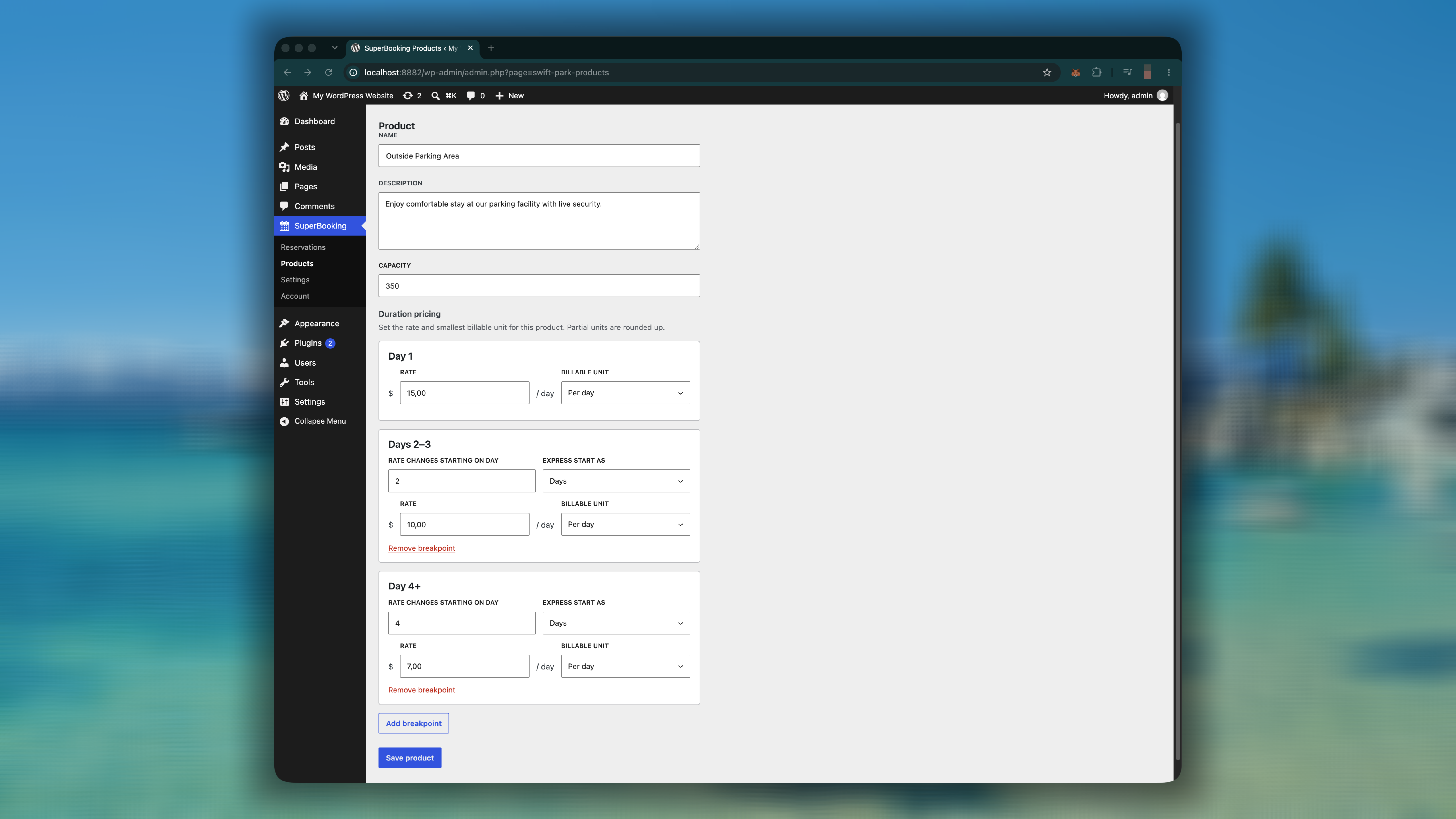
- Duration-based pricing with configurable breakpoints.
- Business-timezone, currency and customer-local-time information.
- Customer details and vehicle registration collection.
- Reservation-management access for existing customers.
- Reservation overview within the WordPress dashboard.
- Gutenberg block integration.
- Elementor widget integration.
[superbooking]shortcode for simple embedding.
安装:
- Upload the plugin through Plugins > Add New > Upload Plugin, or install it directly from the WordPress.org Plugin Directory.
- Activate SuperBooking from the Plugins screen.
- Open SuperBooking > Products and configure your parking product, capacity, and duration pricing.
- Open SuperBooking > Settings and configure the business timezone and currency.
- Add the booking form to a page using the Gutenberg block, Elementor widget, or
[superbooking]shortcode. - Publish the page and perform a test booking.
屏幕截图:
常见问题:
Do I need Gutenberg or Elementor?
No. You can add the booking form to any page or compatible page builder using the [superbooking] shortcode.
Can prices change according to the length of the stay?
Yes. You can create duration-pricing breakpoints, such as one rate for day 1, another for days 2–3, and another for day 4 onward.
Where can I view received reservations?
Reservations are available under SuperBooking > Reservations in the WordPress dashboard.
Does SuperBooking account for different timezones?
Yes. You can configure the business timezone, while the booking form also gives customers local-time context.
更新日志:
0.3.7
- Initial WordPress.org release.