
Swipe Again — Failed Payment Recovery
| 开发者 | swipeagain |
|---|---|
| 更新时间 | 2026年10月30日 22:09 |
| PHP版本: | 7.4 及以上 |
| WordPress版本: | 7.1 |
| 版权: | GPLv2 or later |
| 版权网址: | 版权信息 |
详情介绍:
- Decline-aware smart retries — soft declines (insufficient funds, do-not-honor, temporary holds) are retried on timings matched to the decline; hard declines (stolen card, invalid number) are never retried.
- Branded dunning — email, SMS, and voice sequences in your brand voice bring subscribers to a card-update page.
- 90-day backfill on connect — failed renewals from the last 90 days are pulled in automatically, so recovery starts on your backlog, not just tomorrow's failures.
- One owner per card — WooCommerce Subscriptions ships with its own retry system (off by default). If yours is on, Swipe Again stands down on any order WooCommerce is already retrying — or, with one click in this plugin's settings, hand retry ownership to Swipe Again and the native system turns off. No double charges, ever.
- Live recovery accounting — your recovered totals, right in WooCommerce → Swipe Again, straight from your Swipe Again account.
- The Swipe Again guarantee — 14-day free trial. Guarantee: if recovered revenue in your first 30 days is under $179, your next month is free. Measured on total recovered revenue while the service is active; terms on our website.
- Install and activate this plugin.
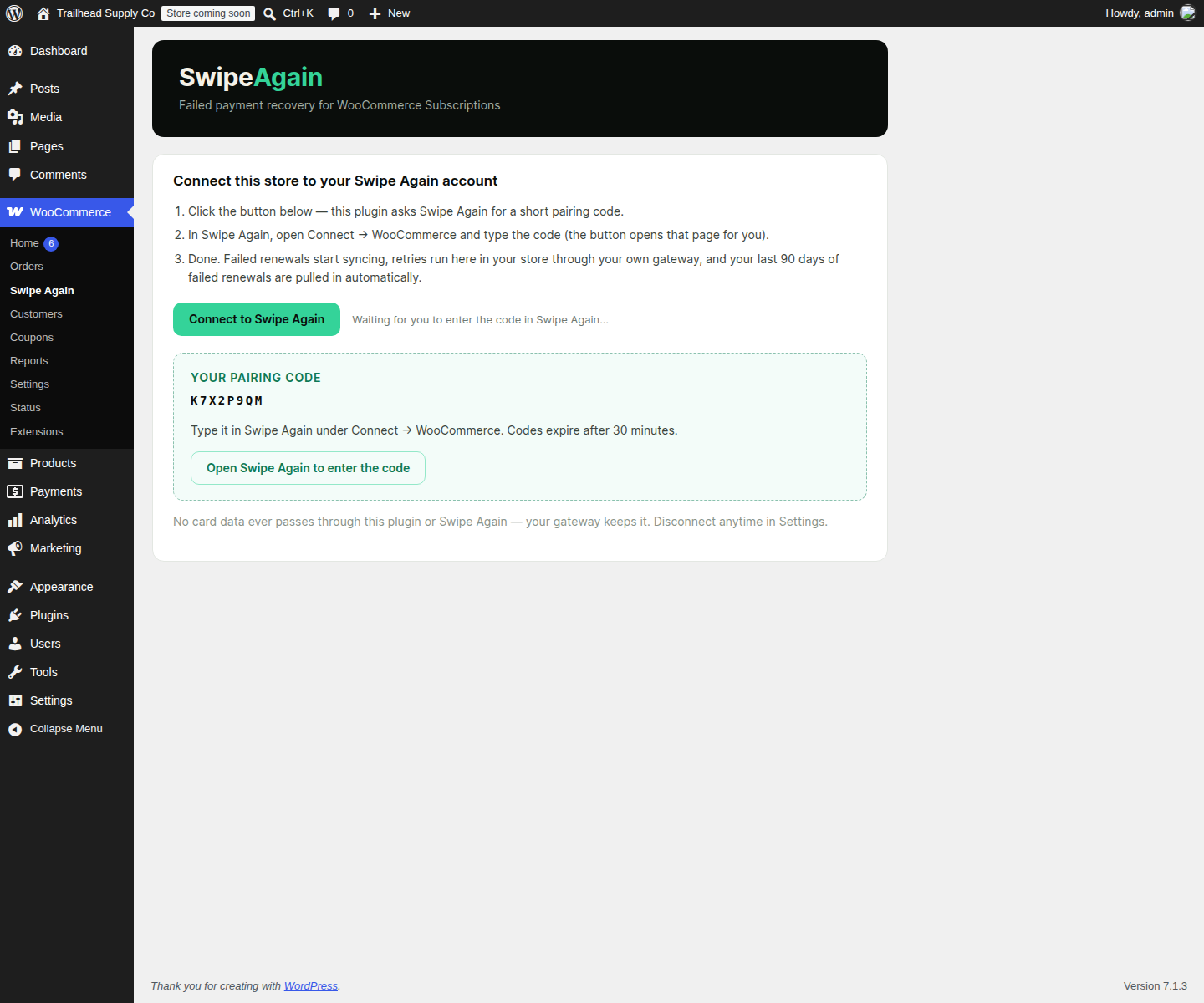
- Open WooCommerce → Swipe Again and click Connect to Swipe Again — you get a short pairing code.
- Type the code in your Swipe Again account (Connect → WooCommerce). The plugin receives its secure key automatically — nothing to copy, no API keys to manage.
- Choose who owns retries in Settings. Done.
- WordPress 6.2+, PHP 7.4+, WooCommerce 8.0+
- WooCommerce Subscriptions (for subscription renewals)
- A Swipe Again account — $179/month flat after a 14-day free trial, no revenue share, no per-recovery fees
安装:
- Upload the plugin files to
/wp-content/plugins/swipe-again/, or install through the WordPress plugins screen. - Activate the plugin through the 'Plugins' screen.
- Open WooCommerce → Swipe Again and click Connect to Swipe Again.
- Enter the pairing code in your Swipe Again account under Connect → WooCommerce.
- In Settings, choose who owns retries (recommended: let Swipe Again manage retries).
屏幕截图:

常见问题:
Which payment gateways does this work with?
All of them. Retries execute inside your store through WooCommerce Subscriptions' own scheduled-payment path, so whatever gateway your subscriptions use — Stripe, PayPal, WooPayments, Square, or any other WooCommerce Subscriptions-compatible gateway — is the gateway that runs the retry. This is the key difference from hosted retry services, which can only re-charge cards they tokenized themselves.
Will this double-charge my customers?
No. Two protections: if WooCommerce Subscriptions' own retry system has a retry pending for an order, Swipe Again stands down and does not touch that order; and every retry command executes at most once — repeat deliveries replay the recorded outcome instead of charging again. If you hand retry ownership to Swipe Again in Settings, the native retry system is off entirely, so one schedule owns every card.
What happens if I disconnect or my plan lapses?
Everything in your store keeps working exactly as before. Syncing and Swipe Again-initiated retries stop; WooCommerce and WooCommerce Subscriptions are untouched. The plugin never disables itself or your store's functions based on plan state.
Does Swipe Again see my customers' card numbers?
No. Charges run through your gateway inside your store. Swipe Again receives order and decline information and customer contact details for dunning — never card numbers, CVCs, or full payment credentials.
How much does it cost?
$179/month flat after a 14-day free trial. No revenue share, no per-recovery percentage, no per-seat pricing. 14-day free trial. Guarantee: if recovered revenue in your first 30 days is under $179, your next month is free. Measured on total recovered revenue while the service is active; terms on our website.
更新日志:
- Fix: plugin-check warnings cleanup, no behavior change.
- Initial release: pairing-code connection, failed-renewal sync for all gateways, in-store retry execution, 90-day backfill, native-retry coordination with stand-down, WP-Admin status and settings screens.