
TableCrafter - Data to Beautiful Tables
| 开发者 | fahdi |
|---|---|
| 更新时间 | 2026年9月22日 18:24 |
| PHP版本: | 8.1 及以上 |
| WordPress版本: | 7.0 |
| 版权: | GPLv2 or later |
| 版权网址: | 版权信息 |
标签
下载
详情介绍:
- JSON / REST APIs (any public endpoint)
- CSV files (URL)
- Public Google Sheets
- Excel (.xlsx) files
- Gutenberg block + Elementor widget +
[tablecrafter]shortcode - Sorting, live search, pagination, and column labels
- Responsive / mobile layouts and accessibility
- CSV / Excel / PDF export
- One-click demo tables to get started in seconds
安装:
- Upload the
tablecrafter-wp-data-tablesfolder to/wp-content/plugins/, or install it from the Plugins screen. - Activate the plugin.
- Open TableCrafter → Create New, pick a data source, and add the generated shortcode to any page.
屏幕截图:
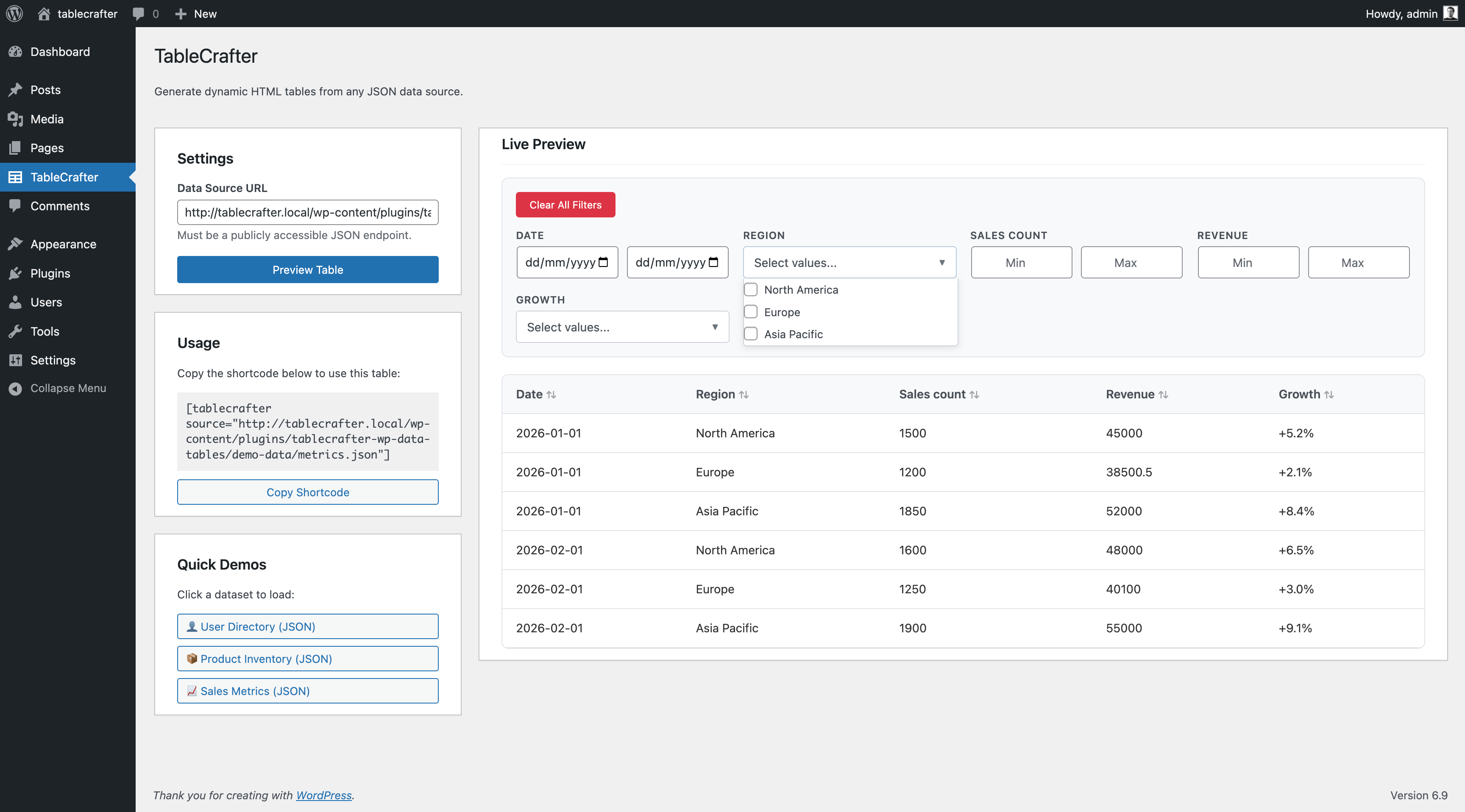
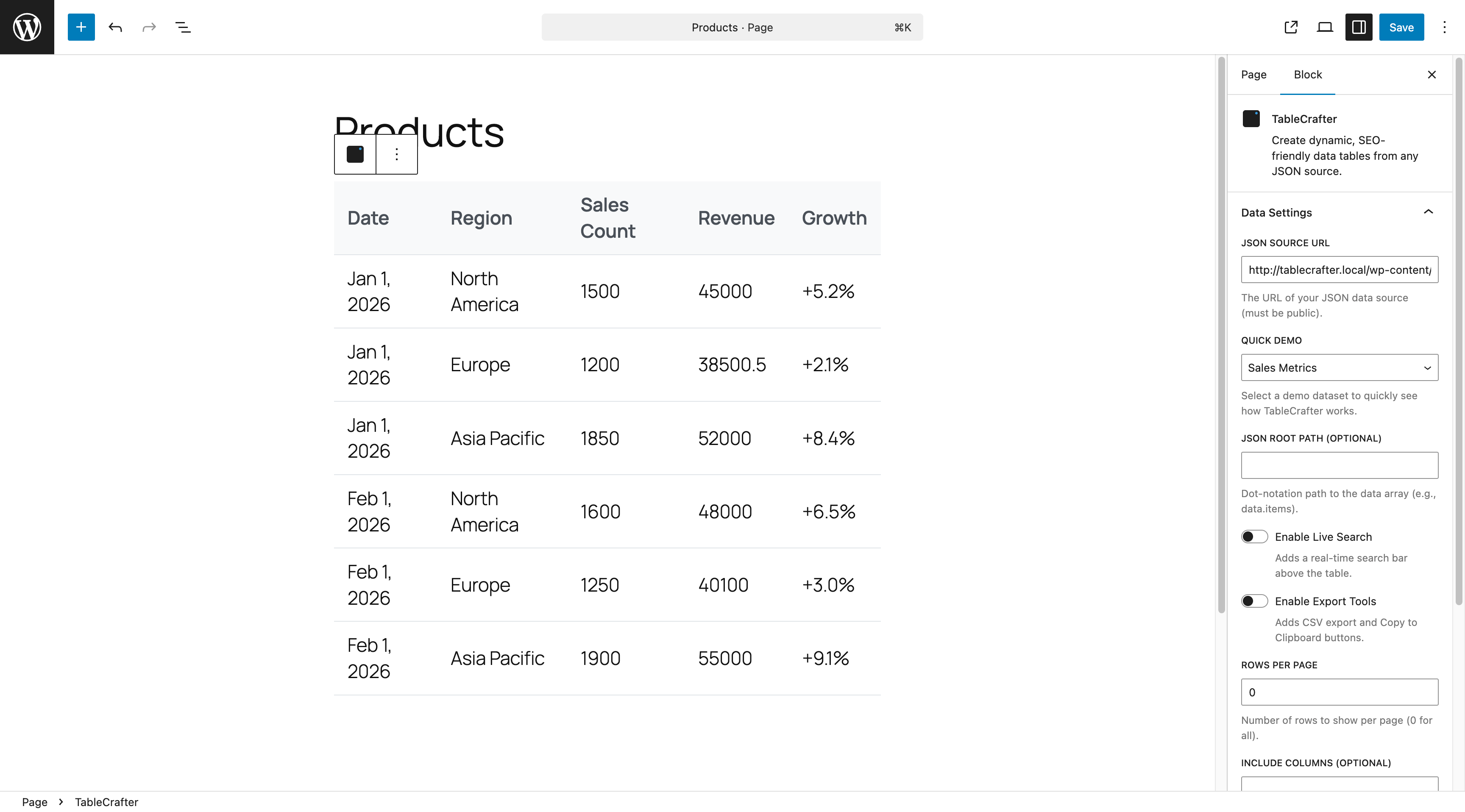


常见问题:
Do I need Gravity Forms?
No. Gravity Forms is one source among many - JSON, CSV, and public Google Sheets work without it.
I used the old TableCrafter free plugin. Will my shortcodes still work?
Yes. Existing tables, settings, and shortcodes are preserved, including the inline [tablecrafter source="..."] form with root, include, and exclude.
Does this store my source data in the WordPress database?
For live sources (JSON / CSV / Google Sheets) it fetches on demand and caches the result temporarily to keep your site fast - it does not permanently copy the data into your database.
Does it work with Elementor?
Yes - there is a TableCrafter widget with a live data preview while you design, plus a Gutenberg block and the shortcode.
Is it secure?
Yes. Remote URLs are fetched server-side through an SSRF guard that blocks internal/loopback addresses, and all admin actions use WordPress capability and nonce checks.
What if my API has CORS issues?
There are none to worry about: remote sources are fetched by your server, not the browser, so browser CORS restrictions never apply.
Can I customize the table styling?
Yes. Tables use standard HTML markup and CSS variables, so you can override colors, spacing, and more from your theme's CSS.
How do I get Notion, XML, External DB, private Sheets, or inline editing?
Those are part of TableCrafter Pro - see the Upgrade to Pro section.
更新日志:
- Performance: each table now loads its rows once per page view instead of two or three times (the visibility and resize observers no longer trigger duplicate fetches).
- Performance: the AJAX row query picks the page of entries first and pivots only those rows, cutting the query from about 56 ms to 6 ms on a 3,000-entry Gravity Forms table; the pagination count query no longer joins the meta table (10 ms to under 1 ms).
- Performance: the full frontend stylesheet is no longer inlined into every table render and the table config is serialized once, shrinking a typical table page from 243 KB to 73 KB (38 KB to 7.6 KB compressed).
- Performance: the database schema check no longer runs on every request; it runs on activation and upgrades only, and now targets the migrated base table so the failing ALTER statements on migrated sites stop.
- Performance: filter dropdown value lists are cached per form and field and invalidated on entry writes, removing one DISTINCT scan per filter column per render.
- Performance: row, cell, touch and delete handlers are delegated once per table instead of being re-bound on every render (about 6,000 listeners per render on a 100-row table down to 14).
- Performance: Thickbox is no longer enqueued on pages without a table; the saved-presets request is skipped for logged-out visitors; the AI summary loads when scrolled into view; scroll indicators update at most once per frame.
- Fix: lookup columns resolve users in one batch instead of one query per user, and two PHP warnings per AJAX request from an unassigned variable are gone.
- New: Pro sites running without an active license now show a clear activation notice in wp-admin with Activate License and Get a License shortcuts. It can be snoozed for 7 days and never appears on localhost or staging environments.
- Security: bundled PhpSpreadsheet updated to 2.4.7 (CVE-2026-59933 and two related advisories); npm build-chain advisories patched (brace-expansion, adm-zip).
- Dev: release tooling hardening - WP.org SVN auth now resolves from the macOS Keychain, and dist packaging hygiene improvements.
- Style: replaced em-dashes and en-dashes with standard hyphens across all plugin code, admin interface text, tooling, and documentation for consistent typography. No functional changes.
- New: Manual tables - build a table by typing into a spreadsheet-style grid, no external data source required. Insert, delete, duplicate, and move rows and columns; rich cell content; per-row, per-column, and per-cell visibility; and CSV import straight into a manual table.
- New: Import from many formats - Excel (XLSX/XLS), OpenDocument (ODS), HTML tables, JSON, and ZIP archives, with append and replace modes.
- New: Excel-compatible formulas - evaluate spreadsheet formulas in cells.
- New: Password-protected tables - gate a table behind a password with a signed unlock cookie.
- New: Block editor upgrade - real sidebar controls (rows per page, search, export buttons, column filters, pagination info), shortcode-to-block conversion, and proper preview states, on every table type.
- New: Merge cells across rows or columns (with overlap validation), row grouping under collapsible sub-headings, and an auto-renumbering index column (pagination-aware, excluded from exports).
- Fixed: data-source tables (JSON, CSV, Google Sheets, Excel) now load the plugin stylesheet on the front end - styled tables instead of bare ones.
- Fixed: saving a table no longer hides it via a misread boolean setting; toolbar visibility choices (pagination, search, filters, export menu, length selector, entry-count label) are now enforced on the live table.
- Reliability: full PHP 8.0-8.4 compatibility is verified on every release via a Docker activation matrix (fresh WordPress + plugin activation, per PHP version).
- Fixed: activation fatal on PHP 8.1 hosts - a PHP 8.2-only
truereturn type prevented the plugin from activating on the supported PHP 8.1 floor. No functional changes.
- New inline-editing validation rules: oneOf (restrict a cell to an allowed list of values), notOneOf (block specific values), phone (built-in format check or your own custom pattern), and unique (instant in-browser duplicate check plus an authoritative server-side check that ignores the row being edited).
- Developers can add custom cell validation rules via the new tablecrafter_validate_cell filter.
- JSON export option added alongside CSV and Excel download.
- Advanced search grammar: type quoted phrases, -word to exclude, field:value, or comparison operators (>, <, >=, <=) directly in the search box on standard tables.
- Inline editing cell-type parity: url, datetime, multiselect, checkbox_group, and color cells now render dedicated input widgets with type-aware validation when editing inline.
- WP.org listing screenshot captions updated to reflect current feature set.
- The All Tables list now shows each table's data source (#2271). The old "Gravity Form" column rendered "Form ID: 0" for every non-Gravity-Forms table. The new "Source" column shows the actual source -- Gravity Forms (with the form name), JSON / REST, CSV, Google Sheets, Airtable, Notion, External Database, WooCommerce -- so mixed-source sites can tell tables apart at a glance.
- Readable field-picker chip labels for JSON, CSV, XML, and Google Sheets (#2247). The column picker in the table builder now shows humanized labels (e.g. "Product Name" instead of product_name) for these sources, consistent with Airtable, Notion, and External DB chips added in 8.0.36-8.0.37.
- Pro: External Database tables can now be viewed by the public (#2254). Each table has a new "Allow public viewing" checkbox. When disabled, logged-out visitors see a clean "This table is not available." message.
- Dashboard stats redesigned. Cards now show Total, In use (tables actually embedded on a post/page), one card per data source in use, and Trash (hidden when empty; matches the Trash tab). Plus a one-time self-heal that folds orphaned pre-Trash-system deletes into the Trash tab as restorable entries.
- Pro data sources configure live in the builder. In TableCrafter Pro, Airtable, Notion, and External Database tables now load their columns into the field picker and show a live sample preview without saving first. Also fixes a Pro bug where External Database tables never rendered due to an unregistered capability.
- Readable headers for external-source tables (#2205, #2245). JSON / CSV / XML / Google Sheets tables now humanize raw column keys in their headers --
product_nameshows as "Product Name", saved column labels win, and known acronyms (ID, URL, SKU) stay upper-case. Applies to both the frontend table and the builder live preview.
- Cleaner table builder: removed the redundant per-step Save buttons (the floating Save covers every step).
- Refreshed the dashboard "What's New" list, which had gone stale.
- Fixed: the dashboard "Total" tables count included trashed tables, so it could read much higher than the number of real tables. It now counts only your live tables.
- Maintenance release. No functional changes to the free plugin (a Pro-only plugin-update-routing fix).
- Fixed: tables set to server-side processing rendered no rows. The entry-fetch guard used a check that never matched (
function_existson a class method), so every request returned an empty result. Server-side tables now load their entries.
- Improved (Pro): building a WooCommerce products table now auto-loads the product columns (Product, SKU, Price, Stock, Rating, Add to Cart) into the field picker and shows a live preview in the builder - previously the column picker and preview were empty.
- Fixed (Pro): WooCommerce product tables now render. They previously showed "Gravity Forms is required for this table" because the render path had no WooCommerce case. Product links, prices, stock and add-to-cart now display.
- Fixed: on the Welcome screen, the "Gravity Forms is not active" notice was unreadable inside the colored header; it now appears above it.
- Fixed: the "Start from a template" buttons now confirm when a table is created (they were creating the table but showing no feedback).
- Improved: the account-page upgrade button and the template result buttons now match the TableCrafter brand.
- Fixed: the upgrade button on the License & Account page could overflow its card on narrow widths; it now stays inside.
- Improved: redesigned the Welcome / "Start from a template" screen in the TableCrafter brand (teal header, branded template cards and buttons).
- Fixed: the "Rate plugin" link now opens the WordPress.org review form so you can actually leave a review (it previously just landed on the plugin page).
- Fixed: the License & Account page had inaccurate upgrade copy - it priced Pro at $9.99/mo (it's $7.99), advertised a 10-day trial (it's 7), and listed Free features (unlimited tables, JSON) as Pro. Corrected the pricing, trial length, and Pro feature list, and added a clearer price display.
- Improved: redesigned the in-plugin upgrade card with an on-brand look and an accurate Pro pitch (frontend editing, bulk operations, advanced filters, and premium data sources) - no longer lists "unlimited tables" as a Pro perk, since that's free.
- Fixed: the "Gravity Forms is not active" admin notice now lists the correct free data sources (JSON, CSV, Google Sheets, Excel) and notes that Gravity Forms entry tables are a Pro feature.
- Improved: the license-activation screen now shows where to find your license key, with links to your account and pricing.
- Fixed: free activation on a fresh site. The Freemius opt-in was missing the WordPress.org-compliant flag, so "Allow & Continue" could error with an invalid-license message; free installs now connect (or skip) cleanly.
- Changed: the premium integrations - Gravity Forms, WooCommerce and Airtable - are now Pro features (joining Notion, XML and External DB). The free tier covers JSON, CSV, Google Sheets and Excel. Free users opening a Pro-source table see an upgrade prompt.
- Fixed: a packaging issue forced PHP 8.3 even though the plugin supports lower. The plugin now correctly runs on PHP 8.1+ (the bundled spreadsheet library's floor). Resolves a fatal error on PHP 8.1/8.2 sites.
- Changed: minimum PHP is now stated as 8.1 (matches the bundled libraries).
- Fixed: inline table auto-refresh (auto_refresh / refresh_interval) now works again - the settings were being dropped before they took effect. Live tables poll and update on schedule as intended.
- New (Pro, foundation): a Support area in the admin to manage customer support threads. This is phase one of an AI-assisted support system with human takeover coming in future updates.
- Performance: large external-source tables now stay fast - only the current page's rows are kept in the page at a time, so tables with thousands of rows sort, filter, and paginate smoothly.
- New: "Start from a template" - create a ready-to-edit table in one click from 5 prebuilt templates (Inventory, Business Directory, CRM Pipeline, Event List, Load Tracker), each with sample data and columns already set up.
- New: embed any table on another website. Each table now has a "Copy embed code" button that gives you an snippet; the embedded view is public and read-only, with a small "Made with TableCrafter" link (removed on Pro).
- New: tables now auto-format your data into beautiful cells - ISO dates become readable dates, large numbers get thousands separators, and links become clickable, all automatically (years and short IDs are left untouched).
- New: a "Plans: Free vs Pro" section in the docs with a clear Free/Pro badge on every data source and feature, so you can see at a glance what's included and what Pro unlocks.
- New: when you pick a Pro-only data source in the table builder, an in-context note now explains it's a Pro feature with an upgrade link - no more guessing.
- Fixed: the plugin's uninstall cleanup now runs through the licensing SDK's uninstall hook instead of a separate uninstall.php, so updates deploy cleanly. Same result - deleting the plugin removes its tables, options and scheduled tasks.
- New: inline tables can auto-refresh again - the classic
auto_refresh,refresh_interval,refresh_indicator,refresh_countdownandrefresh_last_updatedsettings now poll the source and update the table in place. - New: restored inline Airtable sources (
source="airtable://base/table?token=...") from the previous major version - Airtable display stays in the free version. - Fixed: old admin bookmarks (
?page=tablecrafter-wp-data-tables) now redirect to the current screen instead of 404ing. - Fixed: inline tables again carry the classic
.tablecrafter-containerwrapper class, so theme CSS that targeted it keeps working. - Added: an
uninstall.phpso deleting the plugin fully removes its tables, options and scheduled tasks.
- Fixed: Elementor "TableCrafter Table" widgets built on an inline data-source URL (from the previous major version) render again - the inline Data Source URL / columns / toggles controls are back and take precedence over Table ID.
- Fixed: the free build now bundles the licensing SDK (it could be missing in some builds, causing a fatal error) and no longer ships internal development files. The SDK load is also guarded so it can never fatal.
- Fixed: posts using the previous version's
tablecrafter/data-tableblock now render again. The block is re-registered and maps to the inline data-source renderer, and the editor recognizes it instead of showing "unsupported block".
- New: inline-source tables now honor the classic
per_pagesetting and thesearch/exporttoggles, and can show a CSV export button (export="true"). Restores 3.5.x interactive parity (search + click-to-sort + pagination already worked).
- New: backward compatibility for the classic inline shortcode -
[tablecrafter source="..." root="..." include="..." exclude="..."]once again renders JSON, CSV, and public Google Sheet URLs directly, so shortcodes from the previous free plugin keep working. Restored the Usage and parameter documentation and expanded the FAQ.
- New: after TableCrafter does something useful for you (a table goes live, you save an inline edit, or you export data) it shows a single, dismissible note asking for a WordPress.org review. Never on a timer; "Maybe later" snoozes it and "Don't show again" hides it for good.
- New: an Activation funnel panel on the TableCrafter dashboard shows how far this install has progressed through onboarding (activated, opened the builder, created a table, published a table, saved an inline edit, exported). Stored locally only - nothing leaves your site.
- Improved: clearer WordPress.org listing - the short description and intro now lead with editable, multi-source tables, plus a Screenshots section.
- Changed: the "What's new" admin notice now describes the v8 product instead of v7, and re-appears once for anyone who dismissed the older notice.
- New: Google Sheets one-click demo on the getting-started screen (requires internet; the JSON/CSV demos still work offline).
- Fixed: the table builder no longer shows the Gravity Form dropdown for non-Gravity-Forms data sources.
- Maintenance and version alignment with the Pro release. No changes to free features. (Pro adds an External DB connection-management screen.)
- Converged into a single source-agnostic product. Gravity Forms is now one data source among many.
- One-click demo tables + first-activation welcome screen.
- CSV / XML / Google Sheets builder parity (auto-load columns + inline preview).
- Feature-based plans (no row/column caps on the free tier). Full history: https://github.com/TableCrafter/tablecrafter-pro/blob/main/docs/CHANGELOG.md