
Tablefold
| 开发者 | fyrins |
|---|---|
| 更新时间 | 2026年10月30日 01:16 |
| 捐献地址: | 去捐款 |
| PHP版本: | 7.4 及以上 |
| WordPress版本: | 7.1 |
| 版权: | GPL-2.0-or-later |
| 版权网址: | 版权信息 |
详情介绍:
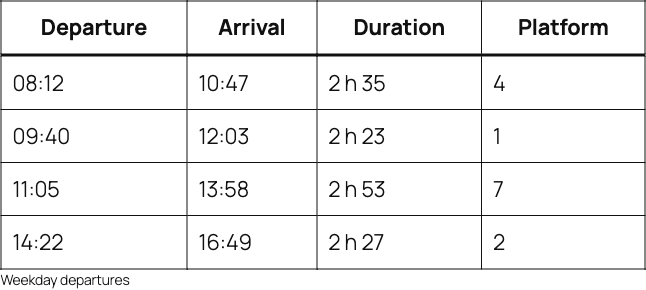
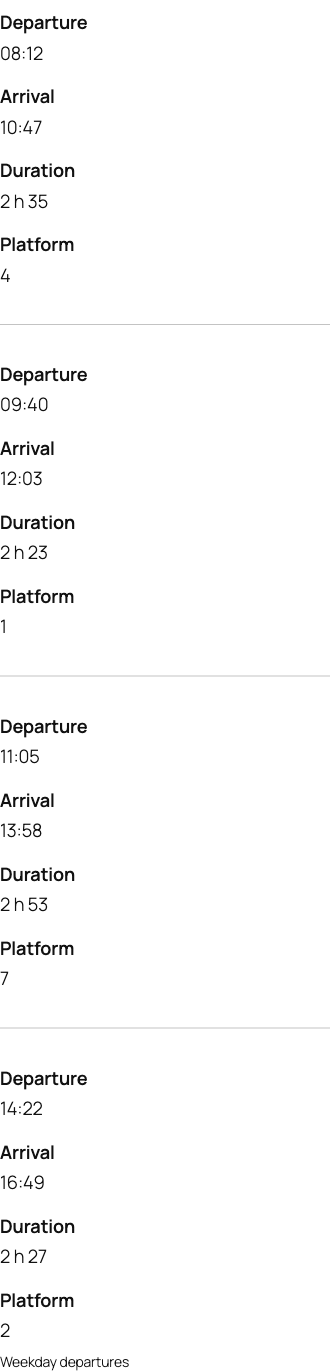
display: block silently removes the implicit ARIA role of every table element. This plugin writes those roles back: table, rowgroup, row, columnheader and cell. Without them the relationship between a header and its cells is gone, which fails success criterion 1.3.1 Info and Relationships.
The header row is hidden from sight, never from assistive technology. It is clipped, not set to display: none, so it stays in the accessibility tree. The visible label drawn next to each value comes from CSS generated content, which is not announced reliably by every screen reader, so it is treated as a visual convenience only. The header information is always carried by the roles and the hidden header row as well, never by the pseudo-element alone.
What it does not do
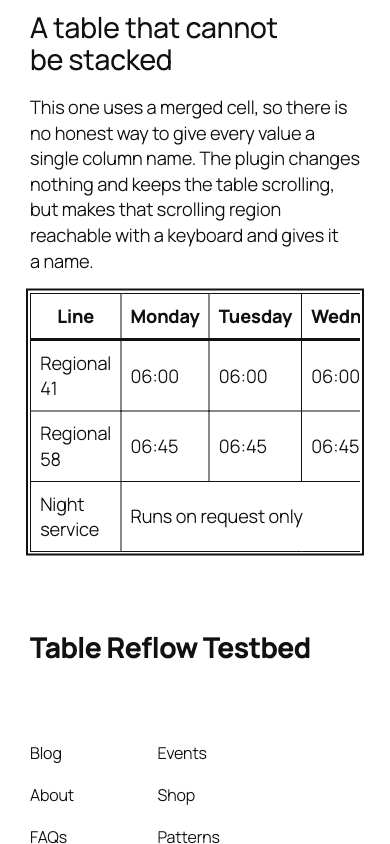
Not every table can be stacked honestly. A table with merged cells, with its headers in the first column, or with no header row at all has no one-to-one mapping between a value and a column name, and inventing one would mislabel the data. When the plugin detects any of those, it changes nothing and leaves the table scrolling horizontally. It then makes that scrolling container reachable with a keyboard and gives it an accessible name, which the block does not do on its own.
How it works
The transformation happens on the server, when the page is rendered. The plugin reads the block markup with the HTML API that ships with WordPress and writes attributes into it. Nothing is stored in the saved content, so your tables stay valid whether the plugin is active or not, and removing the plugin leaves no broken blocks behind.
- No JavaScript on the front end. None at all.
- No outbound network request, no tracking, no analytics.
- No database option is created.
- No external font, script or stylesheet is loaded.
- The stylesheet loads only on pages where a table was actually transformed.
- 1.3.1 Info and Relationships, by restoring the ARIA roles that
display: blockremoves - 1.3.2 Meaningful Sequence, by never reordering content
- 1.4.1 Use of Color, by telling labels apart from values with weight, not colour
- 1.4.3 Contrast, by inheriting the text colour your theme already uses instead of setting its own
- 1.4.4 Resize Text and 1.4.10 Reflow, by removing the horizontal scroll
- 2.1.1 Keyboard and 2.4.7 Focus Visible, on the container of tables that keep scrolling
@wordpress/scripts, the official tooling, and the sources live in src/ in the repository.
安装:
- Install the plugin through Plugins → Add New, or upload the folder to
wp-content/plugins/. - Activate it.
- Edit a post, select a table block, and open Small screen display in the block sidebar.
- Turn on Stack on small screens and pick the width below which the table should stack.
屏幕截图:
常见问题:
My table still scrolls sideways. Why?
The plugin only stacks tables it can label honestly. It leaves a table alone when it has no header section, when the headers are in the first column instead of the first row, when any cell uses colspan or rowspan, or when a row has a different number of cells than the header row. Add a header section and remove merged cells, and the option takes effect.
Does it work with my theme?
Yes. The plugin sets no colour of its own. Labels inherit the text colour of their cell, so whatever contrast your theme already provides is preserved, in light and dark schemes alike.
Can I change the breakpoints?
Yes, with the tablefold_breakpoint_values and tablefold_default_breakpoint filters. Any value you add needs matching rules in a stylesheet you enqueue yourself, because a CSS media query cannot read a custom property.
Does it slow pages down?
The stylesheet is 5 KB, under 1 KB compressed, and it is enqueued only on pages that actually contain a transformed table. There is no front-end JavaScript at all, and blocks other than the table block cost one string comparison.
Will it break my existing tables?
No. The plugin writes nothing into the content you save. Activating or deactivating it never changes the stored markup, so no block can be invalidated either way.
Does it send anything anywhere?
No. There is no outbound request of any kind, no telemetry, and no third party asset.
更新日志:
- First release.