
Tabvera - Product Tabs for WooCommerce
| 开发者 | motylanogha |
|---|---|
| 更新时间 | 2026年10月30日 19:21 |
| PHP版本: | 8.1 及以上 |
| WordPress版本: | 7.1 |
| 版权: | GPLv2 or later |
| 版权网址: | 版权信息 |
详情介绍:
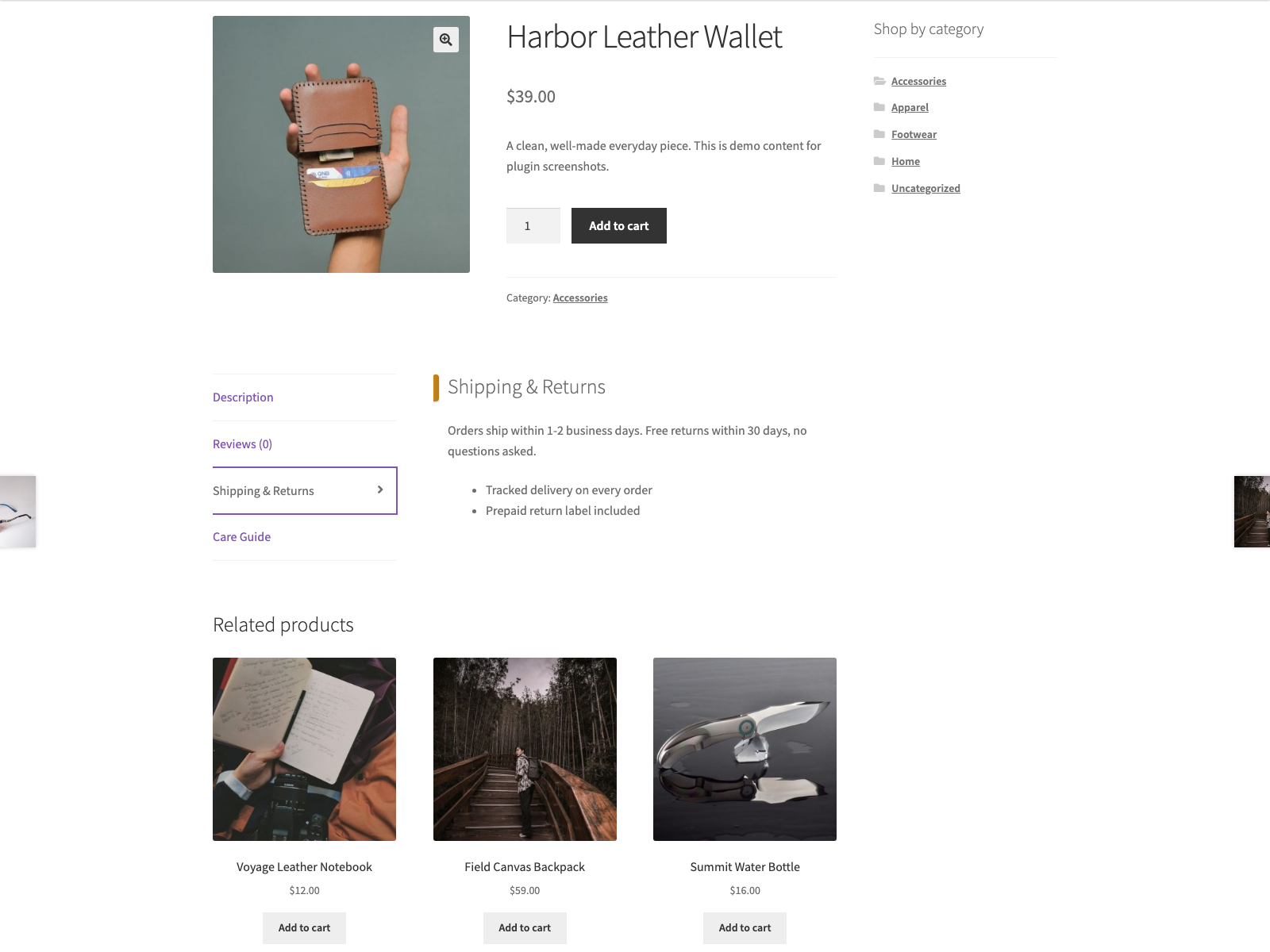
wp_kses_post. Your tabs render after the native WooCommerce tabs, and you can toggle each one on or off without deleting it.
The code lives at github.com/wppoland/tabvera if you want to read it, report a bug or suggest a tab feature.
Documentation and links
- Documentation: plogins.com/tabvera/docs/
- Plugin page: plogins.com/tabvera/
- Source code: github.com/wppoland/tabvera
- Bug reports and feature requests: github.com/wppoland/tabvera/issues
- Tabvera Pro: plogins.com/tabvera-pro/
- Adds your reusable tabs to every single product page, after Description, Additional information and Reviews.
- Stores tab content as
wp_kses_post-sanitised HTML on save, and by default sanitises it again on output. - Optional Shortcodes and blocks in tabs setting (off by default) runs tab content through the standard WordPress content filters instead, so shortcodes and blocks render.
- Hooks the standard
woocommerce_product_tabsfilter at a late priority, so native and third-party tabs keep their place. - Admin screen follows core WordPress styling.
- A disabled tab, or one with no content, simply isn't rendered.
安装:
- Upload the plugin to
/wp-content/plugins/tabvera, or install via Plugins > Add New. - Activate it. WooCommerce must be active.
- Go to WooCommerce > Tabvera Tabs to add your tabs.
屏幕截图:
常见问题:
Does it require WooCommerce?
Yes. Tabvera requires an active WooCommerce installation.
What HTML is allowed in tab content?
The same safe subset WordPress allows in post content (wp_kses_post): links, lists, headings, bold/italic, images, blockquotes and similar. Scripts and unsafe markup are stripped on save, and again on render unless Shortcodes and blocks in tabs is on.
Where do the custom tabs appear?
On the single product page tab list, after the native WooCommerce tabs (Description, Additional information, Reviews).
Can I reuse the same tab on many products?
Yes. Tabs are created once under WooCommerce > Tabvera and every enabled tab shows on every product, so one tab is reused across the whole catalogue by design. Choosing which products a tab appears on is not part of the free plugin.
Is tab HTML safe?
Yes. Content is sanitised with wp_kses_post on save, and with the default settings again on output; scripts are stripped. With Shortcodes and blocks in tabs on, the output pass is the standard WordPress content filters instead of wp_kses_post, so whatever a shortcode or block returns is printed as that shortcode or block produced it.
Does this plugin work on WordPress Multisite?
Yes. This plugin is compatible with WordPress Multisite. Network activate it or activate it on individual sites; each site keeps its own settings and data.
更新日志:
- Fixed: deleting the plugin on a multisite network now removes its settings from every site, not only the main one.
- Links point at the new plogins.com address and the renamed GitHub repository.
- The Upgrade to PRO links open the pricing page in the admin's language where plogins.com has one, and tell plogins.com which plugin the visit came from (utm_source, utm_medium and utm_campaign in the link). Nothing is sent from your site.
- Readme: the PRO section lists what the free plugin includes and what the paid edition adds as two lists, which WordPress.org can display (it does not display tables).
- Readme only: a PRO section with links to the paid edition.
- Fixed: the ochre edge on Tabvera's tab panels no longer covers the first letter of the title and text on themes that load the default WooCommerce stylesheet.
- Fixed: saving the Tabvera settings now shows the "Settings saved" confirmation, and any save error.
- The upgrade card no longer lists shortcodes and blocks in tabs, which the free plugin already does.
- The readme now describes the Shortcodes and blocks in tabs setting and what it changes about output sanitising.
- The upgrade notice's "Coming soon" and "Get notified" labels are English source strings for every language; Polish sites used to get their own Polish source text, which translators in other languages then saw untranslated.
- Renamed to Tabvera, a plain English name in place of the Esperanto one. The text domain and the plugin folder follow the name; the stored settings, options and every hook are unchanged.
- Applying the core the_content filter to rich tab content is now marked as deliberate, so Plugin Check reports no warnings.
- The sidebar upgrade promo now follows the same dismissal as the banner. Dismissing the banner used to leave a full-height advert on the settings screen for good, which is not what the WordPress.org guideline on upgrade prompts means by used with moderation.
- Renamed to Langeto. The WordPress.org review team asks a plugin name to lead with a distinctive, coined identifier rather than a generic descriptive word. Langeto is Esperanto for a tab. The text domain follows the name; the stored data, the settings and every hook are unchanged.
- Fixed: the PRO upgrade promo kept selling to people who had already bought the paid edition. Only the banner could be dismissed, so the sidebar promo and the locked feature cards followed a paying customer around for good. The promo now checks whether the paid edition is active and steps aside when it is.
- Fixed: arrow glyphs in the admin menu paths, and in the strings handed to translators. An arrow inside a translatable string makes the glyph every translator's problem and changes the layout in any locale that drops it.
- Fixed: deleting the plugin left the per-user "dismiss" flag from the PRO notice in the database. Uninstall now removes it for every user, not just the one who dismissed it.
- Changed: Shortcodes and blocks in tabs now shows what it reaches. It is a single switch that changes how every tab body below is rendered, which was invisible from inside a tab, so each tab content box now carries a badge while the switch is on. The badge is rendered from the saved settings, so it is correct with JavaScript switched off, and it follows a tab you add before saving.
- New: Shortcodes and blocks in tabs, a setting on the Tabby screen. The plugin could always run a tab body through the normal WordPress content filters, but that path was held shut by a hardcoded value only the paid add-on ever flipped, which makes it a built-in feature the plugin refused to run. It is a setting now, off by default because it is a wider surface than the safe-HTML pass used otherwise.
- The translation template was regenerated. It still named an older version of the plugin and pointed at source lines that had since moved, which is what translation tools read to show a string in context.
- Renamed to Plogins Tabby - Product Tabs for WooCommerce so the name leads with the brand rather than a generic word, which is what the WordPress.org plugin review team asks for. The plugin slug is unchanged.
- Removed the "Tested up to" header from the main PHP file. It belongs in readme.txt only, where it is already declared; present in both, the header can override the readme and show a compatibility version that was never intended.
- Tested against WordPress 7.1. Verified by activating this build on a clean 7.1 install with WooCommerce 11.1, not by editing the header.
- Fixed the PRO promo on the settings screen quoting a price in PLN. PRO is priced and charged in EUR, so an admin on a Polish site was shown a zloty amount and then billed in euro, and the zloty figure was a fixed conversion that drifted from the real charge as the rate moved. The promo now shows the euro price that is actually taken.
- A tab with an empty content box no longer shows on the product page, so shoppers never open a tab that holds nothing but its heading.
- The settings screen now says that such a tab is kept for later but stays off the storefront.
- Translations: completed Polish, German and Spanish for the PRO upgrade panel.
- Fixed low-contrast admin headings under an OS dark-mode preference.
- Added bundled Polish, German and Spanish translations for the plugin interface.
- First stable release.
- Renamed to Plogins Tabby for WooCommerce for a more distinctive plugin name.
tabby/use_rich_tab_contentandtabby/tab_panel_htmlfilters so premium add-ons can run shortcodes and blocks in tab bodies.
- Initial release: reusable custom product tabs with safe HTML content, managed from a WooCommerce-submenu settings screen.