
Tangleroot Dependency Mapper
| 开发者 | ssplugins |
|---|---|
| 更新时间 | 2026年10月29日 23:26 |
| PHP版本: | 8.2 及以上 |
| WordPress版本: | 7.1 |
| 版权: | GPLv2 or later |
| 版权网址: | 版权信息 |
详情介绍:
- Full discovery: plugins, themes, pages, posts, custom post types, taxonomies, menus, widgets, shortcodes and Gutenberg blocks
- Core relationship detection between all of the above, with evidence and a confidence rating on every result
- A searchable, visual relationship graph and full component detail view
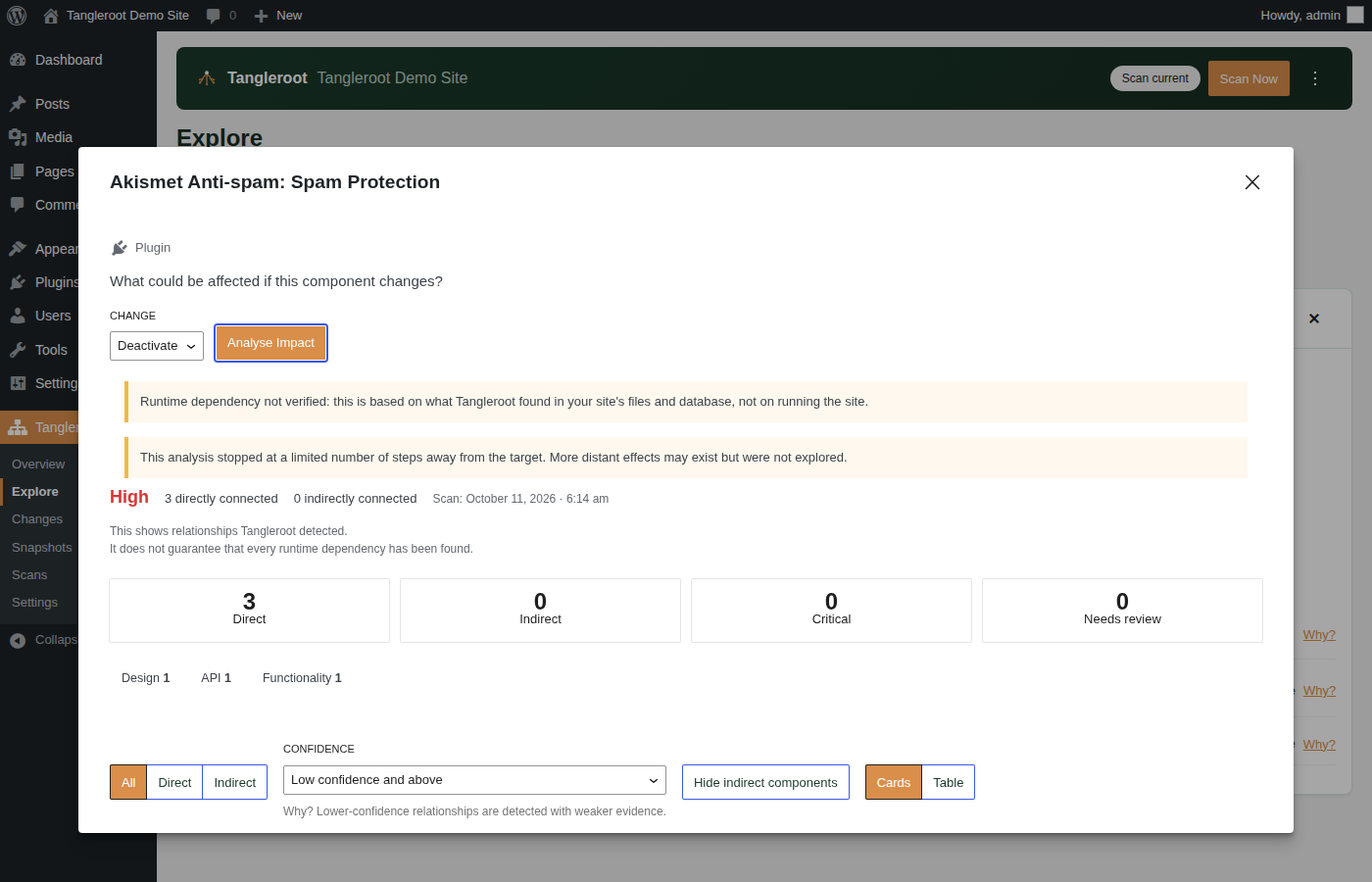
- Impact Explorer, tracing direct and indirect relationships up to 3 levels deep
- Critical and site-wide dependency warnings, at every plan level
- Manual scans, on demand, plus 30 days of change history
- On-screen architecture and change summaries
安装:
- Upload the plugin folder to
/wp-content/plugins/, or install it from the Plugins screen by searching for "Tangleroot Dependency Mapper". - Activate it. Activation creates Tangleroot's own database tables and settings but does not scan your site.
- Open Tangleroot in the WordPress admin menu and run your first scan.
屏幕截图:


常见问题:
Does activating Tangleroot scan my site?
No. Nothing is scanned until you start a scan yourself, from the Tangleroot admin screen.
Is this really free, forever, on unlimited sites?
Yes. Tangleroot is free with no limit on how many sites you install it on, and no signup, account or licence key required. It isn't a trial — it's a complete dependency-mapping tool on its own.
Does Tangleroot ever change anything on my site?
No. Tangleroot is read-only. It scans and records; it never modifies plugins, themes, posts, pages or settings, and never activates or deactivates anything on your behalf.
Will running Tangleroot slow my site down?
Scans run in the background and only read data that's already there, so there's no added runtime overhead for your visitors.
How accurate is the relationship detection?
Every relationship Tangleroot reports comes with a confidence label and the actual evidence behind it — a shortcode match, a registered hook, a database reference — so you can see why Tangleroot found what it found. Lower-confidence findings are shown as uncertain, never hidden or rounded up to look more definite than they are.
What's the difference between this and Tangleroot Pro?
This version covers full basic-tier detection — plugins, themes, content, forms, core relationships — and traces impact up to 3 levels deep. Pro adds provider-specific detection, runtime evidence, database and cron detection, impact tracing up to 10 levels deep, snapshots, scheduled scans, exports and AI explanations. Critical and site-wide warnings are shown in both — those findings are never paywalled.
Does it work on multisite?
Each site in a network builds and keeps its own Tangleroot data. There is no network-wide map in this version.
What does Tangleroot store, and does anything leave my site?
Tangleroot keeps its own data in your WordPress database: scans, components, relationships, the evidence behind each relationship, changes and settings. It stores identifiers and short excerpts, never passwords, API keys, form submissions, user email addresses or full page content. This version connects to no external service — everything is calculated on your own server.
What happens to my data if I deactivate or delete Tangleroot?
Deactivating or deleting Tangleroot keeps your data unless you've turned on "Delete data when plugin is uninstalled" in Settings.
更新日志:
- Fixed: removed the root-level
uninstall.phpfile, which Freemius's platform review rejects now that the plugin integrates its SDK. Cleanup on uninstall (the opt-in "Delete data when plugin is uninstalled" behaviour) is unchanged — it now runs from Freemius's ownafter_uninstallhook instead.
- Changed (Pro): licensing moved from Paddle Billing (and the separate "Tangleroot Licensing" backend plugin) to Freemius. If you run Pro, activate, change plan or remove your license from the License tab's "Manage license" link, which now opens your Freemius account page — the in-plugin license-key field is gone, because Freemius handles key entry, activation and seat management itself. Existing Pro installs will need to connect to Freemius once; see the email sent with this update for how.
- Changed (Pro): the daily license-refresh check is gone — Freemius keeps your license status in sync on its own, so there's nothing left for Tangleroot to poll.
- Changed: the Free version now also includes the Freemius SDK, so the License tab's upgrade prompt links straight to checkout instead of just naming tanglerootmapper.com.
- Note: the separate "Tangleroot Licensing" backend plugin (and the Paddle Billing product behind it) is no longer used by this plugin as of this version and can be decommissioned once every active Pro site has updated.
- Fixed: resolved every WordPress.org Plugin Check warning that caused this plugin's submission to be refused (44 findings across 12 files:
WordPress.DB.PreparedSQLPlaceholders.ReplacementsWrongNumber,WordPress.DB.SlowDBQuery.slow_db_query_meta_key, andWordPress.DB.DirectDatabaseQuery.DirectQuery/NoCaching). No query, data or behaviour change — these were sniff false positives and misplaced inlinephpcs:ignorecomments.
- Fixed: the "Site Architecture" heading on the Overview screen's dark summary card was nearly unreadable — a more specific style rule was overriding the card's white-text colour with the near-black heading colour used on every other (light-background) card. The heading is now reliably white on this card.
- Changed: the admin screens' colour scheme and logo no longer carry the old "SitePilot" navy-blue branding — every screen (header, menus, buttons, badges, tables, the overview summary card) now uses Tangleroot's real forest-green and clay palette, matching tanglerootmapper.com. The header's dependency-graph mark is now the real Tangleroot brand icon, recoloured for the dark header, in place of the generic blue placeholder icon it shipped with. No functional change for site owners, and semantic status colours (impact-level red/amber/green, change-severity badges) are unchanged on purpose.
- Fixed: the admin menu's "current page" highlight never actually matched WordPress's real menu-item ID since the 1.1.0 rename, so the sidebar menu item stayed in WordPress's own default blue instead of Tangleroot's colour even after the fix above — it now highlights correctly in the brand colour on every screen.
- Changed: the separate internal licensing backend plugin is now "Tangleroot Licensing" (was "SitePilot Licensing") — matching REST endpoint path, and Pro license keys are now issued in
TR-XXXX-XXXX-XXXX-XXXXformat (wasSP-). Both sides of this plugin's license-check call were updated together. Also renamed a leftover internal diagnostic reference-code prefix (shown in rare error messages, e.g. "TGR-8F42", was "SP-8F42") - cosmetic only, not a license key. - Note for anyone who already activated Pro against a pre-1.1.2 licensing backend: update the licensing backend first (or at the same time), since the REST path it calls changed.
- Changed: now that tanglerootmapper.com is registered, all remaining references to the licensing backend's old placeholder domain (sitepilotlabs.com) are updated to the real one — the Pro license-check default, the Settings screen's upgrade/license-key hints, and the licensing error message. No functional change for Lite; Pro's license checks continue to work via the same filterable backend URL.
- Changed: renamed from "SitePilot" to "Tangleroot Dependency Mapper" ahead of its first public release, after finding the previous name already in use by an existing WordPress hosting company's own plugin. Every plugin-visible identifier (admin screens, database table names, settings, REST endpoints, text domain) moved to the new name; no functionality changed and no site data is lost on upgrade.
- Fixed: a third pass to satisfy the official WordPress.org Plugin Check tool - the 1.0.9 pass left (and in a few spots worsened) several queries where a dynamically-built placeholder list, a conditionally-assembled set of filter clauses, or a constant used in a
LIMITwas still held in its own variable before being handed to the database call. Every one of those is now rewritten so the prepared statement's SQL text is always a fixed expression, with optional filters expressed as always-present, inert-when-unused conditions rather than variables assembled at runtime. No functional change for site owners.
- Fixed: a second pass to satisfy the official WordPress.org Plugin Check tool - the 1.0.8 pass missed several spots where a query's prepared SQL was still built in a separate variable (or a conditional expression) before being handed to the database call, and a few dynamic
IN (...)clauses still used string interpolation to build the placeholder list rather than concatenation. Every one of those is now rewritten so the prepared statement is built and used as a single expression. No functional change for site owners.
- Fixed: a plugin-wide pass to satisfy the official WordPress.org Plugin Check tool - every custom-table query now binds its table name through
$wpdb->prepare()instead of building it into the query text, exception messages that were flagged as unescaped output are now explicitly escaped, a file was missing its direct-access guard, and a now-unnecessary manual translation-loading call was removed (WordPress has loaded plugin translations automatically since 4.6). No functional change for site owners.
- Fixed: clicking "Explore Impact" from a component's details panel, in Explore's Map or List view, closed that panel for good - closing Impact Explorer afterwards left you with no way back into it short of leaving Explore and re-entering. The details panel now stays exactly where it was and reappears automatically once Impact Explorer is closed.
- Fixed: on the Explore screen's Map view, once you closed a component's details panel there was no way to reopen it for the node you were already looking at short of leaving Explore and coming back in. A single click on any component now shows (or re-shows) its details alongside the diagram; double-clicking still re-centres the map on that component.
- Fixed: clicking the already-centred component in the Map view could rearrange the whole diagram into a different-looking layout for no reason. The diagram only rearranges itself now when a click actually reveals something new.
- Fixed: on the Explore screen's Map view, opening a component's details popup covered the relationship diagram and couldn't be moved, and closing it ended the exploration and cleared the diagram entirely. The details panel now sits beside the diagram instead of on top of it, and closing it just closes it - the diagram and everything you've expanded stay exactly where they were.
- Added (Pro): real license activation. Tangleroot Pro now has a working License tab in Settings - enter the key you were emailed after purchase to activate Pro on this site. (Previously, Pro always showed its features as locked, regardless of which version was installed, because no licensing was wired up yet.)
- Fixed: several spots on the Settings screen (the General tab's toggle, and the AI tab's "Enable AI explanations" toggle below the Pro upsell box) could sit squashed against the element above them, with no breathing room. The admin screens' full visual polish - branding, legible status text, popup button colours, the wider Impact Explorer layout, and this spacing fix - now ships built into the plugin itself, so it looks right out of the box with no extra setup.
- Fixed: on the Settings screen, the "Delete data when plugin is uninstalled" toggle could appear slightly out of line with its label.
- Fixed: opening Impact Explorer from a Changes screen item could show a blank admin screen instead of the impact results, caused by a backend/frontend field-name mismatch. Also added a safeguard so an unexpected result from any Tangleroot screen shows a plain error message instead of a blank page.
- First public release. Full architecture discovery, the relationship graph with evidence and confidence ratings, Impact Explorer (up to 3 levels deep), critical/site-wide warnings, manual scans and 30 days of change history.